Hello,
I am trying to prepare a Jupyterhub (in a docker container) with
- Python 3 as default kernel
- Python 2 additional kernel
- R as additional kernel
In principle the hub does what it should but I see something strange when opening new notebooks:

Although I have only to environments:

Has anyone an idea how it comes to this and how I could "remove" the wrong kernels?
 spalkovits
All 22 comments
The conda env kernels are in addition to any kernels you already have installed in the normal way.
You should be able to see your kernels with:
jupyter kernelspec list
If you see kernels there you would like to remove, you can do so:
jupyter kernelspec remove ir
 minrk
on 1 Sep 2016
minrk
on 1 Sep 2016
Hello,
when I do
jupyter kernelspec list
in the container I get:
Available kernels:
 python2    /usr/local/share/jupyter/kernels/python2
 python3    /usr/local/share/jupyter/kernels/python3
Here I also do not see the R kernel. Refering to the picture above I have two double entries:
- Python 2 and Python [conda env:py2] and they are the same
- Python [default] and Python [conda root]; again they are the same and it does not tell they are Python 3
Here is the relevant code (from my perspective) from my Dockerfile that produces this behavior:
# install Python with conda
RUN wget -q https://repo.continuum.io/miniconda/Miniconda3-latest-Linux-x86_64.sh -O  /tmp/miniconda.sh
RUN bash /tmp/miniconda.sh -f -b -p /opt/conda
RUN /opt/conda/bin/pip install --upgrade pip
RUN rm /tmp/miniconda.sh
ENV PATH=/opt/conda/bin:$PATH

# install jupyterjub
RUN /opt/conda/bin/conda install --yes -c conda-forge jupyterhub
RUN /opt/conda/bin/conda install --yes notebook

# install py3 packages
RUN /opt/conda/bin/conda install --yes notebook numpy matplotlib scipy pandas jupyter scikit-learn sympy nose seaborn

# add python 2 kernel
RUN /opt/conda/bin/conda create --yes -n py2 python=2 ipykernel
RUN /opt/conda/envs/py2/bin/ipython kernel install

# install py2 packages
RUN /opt/conda/bin/conda install --yes -n py2 notebook numpy matplotlib scipy pandas jupyter scikit-learn sympy nose seaborn
In principle the Jupyterhub does everything it should do. But can I customize the list in the picture by any means? As it is also for a lecture I do not what to confuse the students.
Regards
spalkovits
on 1 Sep 2016
I don't get how are you getting the nb_conda_kernels extension if you starting from miniconda... that's weird.
What is your conda list for the root and py2 environments?
You can always disable the extensions or remove it if you want the native behavior, but wondering how you got the extensions installed on your docker...
 damianavila
on 2 Sep 2016
damianavila
on 2 Sep 2016
I noticed this over the last couple days after conda install jupyter. It automatically installs the nb_conda_kernels extension.
 rgbkrk
on 2 Sep 2016
rgbkrk
on 2 Sep 2016
oooh... that's the thing... the jupyter meta install ipywidgets among others and ipywidgets is bundled with the other nbextensions... this is why it ends here.
If you want to keep ipywidgets but not the extensions, you can disable them with:
python -m nb_conda_kernels.install --disable --prefix=<prefix_where_the_extension_is_installed>

jupyter-nbextension disable nb_conda --py --sys-prefix
jupyter-serverextension disable nb_conda --py --sys-prefix

jupyter-nbextension disable nb_anacondacloud --py --sys-prefix
jupyter-serverextension disable nb_anacondacloud --py --sys-prefix

jupyter-nbextension disable nbpresent --py --sys-prefix
jupyter-serverextension disable nbpresent --py --sys-prefix
Alternative, you can remove them (or avoid installing the jupyter metapackage at all).
In that case, if you want ipywidgets without any of these nbextensions installed, you can install ipywidgets from conda-forge.
damianavila
on 2 Sep 2016
That's complicated enough that I'll keep using conda install jupyter. I'm happy to have nb_conda_kernels, just pointing out that was why.
rgbkrk
on 3 Sep 2016
Hello,
I think that helps me. The doubled kernels do not interfere with the intended behavior, so I think I will leave it the way it is now.
Regards...
spalkovits
on 5 Sep 2016
Hello. So what is the way to remove doubled environments? I have exactly the same problem.
 kakzhetak
on 19 Apr 2018
kakzhetak
on 19 Apr 2018
I also have now the same issue.
from the command prompt (Windows10):
jupyter kernelspec list
Available kernels:
python3 G:ProgramDataAnaconda3sharejupyterkernelspython3
python2 C:ProgramDatajupyterkernelspython2
On Jupyter lab I get this:
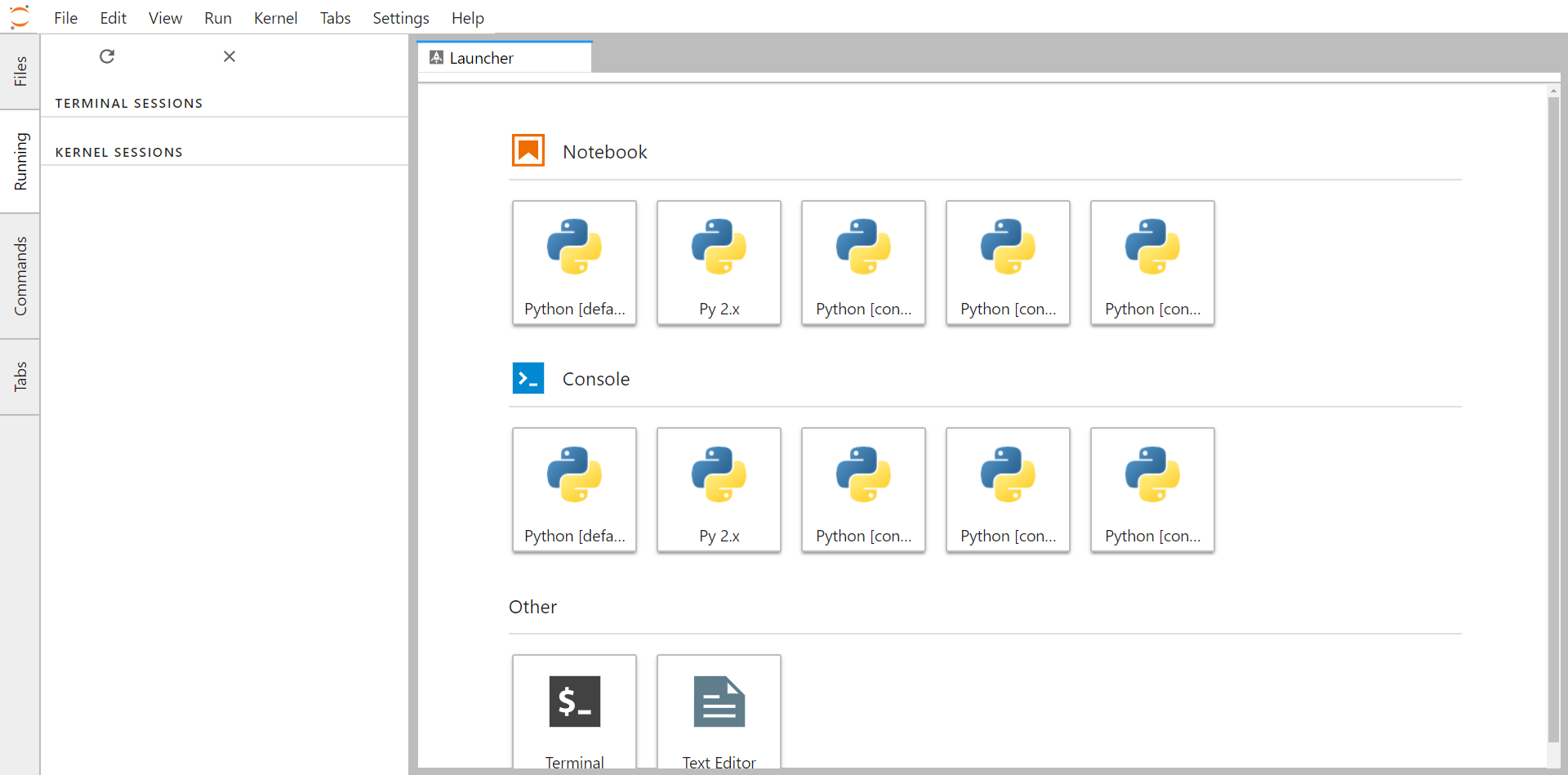
 darioromero
on 17 May 2018
darioromero
on 17 May 2018
I'm seeing a ton of kernels which I have not installed
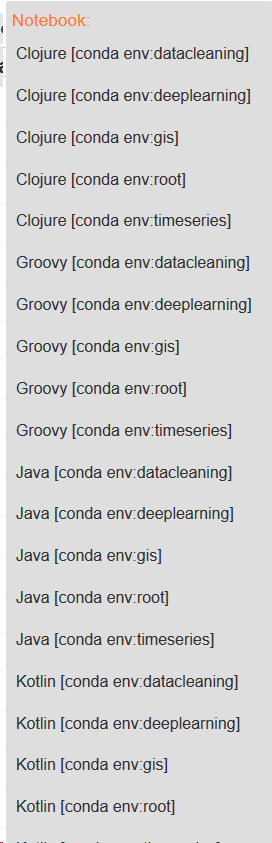
 anderl80
on 13 Feb 2019
anderl80
on 13 Feb 2019
@anderl80 and @darioromero
Looks like you both have nb_conda_kernels installed. This is automatically installed when you install jupyter using conda.
This package (automatically) finds all conda environments and creates kernels. (That's why you see [conda env:...] in the name). These kernels will not show up in your kernelspec. They are created on-the-fly when the jupyter server is started.
If you want this to stop, you'll likely need to uninstall nb_conda_kernels.
 Zsailer
on 13 Feb 2019
Zsailer
on 13 Feb 2019
Thanks for your help! Yes, I use it nb_conda_kernels on purpose for 4-5 conda envs. Can you help me get rid of all those unwanted kernels? I don't use Java/Kotlin/... :-)
anderl80
on 14 Feb 2019
@anderl80
It looks like nb_conda_kernels has a env_filter config option (see here) that allows you to exclude conda environments.
You would need to write a regex to catch the environments you don't want and add this to your jupyter_notebok_config. This regex would look something like "deeplearning|gis|...".
Here are the steps to fix this:
- Find your jupyter_notebook_config file by looking at the paths listed under
configby callingjupyter --pathson your command line. - The config will be either JSON or Python. It will look like one of these two options:
{
   "NotebookApp": {
     "kernel_spec_manager_class": "nb_conda_kernels.CondaKernelSpecManager"
   }
 }
or
c.NotebookApp.kernel_spec_manager_class = "nb_conda_kernels.CondaKernelSpecManager"
- Set the
CondaKernelSpecManager.env_filter = "deeplearning|gis|..."config.
{
   "NotebookApp": {
     "kernel_spec_manager_class": "nb_conda_kernels.CondaKernelSpecManager"
   },
   "CondaKernelSpecManager":{
       "env_filter": "deeplearning|gis"
   }
 }
or
c.NotebookApp.kernel_spec_manager_class = "nb_conda_kernels.CondaKernelSpecManager"
c.CondaKernelSpecManager.env_filter = "deeplearning|gis"
Unfortunately, this does not match language names. For example, if you wanted to create python kernels for "deeplearning" but not the Kotlin kernels specifically, you're out of luck with nb_conda_kernels.
Zsailer
on 14 Feb 2019
You may also be able to run jupyter kernelspec list and then remove the kernelspecs of the undesired kernels. jupyter kernelspec -h has more details.
 willingc
on 14 Feb 2019
willingc
on 14 Feb 2019
@willingc I think the problem is that these nb_conda_kernels don't show up in jupyter kernelspec list. They are dynamically created by a custom kernelspec object when jupyterlab is launched (coming from nb_conda_kernels).
Zsailer
on 14 Feb 2019
Thanks @Zsailer for the clarififcation.
willingc
on 15 Feb 2019
Thanks for clarifying! Problem is I have so many kernels with languages and in the notebook scrolling the list is not possible. So once I created a notebook I can't switch kernels any more unless it's in the first day 10 kernels. That was not always so. I see those different languages since the last update, do you know when this was changed?
anderl80
on 15 Feb 2019
I see those different languages since the last update, do you know when this was changed?
Just to clarify, what did you update? Jupyterhub or nb_conda_kernels?
Zsailer
on 15 Feb 2019
Hm, I guess both to the latest version possible within the conda env. I have an env for Jupyter (don't want to have a Jupyter installation in every env and sync the configurations), and then 5 envs for different purposes. With all those languages (Groovy, Java, ..) which I don't use, the option list has 25 items. Python is way at the end of the alphabetically sorted list and the option menu is not scrollable, so Python Kernels are out of reach down the monitor... :-(
anderl80
on 17 Feb 2019
Every conda env has following kernels:

anderl80
on 17 Feb 2019
I suspect beakerx which I wanted to delete anyway. Kernel pointer jsons in Anaconda3/share/jupyter/ are all containing beakerx stuff Anaconda3\lib\site-packages\beakerx\kernel\base\lib\* ...
anderl80
on 17 Feb 2019
Are you sold on using nb_conda_kernels? While I think its a great tool, this is one instance where their dynamic kernelspec manager becomes a problem.
You can always manually create kernelspecs for the Python environments you want using ipykernel.
Here is the link to relevant section: Kernels for different environments.
Zsailer
on 17 Feb 2019
Related issues
 gagan-preet
·
26Comments
gagan-preet
·
26Comments
 choldgraf
·
30Comments
choldgraf
·
30Comments
 vbraun
·
32Comments
vbraun
·
32Comments
 AndreWin
·
23Comments
AndreWin
·
23Comments
 ckbhatt
·
28Comments
ckbhatt
·
28Comments
Most helpful comment
The conda env kernels are in addition to any kernels you already have installed in the normal way.
You should be able to see your kernels with:
If you see kernels there you would like to remove, you can do so: