Jupyter-themes: jupyter cell output mis alignment
The jupyter code cell output gets mis aligned when the themes are applied. how can we make this fully visible. I have attached an image for reference. jupyter-ouput-misalignment
 bicepjai
All 19 comments
any updates ?
bicepjai
on 12 Jan 2018
hmm I've not had this issue. What CL arguments/values are you using when you install your theme?
 dunovank
on 23 Feb 2018
dunovank
on 23 Feb 2018
Hello, the same problem here. As far as I can see, any theme, any cellw... for example
jt -t monokai -cellw 80% -T
Increasing font (-ofs switch) to ~12 makes output whole visible, but this is not ideal solution.
 coldplug
on 3 Apr 2018
coldplug
on 3 Apr 2018
I assume it's a padding or alignment issue with the css. Does anyone know the location for the prompt output or the hover bar when hovering over a prompt output? This seems to overlap with the output.
 jpweytjens
on 4 Jun 2018
jpweytjens
on 4 Jun 2018
I'm having the same issue, any idea how to solve it? Seems to happen no matter what arguments I use
 FraserHum
on 8 Aug 2018
FraserHum
on 8 Aug 2018
I'm having the same issue. I'm using version 0.19.6 by anaconda.
I applied a below commands,
jt -t monokai -f generic -T -N


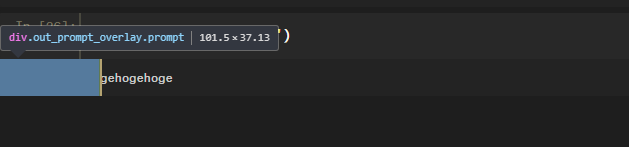
I think, the width of output cell should be the same with width of input cell.
 skokado
on 22 Aug 2018
skokado
on 22 Aug 2018
I've noticed this as well. I traced it to a commit between 0.19.4 and 0.19.5:
https://github.com/dunovank/jupyter-themes/compare/v0.19.4...v0.19.5
I'm using jt -t monokai -cellw 100% -T.
I did jt -r to reset between theme changes.
 vaughnkoch
on 28 Aug 2018
vaughnkoch
on 28 Aug 2018
I have solved the issue by removing the out_prompt_overlay from the css file and actually found there was another normally functioning prompt underneath it. I can post more info when I get home if anyone needs it
FraserHum
on 29 Aug 2018
@FraserHum would you mind posting what you had to change in the CSS file to get the output to align properly? I've been trying myself and having no luck... any help would be greatly appreciated!
 danny-moncada
on 2 Sep 2018
danny-moncada
on 2 Sep 2018
Hi guys, any solution?I'm stuck in that...
 goelo
on 3 Sep 2018
goelo
on 3 Sep 2018
@FraserHum more info on the modifications you made to the CSS files to fix this issue would be appreciated!
 Chmavo
on 4 Sep 2018
Chmavo
on 4 Sep 2018
I deleted the parts that were causing problems instead of putting it to display: none which makes remembering what I changed difficult but hopefully you can find the differences between my custom.css and yours. It should be called out_prompt_overlay or something like that.
FraserHum
on 10 Sep 2018
@FraserHum thank you very much for the reply. This worked for me. I added display:none to out_prompt_overlay and now I can see the full output.
Chmavo
on 10 Sep 2018
In the custom.css file, I fixed it by changing both the div.out_prompt_overlay.prompt's and the div.out_prompt_overlay.prompt:hover's min-width and width values to 11.5ex instead of the original 14.5ex.
This makes the button that is covering the output smaller, instead of completely removing it

 Space-G
on 30 Sep 2018
Space-G
on 30 Sep 2018
In the custom.css file, I fixed it by changing both the div.out_prompt_overlay.prompt's and the div.out_prompt_overlay.prompt:hover's min-width and width values to 11.5ex instead of the original 14.5ex.
This makes the button that is covering the output smaller, instead of completely removing it
by custom.css file do you mean
 chopan123
on 2 Oct 2018
chopan123
on 2 Oct 2018
In the custom.css file, I fixed it by changing both the div.out_prompt_overlay.prompt's and the div.out_prompt_overlay.prompt:hover's min-width and width values to 11.5ex instead of the original 14.5ex.
This makes the button that is covering the output smaller, instead of completely removing it
by custom.css file do you mean .css? for example onedork.css? It does not work for me :(
The file is called custom.css, and I'm using windows so it's located in C:\Users\<YourUsername>\.jupyter\custom\custom.css
Space-G
on 2 Oct 2018
I've got the same issue, output is clipped.
I'm on a mac, and jupyter\customcustom.css is nowhere to be found.
anyone know where to find it?
I tried also changing cells.less but it had no effect.
 Idodox
on 11 Oct 2018
Idodox
on 11 Oct 2018
@FraserHum That works! Thanks a lot.
 yangrq1018
on 13 Oct 2018
yangrq1018
on 13 Oct 2018
@Idodox I'm also on a mac. Make the hidden files visible and you can find the .jupyter folder with the custom.css at the same path.
 hey-simone
on 17 Oct 2018
hey-simone
on 17 Oct 2018
Related issues
 Brett99
·
7Comments
Brett99
·
7Comments
 mlx809593812
·
8Comments
mlx809593812
·
8Comments
 zwh42
·
4Comments
zwh42
·
4Comments
 Brenndoerfer
·
6Comments
Brenndoerfer
·
6Comments
 tanmay7270
·
5Comments
tanmay7270
·
5Comments
Most helpful comment
I have solved the issue by removing the out_prompt_overlay from the css file and actually found there was another normally functioning prompt underneath it. I can post more info when I get home if anyone needs it