Jupyter-book: Can't use subdirectories on Windows
Bug description
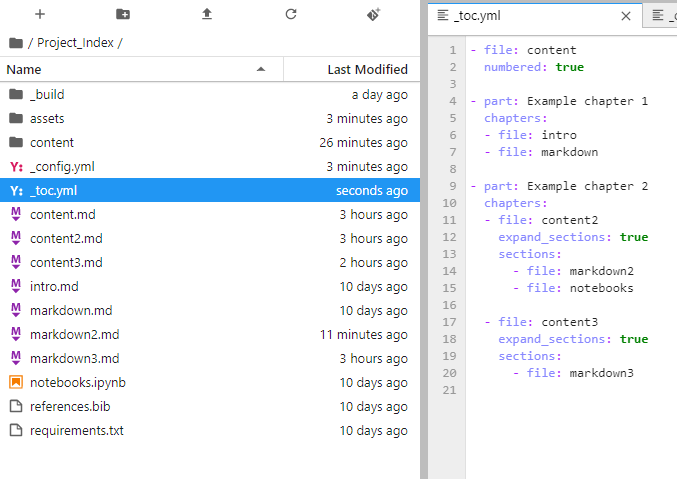
This is a working directory structure:
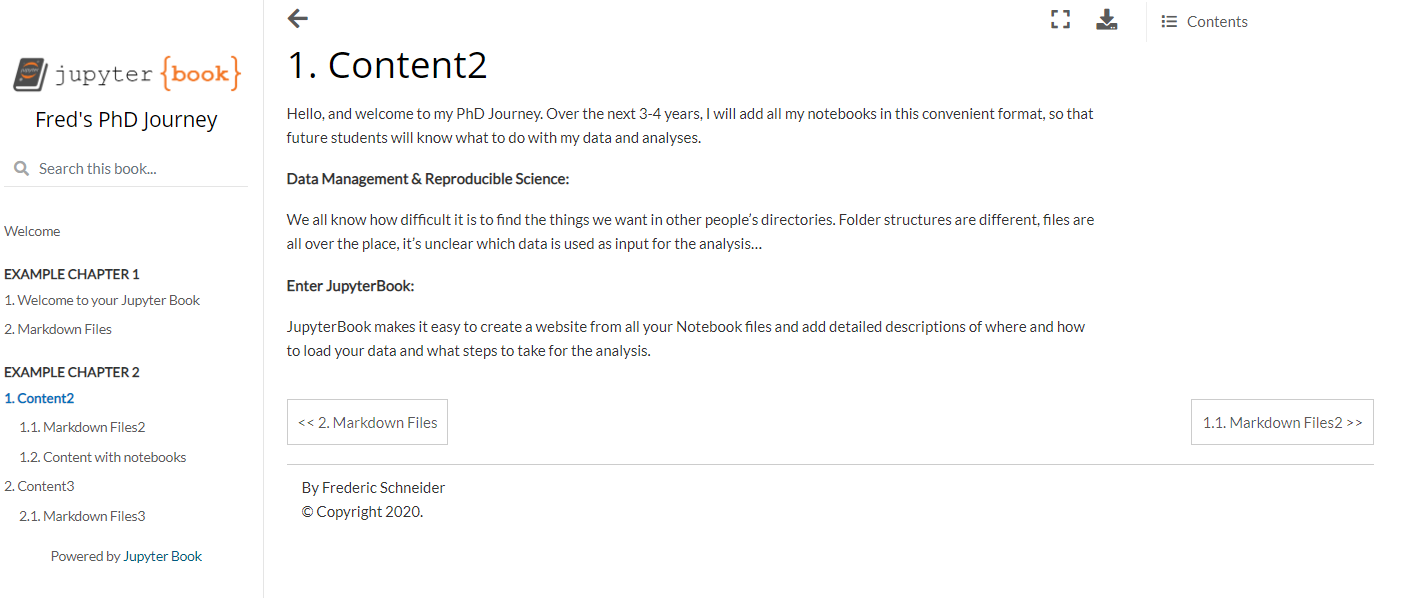
Which looks like this when rendered:
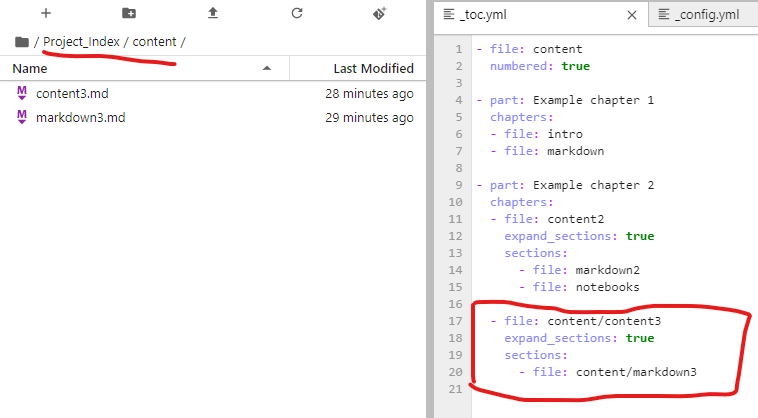
However, when I move some of the files into the 'content' folder like this:
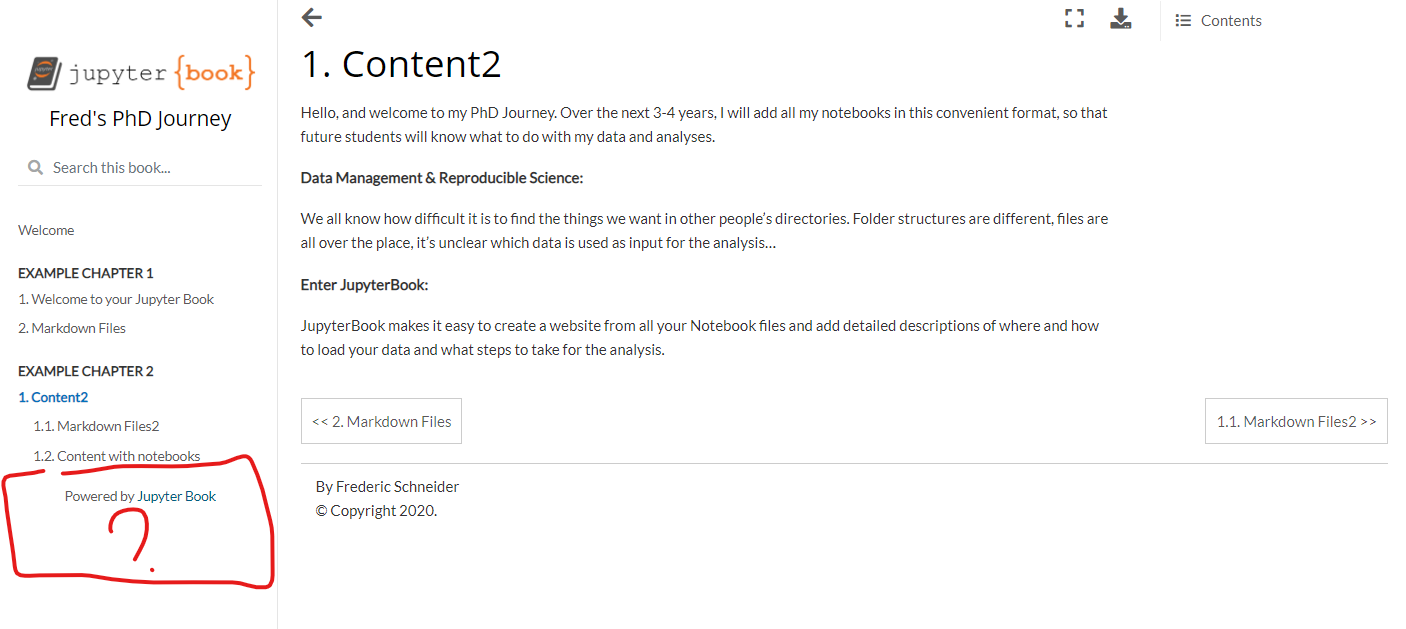
Then, it is no longer displayed:
To Reproduce
Steps to reproduce the behavior:
- Put one of the files in a subdirectory and adjust the reference in the _toc.yml file accordingly
- Build the JupyterBook with 'jupyter-book build your_book'
Expected behavior
I would expect the change of folder not to matter, but apparently the table of contents can't find the file that way.
Environment
- Python Version:
3.8.5 - Package versions:
Jupyter Book: 0.7.4
MyST-NB: 0.8.5
Sphinx Book Theme: 0.0.35
MyST-Parser: 0.9.1
Jupyter-Cache: 0.3.0 - Operating System:
Windows 10 Pro
Other things I've tried
I've also tried changing the file reference to content\content3, and giving the absolute file path, not just relative. No success...
 Material-Scientist
All 15 comments
Thanks for opening your first issue here! Engagement like this is essential for open source projects! :hugs:
If you haven't done so already, check out EBP's Code of Conduct. Also, please try to follow the issue template as it helps other community members to contribute more effectively.
If your issue is a feature request, others may react to it, to raise its prominence (see Feature Voting).
Welcome to the EBP community! :tada:
![welcome[bot] picture](https://avatars0.githubusercontent.com/in/4141?v=4&s=40) welcome[bot]
on 28 Aug 2020
welcome[bot]
on 28 Aug 2020
I may be utterly wrong but I think it is just the _format_ of the ToC that changes; if you click on "Content with notebooks" on the left, doesn't it show the correct nested sections in a "Contents" sidebar to the right?
 RojerGS
on 28 Aug 2020
RojerGS
on 28 Aug 2020
I may be utterly wrong but I think it is just the _format_ of the ToC that changes; if you click on "Content with notebooks" on the left, doesn't it show the correct nested sections in a "Contents" sidebar to the right?
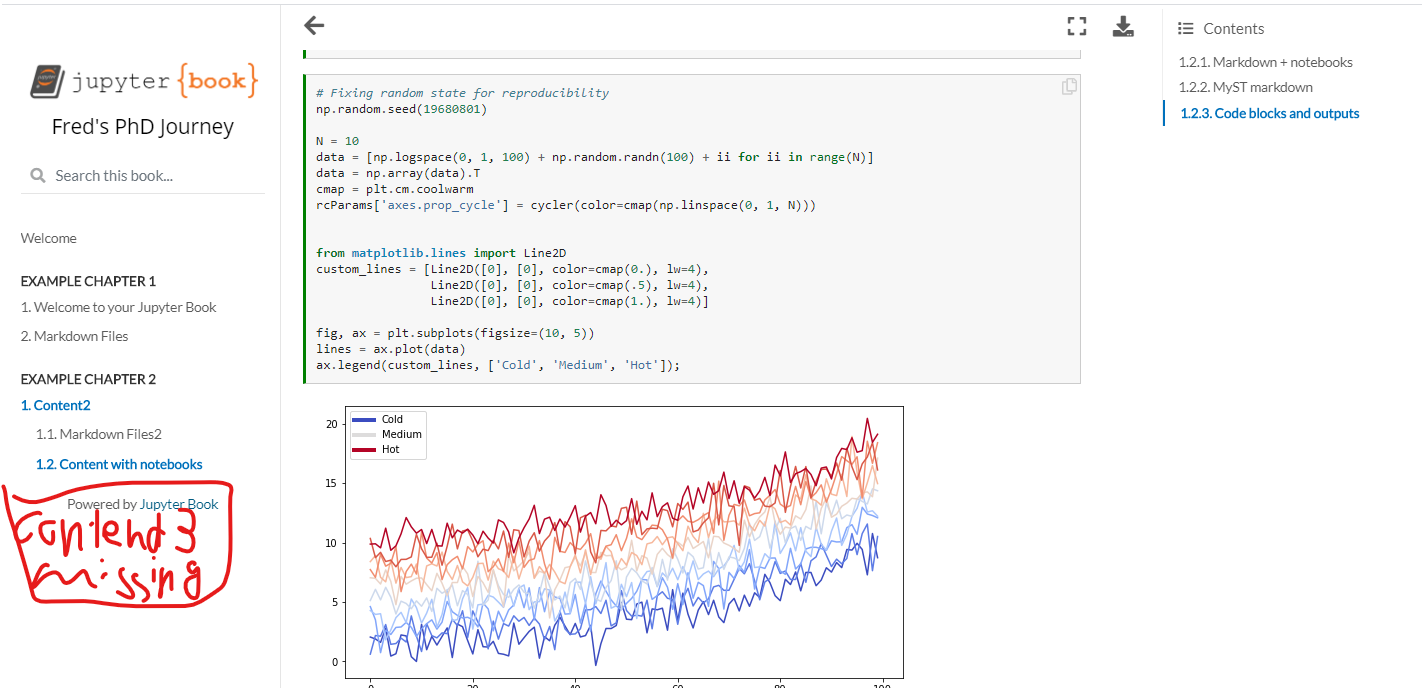
No, the contents on the right is fine. But whenever I put 'content3.md' or 'markdown3.md' in a subdirectory, such as 'content', it'll be missing on the left:
Material-Scientist
on 28 Aug 2020
You might want to bear with me just a sec, since there is a number of Windows specific improvements in #911 which should be finished very soon
 chrisjsewell
on 28 Aug 2020
chrisjsewell
on 28 Aug 2020
Also worth a try:
pip install git+https://github.com/phaustin/jupyter-book@posix_path --upgrade
to get the version of jupyter-book that handles windows paths correctly
 phaustin
on 28 Aug 2020
phaustin
on 28 Aug 2020
@phaustin, I've actually integrated that change into #911 now.
Tests aren't passing, but I'm working on it
chrisjsewell
on 28 Aug 2020
Also worth a try:
pip install git+https://github.com/phaustin/jupyter-book@posix_path --upgradeto get the version of jupyter-book that handles windows paths correctly
Ah, this actually did the trick! Thanks 👍
Material-Scientist
on 28 Aug 2020
Also FYI @phaustin, myst-nb is now fully Windows compliant 😄 https://github.com/executablebooks/MyST-NB/runs/1040260603?check_suite_focus=true
chrisjsewell
on 28 Aug 2020
good news -- even infinite series can eventually converge ;-) Do you know how to turn off multiple failing tests? @foster999 is making headway (https://github.com/phaustin/jupyter-book/pull/1) but I need to learn how to abort a test in progress (github ran the last commit for six hours before timing out) and skip problematic tests.
phaustin
on 28 Aug 2020
Also worth a try:
pip install git+https://github.com/phaustin/jupyter-book@posix_path --upgradeto get the version of jupyter-book that handles windows paths correctly
Maybe a minor issue, but this fix seems to break 'expand_sections: true'
Material-Scientist
on 28 Aug 2020
@phaustin you can use the skip mark decorator as :
@pytest.mark.skip(reason="blah")
And there's a similar mark for setting a timeout with this plug in :)
 foster999
on 28 Aug 2020
foster999
on 28 Aug 2020
thanks -- that's what I was looking for. I guess we need skipif (https://docs.pytest.org/en/latest/skipping.html#id1) to limit the skip to windows. Unfortunately I'm now within the start-of-term event horizon, but I can hopefully take a look at this this weekend.
phaustin
on 28 Aug 2020
guys I'm already all this in #911, there's a global timeout set.
If you need to know anything about pytest, I've literally written whole plugins lol: https://github.com/chrisjsewell/pytest-notebook/
chrisjsewell
on 28 Aug 2020
excellent -- very happy to move to the back of the peloton on this.
phaustin
on 28 Aug 2020
See 6fb0cbe (#911) 😄
chrisjsewell
on 28 Aug 2020
Related issues
 choldgraf
·
4Comments
choldgraf
·
4Comments
 matrs
·
3Comments
choldgraf
·
5Comments
matrs
·
3Comments
choldgraf
·
5Comments
 Cyb3rWard0g
·
5Comments
Cyb3rWard0g
·
5Comments
 nozebacle
·
3Comments
nozebacle
·
3Comments