jupyter-book build: NotImplementedError on Windows Python 3.8
Maintainer Edit:
This issue is related to jupyter/nbclient#85
So it looks like, for now on Windows, you need to use Python 3.7.
Describe the bug
I am following the tutorial set-up https://jupyterbook.org/start/build.html
In the second step it says use jupyter-book build mybookname to build the book - i get an error.
Here is an error: File "C:\Program Files\Python38\lib\asyncio\events.py", line 501, in add_reader
raise NotImplementedError
NotImplementedError
Here is a screenshot of my terminal:

To Reproduce
Steps to reproduce the behavior:
pip install -U jupyter-bookjupyter-book create mybooknamejupyter-book build mybookname
 denigomonov
All 66 comments
Thanks for opening your first issue here! Engagement like this is essential for open source projects! :hugs:
If you haven't done so already, check out EBP's Code of Conduct. Also, please try to follow the issue template as it helps other community members to contribute more effectively.
If your issue is a feature request, others may react to it, to raise its prominence (see Feature Voting).
Welcome to the EBP community! :tada:
![welcome[bot] picture](https://avatars0.githubusercontent.com/in/4141?v=4&s=40) welcome[bot]
on 25 Aug 2020
welcome[bot]
on 25 Aug 2020
Heya thanks, looks like an nbclient issues.
Could you provide the full traceback (drag and drop the referenced log file into a comment), and the version of nbclient installed: pip show nbclient
I notice also that you are using the latest version of myst-parser/myst-nb. This is not yet strictly supported by jupyter-book (coming in the next day or 2!).
I imagine if you run pip check, it will highlight a number of version incompatibilities?
 chrisjsewell
on 25 Aug 2020
chrisjsewell
on 25 Aug 2020
If you could also try, from a fresh environment, with the initial step: pip install -U --use-feature=2020-resolver jupyter-book
(see what is --use-feature=2020-resolver? for an explanation)
chrisjsewell
on 25 Aug 2020
I am new to Jupyter book... so jus trying to figure out the process - thank you
denigomonov
on 25 Aug 2020
(env) C:\Users\denig\Desktop\Projects\JupBook_CNN>pip check
No broken requirements found.
denigomonov
on 25 Aug 2020
I am new to Jupyter book... so jus trying to figure out the process - thank you
👍 and if you could also provide the output of pip list thanks
chrisjsewell
on 25 Aug 2020
(env) C:\Users\denig\Desktop\Projects\JupBook_CNN>pip install -U --use-feature=2020-resolver jupyter-book
Usage:
pip install [options]
pip install [options] -r
pip install [options] [-e]
pip install [options] [-e]
pip install [options]
no such option: --use-feature
denigomonov
on 25 Aug 2020
Actually pip freeze would be better
chrisjsewell
on 25 Aug 2020
no such option: --use-feature
Ah that's probably because you have an older version of pip, but yeh anyway if you could just do pip freeze
chrisjsewell
on 25 Aug 2020
Iam trying to do pip freeze save to txt buy my Norton blocks this action?
denigomonov
on 25 Aug 2020
I have to many to copy paste - please give me a second to figure this out
denigomonov
on 25 Aug 2020
Iam trying to do pip freeze save to txt buy my Norton blocks this action?
No idea!? What about pip list?
Actually I'm also going to ping @phaustin and @foster999, as I note you are using Windows, so they might be interested/have ideas about this
chrisjsewell
on 25 Aug 2020

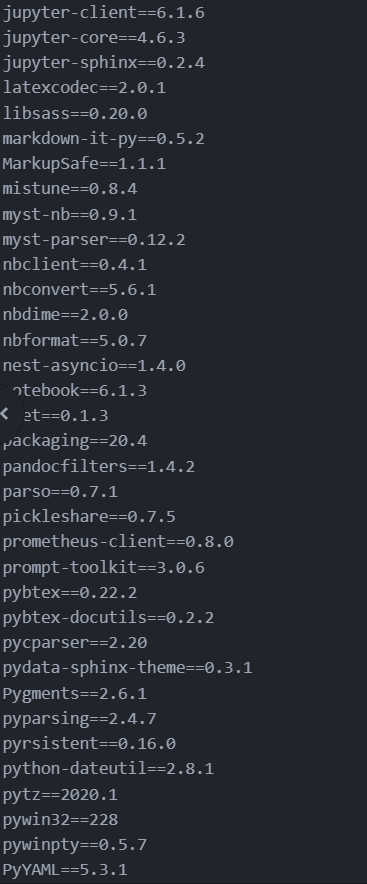
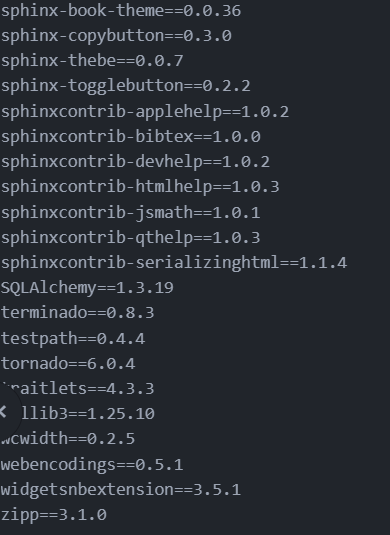
idk how to fix exporting my pip freeze right now
denigomonov
on 25 Aug 2020
I have just updated my pip and running --use-feature
denigomonov
on 25 Aug 2020
idk how to fix exporting my pip freeze right now
So is it not possible to copy/paste this as text 😬 ?
chrisjsewell
on 25 Aug 2020
--use-feature worked now, however the same error again after doing _create_ and _build_ steps
`Exception occurred:
File "C:\Program Files\Python38\libasyncio\events.py", line 501, in add_reader
raise NotImplementedError
NotImplementedError`
denigomonov
on 25 Aug 2020
idk how to fix exporting my pip freeze right now
So is it not possible to copy/paste this as text 😬 ?
Umm let me try... im using Atom so it's a bit glitchy lol
denigomonov
on 25 Aug 2020
Got it
alabaster==0.7.12
argon2-cffi==20.1.0
async-generator==1.10
attrs==20.1.0
Babel==2.8.0
backcall==0.2.0
beautifulsoup4==4.9.1
bleach==3.1.5
certifi==2020.6.20
cffi==1.14.2
chardet==3.0.4
click==7.1.2
colorama==0.4.3
decorator==4.4.2
defusedxml==0.6.0
docutils==0.16
entrypoints==0.3
gitdb==4.0.5
GitPython==3.1.7
idna==2.10
imagesize==1.2.0
importlib-metadata==1.7.0
ipykernel==5.3.4
ipython==7.17.0
ipython-genutils==0.2.0
ipywidgets==7.5.1
jedi==0.17.2
Jinja2==2.11.2
jsonschema==3.2.0
jupyter-book==0.7.4
jupyter-cache==0.4.0
jupyter-client==6.1.6
jupyter-core==4.6.3
jupyter-sphinx==0.2.4
latexcodec==2.0.1
libsass==0.20.0
markdown-it-py==0.5.2
MarkupSafe==1.1.1
mistune==0.8.4
myst-nb==0.9.1
myst-parser==0.12.2
nbclient==0.4.1
nbconvert==5.6.1
nbdime==2.0.0
nbformat==5.0.7
nest-asyncio==1.4.0
notebook==6.1.3
oset==0.1.3
packaging==20.4
pandocfilters==1.4.2
parso==0.7.1
pickleshare==0.7.5
prometheus-client==0.8.0
prompt-toolkit==3.0.6
pybtex==0.22.2
pybtex-docutils==0.2.2
pycparser==2.20
pydata-sphinx-theme==0.3.1
Pygments==2.6.1
pyparsing==2.4.7
pyrsistent==0.16.0
python-dateutil==2.8.1
pytz==2020.1
pywin32==228
pywinpty==0.5.7
PyYAML==5.3.1
pyzmq==19.0.2
requests==2.24.0
Send2Trash==1.5.0
six==1.15.0
smmap==3.0.4
snowballstemmer==2.0.0
soupsieve==2.0.1
Sphinx==2.4.4
sphinx-book-theme==0.0.36
sphinx-copybutton==0.3.0
sphinx-thebe==0.0.7
sphinx-togglebutton==0.2.2
sphinxcontrib-applehelp==1.0.2
sphinxcontrib-bibtex==1.0.0
sphinxcontrib-devhelp==1.0.2
sphinxcontrib-htmlhelp==1.0.3
sphinxcontrib-jsmath==1.0.1
sphinxcontrib-qthelp==1.0.3
sphinxcontrib-serializinghtml==1.1.4
SQLAlchemy==1.3.19
terminado==0.8.3
testpath==0.4.4
tornado==6.0.4
traitlets==4.3.3
urllib3==1.25.10
wcwidth==0.2.5
webencodings==0.5.1
widgetsnbextension==3.5.1
zipp==3.1.0
denigomonov
on 25 Aug 2020
Atom so it's a bit glitchy lol
Get on the VS Code train 😆 !
chrisjsewell
on 25 Aug 2020
Ok yeh I note that https://github.com/executablebooks/jupyter-book/blob/7da6b865256078628affd7ef061b5e88c6f4502b/setup.py#L56 is not actually pinning myst-nb to the older version 😬
Can you try, in a fresh env: pip install -U -use-feature=2020-resolver jupyter-book myst-nb==0.8.5
chrisjsewell
on 25 Aug 2020
Atom so it's a bit glitchy lol
Get on the VS Code train 😆 !
I am coming from purely using Jupyter and Collab as a Data Science person, Atom looked the cleanest
denigomonov
on 25 Aug 2020
I am coming from purely using Jupyter and Collab as a Data Science person, Atom looked the cleanest
If IRC, Atom and VS Code are actually both owned by Microsoft now. They'll probably deprecate Atom in favour of VS Code at some point, since that where all their development focus is on 😉
chrisjsewell
on 25 Aug 2020
second for vscode on windows -- also conda-lock (but I understand conda's not always an option)
 phaustin
on 25 Aug 2020
phaustin
on 25 Aug 2020
Ok yeh I note that
is not actually pinning myst-nb to the older version 😬
Can you try, in a fresh env:pip install -U -use-feature=2020-resolver jupyter-book myst-nb==0.8.5
i think i did it right but got this error at the end
ERROR: Could not install packages due to an EnvironmentError: [WinError 5] Access is denied: 'c:\users\denig\desktop\projects\jupbook_cnn\env\lib\site
-packages\attr\__pycache__'
Consider using the --user option or check the permissions.
denigomonov
on 25 Aug 2020
Ah actually found the issue! https://github.com/jupyter/nbclient/issues/85
So it looks like, for now on Windows, you need to use Python 3.7.
Can you give that a go and let me know how you get on?
chrisjsewell
on 25 Aug 2020
Ah actually found the issue! jupyter/nbclient#85
So it looks like, for now on Windows, you need to use Python 3.7.
Can you give that a go and let me know how you get on?
okay let me try
denigomonov
on 25 Aug 2020
Any chance you can let me know how to do that? Do i need to do that outside of my venv?
denigomonov
on 25 Aug 2020
I feel like I did too many steps now...
denigomonov
on 25 Aug 2020
now i cant even uninstall - i get an error: PermissonError
denigomonov
on 25 Aug 2020
Looks like you got it working, but I'd usually use a command prompt - move to a directory you can write to and use:
pip freeze > requirements.txt
+1 for VSCode 😁
 foster999
on 25 Aug 2020
foster999
on 25 Aug 2020
Looks like you got it working, but I'd usually use a command prompt - move to a directory you can write to and use:
pip freeze > requirements.txt+1 for VSCode 😁
well this the command i wrote.. but i have some permisson problems that doesn't let me do stuff on my own pc
denigomonov
on 25 Aug 2020
Ok I'm not a Windows user (Mac all the way!) so @phaustin @foster999 would you be able to give some guidance on installing python 3.7?
I guess my solution would be to install Conda
chrisjsewell
on 25 Aug 2020
Ok I'm not a Windows user (Mac all the way!) so @phaustin @foster999 would you be able to give some guidance on installing python 3.7?
I guess my solution would be to install Conda
I have tried to do it in conda venv... but then i get a PATH error and cannot use Scripts i install for Jupyter-book
Which, I could not figure out how to solve - so switched to python venv
denigomonov
on 25 Aug 2020
Maybe I'll try to do this through Jupyter notebook terminal
denigomonov
on 25 Aug 2020
Anyone can help on how to downgrade to Python version 3.7 in termnial?
denigomonov
on 25 Aug 2020
chrisjsewell
on 25 Aug 2020
I would strongly recommend miniconda, but I have see environments get corrupted where pip is in your path from some other install, so doing pip install jupyter-book is trying to install in someplace other than the current conda environment, and you get permission errors. The best way to check this is to do:
python -m pip --version
and you should see something like (if your env is called june22)
> python -m pip --version

pip 20.2.2 from C:\Users\phil\minjn20\envs\june22\lib\site-packages\pip (python 3.7)
I would strongly recommend miniconda, but I have see environments get corrupted where pip is in your path from some other install, so doing
pip install jupyter-bookis trying to install in someplace other than the current conda environment, and you get permission errors. The best way to check this is to do:
python -m pip --versionand you should see something like (if your env is called june22)
> python -m pip --version

pip 20.2.2 from C:\Users\phil\minjn20\envs\june22\lib\site-packages\pip (python 3.7)
thank you but that does not help with downgrading to python 3.7
denigomonov
on 25 Aug 2020
i downloaded installer for python 3.7 and yet:

denigomonov
on 25 Aug 2020
Is there now a python3.7 executable? You may have to change the alias of the python executable
chrisjsewell
on 25 Aug 2020
to get a conda environment with jupyter-book and python 3.7:
conda create -n py37 python=3.7
conda activate py37
conda install pip
pip install jupyter-book
Hey @chrisjsewell @phaustin
I have figured it out and it works with your help now, something you guys might want to take a note of to help others:
- Switching to Python version 3.7 solved the build issue
- I created new venv in Anaconda navigator specifying Python 3.7 as a version
- Used conda install pip -> pip install jupyter-book (no path issue later on) -> creat -> build
denigomonov
on 25 Aug 2020
And it works in Atom lmao
denigomonov
on 25 Aug 2020
Switching to Python version 3.7 solved the build issue
🎉 Thanks for your patience 😄
chrisjsewell
on 25 Aug 2020
Switching to Python version 3.7 solved the build issue
🎉 Thanks for your patience 😄
No thank you... As I said I'm not necessarily a back-end developer so not the biggest fan of going through errors in terminals..
Trust, as I will try to publish my book with TensorFlow lib - I am expecting errors here and there so there will be more question sorry...
denigomonov
on 25 Aug 2020
I am expecting errors here and there so there will be more question sorry...
Just keep them coming 😬
chrisjsewell
on 25 Aug 2020
Well keep this issue open for now, until its fixed in nbclient, so that other can find it easily
chrisjsewell
on 25 Aug 2020
(I added an edit to the top of your initial comment, explaining the situation)
chrisjsewell
on 25 Aug 2020
Well keep this issue open for now, until its fixed in nbclient, so that other can find it easily
Okay no problem...
Quick question: it seems that i was missing numpy and matplolib in my new env, however after i installed them - do i need to do jb build myapp again for page to update the content?
denigomonov
on 25 Aug 2020
jb build myapp
Yes, the notebooks with numpy/matplotlib dependencies will need to be re-executed, and the documents rebuilt with the new outputs from those notebooks
chrisjsewell
on 25 Aug 2020
jb build myapp
Yes, the notebooks with numpy/matplotlib dependencies will need to be re-executed, and the documents rebuilt with the new outputs from those notebooks
Hmm...
- I have installed numpy/matplotlib in my conda env
- rebuild
jb build myapp - refreshed the page link in my browser and still getting error:

denigomonov
on 25 Aug 2020
Maybe something is being called from outside the conda env?
Can you do which jb on Windows?
chrisjsewell
on 25 Aug 2020
My conda venv - libs exist:


Your req.txt file:
ibjupyter-book
matplotlib
numpy
Error:

which jb is not recognized as a command
denigomonov
on 25 Aug 2020
I think that the Win equivalent is where jb
I've found with other CLIs (inc. pytest) that if they're installed on the default conda env (root) they can remain on the path in other envs. To get around that I usually call the module like python -m pytest, but this is obviously not ideal. Could try uninstalling jupyter-book from your default conda env:
activate root
pip uninstall jupyter-book
Maybe something is being called from outside the conda env?
Can you dowhich jbon Windows?
C:\Users\denig\anaconda3\envs\jbbook\Scripts\jb.exe
C:\Users\denig\anaconda3\Scripts\jb.exe
denigomonov
on 25 Aug 2020
C:\Users\denig\anaconda3\envs\jbbook\Scripts\jb.exe
C:\Users\denig\anaconda3\Scripts\jb.exe
The second one here is your root env (without dependencies), which might be getting picked up first. So uninstalling from that env might work
foster999
on 25 Aug 2020
@foster999
I do not believe I have double checked both root and not - all have necessary dependencies
If i rund .ipynb file as juoyter notebook all cells get executed with not problems...
I am not sure what is causing this - should i open separate issue? I have to say learning this Jbook setup - causing a lot of issues :(
denigomonov
on 26 Aug 2020
Just to go back to my earlier comment:
I have seen environments get corrupted where pip is in your path from some other install, so doing
pip install jupyter-bookis trying to install in someplace other than the current conda environment, and you get permission errors.
So this is definitely what's happening with your jb install -- my recommendation is to uninstall miniconda and start fresh -- put the new miniconda in a different folder so it's clear exactly what's in your path, and make sure that you always work in an environment that's not the base environment -- i.e.:
conda create -n work python=3.7
conda activate work
before you install any packages. If you're comfortable with powershell you could put something like this at the top of your powershell profile:
https://github.com/eoas-ubc/eoas_tlef/blob/master/docs/support_files/Microsoft.PowerShell_profile.ps1#L1-L4
and add:
conda activate work
so you automatically start in the work environment when you launch a new powershell terminal.
I have five or six different environment.yml files that I keep for specific types of projects (dask, gis, remote sensing) etc. -- so I can always rebuild an environment with:
conda env create -f environment_gis.yml
that makes the cost of tearing down a miniconda install and starting over close to zero, and I have to do that about once or twice a year, despite all of the above precautions. Not ideal, but definitely better than any other package management system available for python.
phaustin
on 26 Aug 2020
Just to go back to my earlier comment:
I have seen environments get corrupted where pip is in your path from some other install, so doing
pip install jupyter-bookis trying to install in someplace other than the current conda environment, and you get permission errors.So this is definitely what's happening with your jb install -- my recommendation is to uninstall miniconda and start fresh -- put the new miniconda in a different folder so it's clear exactly what's in your path, and make sure that you always work in an environment that's not the base environment -- i.e.:
conda create -n work python=3.7
conda activate work
before you install any packages. If you're comfortable with powershell you could put something like this at the top of your powershell profile:
https://github.com/eoas-ubc/eoas_tlef/blob/master/docs/support_files/Microsoft.PowerShell_profile.ps1#L1-L4
and add:
conda activate work
so you automatically start in the work environment when you launch a new powershell terminal.I have five or six different environment.yml files that I keep for specific types of projects (dask, gis, remote sensing) etc. -- so I can always rebuild an environment with:
conda env create -f environment_gis.ymlthat makes the cost of tearing down a miniconda install and starting over close to zero, and I have to do that about once or twice a year, despite all of the above precautions. Not ideal, but definitely better than any other package management system available for python.
It seems you are keep refering to miniconda - that's not what I have. I have full version of Anaconda; i guess i can try Miniconda, however i never worked with it, i'll check the setup online
denigomonov
on 26 Aug 2020
right -- you defintely want to avoid anaconda. Your environments should only have the minimum set of packages you need to work on a specific project. Anything more than that is just extra complexity to debug.
phaustin
on 26 Aug 2020
right -- you defintely want to avoid anaconda. Your environments should only have the minimum set of packages you need to work on a specific project. Anything more than that is just extra complexity to debug.
That is actually very true... it does make sense to create unique venv for each project! Thanks for the tip
- installed miniconda
- followed your steps to create new venv with python 3.7
got an error - failed on loading packages for p 3.7:

denigomonov
on 26 Aug 2020
sheesh -- that's a new one. Seems like it might be a network problem. If it keeps failing at the same point, I might try specfying a prior python like 3.7.6 and in case there's something wrong with the 3.7.7 file on the conda server.
phaustin
on 26 Aug 2020
sheesh -- that's a new one. Seems like it might be a network problem. If it keeps failing at the same point, I might try specfying a prior python like 3.7.6 and in case there's something wrong with the 3.7.7 file on the conda server.
yeah i'm not sure... 3.7.6 worked just fine!
denigomonov
on 26 Aug 2020
@phaustin
Apparently, it's quite tricky when it comes to using specific env for kernels (jupyter notebook)...
Here are the steps, not sure if it something that can help people down the road:
- Create your desired env |
conda create -n env_name python=3.7 - Download jupyter notebook on your root |
conda install jupyter - In order, to use kernels in a specifc env with desired packages you have to install on new env |
(env_name) conda install ipykernel
(env_name) conda install nb_conda_kernels
right -- things will get smoother eventually, but at the moment it is sort of like teaching people to drive while we are paving the road and assembling the car. The other important thing is to install jupyter-book from the branch that has the windows patches applied:
pip install git+https://github.com/phaustin/jupyter-book@posix_path --upgrade
as of today, this version allows me to build the documentation for jupyter-book: https://jupyterbook.org/intro.html
so as long as you keep to that format it should work with windows.
phaustin
on 26 Aug 2020
For anyone that stumbles on to this and is looking for the fix, here is what worked:
pip uninstall jupyter-book
conda create -n workenv python=3.7
conda activate workenv
pip install jupyter-book
Description of what the steps above:
- uninstall jupyter-book (for some reason it has a dash on windows but no dash on macOS/linux!)
- create a new conda environment with python 3.7 (thanks @phaustin!)
- activate the env
- reinstall jupyter-book
I am not 100% sure uninstalling and reinstalling jupyter-book is necessary, but after it worked, I wasn't going to touch it again!
 firasm
on 6 Jan 2021
firasm
on 6 Jan 2021
Related issues
 spring-haru
·
5Comments
spring-haru
·
5Comments
 TomDonoghue
·
4Comments
TomDonoghue
·
4Comments
 choldgraf
·
3Comments
choldgraf
·
3Comments
 sidneymbell
·
5Comments
sidneymbell
·
5Comments
 cedeerwe
·
3Comments
cedeerwe
·
3Comments
Most helpful comment
right -- things will get smoother eventually, but at the moment it is sort of like teaching people to drive while we are paving the road and assembling the car. The other important thing is to install jupyter-book from the branch that has the windows patches applied:
as of today, this version allows me to build the documentation for jupyter-book: https://jupyterbook.org/intro.html
so as long as you keep to that format it should work with windows.