Jupyter-book: Page TOC hiding margin content on loading
Describe the bug
Although the page TOC disappears when scrolling, if a margin note is at the top of the page, it can be hidden on load by the page TOC. For example:
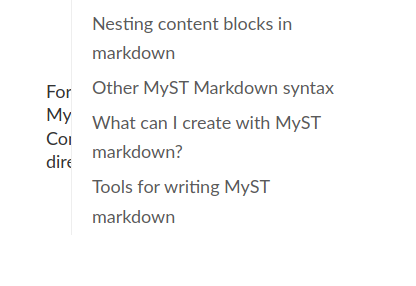
To Reproduce
The official project documentation shows the problem at: https://jupyterbook.org/content/myst.html.
Expected behavior
Personally, that the page TOC would be collapsed on loading ! But I'm sure there are many other potential solutions, here.
Environment
jupyter-book 0.7.4
 emdupre
All 8 comments
thanks for reporting @emdupre. I can see the issue you're referring to on that link. @choldgraf I have noticed that when you start scrolling on that page the right hand contents rolls up to show the margin note. Should we add a manual arrow for vertically collapsing this element?
 mmcky
on 18 Aug 2020
mmcky
on 18 Aug 2020
yeah I guess the question is what behavior do we want? do we want the TOC to be hidden if there is margin content? I could see it either way 🤔🤔
 choldgraf
on 18 Aug 2020
choldgraf
on 18 Aug 2020
I agree -- from my perspective I quite like the contents list being visible (by default) to get an overview of the page -- but it might be nice to have the option to role up the contents (with a small arrow) at the top of the page.
From what I can tell its current behaviour is to roll up when content is in the margin (except for at the top of the page) -- so there is an argument to keep the simplicity of it at the moment.
mmcky
on 18 Aug 2020
My (light) opinion would be to have it hidden by default, with an option to expand. I worry that it's too easy to miss that there's available margin content if the page TOC is covering it by default ! That is, I don't know that I'd think to minimize the page TOC to check before jumping to another section.
But this is definitely a stylistic choice !
emdupre
on 18 Aug 2020
I think I'm tempted to go with what @emdupre suggests, and hide the table of contents if there is margin content. This is because:
- If the user scrolls they will likely immediately see the TOC
- However the user _might_ miss the margin content if they aren't paying attention as they scroll and it's hidden at first
Also, some users might think that it looks "incorrect" to have the TOC overlapping w/ margin content so this would get around that problem
choldgraf
on 18 Aug 2020
I _think_ this would be just a matter of removing the (topOffset >= 0) part here:
in case anybody wants to give this a shot :-)
choldgraf
on 18 Aug 2020
Great, I think I've patched it, but I'm not sure how to test its interaction with Jupyter Book ! Any insight would be appreciated -- I'm sure I'm just overlooking the right contributing guide !
emdupre
on 18 Aug 2020
well the way I test interaction w/ JB is to just build JB locally using my dev version of the theme and see if it works :-) but in general if it works in the theme, it should work in Jupyter Book, there isn't much difference in the builds for both
choldgraf
on 18 Aug 2020
Related issues
 darribas
·
4Comments
darribas
·
4Comments
 spring-haru
·
5Comments
spring-haru
·
5Comments
 sidneymbell
·
5Comments
sidneymbell
·
5Comments
 abielr
·
4Comments
choldgraf
·
4Comments
abielr
·
4Comments
choldgraf
·
4Comments
Most helpful comment
I think I'm tempted to go with what @emdupre suggests, and hide the table of contents if there is margin content. This is because:
Also, some users might think that it looks "incorrect" to have the TOC overlapping w/ margin content so this would get around that problem