Jupyter-book: Inconsistent treatment of H1 headers in LaTeX build
Describe the bug
Some H1 headers in .ipynb Markdown cells are converted to LaTeX \chapter{...} commands and some are converted to \section{...} commands. I can't seem to tell or control why/how this happens.
To Reproduce
Steps to reproduce the behavior:
- Choose a jupyter-book project. I'm using this one.
- Ensure that project has many different H1-type headers in it (using Markdown's
#in.ipynbcells), spread over several files. - Run
jupyter-book build . --builder pdflatex. - View the generated PDF in
./_build/latex/. (In the above repo, it's right here). - The first
#header seems to have become a chapter and all other#headers have become sections within it.
Expected behavior
Each H1 header should be treated equally, each creating its own chapter.
Environment (please complete the following information):
- Python Version 3.7.3
- Output of
jupyter-book --version
Jupyter Book: 0.7.0    # but I've tried with 0.7.2dev0 also and got the same problem
MyST-NB: 0.8.1
Sphinx Book Theme: 0.0.23
MyST-Parser: 0.8.1
Jupyter-Cache: 0.2.1
 nathancarter
All 27 comments
I think this could be because of how Sphinx handles headers and sub-sections. A good way to test this out is to set :numbered: true for all pages, and then see how page numbers are given out according to various structures.
In particular (and w/o looking at your books so this is a guess), if you have a top-level page with headers in it, those headers will be converted to the next-layer down, and headers of sub-pages will be bumped down a level. In addition, if your top-level sections have captions associated with them (headers in jupyter book), then those sections will be treated as a single chapter.
It's very confusing I know, we need to figure out a way to document this behavior
 choldgraf
on 24 Jul 2020
choldgraf
on 24 Jul 2020
I do not have sub-pages; all my pages are top-level. So perhaps the behavior you're describing of demoting header levels is happening to all pages except the first?
I tried what you suggested, which I think would mean something like this:
- file: intro.ipynb
  numbered: true
- file: chapter-1-intro-to-data-science.ipynb
  numbered: true
- file: chapter-2-mathematical-foundations.ipynb
  numbered: true
- file: chapter-3-jupyter.ipynb
  numbered: true
- file: chapter-4-review-of-python-and-pandas.ipynb
  numbered: true
But that did not solve the problem; the resulting PDF had the same structure as before. You can see the structure by clicking the link in the original issue post, above.
nathancarter
on 24 Jul 2020
So setting numbered won't change the structure at all, it'll just give you an easier idea for how Sphinx thinks everything is structured. (and you only need to put numbered in the first toc entry if you want all of them numbered)
Ah I see now that you are specifically talking about H1 headers, I missed that. When you look at the section numbers, do they change in a way that is expected while the Latex sections change in a way that is not expected?
choldgraf
on 24 Jul 2020
HTML output:
When I put numbers under every heading, as you see above, then every page has numbered sections except the main page, intro.ipynb. If instead I do what you suggested,
- file: intro.ipynb
  numbered: true
- file: chapter-1-intro-to-data-science.ipynb
- file: chapter-2-mathematical-foundations.ipynb
- file: chapter-3-jupyter.ipynb
then it no longer numbers any section in the whole book, not even the main page, intro.ipynb.
PDF output:
No matter which way I choose to do the numbered: true setting, I get the same ToC structure, shown in the screenshot below (and visible in the book PDF online here).
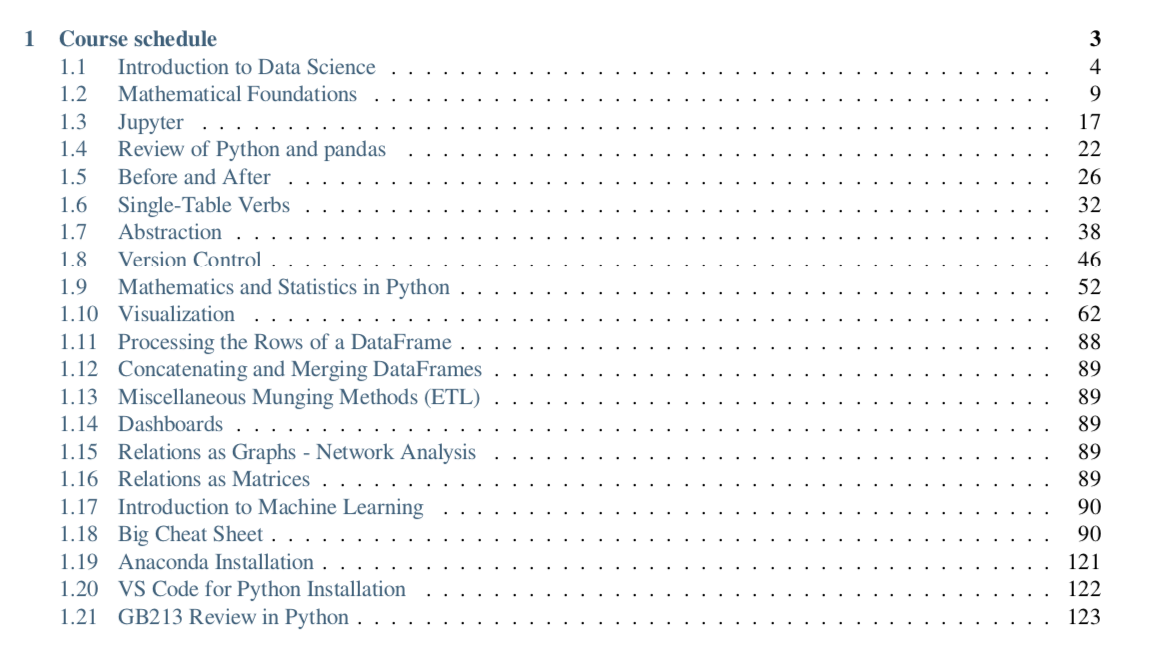
That is what led me to file this issue; the HTML problem is a separate one that I haven't actually filed.
nathancarter
on 24 Jul 2020
argg that's frustrating - sorry this is confusing. Let's leave this open as a bug...I'm not sure what exactly is going on. I thought Sphinx treats the first page in a special way (e.g. as not part of any chapter), but maybe I'm wrong.
choldgraf
on 24 Jul 2020
I wonder if this is something @mmcky or @AakashGfude has run into?
choldgraf
on 24 Jul 2020
Yeah it's definitely treating the first page as special. It makes it the landing page and not part of the nav structure on the left.
I tried moving the numbered: true into the second page instead, but that just numbered only the sections of the second page.
nathancarter
on 24 Jul 2020
This makes me feel like #783 is really needed to ease up some confusion at least. Do you agree?
choldgraf
on 24 Jul 2020
Yes, you already thumbsed-up my comment over there. :)
nathancarter
on 24 Jul 2020
@choldgraf I haven't run into this -- but @AakashGfude is also looking into theme support for LaTeX which will assist with formatting etc. However it sounds like this issue is inconsistent which would be frustrating. @AakashGfude and I can try and replicate this issue and diagnose the issue.
Currently the PDF output is using the generic latex writer bundled with sphinx
 mmcky
on 27 Jul 2020
mmcky
on 27 Jul 2020
I also have an issue similar to this one. I have a flat _toc.yml:
- file: 'Introduction'
  numbered: true

- file: 'Getting-Started'
- file: 'Data-and-Variables'
- file: 'Some-Primitive-Functions'
- file: 'Appendices'
And everything in the Getting-Started, Data-and-Variables, Some-Primitive-Functions and Appendices files gets mapped to subsections (and below). The behaviour I am witnessing is thus incorrect but looks consistent.
I generated the tex with jb build book/ --builder latex to build it myself.
jb --version gives
Jupyter Book: 0.8.1
MyST-NB: 0.10.1
Sphinx Book Theme: 0.0.36
MyST-Parser: 0.12.9
Jupyter-Cache: 0.4.1
NbClient: 0.4.1
(Btw, how can I include the code outputs in the pdf? Currently only the inputs get included)
 RojerGS
on 27 Sep 2020
RojerGS
on 27 Sep 2020
hi @RojerGS -- thanks for the report. I am currently looking at various configurations users are using with jupyter-book. Is this repo public? Would it be possible to get a bit more information about the structure (i.e. heading structure inside of the documents).
I am collecting various project configurations -- but the default jupyterbook method of organising should give you chapters as in this configuration with pdf
Support for code outputs is something that needs to be implemented for the default latex writer and is work in progress. I will update the docs with a notice on this for clarity.
mmcky
on 28 Sep 2020
@mmcky the repo is public, you can find it at RojerGS/MDAPL.
In order to reproduce exactly what I am experiencing:
git clone https://github.com/RojerGS/MDAPL.git
cd MDAPL
make preprocess
jb build book --builder pdflatex
Then be sure to skip _all_ the errors you will be getting, as I am using weird Unicode characters. When the pdf finishes building, you can open it and see that the ToC of the pdf corresponds to the ToC of the Introduction.ipynb. This is wrong, of course. Scrolling to page 46 you will find the subsection "16.3.1 Getting Started" which should be a new chapter and not a subsubsection, as that is the H1 header of the Getting-Started.ipynb file. From there on, everything is two nesting levels too deep.
RojerGS
on 28 Sep 2020
I suspect that your issue is that you've got H2+ headers on your landing page. As such, Sphinx treats all other pages as subsections of those headers. See https://jupyterbook.org/customize/toc.html#how-headers-and-sections-map-onto-to-book-structure for information about how header structure maps on to book structure.
choldgraf
on 28 Sep 2020
@choldgraf is that treatment different for latex and html builds, then? Because the ToC of the HTML build is what I'd expect.
What is more, the link you gave provides with two alternative rules of thumb, and I am following the second one.
RojerGS
on 28 Sep 2020
hmmm, in general it shouldn't be. Can you try upgrading to the latest jupyter-book and see if that changes anything?
re: the strategy you mention - you mean having a single file for the whole book? I'm a bit confused because I see multiple ipynb files in your repo
choldgraf
on 28 Sep 2020
The link you sent has a tip that reads
A good rule of thumb is to take one of these two approaches:

 1. (...)

 2. Use a flat list of files instead of nested files. This way the section hierarchy is defined only in a single file within each section. However, this means you will have longer files in general.
I am using the 2nd option, as the several .ipynb files you see are listed in the _toc.yml as top level files.
RojerGS
on 28 Sep 2020
ah - we should clarify the docs there because there is one exception to the second approach, which is the first page of the book. That's a "landing" page and it is treated hierarchically as 'above' all of the other pages. So (I think) the problem here is that your _first_ page has second+ level headers in it.
choldgraf
on 28 Sep 2020
Yes, the clarification will be really important then. But that doesn't explain why the HTML and LaTeX builds get ToCs with different hierarchies.
RojerGS
on 28 Sep 2020
I'm finding it a bit hard to debug this because it seems like your repository has changed since you last provided instructions for how to build with it. (at least, running make html is returning errors about not being able to open ToC) Do you have a link to the _config.yml and _toc.yml files that you're using? Alternatively can you re-create this bug with a minimal example so others can re-create?
choldgraf
on 28 Sep 2020
hey @RojerGS I couldn't get your repo to build either with the instructions above make preprocess didn't set the book up for me.
mmcky
on 29 Sep 2020
Yeah @mmcky and @choldgraf sorry for the rookie mistake. As of now, you should be able to
git clone https://github.com/RojerGS/MDAPL
cd MDAPL
pip install -r scripts/requirements.txt
make preprocess
jb build book
jb build book --builder latex
This should get you the HTML and latex builds with the inconsistent ToCs. _But_ I am not sure if the build will work fine because I am using a custom kernel, the Dyalog APL kernel; if possible just ask for the build not to execute the notebooks.
Btw, now I'm running with jb --version
Jupyter Book: 0.8.2
MyST-NB: 0.10.1
Sphinx Book Theme: 0.0.36
MyST-Parser: 0.12.9
Jupyter-Cache: 0.4.1
NbClient: 0.4.1
and I still get this issue.
RojerGS
on 29 Sep 2020
You can also check my issue810 repo with a minimal example of what is wrong. The repo already has the HTML and latex builds so it should be easier to see how the headers are getting all messed up in the latex build but not in the HTML build.
RojerGS
on 29 Sep 2020
thanks @RojerGS for the minimal example that is a big help. I will compare it with a reference configuration for the files jupyterbook configuration.
mmcky
on 30 Sep 2020
Hey there @mmcky , is there any (rough) estimate for when this will be addressed and/or fixed? Just want to know if I should try to work around it or if I can trust it'll be addressed soon-ish.
RojerGS
on 12 Oct 2020
sorry @RojerGS -- I have been caught up with a large migration project. I took a look at the xml structure of the document given the presence of H2+ headers in the introduction.ipynb notebook.
<document source="C:\Users\rodri\Documents\dyalog\issue810\Introduction.ipynb">
    <section ids="introduction" names="introduction">
        <title>
            Introduction
        <paragraph>
            This is the introduction.
        <section ids="a-h2-header-in-the-intro" names="a\ h2\ header\ in\ the\ intro">
            <title>
                A H2 header in the intro
            <paragraph>
                Some text
            <section ids="h3" names="h3">
                <title>
                    H3
                <paragraph>
                    The quick brown fox jumps over the lazy dog
        <section ids="another-h2-intro-header" names="another\ h2\ intro\ header">
            <title>
                Another h2 intro header
            <paragraph>
                Yeah boy
            <compound classes="toctree-wrapper">
                <toctree caption="True" entries="(None,\ 'first-chapter') (None,\ 'other-chapter')" glob="False" hidden="True" includefiles="first-chapter other-chapter" includehidden="False" maxdepth="-1" numbered="999" parent="Introduction" rawentries="" titlesonly="True">
The current pdf writer used to produce the pdf is the generic latexpdf writer provided by sphinx which parses these document trees. To support headers in the introduction.ipynb notebook we will need to adjust / transform the structure of the document to account for those headers as they cause issues with multiple titles and an incorrect node structure etc.
@choldgraf advice on this issue is the best at the moment. There is a tip on that page not to use headers in the Introduction.ipynb and instead use bold in place of usual headers. Hopefully that get's you far enough for the time being in your project.
There is a medium term project looking at supporting frontmatter upstream in sphinx but that is likely a few months away.
mmcky
on 12 Oct 2020
@mmcky thank you for your reply. Do not worry, I understand people have to prioritise many things :) I think I will work around it for the time being, then.
RojerGS
on 14 Oct 2020
Related issues
 akhmerov
·
5Comments
akhmerov
·
5Comments
 firasm
·
5Comments
firasm
·
5Comments
 TomDonoghue
·
4Comments
choldgraf
·
4Comments
choldgraf
·
5Comments
TomDonoghue
·
4Comments
choldgraf
·
4Comments
choldgraf
·
5Comments