Jupyter-book: The navbar_number_sections option recently stopped working
Describe the bug
Some change since v0.7.0 broke the _config.yml option navbar_number_sections.
To Reproduce
To see the behavior working correctly:
- Create a jupyter book project with a
_config.ymlcontainingnavbar_number_sections: truein thehtml:section. - Put some pages in.
- Build the html using jupyter-book v0.7.0.
- See the nav on the left has correctly numbered the sections.
To see the behavior working incorrectly:
- Same as step 1 above.
- Same as step 2 above.
- Build the html using jupyter-book v0.7.2dev0.
- See the nav on the left has not numbered the sections, ignoring the
_config.ymlsetting.
Expected behavior
Always respect the setting in the config file.
My book repo is here: https://github.com/nathancarter/MA346-course-notes
Environment (please complete the following information):
- Python Version 3.7.3
- Output of
jupyter-book --version
Jupyter Book: 0.7.2dev0
MyST-NB: 0.8.1
Sphinx Book Theme: 0.0.23
MyST-Parser: 0.8.1
Jupyter-Cache: 0.2.1
 nathancarter
All 31 comments
yes! this is a deprecation on master, sorry for the confusion - we're still working out various APIs etc. If you'd like to number sections, can you put :numbered: in _toc.yml according to https://jupyterbook.org/customize/toc.html#number-your-book-s-sections and see if that works for you? (on master)
 choldgraf
on 24 Jul 2020
choldgraf
on 24 Jul 2020
If I'm reading those instructions correctly, because I want to number all sections, I should put numbered: true inside the first section, like so.
- file: intro.ipynb
  numbered: true
- file: chapter-1-intro-to-data-science.ipynb
- file: chapter-2-mathematical-foundations.ipynb
- file: chapter-3-jupyter.ipynb
- file: chapter-4-review-of-python-and-pandas.ipynb
I tried that now with 0.7.2dev0 and it did not change the nav output; it was still without numbers.
nathancarter
on 24 Jul 2020
hmm - are you also on the latest sphinx-book-theme? (can you send a link to your repo?)
choldgraf
on 24 Jul 2020
Aha! Upgraded sphinx-book-theme from 0.0.23 to 0.0.32 and that solved this! Thanks!
Edit: This was posted incorrectly; I made a mistake and this does not solve the problem. See below.
nathancarter
on 24 Jul 2020
yay! and thanks for your patience in dealing with this relatively young ecosystem of tools :-)
choldgraf
on 24 Jul 2020
I'm so sorry to re-open this issue. My previous comment was incorrect. I'm doing too many tests here and got a bit mixed up. Upgrading sphinx-book-theme from 0.0.23 to 0.0.32 does not seem to have solved the problem. When I rebuild now with the same repo (linked to above) and the following setup, I still do not get numbered nav bar items. Sorry for the mistaken report earlier.
$ jupyter-book --version
Jupyter Book: 0.7.2dev0
MyST-NB: 0.8.1
Sphinx Book Theme: 0.0.32
MyST-Parser: 0.8.1
Jupyter-Cache: 0.2.1
# _config.yml
title: MA346 Course Notes
author: Nathan Carter
logo: logo.png

exclude_patterns: ["README.md","_slides/*","experiments/*"]

repository:
  url: https://github.com/nathancarter/ma346-course-notes

latex:
  latex_documents:
    targetname: book.tex
  latex_engine: xelatex

html:
  baseurl: "https://nathancarter.github.io/ma346-course-notes"
  navbar_number_sections: true
do you have numbered: true in your _toc.yml file following the instructions on this page? And you're on the master branch of jupyter-book right?
Also - navbar_number_sections is now deprecated so you can remove it
choldgraf
on 29 Jul 2020
I think so. I just did this:
- Put
numbered: trueback into my_toc.ymlin what I think is the right way. (Here's the file so you can verify.) - Installed the latest Jupyter Book with
pip install git+git://github.com/executablebooks/jupyter-book.git, which succeeded (and nowjupyter-book --versiongives 0.7.2). - Removed the deprecated option from
_config.yml. - Rebuilt everything.
I still do not get any sections numbered, neither in the page contents nor the nav bar. You can see the generated site here.
nathancarter
on 29 Jul 2020
OK I _think_ I know what is going on here, will try and add a fix for this soon
choldgraf
on 29 Jul 2020
OK try this again on the latest jupyter book version
choldgraf
on 29 Jul 2020
I upgraded and now jupyter-book --version says 0.7.3.
The behavior is the same, sorry.
- If I place
numbered: trueafter just my first- file:line (which is before all chapters, incidentally), I get no numbers anywhere. - If I place
numbered: trueinside a specific chapter, I get numbering within only that chapter. - If I place
numbered: trueinside all chapters, I get independent numbering in each chapter (starting again as if each chapter were chapter 1).
And none of these attempts impacts the PDF at all, which always has one enormous chapter (numbered Chapter 1) and every other major heading is a section within that chapter, sequentially numbered.
The specific _toc.yml I'm using (if you're curious) can be seen here. The PDF structure I'm describing is visible here (see its ToC).
nathancarter
on 30 Jul 2020
Ah sorry - the changes I made weren't for the PDF version, they were for the HTML version to get the numbering working. For PDF maybe @mmcky can help advise?
choldgraf
on 30 Jul 2020
@AakashGfude we will need to think how to transfer this through to the LaTeX layer. Perhaps theme support?
 mmcky
on 30 Jul 2020
mmcky
on 30 Jul 2020
@mmcky hmm. not sure if the jinja template is the only way around here. Will do some digging this week and see how to program these things. Don't know yet how sphinx exactly handles Latex customization under the hood. https://www.sphinx-doc.org/en/master/latex.html .
Let's think about this.
 AakashGfude
on 30 Jul 2020
AakashGfude
on 30 Jul 2020
thanks @AakashGfude maybe it is time to think about starting our own LaTeX writer so that we can make custom changes. Perhaps we can inherit the default writer and override methods to try that approach?
mmcky
on 30 Jul 2020
@mmcky you are right. A lot of things are hinting towards a writer now and it makes sense in my limited knowledge of the whole infrastructure. :smile:
AakashGfude
on 30 Jul 2020
@AakashGfude @mmcky can we start by just documenting what the current expected behavior is with Latex/PDF and section numberings and groupings? I think that is a much faster next step than building a whole Latex writer. We aren't doing anything clever under the hood so this should just be a matter of documenting how Sphinx handles its page structure -> Latex logic. Do you know of a good writeup for this? Just something that says "given these toctree structures, this is how it'll look in PDF"?
choldgraf
on 30 Jul 2020
ah @nathancarter I just looked at your book's content, I think that the "everything is one giant chapter" problem is because you have a second-level header in the first page of your book. "## Course Schedule". Because it's on the first page, it's being treated as a parent header for everything underneath. Try making it bold instead of a header and see if that works.
This is documented here: https://jupyterbook.org/customize/toc.html#numbering-caveats-and-notes but I think could be improved. Do you have suggestions for how to make this easier to follow?
choldgraf
on 30 Jul 2020
OK that's a huge help! My PDF now has chapter and section numbering as expected and its ToC looks really nice. 🎉 (I have not yet pushed the latest PDF to the repo, FYI.)
There are a few things that are still wrong, but they are minor in comparison. I will list them here just for completeness.
- The first
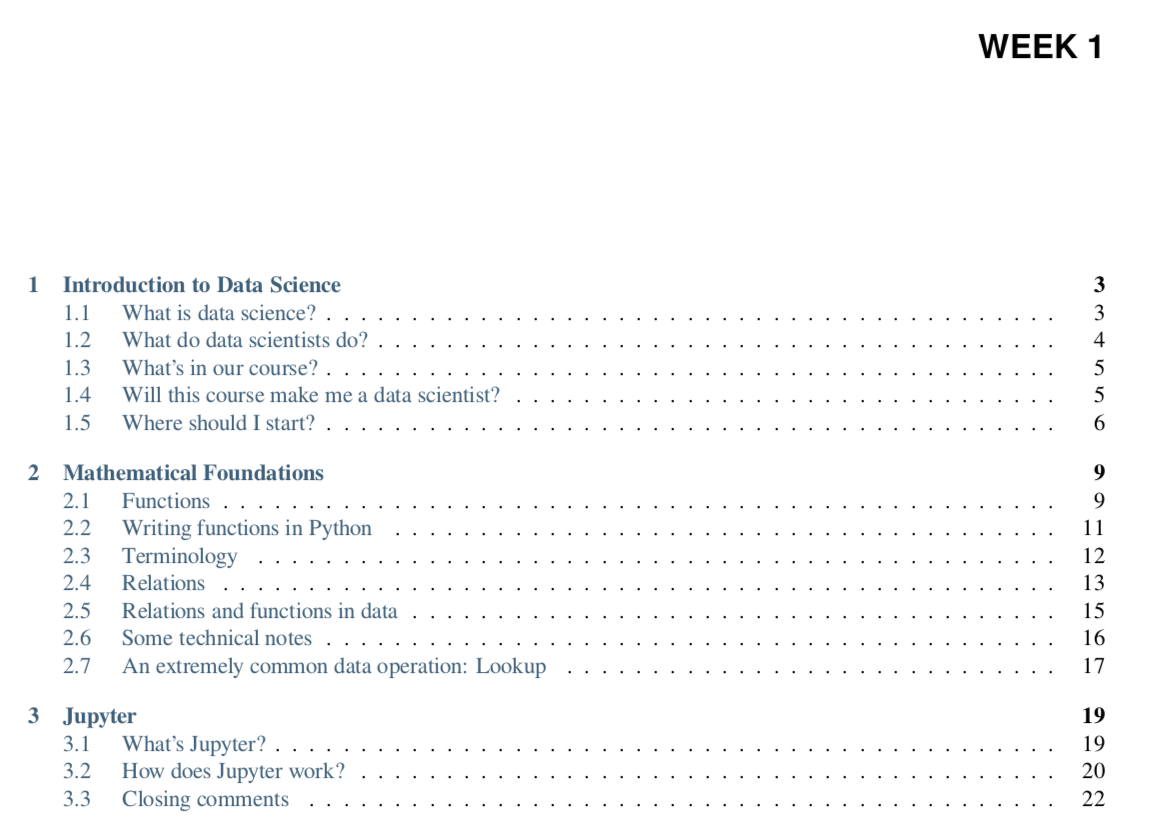
- chapter:line in my_toc.ymlis the one and only header shown in my PDF's ToC. It looks like the attached image. Other- chapter:headers seem to have been ignored in the PDF (but still respected in the HTML). - The
##heading that I turned into**bold**does not show up as bold due to #751. - Ideally, one would like to be able to have subsections in a first page and not have to avoid that to get the desired output.
But like I said, these are all lesser concerns than having a correct ToC, so this is a great step.
nathancarter
on 30 Jul 2020
Hmmm - that actually still doesn't look right to me. It looks like the builder is picking it all up as a single chapter called "week 1". 🤔🤔
choldgraf
on 30 Jul 2020
OK it looks like this is actually expected behavior from Sphinx:
https://github.com/sphinx-doc/sphinx/issues/3169
So Sphinx treats the :caption: elements as a caption for the TOCtree, not as the Chapter title. As a result when the Latex PDF is built, then files becomes chapters and the caption of the first TOCtree is used for all of them.
This is unfortunate behavior because it means that the sidebar in the HTML treats captions a bit differently than the latex builder does :-/
Do people foresee this confusing people when it comes to the structure of _toc.yml? @chrisjsewell @mmcky and @AakashGfude what do you think?
choldgraf
on 30 Jul 2020
As this discussion has evolved the way I see chapter (as it is currently implemented) is effectively as a part equivalent that is organising chapters into groups.
The default approach in past RST/Sphinx I have worked on is for toc to be inferred from the internal heading structure of the text and toctree takes in the order of files. The caption is used to provide a heading to a local contents or toc object typically. Overloading on caption works for html due to ability to style things with css so we would need to see if we can intercept these captions for parts in the LaTeX context. Perhaps @AakashGfude and I should setup a number of test cases for various toc patterns that people would usually use to see how that aligns with _toc.yml and document in a table doc|html|pdf snippets of the outputs.
mmcky
on 31 Jul 2020
The chapters are correctly structured in that picture, @choldgraf -- things numbered 1, 2, 3 (not 1.1, 1.2, etc.) are chapters in a LaTeX doc. If we want something above the level of chapters, then the LaTeX concept for that is parts, as @mmcky says.
In fact, when I saw WEEK 1 in the image above, my first thought was that it must be a LaTeX \part{WEEK 1} command. As it turns out, by inspecting book.tex, this is not the case. LaTeX lets you add things to the ToC even if they aren't actual structural pieces of your book, and that's what's being done. My LaTeX file contains this line:
\addto\captionsenglish{\renewcommand{\contentsname}{Week 1}}
Seems that such a command should be repeated for all the chapter headings, not just the first.
nathancarter
on 31 Jul 2020
yep - the problem there (and see my latest response in #783) is that Sphinx actually collapses all toctrees into a single table of contents when it builds with latex, and then only uses the caption from the first toctree in there. I think this is weird and agree w/ you that \part makes a lot more sense IMO. Maybe something that we can explore in the future, but for now I wanna make sure that we just have a clear handle on how Sphinx operates.
choldgraf
on 31 Jul 2020
OK makes sense.
And just to keep this issue sort of on track: The original question was about the HTML nav bar and remains an open concern. We've been discussing just the PDF part for awhile now.
nathancarter
on 31 Jul 2020
right - so @nathancarter on the HTML output: on the latest master branch of jupyter-book and sphinx-book-theme, you still don't see any numbering in the left sidebar with numbered: true in your _toc.yml file?
choldgraf
on 1 Aug 2020
This morning I ran:
$ pip install git+git://github.com/executablebooks/jupyter-book.git
(lots of output, ending with "Successfully built jupyter-book")
$ pip install git+git://github.com/executablebooks/sphinx-book-theme.git
(lots of output, ending with "Successfully built sphinx-book-theme")
$ jupyter-book --version
Jupyter Book: 0.7.3
MyST-NB: 0.8.1
Sphinx Book Theme: 0.0.33
MyST-Parser: 0.8.1
Jupyter-Cache: 0.2.1
Then I edited my _toc.yml to ensure numbered: true was in it, like so:
- file: intro.ipynb
  numbered: true       # <---- HERE
- chapter: Week 1
  sections:
  - file: chapter-1-intro-to-data-science.ipynb
  - file: chapter-2-mathematical-foundations.ipynb
- chapter: Week 2
  sections:
  - file: chapter-3-jupyter.ipynb
  - file: chapter-4-review-of-python-and-pandas.ipynb
- chapter: Week 3
  sections:
  - file: chapter-5-before-and-after.ipynb
  - file: chapter-6-single-table-verbs.ipynb
Then I rebuilt the book with:
$ rm -rf _build/html
$ jupyter-book build .
(lots of output, ending with the successful build messages)
The nav bar still looks like the screenshot shown below.
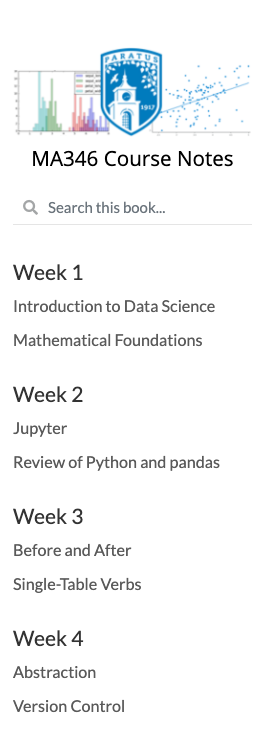
(Actually, that shows only the top of the nav bar, but it's enough for our purposes here.)
All of this has been pushed to the repo and website for your reference.
nathancarter
on 3 Aug 2020
I wonder if this is the same issue that some folks in #783 were running into...could try uninstalling and re-installing? I wonder if this is some kinda "master not updating" problem
choldgraf
on 4 Aug 2020
@nathancarter did this get resolved for you after another upgrade?
choldgraf
on 13 Aug 2020
@choldgraf Yes, it did, thanks!
nathancarter
on 14 Aug 2020
wohoo! OK I'm gonna close this because the title/top-level-comment are for the HTML use-case. However is the PDF numbering issue still there? I don't think it's a bug, but is more like "expected behavior that we could try to improve with an enhancement". If so can we open a new issue for that one?
choldgraf
on 15 Aug 2020
Related issues
 bsamadi
·
3Comments
bsamadi
·
3Comments
 darribas
·
4Comments
darribas
·
4Comments
 sidneymbell
·
5Comments
sidneymbell
·
5Comments
 firasm
·
5Comments
AakashGfude
·
4Comments
firasm
·
5Comments
AakashGfude
·
4Comments