Jupyter-book: code-cell inside a "special block" in a markdown cell of Jupyter Notebook
I tried to execute a code inside a "special block" in a markdown cell in Jupyter Notebook:
``
{tip}
Here is a sentence.
```{code-cell} python3
z = 100
Here is another sentence.
````
``````

It generates an error:
WARNING: Unknown directive type "code-cell".
```
Is it an expected result?
 spring-haru
All 10 comments
Yep - unfortunately you can't put code cells inside of things like tips :-/
I think we should have code-cell return a more informative error though
 choldgraf
on 8 Jun 2020
choldgraf
on 8 Jun 2020
There's a workaround if you'd like to include a code-cell in a directive which does not support it. I have discussed it in issue #671. Check it out and let us know if it is helpful.
@choldgraf I think that would be useful. We can also include an example of the workaround in the documentation if you think that will help the users.
 najuzilu
on 9 Jun 2020
najuzilu
on 9 Jun 2020
@najuzilu though doesn't that only work for the toggle directive?
choldgraf
on 9 Jun 2020
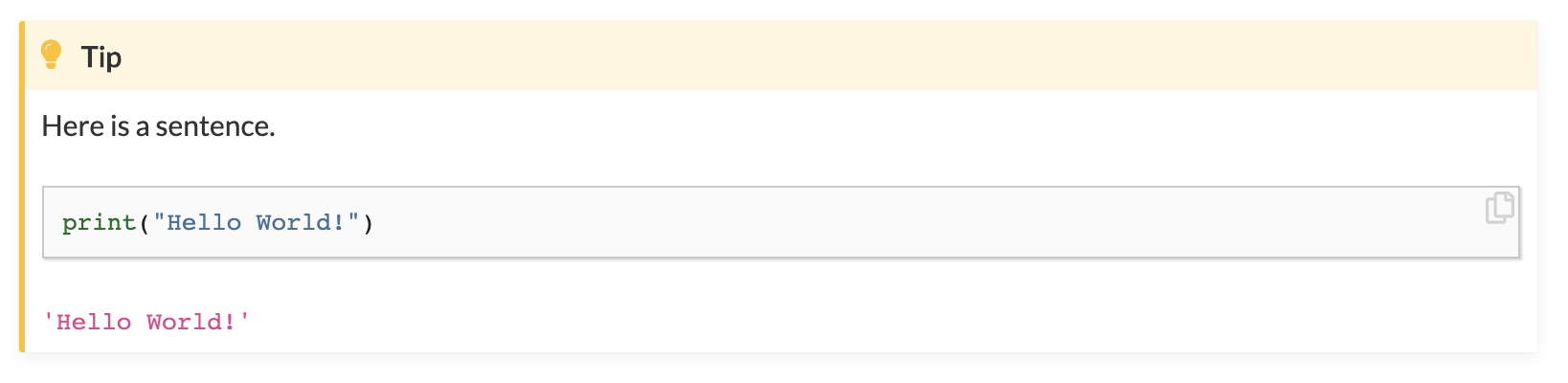
@choldgraf it actually works for the admonition directives as well. Here's the example I tested:
``
{tip}
Here is a sentence.
print("Hello World!")
{glue:}glued_txt
````
% The code cell below is not displayed
```{code-cell} ipython3
:tags: [remove-cell]
from myst_nb import glue
my_variable = "Hello World!"
glue("glued_txt", my_variable)
```
``````
This is what it looks like:
najuzilu
on 9 Jun 2020
ahhh right! I missed that part of your explanation, good point 👍
maybe we can add an extra section here: https://jupyterbook.org/content/content-blocks.html#notes-warnings-and-other-admonitions like "how to insert code outputs into your admonition blocks" and show a short example, then cross-link to the glue docs?
choldgraf
on 9 Jun 2020
@najuzilu
I inserted your code in a markdown cell of a Jupyter Notebook, and
jb clean . --all
jb build .
but the following error messages were generated:
WARNING: Unknown directive type "code-cell".

WARNING: Couldn't find key `glued_txt` in keys defined across all pages.
What am I missing here?
myst-nb: 0.8.1
jupyter-book: 0.7.0b4
Python: 3.8.2
spring-haru
on 10 Jun 2020
@choldgraf would glue work on a Jupyter Notebook? I work primarily with .md files.
najuzilu
on 10 Jun 2020
well, if you're working in a notebook, then you shouldn't use {code-cell}, you should just write code in the notebook like you normally would (and put glue() in that code).
choldgraf
on 10 Jun 2020
The following worked!
Place the following in a markdown cell:
``
{tip}
Here is a sentence.
print("Hello World!")
{glue:}glued_txt
````
``````
Place the following in a code cell with a tag remove-cell:
from myst_nb import glue
my_variable = "Hello World!"
glue("glued_txt", my_variable)
yes, that's it! Perhaps we can add the note about remove_cell to the docs here: https://jupyterbook.org/content/content-blocks.html#insert-code-cell-outputs-into-admonitions ?
choldgraf
on 10 Jun 2020
Related issues
 muzny
·
4Comments
muzny
·
4Comments
 cedeerwe
·
3Comments
choldgraf
·
3Comments
cedeerwe
·
3Comments
choldgraf
·
3Comments
 nozebacle
·
3Comments
choldgraf
·
4Comments
nozebacle
·
3Comments
choldgraf
·
4Comments
Most helpful comment
The following worked!
Place the following in a markdown cell:
``
Here is a sentence.
{glue:}
glued_txt````
``````
Place the following in a code cell with a tag
remove-cell: