Jupyter-book: Defining TeX macros for MathJax
All 13 comments
Hey @bsamadi I just came across this mathjax_config option on the Sphinx doc website. Thought it might be useful for defining TeX macros.
 najuzilu
on 20 May 2020
najuzilu
on 20 May 2020
I made the following changes under _config.yml and the new commands worked fine
sphinx:
  extra_extensions          : ""
  config                    :
    mathjax_config          :
      TeX                   :
        Macros              :
          "N"               : "\\mathbb{N}"
          "Z"               : "\\mathbb{Z}"
          "R"               : "\\mathbb{R}"
          "Z"               : "\\mathbb{Z}"
perfect! think you could open a docs PR here for it? https://jupyterbook.org/advanced/sphinx.html
 choldgraf
on 20 May 2020
choldgraf
on 20 May 2020
I think this was closed by #618 !
choldgraf
on 22 May 2020
Is there a way to add a function with arguments? Thanks!
 dafriedman97
on 28 May 2020
dafriedman97
on 28 May 2020
Hey @dafriedman97, on this page, I saw this example:
MathJax.Hub.Config({
TeX: {
Macros: {
RR: "{\bf R}",
bold: ["{\bf #1}",1]
}
}
});
I was looking for a DeclareMathOperator equivalent. For now, I have defined the sign function like this:
"sign" : "\mathop{\rm sgn}nolimits"
 bsamadi
on 28 May 2020
bsamadi
on 28 May 2020
That works -- thanks!
dafriedman97
on 28 May 2020
@dafriedman97 I made sure to include an example in the documentation here.
najuzilu
on 28 May 2020
I have included this macro in _config.yml:
sphinx:
extra_extensions : ""
config :
mathjax_config :
TeX :
Macros :
"bmat" : "{\\begin{bmatrix}}"
"emat" : "{\\end{bmatrix}}"
It doesn't work. See this page (right before the Python code):
http://bsamadi.github.io/cvxguide/SecondOrderConeProgram.html
However, when I include it inside the page as:
'''{math}
newcommand{bmat}{left[begin{array}}
newcommand{emat}{end{array}right]}
'''
It works, see this page for example:
http://bsamadi.github.io/cvxguide/QuadraticProgram.html
bsamadi
on 28 May 2020
Hey @bsamadi, I just tried the following:
sphinx:
  config:
    mathjax_config:
      TeX:
        Macros:
          "bmat" : ["\\left[\\begin{array}"]
          "emat" : ["\\end{array}\\right]"]
and this is the output
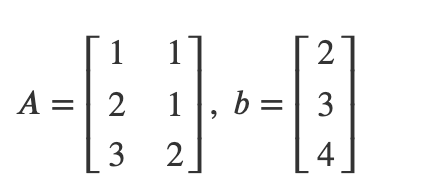
najuzilu
on 28 May 2020
Thank you @najuzilu. The problem was the outer brackets. After looking at your example, I removed them. It would be great to add this to the documentation. Thank you so much!
bsamadi
on 28 May 2020
@choldgraf do you think we should include this example under the cheatsheet #637 or add it as an example in the documentation here.
najuzilu
on 29 May 2020
I think here: https://jupyterbook.org/advanced/sphinx.html?highlight=latex#defining-tex-macros makes the most sense 👍
choldgraf
on 29 May 2020
Related issues
 spring-haru
·
5Comments
spring-haru
·
5Comments
 nozebacle
·
3Comments
nozebacle
·
3Comments
 rickwierenga
·
3Comments
rickwierenga
·
3Comments
 firasm
·
5Comments
firasm
·
5Comments
 akhmerov
·
5Comments
akhmerov
·
5Comments
Most helpful comment
I made the following changes under
_config.ymland the new commands worked fine