Jupyter-book: Explore using Sphinx to build books instead of Jekyll
This is related to #83 which talks about exploring SSGs in general, this issue is specifically for thinking about using Sphinx to build books for Jupyter Book. A few thoughts:
A quick idea for the build system
- Keep the CLI, which would create a Sphinx template with the Jupyter Book templates pre-initialized, along with several extensions that we'll standardize across books.
- Beyond that, building the book could either be just
make htmlor something with more sugar in it likejupyter-book build. - Use nbsphinx to directly support notebooks. Support nbsphinx markdown features, and then upstream improvements to nbsphinx as we need new features in Jupyter Book.
What it'd require
At least:
- Conversion of all Liquid templates into Jinja templates
- Figure out how to map the
yamlconfiguration files into something that works with sphinx'sconf.py - Figure out document structure issues (Jekyll uses a
ymlfile define the site structure, while AFAIK Sphinx requires you to puttoctreeelements in pages that define the site structure - Change the Jupyter Book CLI to generate the proper template for a Sphinx site instead of a Jekyll site
Potential benefits
The biggest benefit of Sphinx is that it already supports many of the feature's we hope to implement to improve the state around publishing etc. For example:
- Notebooks can be read directly into sphinx via nbsphinx, so we don't have an intermediate HTML representation (however, we'd need to figure out a way to include tag information in the HTML that was generated)
- Most importantly, many of the features around publishing etc already exist in Sphinx. For example, cross-references between notebooks / other files automatically resolve, equations work the same way, there's more support for references (though this would need to be improved), etc. Most of these are simply Sphinx extensions, and so could be removed from Jupyter Book's codebase (or factored out into Sphinx extensions themselves if they are broadly useful).
- Sphinx already supports PDF, EPUB, etc output (because rST is used under the hood and this is a semantic markup language)
- There is a healthy community of development around "notebooks for Sphinx" and as that story improves, so could Jupyter Book (and vice-versa).
- This is a bit of a reach, but using Intersphinx we could make books aware of other books, which is pretty badass
- We could piggy-back on readthedocs for hosting documentation
Potential drawbacks
(aside from the one-time work of converting all of the templates from Liquid -> Jinja and making the necessary CLI etc changes)
- Some features may not work easily in Sphinx - e.g., I'm not sure how to get Turbolinks working in Sphinx websites, but perhaps this is just a question of getting the templating right.
- docutils is notoriously difficult to work with and debug, so we might be exposing ourselves to more developing pain (then again, we have virtually no ability to develop Jekyll since it's written in Ruby)
- Configuration in Sphinx is python-specific, and I don't think we want to require everyday users to write Python (if anything, because it will make people think Jupyter Book is python-specific when it is not). Perhaps we can keep the YAML config layer on top somehow.
- We still don't solve our long-term problems with publishing etc, but maybe Sphinx may help get us a step closer to the solution (this would similarly be true with Pandoc).
- It is still kind of a mystery to me how Sphinx builds up its internal model of the site structure from
toctree::elements - Maybe some performance issues around generating the HTML files?
How to port some features to Sphinx
This is a quick section to describe how we'd need to port some features from Jekyll to Sphinx.
Site-wide metadata
In Jekyll, site-wide metadata is stored in the YAML file. We could keep this file, and then use it to populate html_context in the build. Then we'd have access to these variables as variable names.
Page-level metadata
In Jekyll, we store page-level metadata as a YAML header. In Sphinx, this is done with :key: value pairs at the top of the page e.g. see here. We auto-populate the page-level YAML, so we can do the same in rST with key: value pairs
Table of Contents
In Jekyll, we specify a table of contents with a single YAML file. In Sphinx, TOC is inferred from the .. toctree:: directive, generally split across many pages. I'm not sure how we'd handle this - maybe insert toctree lines into some intermediate files to define the book structure that way?
Page HTML structure
Jekyll uses Liquid templates, while Sphinx uses Jinja templates. We'd need to make this one-time conversion and use the Sphinx configuration variables etc instead of the jinja config.yaml ones. This might also be an opportunity to utilize a framework like bootstrap, which could help simplify the CSS a bit. I wonder if @jorisvandenbossche would be interested in advising or helping with that at all?
I'd be curious to hear other people's thoughts on this, particularly @mgeier, @mmcky, @akhmerov, @chrisjsewell, @willingc who I think have thought through some of these issues re: books and Sphinx before. Also @lheagy who I believe basically already has a pipeline like this for geosci.xyz. Also ping @mwouts who might also have experience w/ sphinx and documentation formats. Would love to hear thoughts on this idea if you have them :-)
 choldgraf
All 30 comments
another plus for sphinx is that rst2pdf is back in active development and works on python 3: https://github.com/rst2pdf/rst2pdf/blob/master/README.rst
The main painpoint for me with this workflow is that jupyter markdown doesn't support the pandoc scaled image version of markdown image tags, and sphinx/nbsphinx drops <img> tags, so all images have to be exactly scaled for a particular output. This is what motivated my interest in html/paged.js/chrome.
 phaustin
on 2 Jan 2020
phaustin
on 2 Jan 2020
+1 for sphinx 👍 I'm pretty well versed on the docutils/sphinx build process now (see https://github.com/ExecutableBookProject/meta/issues/13#issuecomment-564041903), so if you have any questions.
As I've mentioned before, in ipypublish.sphinx.notebook I've built on nbsphinx to add some of the Bookdown-esque features (figure/table captions & labels, references etc). But as I've recently discussed with @mgeier (https://github.com/chrisjsewell/ipypublish/pull/126#issuecomment-567668181) going via nbformat/pandoc is not ideal, and it would be better to get an RST parser to accept markdown elements, rather than visa-versa.
 chrisjsewell
on 2 Jan 2020
chrisjsewell
on 2 Jan 2020
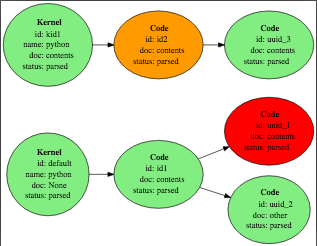
On a related note, I've been playing around with implementing the Knitr type code execution & caching, via a sphinx extension that utilizes a 'JupyterSQL' cache (implemented in sqlalchemy) with structure:

You can convert this directly to/from one or more notebooks, but it also provides additional functionality:
- The times of modifications are recorded.
- Execution paths can be branching, and not all kernels/cells have to be in the same document.
- A single document can contain more than one kernel and related cells.
For example, given these two files, parsed after some modifications:
contents.rst
.. code-exec:: id1
    :timeout: 20

    a = 1
    a

.. code-exec::
    :show-code:

    b = 2
    print(a, b)

.. code-exec::
    :follows: id2
    :allow-except:

    raise ValueError("d")

.. code-kernel:: kid1
    :type: python

.. code-exec:: id2
    :kernel: kid1

    pass
other.rst
.. code-exec::
    :follows: id1
    :show-code:

    c = 3
    print(a, c)
The following potential execution paths are determined, where orange indicates that the cell has been modified since it was last executed, and red indicates that the cell has no associated execution output (i.e. it was added since the last execution):
After execution of all required paths, outputs are then rendered in the document via a model-view implementation (in a post-transform):
.. code-view:: id1
   :label: ref1
   :mimetype: text/html
   :width: 100

   This is a caption that can contain *any* `rst` elements [fnote]_.
This gives a lot more control over the execution/output than is currently possible.
chrisjsewell
on 2 Jan 2020
Perhaps we can keep the YAML config layer on top somehow
I literally already do this in ipypublish, with a config.yaml here 😄
chrisjsewell
on 2 Jan 2020
Thanks for raising an excellent issue @choldgraf!
Zooming a bit out, I think a project like jupyter book seeks to score high on multiple scales:
- Being able to easily publish and develop materials with automatically computed outputs. This part is largely resolved thanks to jupyter. There are multiple excellent projects that use the jupyter infrastructure to evaluate the outputs.
- Providing a high quality publication format, both online and pdf/epub. This is where having a good theme is a killer feature. I haven't seen a sphinx theme that would be as good as e.g. the jupyter book.
- Providing a rich feature set. Turns out there are many things that one may want from publishing a book. To name one recent and personal example, recently I was wondering how to provide a list of keywords or learning goals and mark every section of a document and every exercise with the proper keywords. For that an already rich and extensible markup is a necessity.
- Providing a low entry barrier to the users and contributors. Here the easy to use syntax and the ability of editing plaintext files are the most important features. After coordinating several projects of this sort, I have observed that the technical expertise required to develop in notebooks is an obstacle to at least a few contributors. In particular the need to set up a correct environment, and the understanding how to use git + notebooks seem to be pain points.
From this perspective using sphinx seems to be a move in the right direction. It was already integrated with the jupyter build machinery, and a project like jupyter book could bring a better suited theme as well as several publication-oriented extensions.
 akhmerov
on 3 Jan 2020
akhmerov
on 3 Jan 2020
@chrisjsewell for some reason I had the impression that you were trying to move away from Sphinx, though, and towards Pandoc, is that right?
@akhmerov I agree w/ all of those points - to me the main benefit of Sphinx is that we'd get to piggy back (and contribute back to) a large community of projects. And since Python is already there w/ Jupyter, we'd reduce the dependency complexity.
Imagine if one could write CommonMark markdown, and then use .. directive:: directives as well as :ref: directives in-line, that would be perhaps the best of both worlds (and is somewhat already possible with the recommonmark extension). Then you could get the Sphinx ecosystem for free.
choldgraf
on 3 Jan 2020
@chrisjsewell for some reason I had the impression that you were trying to move away from Sphinx, though, and towards Pandoc, is that right?
No definitely sphinx lol, as you and @akhmerov mentions, for writing publishable documents, you definitely need a markup language that offers extensible inline/block level syntax, i.e. RST roles and directives, or LaTex \env{} and \begin{env}\end{env}, which is not really available with Markdown.
Imagine if one could write CommonMark markdown, and then use .. directive:: directives as well as :ref: directives in-line, that would be perhaps the best of both worlds (and is somewhat already possible with the recommonmark extension). Then you could get the Sphinx ecosystem for free.
This is where Pandoc comes in at the moment as the bridge from the Markdown cells of the notebook to RST. I don't believe that recommonmark can actually parse roles/directives? But this is partly what my ipubpandoc filter does.
Obviously though, you don't really want to have this two-step Markdown[pandoc]->RST[docutils]->doctree process as a necessity of your build process. So, off the top of my head, there are a few options:
- You have a notebook v5 with first class support for RST (i.e. with a dedicated RST cell type), and you offer people a conversion tool for existing v4 notebooks.
- You create a parser that supports all Markdown and RST syntax elements. I wouldn't say this is a good idea.
- You create a parser for a 'new syntax' that maps markdown syntax to RST elements, plus adding in the RST only elements in some form (roles, directives, etc). This is basically what we are talking about with the Myst format, and would be a sub-class of the docutils's RST parser.
docutils is notoriously difficult to work with and debug
After working with it for a while now, its not as bad as I first thought. Theoretically its sound, but the API could definitely do with some improvements. Sphinx itself has to monkey patch some parts, which is never a good sign, and its ludicrous that its not yet at version 1.0 status. We definitely need to 'gang up' on its development team lol, and get them to move it to GitHub, because being hosted by sourceforge I believe is very much hindering its development.
chrisjsewell
on 3 Jan 2020
You have a notebook v5 with first class support for RST (i.e. with a dedicated RST cell type), and you offer people a conversion tool for existing v4 notebooks.
I'm all for it (albeit rather as a global switch for markup language, rather than a new cell type). This isn't mutually exclusive with the other options though.
You create a parser for a 'new syntax' that maps markdown syntax to RST elements, plus adding in the RST only elements in some form (roles, directives, etc). This is basically what we are talking about with the Myst format, and would be a sub-class of the docutils's RST parser.
The more I hear about this option, the more I like it. If it's a super-set of RST, the amount of disruption to users would be limited.
akhmerov
on 4 Jan 2020
Thanks for getting this conversation started @choldgraf!
:+1: on using sphinx and supporting RST. The benefits of having equation numbers, easy anchors and internal referencing, export to pdf & EPUB, intersphinx, bibtex support with sphinxcontrib.bibtex, and the fact that you can write your own simple extensions are all things we benefit from in the GeoSci project.
Just a couple notes based on my experience so far...
docutils is notoriously difficult to work with and debug, so we might be exposing ourselves to more developing pain (then again, we have virtually no ability to develop Jekyll since it's written in Ruby)
We periodically have run into version conflicts with docutils, but since the community of folks relying on sphinx is reasonable large, these are usually sorted out within a day. I have never had to go to the level of docutils to sort out a bug.
It is still kind of a mystery to me how Sphinx builds up its internal model of the site structure from toctree:: elements
Here are a couple pages that might help provide a bit of clarification on the toctrees... If my main landing page is index.rst and that has a toctree with
.. toctree::
    content/foundations/index.rst
    content/physical_properties/index.rst
and say content/foundations/index.rst also has a toctree
.. toctree::
    geophysics_primer.rst
    survey_methods.rst
Then the table of contents is:
- Foundations
- Geophysics Primer
- Survey Methods
- Physical Properties
so basically it lets you define the nesting and contents of each part of the book locally (This example is adapted from: https://gpg.geosci.xyz/index.html)
Maybe some performance issues around generating the HTML files?
I have never encountered anything that was a real blocker here. Sphinx does a pretty good tracking the logic of what needs to be updated and what doesn't when you rebuild a site.
I hope this is helpful!
 lheagy
on 10 Jan 2020
lheagy
on 10 Jan 2020
so basically it lets you define the nesting and contents of each part of the book locally
Yes essentially after parsing all the documents, it compiles a branching tree of the project; starting from the root file (by default index.rst), then each parent file defines its children (via .. toctree::s). This structure obviously necessitates that each file be referenced only once, Sphinx will raise an error if not, and also Sphinx warns if any (non-excluded) files in the source folder are not part of this tree (unless the file is set as an 'orphan', using the :orphan: role).
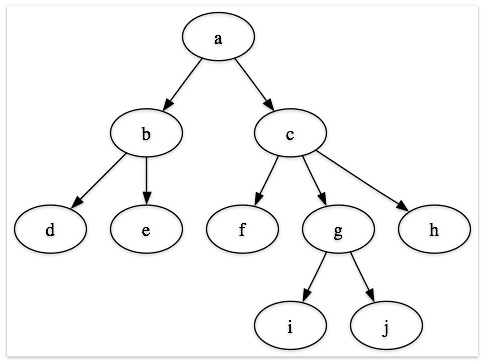
In this context, @choldgraf I don't think it makes sense to define a global toc.yaml, since this would break the 'modular' pattern you have for parents defining their own children. It would be easy though to create a small tool for visualizing this tree, for a given project, if people would find it useful (maybe someone already has?).
chrisjsewell
on 10 Jan 2020
I have seen some confusion regarding heading levels in docutils, most recently https://github.com/spatialaudio/nbsphinx/issues/373.
The mapping from Markdown's absolute heading levels to docutils is sometimes confusing, but most of the time it works without complaints.
But back to the original question: "is it worth to switch to Sphinx?"
I obviously like Sphinx. I think it's very powerful and flexible. But I admit that it also has a few downsides and it is not always smooth sailing ...
I think it would be nice for the Jupyter ecosystem to have various ways to use notebooks on the web. Based on a variety of technologies (frameworks, languages, ...).
Switching Jupyter Book to Sphinx would actually reduce this diversity.
Also, why shouldn't users simply use Sphinx + nbsphinx?
Why should they use (a hypothetical Sphinx-based) Jupyter Book instead?
Wouldn't Jupyter Book degenerate into a configuration generator for Sphinx?
[...] and then upstream improvements to nbsphinx as we need new features in Jupyter Book.
That would be great either way!
Conversion of all Liquid templates into Jinja templates
I don't know what Liquid templates are and how they work, but I would like to warn you that creating reST files with a template system isn't the best way to get content into Sphinx.
I think it would be much better to convert Jupyter notebooks from their dict-like Python representation (as created by nbformat) directly into the internal docutils representation instead of going the detour via the totally unneeded reST format. This is my long-term goal for nbsphinx, see https://github.com/spatialaudio/nbsphinx/issues/36.
Don't get me wrong, I actually like the reST format (especially its flexibility and extensibility), but in the conversion from Jupyter notebooks to docutils it's just an unnecessary intermediate step that doesn't bring any advantages but a few disadvantages.
Configuration in Sphinx is python-specific, and I don't think we want to require everyday users to write Python
I don't think this is a problem (but as a Python user I'm of course biased).
I think most settings don't really need a deep understanding of Python. It's mostly about assigning strings/lists/dicts to variables.
The good thing about this, however, is that if you do know Python, you can do arbitrarily awesome things in the conf.py.
because it will make people think Jupyter Book is python-specific when it is not
I think that's a valid concern, but it should rather be addressed by better documentation and more examples in non-Python languages.
In conclusion, I don't see a good reason for Jupyter Book to switch to Sphinx, but it would nevertheless be great if the Sphinx + nbsphinx can get a few improvements based on experiences made with Jupyter Book features.
I think the currently most obvious and pressing problem of Sphinx is the lack of a great theme (as mentioned in https://github.com/jupyter/jupyter-book/issues/460#issuecomment-570576501)!
If you want to have a look at a few available themes, see https://nbsphinx.readthedocs.io/en/latest/usage.html#HTML-Themes.
The above-mentioned syntax extensions (be it extending Markdown with reST features or vice versa) can be straightforwardly implemented, the main question for me is whether this should be something that only works for HTML output or something that should also be supported in JupyterLab (I think latter would be better).
I think some syntax extensions for Jupyter Markdown would be great in the long run, but I think supporting multiple markup languages would do more harm than good because it would fragment the user base even more than it already is.
 mgeier
on 10 Jan 2020
mgeier
on 10 Jan 2020
@mgeier this is nice feedback, thanks! I want to quickly clear up a couple things:
Also, why shouldn't users simply use Sphinx + nbsphinx?
I think people like Jupyter Book because of the theme and because of the user-facing CLI and configuration. To this extent, the static site generator that's used (Sphinx, Jekyll, etc) should be relatively invisible to users. So in a sense, what you're describing here is true - Jupyter Book could be:
- A Sphinx theme for the general Jupyter Book look-and-feel
- A collection of Sphinx extensions that add extra functionality (e.g. copybuttons etc)
- A command-line interface that abstracts away Sphinx's configuration system and uses a YAML-based system (like Jupyter Book currently uses)
Note that currently, Jupyter Book is basically exactly this, but swaps out "Jekyll" for "Sphinx".
I don't know what Liquid templates are and how they work, but I would like to warn you that creating reST files with a template system isn't the best way to get content into Sphinx.
I agree - I was referring to using templates for the HTML of the site. Sphinx uses Jinja to define the layout of the page, the CSS, etc. Jekyll uses a similar tool called Liquid. They do the same thing, but just have slightly different syntax. I agree that for reading in the content, a long-term solution would not use templates.
The above-mentioned syntax extensions (be it extending Markdown with reST features or vice versa) can be straightforwardly implemented
To me the main reason to use Sphinx would be:
- Out-of-the-box features for publishing, like citations, footnotes, etc (since there's an actual underlying document structure, not just a blob of HTML being produced)
- A pathway to extending syntax for new things in a standardized way (with rST roles and directives)
If we don't use Sphinx, we'll need to create all of these features ourselves, but in a hacky and one-off fashion that only works for Jupyter Book. I'm worried about the maintainability of a stack like this, given that it'd be dependent on a static-site generator that uses either Ruby, Go, or Haskell (none of which many Python folks are familiar with).
An example is citations with BibTex. @emdupre has already done some great work exploring what this could look like (#410) but it's clear that adding citations support will require plugging in a bunch of extra code. If JB were using Sphinx under the hood, it'd just be a matter of adding the sphinxcontrib-bibtex plugin to our extensions list.
I think the main other option here would be to use Pandoc instead of Sphinx to build the HTML (and other document types as well). This would allow notebooks to use Pandoc-style markdown and have it behave (more or less) as expected. I'm not sure what are the clear benefits to this over using Sphinx (other than having a fancier markdown flavor supported) but it's definitely something to think about too (https://github.com/jupyter/jupyter-book/issues/94)
choldgraf
on 10 Jan 2020
+1 for considering using Sphinx. We're currently using Sphinx + nbsphinx + sphinx versions for an online course we teach, but the page format with Jupyter book and the integrated tools for interacting with notebooks would be a nice improvement over our current site design (especially since we're considering creating an e-book of the course). Some of the sphinx directives and the toctrees alone could be nice options to have, though I must say we're only exploring using Jupyter book for our web course and I'm not yet familiar enough with the day-to-day use of Jupyter book to know whether it is quicker/easier to use Sphinx. I also can't comment in any detail about features we're missing in Jupyter book other than the lack of versioning (e.g., #31).
 davewhipp
on 12 Jan 2020
davewhipp
on 12 Jan 2020
A Sphinx theme for the general Jupyter Book look-and-feel
That would be great!
But please make this as a separate project, so that it is usable for all Sphinx users, not just people interested in Jupyter.
And please don't underestimate the amount of work that has to be done until a Sphinx theme is really good.
A collection of Sphinx extensions that add extra functionality (e.g. copybuttons etc)
This "collection" doesn't really have to be part of the Jupyter Book project, does it?
Some extensions could be incorporated into nbsphinx or jupyter_sphinx or similar projects, others could be stand-alone extensions, as already demonstrated with https://github.com/choldgraf/sphinx-copybutton
A command-line interface that abstracts away Sphinx's configuration system and uses a YAML-based system (like Jupyter Book currently uses)
That would be the only remaining part of the core Jupyter Book project.
That's what I meant with (https://github.com/jupyter/jupyter-book/issues/460#issuecomment-573079429):
"Wouldn't Jupyter Book degenerate into a configuration generator for Sphinx?"
mgeier
on 13 Jan 2020
@mgeier sounds very reasonable to me.
The remaining jupyter-book project would then also drag in and properly configure all the other extensions.
akhmerov
on 13 Jan 2020
I wonder if this is going to be a different priority-set for single- vs multi-page books.
The benefits of having equation numbers, easy anchors and internal referencing, export to pdf & EPUB, intersphinx, bibtex support with sphinxcontrib.bibtex, and the fact that you can write your own simple extensions are all things we benefit from in the GeoSci project.
These points @lheagy brings up are all hugely important, but in the single-page case I'm not sure there's a need to move to Sphinx for them.
There's a stack of Distill JavaScript (that I'm slowly working through in #410) that can handle bibtex support. There's a smaller bit of JavaScript I could pull from the same source for equation numbers. Internal referencing and intersphinx make less sense with single pages (in my mind) and personally I'm less worried about exporting to PDF with single-pages (though maybe that's mistaken).
Also, this is just a personal leaning, but I think one of the selling points of creating something like a Jupyter Book is that you can take advantage of all of the amazing features of HTML. I'm worried moving to Sphinx would require giving up several of these, mostly because:
And please don't underestimate the amount of work that has to be done until a Sphinx theme is really good.
 emdupre
on 13 Jan 2020
emdupre
on 13 Jan 2020
@emdupre one thing that I have run into, and that makes me wonder if it'd be a deal-breaker for using pure HTML for single-page documents, is the idea that markdown has no "document model". One can extend its functionality by adopting syntax w/ the right rules for HTML/JS conversion, but these tend to be one-off things that are project-specific. In talking with some folks who interact with some more traditional publisher types, it wouldn't be enough to "just" have the HTML, and using a pure markdown -> html converter would leave a lot of extra work to be done to get Jupyter Book suitable for document publishing.
To me, the reason to use Sphinx is that you could utilize this document model under the hood. This would give a foundation that is much closer to what publishers already use, which would require less one-off bespoke code.
I think one of the selling points of creating something like a Jupyter Book is that you can take advantage of all of the amazing features of HTML
I think this is a fair concern - in my mind using Sphinx is worth it if the end product is exactly the same as what we currently use with Jupyter Book, and following the exact same process, with minimal extra code complexity. This should be possible, because in the end Sphinx is "just" another static site generator (albeit one with a document model under the hood).
But please make this as a separate project, so that it is usable for all Sphinx users, not just people interested in Jupyter.
Indeed that would be the whole point. Factoring out pieces of Jupyter Book into components that can be re-used elsewhere would be one of the main benefits of using Sphinx. For example, I have:
which both replicate parts of Jupyter Book's UI. If Jupyter Book itself were built off of Sphinx, then it could just use these extensions, rather than having that code inside of Jupyter Book itself. This could make the code more modular and extensible.
So the end product would probably be splitting the single jupyter-book repository into multiple repositories:
- One that contains the Sphinx theme and general structure of Jupyter Book. This would be usable as a standalone theme
- A few that make up Sphinx extensions that offer certain functionality (like copy buttons)
- A command-line interface that configures and controls the creation of books using this theme
choldgraf
on 13 Jan 2020
talking with some folks who interact with some more traditional publisher types, it wouldn't be enough to "just" have the HTML, and using a pure markdown -> html converter would leave a lot of extra work to be done to get Jupyter Book suitable for document publishing.
I was thinking about HTML to JATS converters, like this one from CoKo. Would it be more difficult of a conversion than Sphinx to JATS ?
emdupre
on 13 Jan 2020
Oh cool! I think something like that could work, though in that case you'd need to have particularly-structued HTML in order for the conversion to work as expected, no? E.g. you'd need certain classes or data attributes on HTML elements to signal that they have various roles in the document (like "author" or "title" or "figure" etc). I'm not super knowledgeable about that world though
choldgraf
on 13 Jan 2020
Pandoc supports JATS, so the lowest effort approach for generating JATS out of sphinx-based book would likely involve using pandoc. @emdupre do you have a specific application in mind? I must admit I haven't encountered JATS too often. What is its use?
akhmerov
on 13 Jan 2020
@emdupre do you have a specific application in mind? I must admit I haven't encountered JATS too often. What is its use?
I feel like I should clarify here I don't have any experience in academic publishing as an industry, so there are definitely other folks better able to answer the use of the JATS format. But I do know that it's the _de facto_ internal standard in academic publishing and that to have something in PubMed, etc, it needs to be in JATS.
I'm interested in single-page uses for Jupyter Book in scientific publishing, so ending up with something that can be programmatically converted to JATS would be important to my use case. But pandoc-based conversion would be the other option !
emdupre
on 13 Jan 2020
@emdupre I agree that converting to JATS should be a part of any final toolchain here. I think that because rST is a semantic markup language, it should be pretty easy to convert that into JATS (and anyway Pandoc supports rST as well as markdown, so anything that works in rST should be convertible in the same way that markdown is, no)
choldgraf
on 14 Jan 2020
we're doing this in beta.jupyterbook.org now!
choldgraf
on 24 Apr 2020
I just wanted to say thanks for the detailed descriptions in issue and all of the work you all have done to make sphinx possible. I'm not actually using jupyter-book myself, but I do use sphinx a lot, and I think you had exactly the right strategy here to make a lot of useful sphinx plugins, and all of these plugins are proving very useful to me. You've saved me a lot of work in explaining to people why sphinx (or something similar) and proper doctrees are really needed for anything of moderate complexity. I hope that this helps to move the community more towards this direction - at least it helps me move my communities that way.
Thanks again, and count me in.
 rkdarst
on 29 Jul 2020
rkdarst
on 29 Jul 2020
In https://github.com/executablebooks/jupyter-book/issues/460#issuecomment-573651445 I've mentioned how much work it is to create a Sphinx theme.
More or less since then (more than half a year ago) I've been working on my own theme, which I have released recently: https://insipid-sphinx-theme.readthedocs.io/.
I'm of course biased, but I think it would be quite well suited for a "book-like" application. After all, it is based on mdBook which itself is based on the old gitbook.
mgeier
on 21 Aug 2020
Thanks @mgeier I'll have a look 😀
chrisjsewell
on 21 Aug 2020
@mgeier - Insipid-sphinx theme looks awesome!
 shaloo
on 14 Oct 2020
shaloo
on 14 Oct 2020
@shaloo Thanks! I've recently changed the colors because I didn't really like them (https://github.com/mgeier/insipid-sphinx-theme/pull/16). Can you please check if you still like it with the new colors, see the latest version: https://insipid-sphinx-theme.readthedocs.io/en/latest/index.html
Unless there are complaints, a new release will be coming soon.
mgeier
on 14 Oct 2020
@shaloo I've just released version 0.2.0 of https://insipid-sphinx-theme.readthedocs.io/.
mgeier
on 18 Oct 2020
Thx. Moving the conversation to https://github.com/mgeier/insipid-sphinx-theme/issues/18 as this is not related to Jupiter-book.
shaloo
on 19 Oct 2020
Related issues
 matrs
·
3Comments
matrs
·
3Comments
 darribas
·
4Comments
darribas
·
4Comments
 rickwierenga
·
3Comments
rickwierenga
·
3Comments
 abielr
·
4Comments
abielr
·
4Comments
 TomDonoghue
·
4Comments
TomDonoghue
·
4Comments
Most helpful comment
I just wanted to say thanks for the detailed descriptions in issue and all of the work you all have done to make sphinx possible. I'm not actually using jupyter-book myself, but I do use sphinx a lot, and I think you had exactly the right strategy here to make a lot of useful sphinx plugins, and all of these plugins are proving very useful to me. You've saved me a lot of work in explaining to people why sphinx (or something similar) and proper doctrees are really needed for anything of moderate complexity. I hope that this helps to move the community more towards this direction - at least it helps me move my communities that way.
Thanks again, and count me in.