Junit5: User Guide PDF should support special characters
Special characters (e.g., emoji from custom display names and glyphs used with unicode mode for the ConsoleLauncher) are currently broken in the generated PDF.
See discussion in https://github.com/asciidoctor/asciidoctor-pdf/issues/323.
See https://github.com/junit-team/junit5/issues/770#issuecomment-296403960.
Deliverables
- [x] All special characters are displayed correctly in the PDF version of User Guide
 marcphilipp
All 18 comments
FYI, Asciidoctor PDF 1.5.x bundles an emoji font you can declare in your theme. It's also included in the default-with-fallback-font theme. See https://github.com/asciidoctor/asciidoctor-pdf/blob/v1.5.x/data/themes/default-with-fallback-font-theme.yml
 mojavelinux
on 5 Jun 2020
mojavelinux
on 5 Jun 2020
@mojavelinux Thanks for the pointer! I've tried using that (see https://github.com/junit-team/junit5/commit/8cc83069497bcccce5df7c43e9be4705bc39f50f) from the Gradle plugin but I'm running into a failure: https://ge.junit.org/s/7scjo3n42afqc/console-log?task=:documentation:asciidoctorPdf
Any ideas?
marcphilipp
on 6 Jun 2020
That's not the result I got (using Java 11), so I'm not sure why you would be getting that failure. Here's what I did.
Upgrade to Asciidoctor PDF 1.5.3 (from 1.5.0.rc2, which is quite old)
asciidoctorj {
   modules {
       diagram.use()
       pdf.version("1.5.3")
   }
}
Set the pdf-theme in the document header of the AsciiDoc source file to use the default-with-fallback-font theme
:pdf-theme: default-with-fallback-font
Here's the output you'll see:
Jun 10, 2020 1:33:57 AM uri:classloader:/gems/asciidoctor-pdf-1.5.3/lib/asciidoctor/pdf/converter.rb convert_listing_or_literal
WARNING: Could not locate the character `╯' in the following fonts: M+ 1mn, M+ 1p Fallback, Noto Emoji
Jun 10, 2020 1:34:11 AM uri:classloader:/gems/asciidoctor-2.0.10/lib/asciidoctor/abstract_block.rb content
WARNING: Could not locate the character `✔' in the following fonts: M+ 1mn, M+ 1p Fallback, Noto Emoji
Jun 10, 2020 1:34:26 AM uri:classloader:/gems/asciidoctor-2.0.10/lib/asciidoctor/document.rb content
WARNING: Could not locate the character `↷' in the following fonts: M+ 1mn, M+ 1p Fallback, Noto Emoji
Unfortunately, this indicates that these glyphs aren't included in the bundled fallback font (M+ 1p) or emoji font (Noto Emoji).
Therefore, it's necessary to create a custom theme file (junit-pdf-theme.yml) and point it at font that provides these characters, like Symbola.
extends: default
font:
  catalog:
    merge: true
    Symbola: /usr/share/fonts/gdouros-symbola/Symbola.ttf
  fallbacks: [Symbola]
Then add this line to the document header of the AsciiDoc source file:
:pdf-theme: {basedir}/junit-pdf-theme.yml
When I do that, I only end up with one warning:
Jun 10, 2020 1:48:38 AM uri:classloader:/gems/asciidoctor-pdf-1.5.3/lib/asciidoctor/pdf/converter.rb convert_listing_or_literal
WARNING: Could not locate the character `)' in the following fonts: M+ 1mn, Symbola
That's the from the table flip kaomoji, which uses a very rare character in a standard font (since it's from a Japanese charset, U+FF09).
mojavelinux
on 10 Jun 2020
Thanks, I'll try that! We can probably get rid of the table flip kaomoji but might need a special fallback font like Symbola nevertheless.
@mojavelinux Is there a way to point to a font file using a relative path, e.g. in the Git repo, to keep the build portable?
marcphilipp
on 14 Jun 2020
Is there a way to point to a font file using a relative path, e.g. in the Git repo, to keep the build portable?
Absolutely. See https://github.com/asciidoctor/asciidoctor-pdf/blob/v1.5.x/docs/theming-guide.adoc#custom-fonts and https://github.com/asciidoctor/asciidoctor-pdf/blob/v1.5.x/docs/theming-guide.adoc#applying-your-theme.
mojavelinux
on 15 Jun 2020
Hello!
I have made some progress with this but wanted to ask a question.
WIth this commit: https://github.com/halitanildonmez/junit5/commit/2cd55079cb4fe3f6978b269134396bf040472580
I get the PDF report looking like this (from page 88):
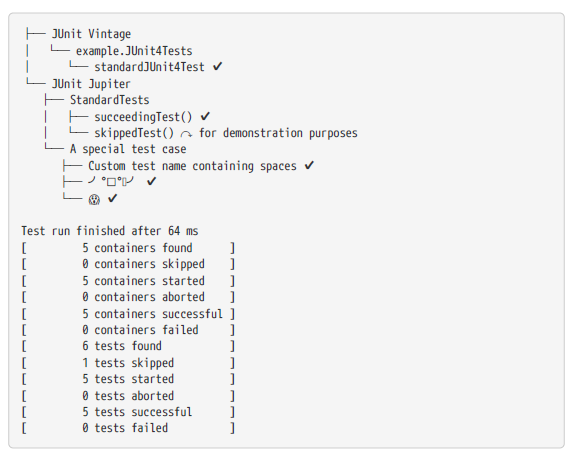
Here is my issue:
What I did was essentially copy all the fonts from asciidoctor (https://github.com/asciidoctor/asciidoctor-pdf/tree/master/data/fonts)
and paste them under (../user-guide/resources).
The reason was because writing setFontsDir("$sourceDir/user-guide/resources:GEM_FONTS_DIR") gives me the error:
Directory 'H:\Projects\OpenSource\Java\junit5\documentation\src\docs\asciidoc\user-guide\resources;GEM_FONTS_DIR' specified for property 'fontsDir' does not exist.
Looking here: https://github.com/asciidoctor/asciidoctor-pdf/blob/master/docs/theming-guide.adoc#custom-fonts semi colon should work but it does not.
Am I doing something wrong here ? Maybe @mojavelinux can take a quick look ?
 halitanildonmez
on 27 Jul 2020
halitanildonmez
on 27 Jul 2020
Also another quick note: doing setFontsDir("$sourceDir/user-guide/resources;GEM_FONTS_DIR") did not worked either
halitanildonmez
on 31 Jul 2020
This is likely a version issue. The build is still using Asciidoctor PDF 1.5.0.rc.2, which is substantially behind the 1.5.3 release. See https://github.com/asciidoctor/asciidoctor-pdf/blob/v1.5.x/CHANGELOG.adoc
Specifically, 1.5.0.rc.3 introduced the feature you need here:
allow custom theme to merge font catalog with theme being extended (1505)
Always be sure you're using the latest stable version before spending time trying to use new features ;)
mojavelinux
on 1 Aug 2020
I'll submit a PR so that you can see how the configuration should look.
mojavelinux
on 1 Aug 2020
The problem you are facing is that the Gradle plugin tries to coerce the value passed to setFontsDir to a file. This is a bad assumption because the property accepts multiple values separated by a delimiter (; or :).
You can workaround the problem by setting the pdf-fontsdir attribute directly. But since you're already setting the theme in the user guide itself, it's best to set the pdf-fontsdir attribute there too.
mojavelinux
on 1 Aug 2020
See https://github.com/mojavelinux/junit5/commit/8bad7537c0cf54d4338d8c3e49769d8003e00a78
Let me know if you want me to submit a PR.
mojavelinux
on 1 Aug 2020
Thank you @mojavelinux and @marcphilipp for the input and the help.
The mistake I was making was that I was using the gradle for setting the paths. Using pdf-fontsdir directly inside index.adoc worked like a charm 😄
BTW I got the symbola font from: https://www.wfonts.com/font/symbola2315 I can change it if you wish. To be honest I do not know where to find these fonts.
Again thanks for the help and apologies for the mistakes on my part
halitanildonmez
on 1 Aug 2020
The mistake I was making was that I was using the gradle for setting the paths.
It's more a bug in the Gradle plugin, which I encourage you to report.
I got the symbola font from: wfonts.com/font/symbola2315 I can change it if you wish.
I tend to pull the font from the Linux system on on (in my case Fedora) since I know that means the license has been vetted. I just used Symbola as an example so you could see it working.
mojavelinux
on 1 Aug 2020
Hmm then maybe we need to consider which font to use. Maybe @marcphilipp can chip in since now we have proven that one can use custom fonts
halitanildonmez
on 1 Aug 2020
@mojavelinux Thanks a lot for looking into this! 👍
The mistake I was making was that I was using the gradle for setting the paths.
It's more a bug in the Gradle plugin, which I encourage you to report.
@halitanildonmez Could you please raise an issue for the asciidoctor-gradle-plugin?
Hmm then maybe we need to consider which font to use.
Since we only use it as a fallback for very few characters, I'm fine with using Symbola.
I got the symbola font from: wfonts.com/font/symbola2315 I can change it if you wish.
I tend to pull the font from the Linux system on on (in my case Fedora) since I know that means the license has been vetted. I just used Symbola as an example so you could see it working.
@halitanildonmez Please use the version from https://github.com/mojavelinux/junit5/commit/8bad7537c0cf54d4338d8c3e49769d8003e00a78. It seems to have correct metadata and declares 10.24 as its version which according to Wikipedia is the latest version with an non-restrictive license.
marcphilipp
on 1 Aug 2020
@mojavelinux Thanks a lot for looking into this! 👍
Same here. Thanks @mojavelinux !
The mistake I was making was that I was using the gradle for setting the paths.
It's more a bug in the Gradle plugin, which I encourage you to report.
@halitanildonmez Could you please raise an issue for the asciidoctor-gradle-plugin?
Will do!
Hmm then maybe we need to consider which font to use.
Since we only use it as a fallback for very few characters, I'm fine with using Symbola.
Great! Since we have a theme you can change it later if need be.
I got the symbola font from: wfonts.com/font/symbola2315 I can change it if you wish.
I tend to pull the font from the Linux system on on (in my case Fedora) since I know that means the license has been vetted. I just used Symbola as an example so you could see it working.
@halitanildonmez Please use the version from mojavelinux@8bad753. It seems to have correct metadata and declares 10.24 as its version which according to Wikipedia is the latest version with an non-restrictive license.
Done!
halitanildonmez
on 1 Aug 2020
@halitanildonmez Thanks a lot for getting this done! 👍
marcphilipp
on 2 Aug 2020
You are most welcome! 😄 Thanks for all the help @marcphilipp and @mojavelinux !!
halitanildonmez
on 2 Aug 2020
Related issues
 lessthanoptimal
·
4Comments
lessthanoptimal
·
4Comments
 PeterWippermann
·
5Comments
PeterWippermann
·
5Comments
 borisilic
·
4Comments
borisilic
·
4Comments
 ondrejlerch
·
4Comments
ondrejlerch
·
4Comments
 solter
·
4Comments
solter
·
4Comments
Most helpful comment
@halitanildonmez Thanks a lot for getting this done! 👍