Junit5: JUnit 5 is 10x slower than JUnit 4
Code to reproduce
JUnit Jupiter
    static long nOfTimes, start = System.nanoTime();

    @org.junit.jupiter.api.Test
    void testSpeed() {
        Assertions.assertTrue(true);
        if(++nOfTimes == 1000)
            System.out.println(TimeUnit.NANOSECONDS.toMillis(System.nanoTime() - start));//10085
    }
JUnit 4
    static long nOfTimes, start = System.nanoTime();

    @org.junit.Test
    public void testSpeed() {
        org.junit.Assert.assertTrue(true);
        if (++nOfTimes == 1000)
            System.out.println(TimeUnit.NANOSECONDS.toMillis(System.nanoTime() - start));//1041
    }
Results
Results on my machine (i5): ~10sec (JUnit5) and ~1sec (JUnit4).
Environment
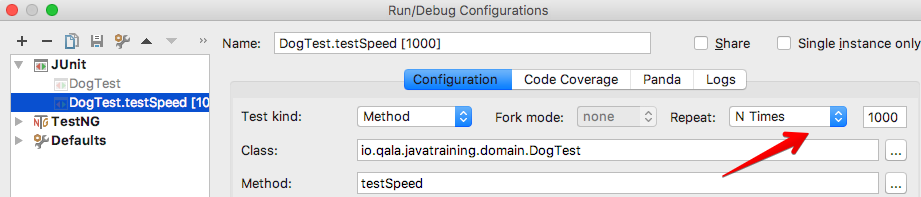
- IntelliJ 2017.2 EAP (see screenshot on how to setup 1K repeats)
- JUnit 4.11
- Jupiter 5.0.0-20170610.145620-613
- Platform Launcher 1.0.0-20170610.145632-612
- Platform Engine 1.0.0-20170610.145629-613
- Surefire Provider 1.0.0-20170610.145635-612
- MacOS
Justification
The speed will be important for randomized testing since it's a common practice to repeat such tests many times. Especially if someone implements a Property Based Testing framework like QuickCheck based on JUnit5.
 ctapobep
All 18 comments
Thanks for the report, @ctapobep -- what happens to the timings when you leave IDEA out off the setup?
Maybe you want to setup a JMH suite to compare JUnit 4 and JUnit Platform + JUnit Jupiter again?
 sormuras
on 10 Jun 2017
sormuras
on 10 Jun 2017
Um.. I don't know how relevant that would be:
- You need to run the test many times - JUnit4 doesn't support this. Though I assume it's possible to write a rule for this, but this is not the same as testing multiple test launches. So such a test would check different performance.
- I'm particularly interested in the speed of tests in IDE because that is usually the environment where I run them many times.
Are you trying to figure out if it's JUnit itself or IntelliJ who degraded the performance? My assumption was that since IntelliJ uses the same UI and it's just the Launchers who are different - it would be fair to look into the launcher first. But surely IntelliJ could simply do something ineffective by itself.
If you want for them to look into this first, I can create an issues in their bugtracker and point them here as well. Or if you communicate with them you could just chat them the link to this issue.
ctapobep
on 11 Jun 2017
@akozlova Any idea what might cause this?
 marcphilipp
on 11 Jun 2017
marcphilipp
on 11 Jun 2017
Were junit 5 tests repeated with IDEA means or with RepeatedTest? I checked that IDEA starts Launcher#discover and Launcher#execute for each test. When all discovery was done on IDEA's side (junit 4.-), this part was mostly trivial. With junit 5, that's not the case anymore and looks like it causes the slowdown. The snapshot from run with "until stopped" condition:
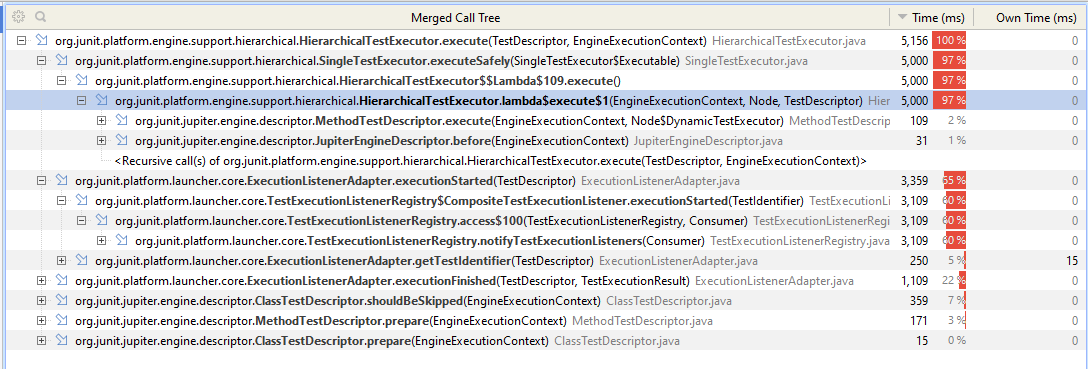
There is IDEA part when tests send notifications to the IDE but it must be the same (at least as far as I can compare the snapshots).
 akozlova
on 13 Jun 2017
akozlova
on 13 Jun 2017
Thanks for looking into this, @akozlova! Which version did you use? M4? Are you using a MethodSelector in the DiscoveryRequest?
marcphilipp
on 16 Jun 2017
I checked M4 with class selector (can check method selector if necessary). But looks like the slowdown in such setup is expected.
akozlova
on 16 Jun 2017
Actually, the way of performing test repetitions in JUnit 5 is _slightly_ different:
@RepeatedTest(value = 1000)
void testSpeed5() {
    Assertions.assertTrue(true);
    if(++nOfTimes5 == 1000)
        System.out.println(TimeUnit.NANOSECONDS.toMillis(System.nanoTime() - start5));//10085
}
This way, the discovery mechanism does not need to resolve the test repeatedly and, therefore, gains in a much better performance (especially if you have more than one TestEngine in your classpath, eg. Jupiter and Vintage). I would recommend following this approach for repeated tests.
Having said this, the performance of JUnit4 cannot be reached by JUnit5 in this specific case, as JUnit4 does not need to resolve anything but simply executes the test method selected for this run. All the discovery is performed by static analysis of IntelliJ IDEA. This also shows up how tightly coupled the IDEs and JUnit4 have been. With JUnit5 we decoupled these worlds and introduced features where required, to support certain use-cases (see above).
I would state that this is not an issue, but test repetitions rather should be done differently with JUnit5. So I would close this issue.
Thoughts?
 bechte
on 12 Sep 2017
bechte
on 12 Sep 2017
Changing the source code just to run the test many times is not awesome, but bearable. The real problem though is that @RepeatedTest works only if there are no other test-template annotations like parameterization.
ctapobep
on 12 Sep 2017
True. Could you describe your use-case a bit more in detail. I can imagine different reasons for running tests multiple times, such as test non-deterministic behaviour, testing performance, etc.
Talking about things like QuickCheck I could imagine that we rather use a parameter provider to inject the different values for the test and get multiple executions by that and, additionally, the use of parameterized tests. I'd like to get a better feeling, what you are exactly looking for.
bechte
on 12 Sep 2017
Changing the source code just to run the test many times is not awesome, but bearable. The real problem though is that
@RepeatedTestworks only if there are no other test-template annotations like parameterization.
That sounds like it could potentially be a topic for a new issue to add to the backlog.
@ctapobep, care to open such an issue?
 sbrannen
on 12 Sep 2017
sbrannen
on 12 Sep 2017
BTW, in case it's unclear to anyone reading this discussion, @RepeatedTest cannot be used to _repeat_ a @ParameterizedTest because they are both _test template providers_ which cannot _wrap_ each other.
sbrannen
on 12 Sep 2017
I would state that this is not an issue, but test repetitions rather should be done differently with JUnit5. So I would close this issue.
While I agree that repetitions should be performed using @RepeatedTest within JUnit Jupiter, I'm not sure if we should close this issue just yet.
Rather, I think it might be prudent to actually compare apples to apples with some real benchmarking of JUnit Jupiter vs. JUnit 4 with regard to test execution speed. Using IntelliJ's _repeat_ feature is not sufficient in this regard.
Otherwise, we are simply making unfounded assumptions.
sbrannen
on 12 Sep 2017
Of course, another option would be to close this issue until someone from the community provides bona fide proof that JUnit Jupiter is demonstrably slower than JUnit 4 with regard to test method execution.
sbrannen
on 12 Sep 2017
Closing in favor of #1273.
marcphilipp
on 16 Mar 2018
I have created jmh benchmarks (here).
Here are the results :
Benchmark                                                     Mode  Cnt      Score      Error  Units
AssertionBenchmarks.junit4_platform_emptyTest                thrpt   25  98478.933 ± 1995.784  ops/s
AssertionBenchmarks.junit4_platform_noTest                   thrpt   25  77682.319 ± 1124.970  ops/s
AssertionBenchmarks.junitJupiter_platform_emptyTest          thrpt   25   8977.310 ±   90.799  ops/s
AssertionBenchmarks.junitJupiter_platform_noTest             thrpt   25  39726.340 ±  285.684  ops/s
AssertionBenchmarks.junitJupiter_platform_vintage_emptyTest  thrpt   25  34648.446 ±  408.864  ops/s
 fduminy
on 11 Aug 2018
fduminy
on 11 Aug 2018
Hmm, looks like I meant to close this issue back in March.
@fduminy We now have JMH benchmark for assertions in this repo. Please open a new issue if you'd like to contribute additional ones. Thanks!
marcphilipp
on 11 Aug 2018
I have created the pull request https://github.com/junit-team/junit5/pull/1539
fduminy
on 12 Aug 2018
I have migrated a multi-module Java project from junit4 to junit5 and now running tests are super fast. Just note that if you run it still as a test-suite then it will use junit4 runner. But if you run all tests in IDE then you will see the real effect of junit5. I also, tested above example, and junit5 is super fast here as well.
 asatklichov
on 31 Jul 2020
asatklichov
on 31 Jul 2020
Related issues
 kec2
·
3Comments
kec2
·
3Comments
 mfulton26
·
3Comments
mfulton26
·
3Comments
 littleclay
·
3Comments
littleclay
·
3Comments
 blindpirate
·
5Comments
blindpirate
·
5Comments
 lessthanoptimal
·
4Comments
lessthanoptimal
·
4Comments
Most helpful comment
I have migrated a multi-module Java project from junit4 to junit5 and now running tests are super fast. Just note that if you run it still as a test-suite then it will use junit4 runner. But if you run all tests in IDE then you will see the real effect of junit5. I also, tested above example, and junit5 is super fast here as well.