Julius: Translation request: "Display scale" and "Cursor scale"
For the next release, we have two additional settings in the configuration screen, the sliders for "Display scale" and "Cursor scale":
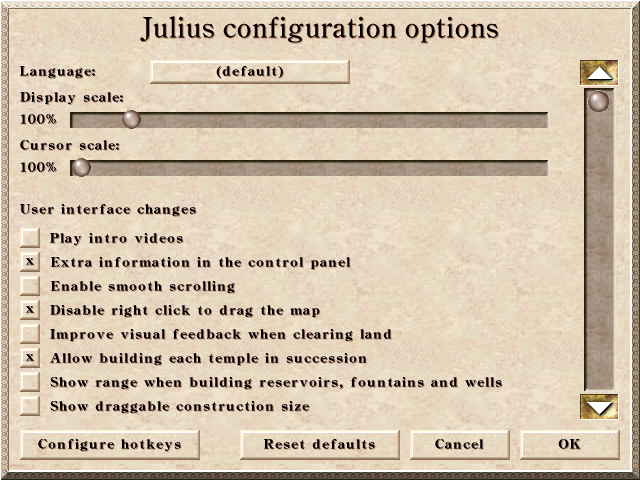
A description of the options is here.
We need translations for "Display scale:" and "Cursor scale:" in the following languages:
- [x] French
- [x] German
- [x] Italian
- [x] Korean
@m-mohr, @constant-current, @basilero, @fetchinist - you have contributed translations before, could you perhaps provide them?
 bvschaik
All 7 comments
Sure, I've aligned them with Windows terminology:
Display Scale:
Skalierung der Anzeige:
Cursor Scale:
Skalierung des Mauszeigers:
 m-mohr
on 30 Dec 2020
m-mohr
on 30 Dec 2020
Russian translation, if needed:
"Display scale:" "Масштабирование изображения в окне"
"Cursor scale:" "Масштабирование курсора"
 catch220
on 30 Dec 2020
catch220
on 30 Dec 2020
I have also aligned with Win10 options and it seems to be quite similar on different Linux desktop environments.
Display scale "Mise à l'échelle de l'affichage"
Cursor scale "Taille du curseur de souris"
 constant-current
on 30 Dec 2020
constant-current
on 30 Dec 2020
in korean:
Display scale - 화면 배율
Cursor scale - 커서 배율
 fetchinist
on 31 Dec 2020
fetchinist
on 31 Dec 2020
@tafazzi maybe you could help with the italian translation, please?
 crudelios
on 31 Dec 2020
crudelios
on 31 Dec 2020
@tafazzi maybe you could help with the italian translation, please?
Sure! Here are the two options in Italian:
Display Scale:
Ridimensionamento display
Cursor Scale:
Ridimensionamento cursore
 tafazzi
on 31 Dec 2020
tafazzi
on 31 Dec 2020
Thanks all!
bvschaik
on 1 Jan 2021
Related issues
 Sagatt
·
8Comments
Sagatt
·
8Comments
 atolstoy
·
4Comments
atolstoy
·
4Comments
 mirh
·
9Comments
mirh
·
9Comments
 jfkonecn
·
5Comments
jfkonecn
·
5Comments
 jonathanmcnamee
·
3Comments
jonathanmcnamee
·
3Comments