@m-mohr, continuing the discussion from #195:
Hmm, so let's think about best gestures. I'm also thinking about how other apps do that.
So what do we have on a computer with a mouse:
movement (scrolling): Taken from some maps: Use two fingers and move/scroll. Alternative: One tap, keep pressing and move.
left mouse click: Single tap
left mouse pressed for longer time (e.g. building houses): Double tap, keep pressing after the second tap and move.
right mouse click (exit menus, delete messages, reset tool, ...): Double tap? Or some gesture? In menus: Use hardware back button from Android? Could we use that "x" button left to the messages for tool reset?
middle mouse scroll (not sure, is that used?)
more?
These gestures are what I would expect intuitievely.
What do you think @crudelios ?
 crudelios
All 25 comments
movement (scrolling) Taken from some maps: Use two fingers and move/scroll.
I have to be honest with you, I hate having to use two fingers to scroll maps. I really think single-finger city scrolling is the best here, but if most people disagree then I'll reluctantly change it.
left mouse pressed for longer time (e.g. building houses): Double tap, keep pressing after the second tap and move.
I tried double tap once, the problem is you never exactly hit the same spot and end up starting the build on the wrong tile. This is even worse on small screens.
right mouse click (exit menus, delete messages, reset tool, ...): Double tap? Or some gesture?
Double click in menus should emulate double click with the left mouse button. It isn't implemented right now, but I'll do it in the future.
In menus: Use hardware back button from Android?
I thought about this, but the back button should be an alternative, and not the only way to go back. Also, depending on the phone and Android version, you may have a physical button, a software button or a gesture button, which makes the design inconsistent.
middle mouse scroll (not sure, is that used?)
This is already implemented for menu scrolling. Use two fingers close to each other and it should scroll.
Regarding menu scrolling, I'm thinking about implementing single finger menu scrolling if the user first touches (then drags) the scrollable part of the menu. Two-finger scrolling work regardless of the area of the screen you touch.
Other discussed suggestions:
Double click to select walker/building/etc: while still subject to hitting the wrong tile, it's less aggravating than starting to build houses in the wrong spot, so I'm ok with it.
Reducing the radius or simply removing city scroll when constructing near the edges of the screen: removing the feature will prevent users from scrolling the city when they are building, so that doesn't feel like a good idea. Reducing the radius thus seems like the best alternative, but a good compromise requires testing.
There is also a bug that is very noticeable on the empire map in which if you click the screen, move your finger very fast and immediately release it, instead of the map scrolling very fast, it will stop on its tracks the moment you release the finger. This is annoying and needs fixing.
Map editor:
Map editor does not really support touch right now, as you can't scroll the city. This happens because there is always something selected, so the touch interface is always in "constructing something" mode.
Therefore I think there should be a way to not select anything to do in the map editor so that city scrolling works. An alternative would be to use two fingers to scroll the city, but then that would be inconsistent with the normal city creation mode. Unless double-finger scrolling is allowed in construction mode... Hummm.
Does anyone know of a program that creates gifs so the touch ideas can be viewed in an animation?
crudelios
on 23 Jan 2020
Maybe there'a path in-between. I must admit I like two finger scrolling here because it's explicit. It happens so often to accidentally scroll that I'd be in favor of really just scrolling when a user chooses to (with two fingers). And I think it's easier to do than the current right click behavior, which is the most annoying thing at the moment in the Android build. If we'd go for that one tap - press building would be open and wouldn't need a double click. Regarding hardware back button: It's fine to just have it as alternative.
Maybe:
- movement (scrolling, incl. middle mouse scroll): Use two fingers and move/scroll. I guess one could allow also single tap scroll if no tool is selected...
- left mouse click: Single tap
- left mouse pressed for longer time (e.g. building houses): Single tap, keep pressing and move.
- right mouse click (exit menus, delete messages, reset tool, ...): Double tap? As alternative in menus: Use hardware back button from Android. Also, to select moving objects (people on streets usually), I'd also allow a single tap as it's hard to double tap on moving subjects.
What actual actions are there in game for double click in game? I doubt we would need to emulate that in an Android version though if it's just for some rare cases...
 m-mohr
on 23 Jan 2020
m-mohr
on 23 Jan 2020
If you are click-dragging to build houses, the moment you release the finger is when the houses are built. So it isn't possible to double-tap to cancel the current build. The only real way I see to cancel a current build is the current one: clicking with a second finger.
I think single finger city scroll when nothing is being built and two-finger city scroll when something is being built is a good compromise.
As the implementation can distinguish between a finger tap and a click-drag, it's possible to allow a single tap to display a building or walker details and a click-drag to scroll the map. I just fear that a user may accidentaly open too many detail menus while trying to scroll or to do something else if that is left to a single tap.
Oh, another one that already exists: click and hold a button to show its tooltip.
crudelios
on 23 Jan 2020
If you are click-dragging to build houses, the moment you release the finger is when the houses are built. So it isn't possible to double-tap to cancel the current build. The only real way I see to cancel a current build is the current one: clicking with a second finger.
Wait, I'm not speaking about cancelling the build process but resetting the tool to "no tool selected". I guess for cancelling the build process your solution is fine.
I think single finger city scroll when nothing is being built and two-finger city scroll when something is being built is a good compromise.
Although I guess two-finger scroll could always be available and one finger scroll be available as additional way if no tool is selected.
As the implementation can distinguish between a finger tap and a click-drag, it's possible to allow a single tap to display a building or walker details and a click-drag to scroll the map. I just fear that a user may accidentaly open too many detail menus while trying to scroll or to do something else if that is left to a single tap.
Could be, I guess we need to try that out. But I guess we have no better alternative. With the current approach I never hit the moving target I wanted to hit. Maybe it's easier on a tablet though.
Oh, another one that already exists: click and hold a button to show its tooltip.
Where's that used? I guess that could be something to be something the current right click behavior could be used for. Press target for tooltip for with one finger and show tooltip once second finger is on screen. What do you think?
m-mohr
on 23 Jan 2020
Wait, I'm not speaking about cancelling the build process but resetting the tool to "no tool selected". I guess for cancelling the build process your solution is fine.
It's the same problem. Double-clicking implies single-clicking, and single-clicking adds the building to the city.
Although I guess two-finger scroll could always be available and one finger scroll be available as additional way if no tool is selected.
It works that way already, you can two-finger scroll the city when no construction is selected.
Where's that used? I guess that could be something to be something the current right click behavior could be used for.
Right now, touching without releasing in menus is equivalent to mouse hovering. The only exceptions are the arrow buttons, which continuously trigger when pressed.
Incidentally, I feel clicking with a second finger is too clunky just to display a tooltip.
crudelios
on 23 Jan 2020
It's the same problem. Double-clicking implies single-clicking, and single-clicking adds the building to the city.
But how does Google Maps this? When I double tap it zooms in and it doesn't activate the underlying action for a single tap. So there must be a way to control that and not place a building on double tap.
It works that way already, you can two-finger scroll the city when no construction is selected.
Yes, but the important part for me is not that it works with two fingers, but that it doesn't accidentally scroll and puts houses everywhere by accident for example.
Right now, touching without releasing in menus is equivalent to mouse hovering. The only exceptions are the arrow buttons, which continuously trigger when pressed.
Incidentally, I feel clicking with a second finger is too clunky just to display a tooltip.
But then how often so you really want to get a tooltip in the game? I guess not so often, at least I don't. And at the same time you think this relatively complex gesture is not so clunky for a task you do like every 10 sekonds or so in game?
I think the things you do all the time should be as easy as possible and the rarer cases you rarely use should be the things that can be more complex (e.g. tooltips or double clicks). But that's just my opinion, I still appreciate all your work to get it working on Android highly. It's just that with the current touch gestures I don't have fun playing it on Android and will probably just not use it then (or fork it at some point).
m-mohr
on 24 Jan 2020
But how does Google Maps this?
When you click on Google Maps, it waits a bit to check if you double click. Actually the empire map touch interface in Julius already does something similar.
For constructuion, it might make things a bit laggy. Only checking we'll know.
Yes, but the important part for me is not that it works with two fingers, but that it doesn't accidentally scroll and puts houses everywhere by accident for example.
I remembered that before I had implemented border scrolling I had two finger scrolling while building. It isn't as good as you may expect. If you want to scroll while building houses or roads, you can't let go off the first finger while the second is scrolling. It gets awkward fast.
That's why I ended up implementing scrolling when you are close to the edges.
And at the same time you think this relatively complex gesture is not so clunky for a task you do like every 10 sekonds or so in game?
You have a point, I'm not being consistent. I agree there must be a better way to "emulate" right-clicking. However, I also think it's more intuitive for the user that mouse hovering should be emulated by touching and holding.
crudelios
on 24 Jan 2020
When you click on Google Maps, it waits a bit to check if you double click.
For constructuion, it might make things a bit laggy. Only checking we'll know.
Oh, it doesn't feel laggy for Google Maps. But indeed it may get annoying when you want to cancel, but double tap is too slow or so and instead it builds....
I remembered that before I had implemented border scrolling I had two finger scrolling while building. It isn't as good as you may expect. If you want to scroll while building houses or roads, you can't let go off the first finger while the second is scrolling. It gets awkward fast.
That's why I ended up implementing scrolling when you are close to the edges
I rarely ever scroll while building, but maybe would be an idea to make the area that allows scrolling smaller and maybe make it half the scrolling speed? When building its usually rarely the case that you want to scroll fast in contrast to normal scrolling in game.
You have a point, I'm not being consistent. I agree there must be a better way to "emulate" right-clicking. However, I also think it's more intuitive for the user that mouse hovering should be emulated by touching and holding.
Are Android users really expecting a long press to be a tooltip? Usually in Android long press is opening menus or selecting things... Nevertheless, a long press is not covered yet by my proposal and can be used for tooltips?!
Overall, I'd like to have things I commonly use easy and things rarely used can be a bit more 'difficult'.
m-mohr
on 24 Jan 2020
But indeed it may get annoying when you want to cancel, but double tap is too slow or so and instead it builds....
Yeah, that's also a problem. But you're right that having to use two fingers is clumsy. So I'm not really sure what the alternative is.
I rarely ever scroll while building, but maybe would be an idea to make the area that allows scrolling smaller and maybe make it half the scrolling speed?
Yes. I agree to both.
Are Android users really expecting a long press to be a tooltip? Usually in Android long press is opening menus or selecting things... Nevertheless, a long press is not covered yet by my proposal and can be used for tooltips?!
Android doesn't have tooltips. I guess long press can still be a tooltip.
After thinking about it, I think a single fast click on the map with no construction selected should open the popup window. For menus, a long press could emulate a right click. Now only a "cancel construction" gesture is needed and the two-finger thing can be fully ditched.
crudelios
on 26 Jan 2020
Android doesn't have tooltips. I guess long press can still be a tooltip.
I'm short on time so I haven't read the entire thread, but Android does have tooltips, at least for toolbar icons. They're indeed activated by long press. Try for example in Gmail: if you open a message and long press the trash can, you will see a "Delete" tooltip pop up.
 bvschaik
on 26 Jan 2020
bvschaik
on 26 Jan 2020
The "scrolling close to the borders during building" problem will be improved by #287. I'm not sure it's perfect though.
crudelios
on 30 Jan 2020
@m-mohr How dobyou feel about scrolling during construction now?
Also, smooth scrolling makes it clear that the current way to show building info isn't good.
Stopping the game from running when touch or smooth scrolling has to go. It just looks awkward.
Lastly, handling military is a serious hassle when using touch. I need ideas for some sort of visual feedback, as the mouse cursor isn't available.
crudelios
on 9 Feb 2020
Smooth scrolling is working well and the new implementation works quite good in when constructing.
I agree that stopping the game when scrolling and touching is really weird.
As said in the PR, the right click behaviour is still the most annoying thing at the moment. Everything else seems to be working quite good. Haven't used military yet though, but yeah also building reservoires and some other things is still a bit fiddly as the mouse cursor is missing.
m-mohr
on 9 Feb 2020
My idea:
- Single-clicking on the map without any construction/military active will show the tile information
- Double clicking on menus emulates right-click (exits the menu)
- To cancel a construction/unselect a legion, click with two fingers. That means, if you're click-dragging, do the same thing you're doing now, and if you're not click-dragging, a two-finger tap is all that's required
- Somehow better inform the player if something is selected to construct or if a legion is active. Perhaps display that information somewhere. But I don't really know what or where I should display it
crudelios
on 10 Feb 2020
- Single-clicking on the map without any construction/military active will show the tile information
- Double clicking on menus emulates right-click (exits the menu)
- To cancel a construction/unselect a legion, click with two fingers. That means, if you're click-dragging, do the same thing you're doing now
That all sounds good.
and if you're not click-dragging, a two-finger tap is all that's required.
Couldn't we just use double-click here, too? Double click basically means cancelling following the description above. Why not here? I think that's easier.
- Somehow better inform the player if something is selected to construct or if a legion is active. Perhaps display that information somewhere. But I don't really know what or where I should display it
When you hover over something in construction mode there's an image shown, couldn't you just show that image in the bottom left corner or so? Although it's still not possible to see whether the reservoire is full or not with this approach. This leaves me thinking whether click-hold should be just like a mouse-over (show building as it would be built) and then confirm building with the second finger?!
m-mohr
on 10 Feb 2020
Couldn't we just use double-click here, too?
I think people will end up building rather than cancelling the build if I set it to double-click? I'll do it anyway so it can be tested.
Although it's still not possible to see whether the reservoire is full or not with this approach.
I can disable draggable reservoirs for touch, then it'll work like a normal building where you can click-hold to show its ghost.
Also, I'm not sure showing a legion on the bottom left corner will look good :/
crudelios
on 10 Feb 2020
I think people will end up building rather than cancelling
Well, at the moment I'm also often building by accident because I couldn't properly cancel building. But yeah, it's all try and error now. ;-)
I'm not sure showing a legion on the bottom left corner will look good :/
Well, I was mostly thinking about buildings of course, but maybe for the legions just show the signifier (the flag thing).
I can disable draggable reservoirs for touch,
Wait, I tried again. I can actually see it while pressing, it's just not so easy to actually get it shown. It tries relatively quickly to drag/drop due to imprecise input from the fingers.
m-mohr
on 10 Feb 2020
I think the image will take too much space, especially on smaller devices. Perhaps I can simply add a string with the building or legion name so people know something is selected. It can be placed on a corner or centered at the top or something, displaying like a tooltip over the city. Or, if there's enough width, it can be displayed on the top menu. I want @bvschaik's feedback for this though.
I'll disable draggable reservoirs when using touch.
crudelios
on 10 Feb 2020
I thought about just resizing the images to 50px or so if that's possible so that they are small and all the same size. But any other indicator is probably also good.
m-mohr
on 10 Feb 2020
Ideas from @bvschaik:
- For normal buildings like schools, click once to show the construction ghost and again on the same spot to build it. Click elsewhere to change the building ghost's position.
- For draggable buildings like roads: same as normal to begin placement, then keep the finger down and drag to expand the road.
- To cancel a build: add a good old
Xbutton somewhere.
crudelios
on 12 Feb 2020
Good ideas.
* To cancel a build: add a good old `X` button somewhere.
There's already the "x" left to the messages button we could re-use. Also, this only works if not dragging (houses, streets, reservoires, ...).
m-mohr
on 12 Feb 2020
I'm finally changing the way touch works. When it's stable I'll post a test build for android here and describe the new implementation.
crudelios
on 18 Feb 2020
Improved touch support is almost ready.
With all your suggestions, I managed to find a way to not need a second finger at all (though I kept the second finger tap as redundancy is always welcome).
The only thing that's left to do is the scenario editor.
Here are some of the new features:
- Cancel build button. Only appears when touch is being used.
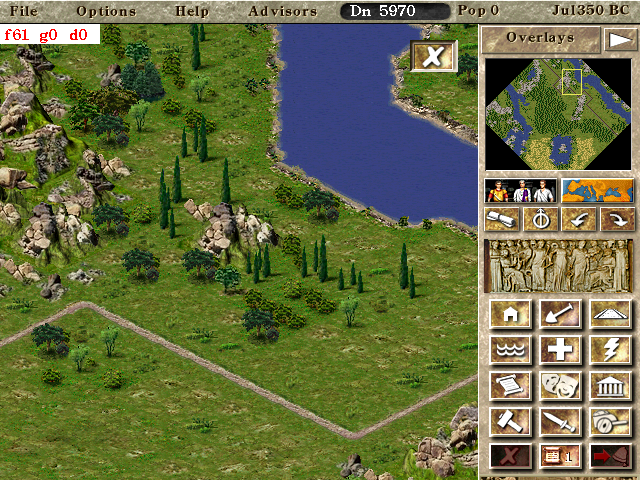
- Double tap to exit most windows
- Increased top menu options hitbox to make it easier to select the menu option
- Keep overlay submenu open on main button click. Works for both touch and mouse
- Single tap on city without any construction active to show building info
- Scrolling no longer stops the city when either smooth scrolling is active or touch is used to scroll
- Complete overhaul of construction using touch
New way to construct using touch
There are two types of construction: some can be click-dragged, others cannot (they are single buildings).
Examples of constructions that can be click-dragged: roads, houses, walls, reservoirs, clear land.
There are different (but somewhat similar) ways to build a simple and a click-draggable construction.
__For simple builings:__ tap anywhere on the map to show the ghost. Tap again on the same spot to confirm construction or somewhere else to move the ghost. If you press-drag, the building ghost will move with your finger.
__For click-draggable buildings:__ Press to set the starting position. You can then either drag the finger to extend the construction range, or immediately lift the finger and tap somewhere else to extend the construction range. To confirm the construction, tap at the end of the range (the tile you last released the finger at).
If you are not happy with the construction range, instead of confirming it as said above, you can do either of the following:
- Press and drag at the end of the range to change the end of the range
- Tap somewhere else to set the end of the range to that spot
- Press and drag somewhere else to restart the construction range from the pressed spot
When either type of construction is active, if you press-drag next to the edges of the screen, the city will scroll. The closer to the edge your finger is, the faster the scroll will be.
Cancelling a build
As mentioned earlier, there is now a button to cancel the build. As an alternative, you can still tap with a second finger to cancel the build. Both options work exactly the same way.
For simple buildings or click-draggable buildings that are not being constructed, clicking the button cancels the selected construction. That means you can navigate the city normally and you'll have to select the proper build button on the sidebar if you want to restart construction.
If you are in the middle of a click-draggable construction, pressing the button will only remove the pending construction. If you don't wish to build anything, you must press the cancel button again.
crudelios
on 28 Feb 2020
Sounds great, looking forward to the APK to test it.
m-mohr
on 1 Mar 2020
Improved touch support has its own PR now.
Unfortunately due to the fact that I am adding android support in pieces, the Android build is incompatible with the rest of the code right now, no there will not be a build with the new touch support.
However, when the android build finally lands, it will have the new changes for testing.
crudelios
on 2 Mar 2020
Related issues
 pingwinator
·
8Comments
pingwinator
·
8Comments
 411752230
·
9Comments
411752230
·
9Comments
 LePatator
·
5Comments
LePatator
·
5Comments
 atolstoy
·
4Comments
atolstoy
·
4Comments
 jdmillard
·
3Comments
jdmillard
·
3Comments
Most helpful comment
I'm finally changing the way touch works. When it's stable I'll post a test build for android here and describe the new implementation.