Jtapplecalendar: Problem with selection of a date and then scroll to another month where i'm now able to select two dates. The first date doesn't get deselected
Hello! Thank you for all the wonderful work!
I'm using version 7.1.1
I have a problem with the selection of a date. If i select a date in a month and i fx scroll to the month before where this date is also shown, it won't be deselected. So now i'm marking 2 dates. I've attached two pictures to show it. My code is also attached.
Thank you!
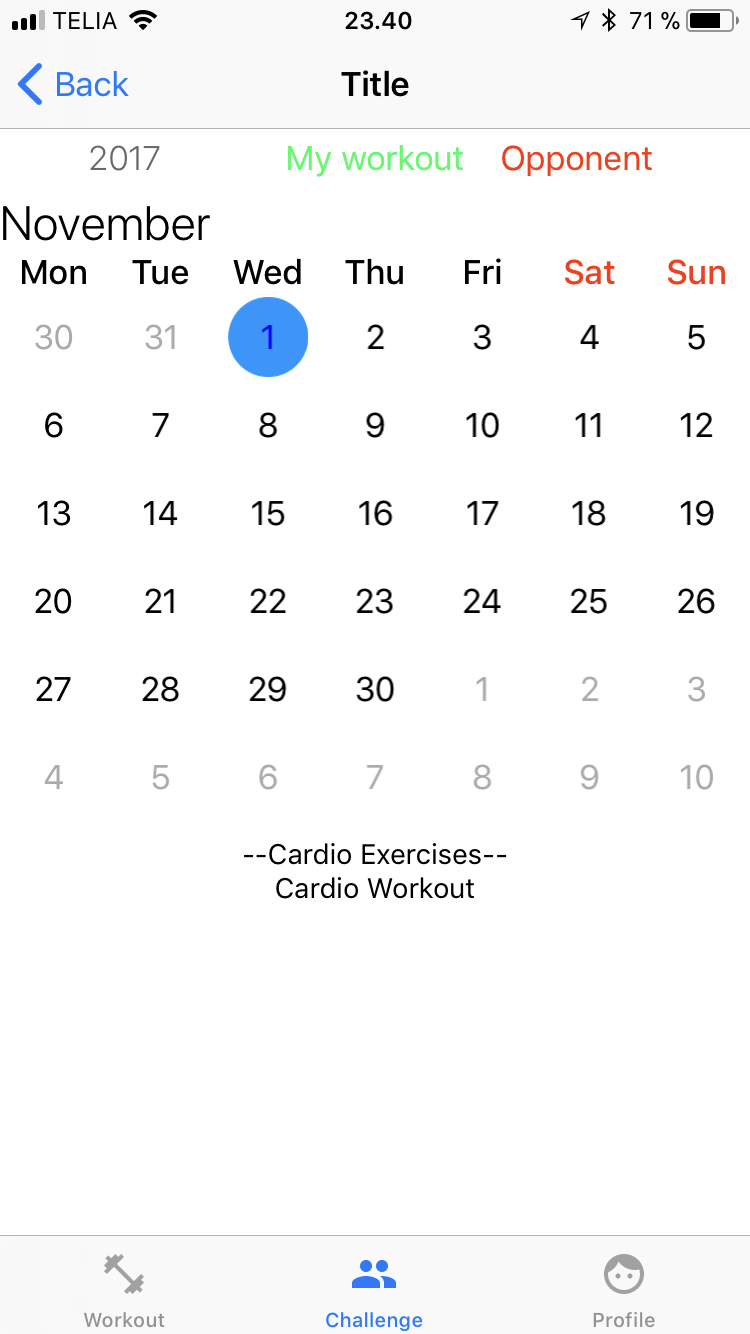
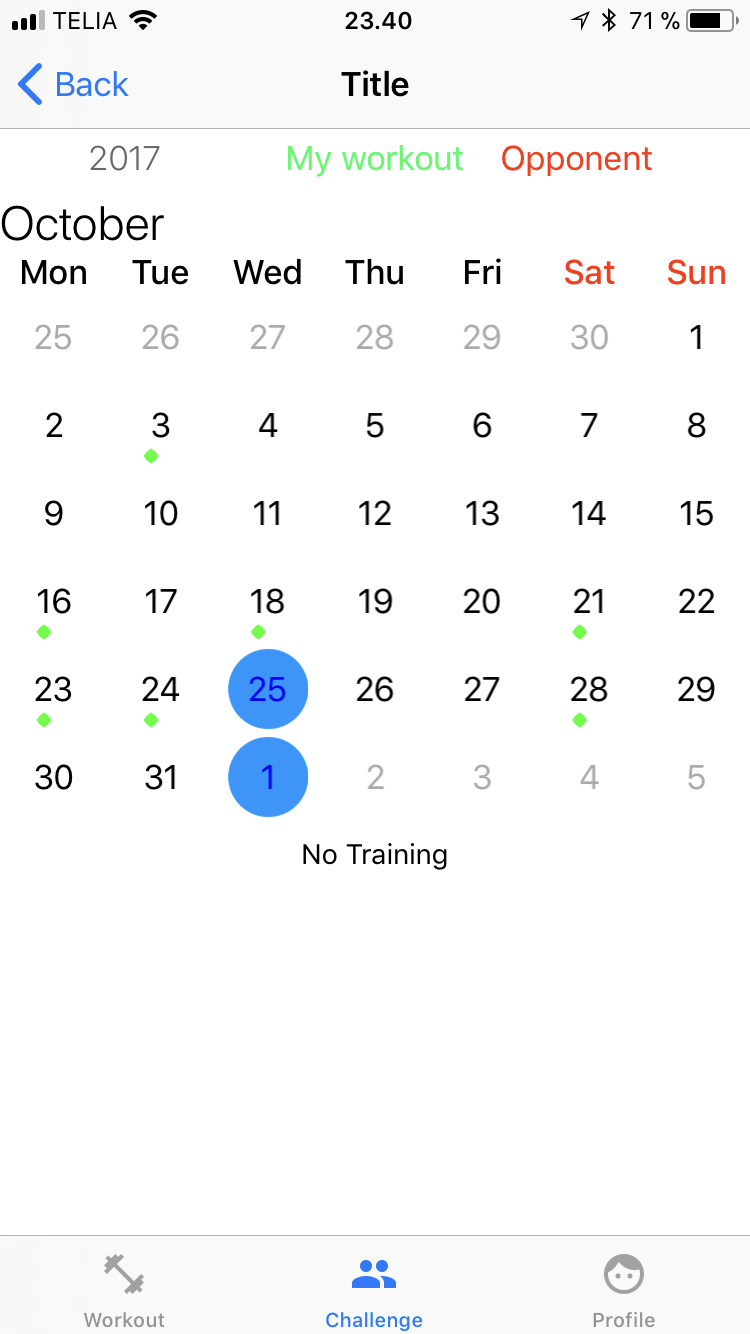
//
//  SpecificChallengeViewController.swift
//  FitnessWorkout
//
//  Created by Nicki on 28/10/2017.
//  Copyright © 2017 Nicki. All rights reserved.
//

import UIKit
import JTAppleCalendar
import Firebase
import FirebaseAuth

class SpecificChallengeViewController: UIViewController {

    let formatter = DateFormatter()
    var opponentUser: UserModel?
    var opponentEmail: String?
    var dbRefCurrentUser: DatabaseReference!
    var dbRefOpponent: DatabaseReference!
    var trainingDatesUser = [TrainingDates]()
    var trainingDatesOpponent = [TrainingDates]()
    var boolChallengeCalendar: Bool?

    @IBOutlet weak var calendarView: JTAppleCalendarView!
    @IBOutlet weak var labelYear: UILabel!
    @IBOutlet weak var labelMonth: UILabel!


    @IBOutlet weak var textViewUser: UITextView!
    @IBOutlet weak var textViewOppo: UITextView!
    @IBOutlet weak var labelSplitter: UILabel!


    override func viewDidLoad() {
        super.viewDidLoad()


        setupCalenderView()


    }

    override func viewWillAppear(_ animated: Bool) {
        super.viewWillAppear(animated)

        calendarView.scrollToDate(Date())
    }

    func setupCalenderView() {
        calendarView.minimumLineSpacing = 0
        calendarView.minimumInteritemSpacing = 0

        //Setup labels
        calendarView.visibleDates { (visibleDates) in
            self.setupViewsOfCalendar(from: visibleDates)
        }
    }

    func setupViewsOfCalendar(from visibleDates: DateSegmentInfo) {
        let date = visibleDates.monthDates.first!.date

        formatter.dateFormat = "YYYY"
        labelYear.text = formatter.string(from: date)

        formatter.dateFormat = "MMMM"
        labelMonth.text = formatter.string(from: date)
    }
    override func didReceiveMemoryWarning() {
        super.didReceiveMemoryWarning()

    }

    func handleCellSelected(view: JTAppleCell?, cellState: CellState, date: Date) {
        guard let validCell = view as? CustomCalenderCollectionViewCell else { return }

        if cellState.isSelected {
            validCell.selectedView.isHidden = false
//            validCell.selectedView.backgroundColor = UIColor.blue.withAlphaComponent(0.3)
//            validCell.selectedView.layer.cornerRadius =  20
//        } else if (Calendar.current.isDateInToday(date) ) {
//            validCell.selectedView.isHidden = false
//            validCell.selectedView.layer.cornerRadius =  40
//            validCell.selectedView.backgroundColor = UIColor.gray.withAlphaComponent(0.3)
        } else {
            validCell.selectedView.isHidden = true
        }

    }

    func handleCellTextColor(view: JTAppleCell?, cellState: CellState, date: Date) {
        guard let validCell = view as? CustomCalenderCollectionViewCell else { return }
        if cellState.isSelected {
            validCell.dateLabel.textColor = UIColor.blue
        } else {
            if cellState.dateBelongsTo == .thisMonth {
                validCell.dateLabel.textColor = UIColor.black
            } else {
                validCell.dateLabel.textColor = UIColor.lightGray
            }
        }
    }
}

extension SpecificChallengeViewController: JTAppleCalendarViewDataSource {
    public func calendar(_ calendar: JTAppleCalendarView, willDisplay cell: JTAppleCell, forItemAt date: Date, cellState: CellState, indexPath: IndexPath) {

    }

    public func configureCalendar(_ calendar: JTAppleCalendarView) -> ConfigurationParameters {

        formatter.dateFormat = "yyyy-MM-dd HH:mm:ss"
        formatter.timeZone = Calendar.current.timeZone
        formatter.locale = Calendar.current.locale

        var startDate: Date = formatter.date(from: "2017-10-01 22:00:00")!
        var endDate: Date = formatter.date(from: "2018-12-31 22:00:00")!


         let parameters = ConfigurationParameters(startDate: startDate, endDate: Date(), numberOfRows: 6, firstDayOfWeek: .monday)

        return parameters
    }

}

extension SpecificChallengeViewController: JTAppleCalendarViewDelegate {


    public func calendar(_ calendar: JTAppleCalendarView, cellForItemAt date: Date, cellState: CellState, indexPath: IndexPath) -> JTAppleCell {
        let cell = calendar.dequeueReusableJTAppleCell(withReuseIdentifier: "customCellCalendar", for: indexPath) as! CustomCalenderCollectionViewCell
        cell.dateLabel.text = cellState.text


        cell.didTraingThatDayUser.backgroundColor = UIColor.white
        cell.didTraingThatDayOppo.backgroundColor = UIColor.white


        handleCellSelected(view: cell, cellState: cellState, date: date)
        handleCellTextColor(view: cell, cellState: cellState, date: date)

        return cell
    }

    public func calendar(_ calendar: JTAppleCalendarView, didSelectDate date: Date, cell: JTAppleCell?, cellState: CellState) {
        handleCellSelected(view: cell, cellState: cellState, date: date)
        handleCellTextColor(view: cell, cellState: cellState, date: date)


    }

    public func calendar(_ calendar: JTAppleCalendarView, didDeselectDate date: Date, cell: JTAppleCell?, cellState: CellState) {
        handleCellSelected(view: cell, cellState: cellState, date: date)
        handleCellTextColor(view: cell, cellState: cellState, date: date)
    }

    func calendar(_ calendar: JTAppleCalendarView, shouldSelectDate date: Date, cell: JTAppleCell?, cellState: CellState) -> Bool {
        if cellState.dateBelongsTo != .thisMonth {
            return false
        }
        return true
    }

    public func calendar(_ calendar: JTAppleCalendarView, didScrollToDateSegmentWith visibleDates: DateSegmentInfo) {
        setupViewsOfCalendar(from: visibleDates)

    }

}
 nickinylin
All 8 comments
You did not implement the will display cell function.
In version 7.1.1 I force every developer to implement it.
The reason is explained here -> https://github.com/patchthecode/JTAppleCalendar/issues/553
Can you let me know if this fixed your issue?
 patchthecode
on 2 Nov 2017
patchthecode
on 2 Nov 2017
Yes this solved my issue. Thank you! Have a nice day :)
nickinylin
on 2 Nov 2017
awesome.
patchthecode
on 2 Nov 2017
Hey, sorry to reopen this issue, but I too am experiencing this issue. If I select an 'out of month day' then select another date, the out of month day remains selected. I have implement the 'willDisplay' method as shown in the screenshot. Additionally, how do I prevent the out days from being selected, but enable the cell from the previous/next month to remain selected?
Update 1: It seems that willDisplay is not being called. Am investigating.
Update 2: I've worked around the issue by including the below function (Screenshot 2) in didSelect()


 cyrilzakka
on 6 Sep 2018
cyrilzakka
on 6 Sep 2018
@cyrilzakka did you reset your cells.
patchthecode
on 7 Sep 2018
@patchthecode I seem to have missed this step, my apologies. Was it in one of the first two videos? Where can I find it?
cyrilzakka
on 7 Sep 2018
@cyrilzakka I sorry, i misread the question you asked.
mind joining me here? https://gitter.im/patchthecode/JTAppleCalendar
patchthecode
on 7 Sep 2018
issue resolved. user was dequeueing inside the willDisplay function.
patchthecode
on 7 Sep 2018
Related issues
 carlosper88
·
4Comments
carlosper88
·
4Comments
 zhanswift
·
5Comments
zhanswift
·
5Comments
 PedroAnibarro1
·
5Comments
PedroAnibarro1
·
5Comments
 gotamafandy
·
3Comments
gotamafandy
·
3Comments
 programus
·
5Comments
programus
·
5Comments
Most helpful comment
Yes this solved my issue. Thank you! Have a nice day :)