Jtapplecalendar: Show two months on the same screen (with one data range)
Hi there. Thx for this big and awesome work.
Can i show two months on the same screen with one data range?
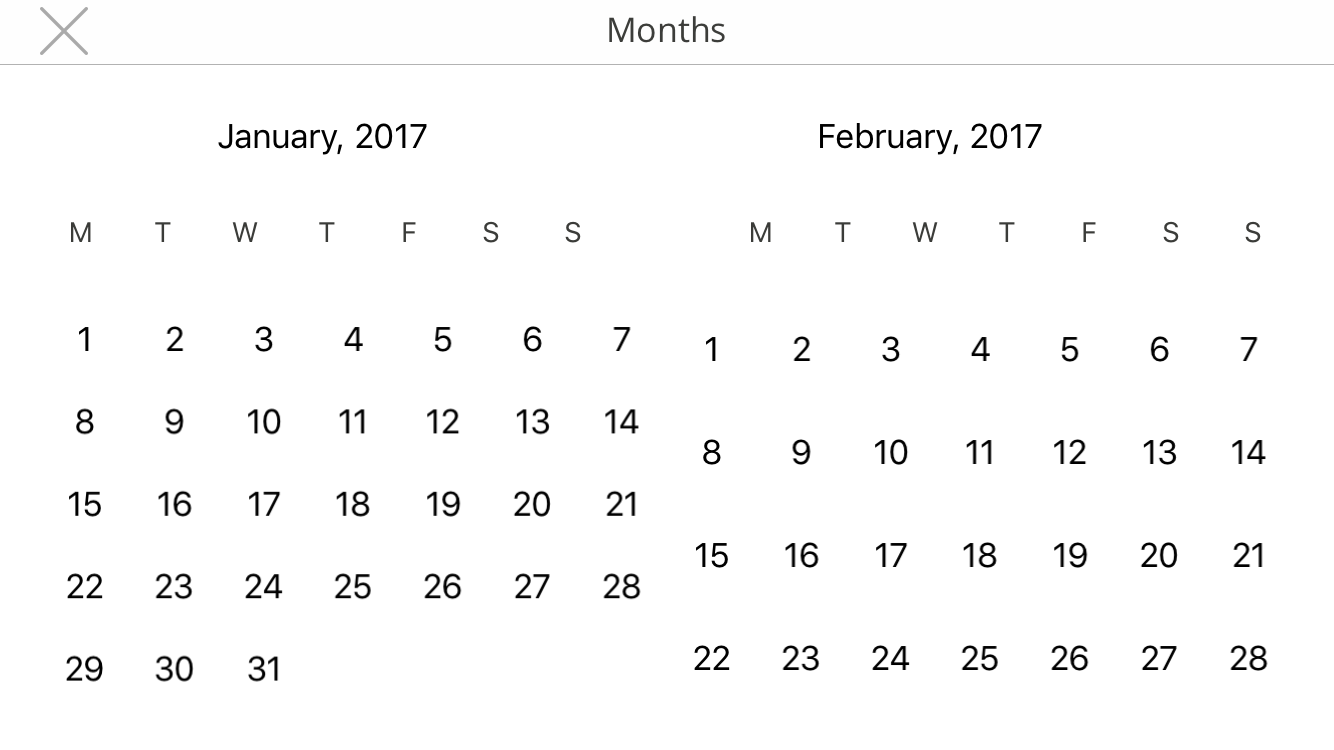
For example:

There are two month with one range of selection.
Thanks in advance.
 atereshkov
All 29 comments
2 months on same screen -> https://patchthecode.github.io/CommonQuestions/
 patchthecode
on 17 Jan 2017
patchthecode
on 17 Jan 2017
Thank you very much. I will try.
But I still do not understand how the cell size is related to two months (maybe because I have not tried to do it).
atereshkov
on 17 Jan 2017
Normally, the cell stretches to fill the size of the Calendar view. This forces one month to be on screen. If you make the cell size smaller, then more cells can fit on the screen.
patchthecode
on 18 Jan 2017
However, I have not had someone have 2 months on same screen using horizontal mode before. So if you find any issues then do let me know. And I will fix it.
patchthecode
on 18 Jan 2017
Hi I'm also trying to do this too. Could there be something else that I need to update other than calendarView.itemSize ? it looks like this when I set as 20

And here's the normal view

Thanks for helping
 vinamelody
on 18 Jan 2017
vinamelody
on 18 Jan 2017
@vinamelody I cannot tell you want to set. You first need to tell me how you want your calendar to look. Technically, you are seeing 2 months on one screen right there. haha.
patchthecode
on 18 Jan 2017
When changing the item size to 20, Somehow it doesn't take the whole width anymore:) that's where I'm stuck
vinamelody
on 18 Jan 2017
can you set the item size, to a size where the 2 months exactly take up the width?
let itemSize = calendarView.width / 14.0
patchthecode
on 18 Jan 2017
As I understand from comments of @vinamelody , I can't get exactly the same result like in the image of my first post? Because the calendar is compressed vertically? And the next month will be below the previous one and so on.
atereshkov
on 18 Jan 2017
@handioq Is your calendar vertical or horizontal?
If it is vertical you will have no problems.
If your calendar is horizontal, then your calendar will look exactly like your image above. The only difference is that there will be no space in the middle.
I will have to code this as an upgrade.
But tell you what, try creating the calendar from the tutorial -> https://patchthecode.github.io/MainTutorial/
creating it will take you about 15 mins max. If you have anything you need, then I can provide an enhancement.
patchthecode
on 18 Jan 2017
Thanks for the pointer :) ! It's working when I did this
override func viewDidLoad() {
        super.viewDidLoad()

        calendarView.dataSource = self
        calendarView.delegate = self
        calendarView.scrollEnabled = true

        print("Calendarview width is \(calendarView.frame.width)")
        calendarView.itemSize = calendarView.frame.width / 14
        calendarView.registerCellViewXib(file: "CellView")
}

vinamelody
on 19 Jan 2017
@patchthecode My calendar is horizontal.
I'll try to do it soon and will write if problems arise. Please, don't close this ticket for now.
Thanks for the help!
@vinamelody thx u too.
atereshkov
on 19 Jan 2017
@patchthecode I tried. 2 months are displayed.
But there is a problem, how to scroll only one month, not two at once?
Or maybe some workaround exists? (set the start date and reload data should work?)
Now my calendar looks like:

And if you can do an update for space in the middle , then I will be very thankful to you. Or tell me in what direction to look, maybe I'll try to fix it myself.
atereshkov
on 19 Jan 2017
@handioq I think you need to look at the documentation. It will help you a lot.
Have you looked at the Calendar Scrolling documentation?
If you are still stuck with the scrolling then let me know.
Now for the space in the middle -> yes i will have to do an update for that. I did not set spaces for the months.
patchthecode
on 19 Jan 2017
@patchthecode oh, i missed it.
I will wait for updates.
Thank you again.
atereshkov
on 19 Jan 2017
Earlier I thought it would be better to have space in between months but then after a day of trying out, consider this:
If you're making a horizontal stack view for the days (Sun, Mon, ..... Sun, ... Sat) for 2 weeks, it will be easier to layout with just "Fill Equally" option. Any thoughts :)
@handioq just curious, which scrolling option fits your need?
vinamelody
on 19 Jan 2017
@vinamelody I use
calendarView.scrollingMode = .stopAtEachSection
And for 2-weeks.. i use 2 stack views :)
atereshkov
on 19 Jan 2017
lol ok ... glad it worked out :) and thanks @patchthecode for making this ..
guess i still have much to learn
vinamelody
on 19 Jan 2017
@vinamelody you're welcome much. If it has helped you in any way leave a start rating. I;d appreciate it :D
Thanks for the suggestions. I will get to work on the improvements in a short while.
patchthecode
on 19 Jan 2017
Will add the space between Months as an update.
Closing this as original issue is resolved
patchthecode
on 20 Jan 2017
Hey @patchthecode, thanks for the the great heads up for this issue. I have achieved so far this much as seen in the attached image. However, are there any way to add the space between the months?
One more thing is when numberOfRows is passed 5 in configuration parameters, there's an alignment issue happens only for the month February in non-leap years. Is there a way to fix it? I believe I have to pay with the height of cell a little, however, just in case you've faced already any suggestions?
 rameswarprasad
on 19 Apr 2019
rameswarprasad
on 19 Apr 2019
@rameswar54 to increase space between months, try increasing the calendarView.sectionInset.left
One more thing is when numberOfRows is passed 5 in configuration parameters, there's an alignment issue
not an issue. The calendar will autofill the size of the date to fill the necessary space.
If you want constant height, then you can set the generateOutDates = .endOfGridin stead of .endOfRow. Set number of rows to 6.
patchthecode
on 19 Apr 2019
Thanks for the heads up regarding alignment issue. It's fixed.
There's a problem with using sectionInset.left. It's a horizontal scroll calendar. So using sectionInset.left would shift every section subsequently while scrolling. Any other ways?
rameswarprasad
on 20 Apr 2019
so using sectionInset.left would shift every section subsequently while scrolling
but doesnt shifting every section creates a space between months?
try .right instead of .left
unless i misunderstood?
patchthecode
on 20 Apr 2019
Nah I missed something. Subtracting the insets from calendar width while calculating the item size. 😅
rameswarprasad
on 20 Apr 2019
@rameswar54 so it works now?
patchthecode
on 20 Apr 2019
Yes. Below line fixed the issue.
calendarView.cellSize = (calendarView.frame.width - 2 * (leftInset + rightInset)) / 14
However, I just found a new one, the same code shows 16 cells in iPhone plus models instead of 14. Same result with below line of code as well. I think there's a default max size for cell in the code somewhere. Is that the case?
calendarView.cellSize = calendarView.frame.width / 14
rameswarprasad
on 20 Apr 2019
if you didnt set a size, then this is the default size.
but one you set a size then it should respect that size forever.
It if does not do this, then there is a bug. If you show me the steps to repeat this (or better yet, give me a sample app with the bug) then i can fix it.
patchthecode
on 21 Apr 2019
I think there's a problem with my storyboard, I'll try to fix it, if still something comes up will let you know. Thanks for the help. 🙌
rameswarprasad
on 22 Apr 2019
Related issues
 dbmrq
·
5Comments
dbmrq
·
5Comments
 PedroAnibarro1
·
5Comments
PedroAnibarro1
·
5Comments
 gotamafandy
·
3Comments
gotamafandy
·
3Comments
 nikolalukovic
·
4Comments
nikolalukovic
·
4Comments
 programus
·
3Comments
programus
·
3Comments
Most helpful comment
@vinamelody you're welcome much. If it has helped you in any way leave a start rating. I;d appreciate it :D
Thanks for the suggestions. I will get to work on the improvements in a short while.