Jss: @keyframes not working in chrome [jss-vendor-prefixer] [jss-preset-default]
os:
macOS Sierra Version 10.12.6
browser:
Version 63.0.3239.132 (Official Build) (64-bit)
dependencies:
jss-preset-default: ^4.3.0
react-jss: ^8.3.3
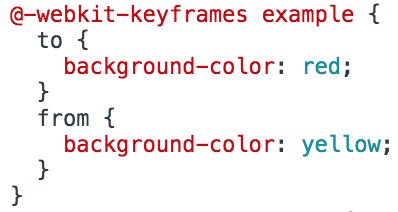
Using the default preset, the keyframes vendor prefix is being generated incorrectly...

The prefix should be...
 jeffal
All 13 comments
what jss-vendor-prefixer version have you got installed?
 kof
on 13 Feb 2018
kof
on 13 Feb 2018
it should be 7.0.0
kof
on 13 Feb 2018
@kof Yes, this is the version installed by jss-preset-default. I was able to recreate this issue using the Calendar example. Modifying jss.js as follows:
// Setup jss plugins.
// import { create } from 'jss'
import { jss } from 'react-jss';
// import extend from 'jss-extend'
// import nested from 'jss-nested'
// import camelCase from 'jss-camel-case'
// import defaultUnit from 'jss-default-unit'
import vendorPrefixer from 'jss-vendor-prefixer'
import preset from 'jss-preset-default'

// const jss = create()
jss.setup(preset())

// jss.use(extend())
// jss.use(nested())
// jss.use(camelCase())
// jss.use(defaultUnit())
// jss.use(vendorPrefixer())

export default jss
The issue appears when using a combination of react-jss and the jss-preset-default. Using a created jss does not result in the added vendor prefixes.
Thank you!
jeffal
on 13 Feb 2018
what is your source code you are using?
kof
on 13 Feb 2018
oh, you prefixed the keyframes manually and got it double prefixed?
kof
on 13 Feb 2018
Here is the source code: https://github.com/cssinjs/examples
I modified jss.js here in order to confirm the issue was not related to my project.
Here is an example of the keyframe styles:
  '@keyframes example': {
    to: {
      background: '#fff'
    },
    from: {
      background: 'pink'
    }
  },
https://codesandbox.io/s/9q244k377p
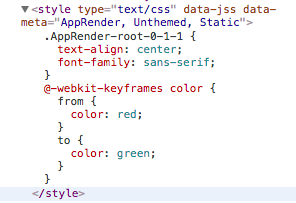
looks correct to me
kof
on 13 Feb 2018
if you use react-jss, you don't need to setup plugins, default preset is already in place
kof
on 13 Feb 2018
Thank you, I did not know this.
Here is an example with default preset that shows the issue:
https://codesandbox.io/s/4wk33xv4r9
I will not use the default preset with react-jss and the issue will be solved!
jeffal
on 13 Feb 2018
your example works correctly and generated css correct
kof
on 13 Feb 2018
Oh I see it when I decomment the preset
kof
on 13 Feb 2018
This applies all plugins second time, not its clear why.
kof
on 13 Feb 2018
Maybe there should be a warning when someone tries to apply plugins twice or more.
kof
on 13 Feb 2018
Related issues
 trusktr
·
6Comments
trusktr
·
6Comments
 mg901
·
3Comments
mg901
·
3Comments
 dan-lee
·
3Comments
dan-lee
·
3Comments
 Telokis
·
3Comments
kof
·
6Comments
Telokis
·
3Comments
kof
·
6Comments
Most helpful comment
if you use react-jss, you don't need to setup plugins, default preset is already in place