ERROR: jsPDF PubSub Error Object doesn't support property or method 'toString' TypeError: Object doesn't support property or method 'toString'.
I have my code
const pdf = new jsPDF('l', 'mm', 'a3');
let base64Str = 'AAEAAAANAIAAAwBQRkZUTXas8jIADxLYAAAAHEdERUYAKR.....';
pdf.addFileToVFS('NotoSansCJKjp-Regular.ttf', base64Str);
pdf.addFont('NotoSansCJKjp-Regular.ttf', 'NotoSansCJKjp', 'normal');
pdf.setFont('NotoSansCJKjp');
pdf.setFontSize(12);
pdf.text('取引報告書及び仮想通貨管理明細簿兼残高報告書', 15, 20);
pdf.save('test.pdf');
base64Str i get in https://raw.githubusercontent.com/sphilee/jsPDF-CustomFonts-support/master/dist/default_vfs.js
please help me
 rstuannm
All 24 comments
I see it error on function pdf.save
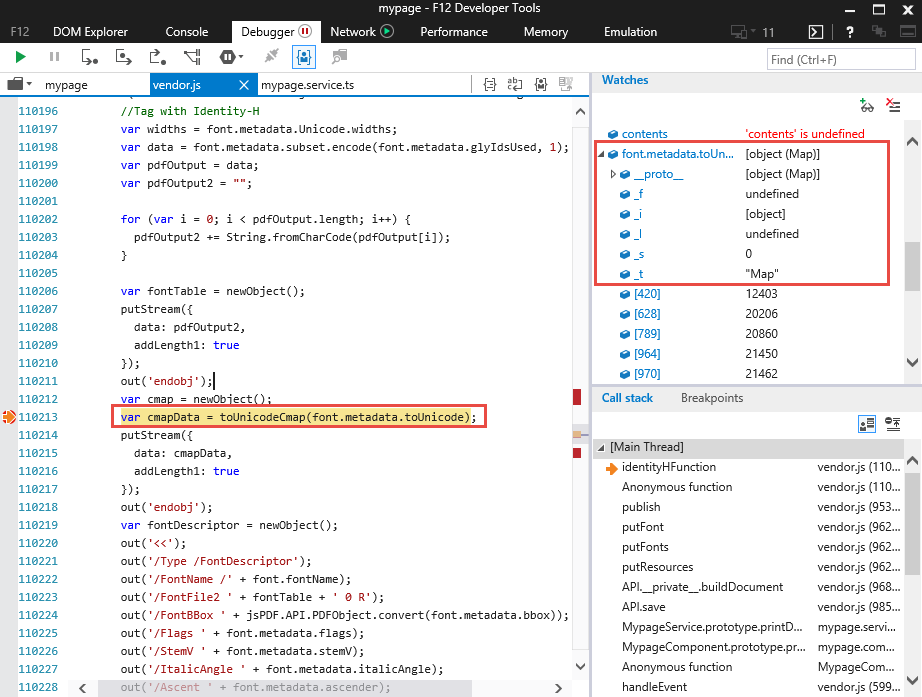
detail is font.metadata.toUnicode in ie have _f,_i,_l,_s,_t. in other brower not have it (_f,_i,_l,_s,_t)
version 1.5.3 is error but version 1.4.1 is ok.
but i must used version 1.5.3 because i used pdf.autotable
How to fix it!
rstuannm
on 23 Feb 2019
https://github.com/MrRio/jsPDF#use-of-utf-8--ttf
 Uzlopak
on 23 Feb 2019
Uzlopak
on 23 Feb 2019
I user it but it same error ERROR: jsPDF PubSub Error Object doesn't support property or method 'toString' TypeError: Object doesn't support property or method 'toString'.

I try used version 1.4.1 it ok. why that version 1.5.3 err? :(
rstuannm
on 23 Feb 2019
please use jspdf.debug.js to give more information
Uzlopak
on 23 Feb 2019
comment number 2
I see it error on function pdf.save
detail is font.metadata.toUnicode in ie have _f,_i,_l,_s,_t. in other brower not have it (_f,_i,_l,_s,_t)
version 1.5.3 is error but version 1.4.1 is ok.
but i must used version 1.5.3 because i used pdf.autotable
I had sent img
rstuannm
on 23 Feb 2019
Check this topic:
https://github.com/MrRio/jsPDF/issues/2259
Maybe it will help you
 krzbor
on 23 Feb 2019
krzbor
on 23 Feb 2019
thanks for support.
May be I will used version 1.4.1 for this isue.
rstuannm
on 24 Feb 2019
If you would supply your code, I could test it locally and provide a solution.
Uzlopak
on 24 Feb 2019
I have identified the root cause of this issue. It is in the function toUnicodeCmap in jsPDF source code. It is looping in the codes array and one of the entries is key "objectOnly". In IE this object is undefined:

The script is then expecting each element to be an actual object:
unicode = ('0000' + **map[code].toString(16)**).slice(-4);
Method .toString(16) will cause that error in IE: jsPDF PubSub Error Object doesn't support property or method 'toString'. Because of this, the further execution is aborted and PDF definition of fonts at the bottom of the file is not valid.
I have fixed the code like this:
if((map[code] != null) && (map[code] != undefined)) {
unicode = ('0000' + map[code].toString(16)).slice(-4);
code = ('0000' + (+code).toString(16)).slice(-4);
range.push("<" + code + "><" + unicode + ">");
}
It will simply check for NULL or UNDEFINED and not continue to the critical section. Now the generated PDF will is exactly the same as the one from Chrome. Before the fix, the file was approx 1KB smaller because of the missing section.
 plodik
on 25 Feb 2019
plodik
on 25 Feb 2019
Can you create a Pullrequest, please?
Uzlopak
on 26 Feb 2019
Expanding on @plodik's comment:
Checking for null and undefined is not enough, some objects apparently don't have the toString method on IE11. I had to add && typeof map[code].toString === "function" to the check in order for it to work properly on IE11.
 HitomiTenshi
on 14 Mar 2019
HitomiTenshi
on 14 Mar 2019
2318 Here's a PR
HitomiTenshi
on 14 Mar 2019
Merged PR
Uzlopak
on 16 Mar 2019
I'm still seeing this issue when installing using npm install git://github.com/MrRio/jsPDF.git#master. Has the fix been merged into the distribution build?
 dangnelson
on 9 Apr 2019
dangnelson
on 9 Apr 2019
In case anyone else comes here, although the fix is applied to master, note that the dist files have not been re-built.
I've forked this project, added the fix to 1.5.3 release (the latest master branch was not stable for me), and updated the dist files. You can use this via:
npm install https://github.com/jdmwood2/jsPDF.git#138a44246e2cf51bee38a66f7d955ee82829b3d5
 jdmwood
on 1 Jul 2019
jdmwood
on 1 Jul 2019
Hi @Uzlopak , I see this issue still exist in 1.5.3 the below code fixes the issue. Can you please commit and release a new version?
if (Number.isInteger(parseInt(code))) {
          unicode = ('0000' + map[code].toString(16)).slice(-4);
          code = ('0000' + (+code).toString(16)).slice(-4);
          range.push("<" + code + "><" + unicode + ">");
      }
 Sravan-Nayini
on 3 May 2020
Sravan-Nayini
on 3 May 2020
I'm still having issues with IE11...I posted about it here: https://stackoverflow.com/questions/62920928/jspdf-issues-with-producing-pdf-and-using-custom-fonts-in-ie11
@Sravan-Nayini Would that code help resolve the problem I'm having? If so, where might I add it? I'm currently using the hosted library via the CDN link.
 devlinpeck
on 15 Jul 2020
devlinpeck
on 15 Jul 2020
Could you test it with the files in PR #2804 (you need to run npm run build first)? It should be fixed there. If not, we should fix it.
 HackbrettXXX
on 16 Jul 2020
HackbrettXXX
on 16 Jul 2020
@HackbrettXXX I'm kind of a noob when it comes to GitHub and things. I haven't been using npm to do any of this work...just an HTML package. Can you please point me in the right direction to get the files from the pull request you linked and use them in my project? Sorry if this is not a good question.
devlinpeck
on 16 Jul 2020
Ok, lets make it easy. I have a prebuilt version on my fork. You can include these script tags in your HTML file:
<script src="https://raw.githubusercontent.com/HackbrettXXX/jsPDF/prebuilt/dist/polyfills.umd.js"></script>
<script src="https://raw.githubusercontent.com/HackbrettXXX/jsPDF/prebuilt/dist/jspdf.umd.js"></script>
Then run your test case. Note that the jsPDF constructor is now under window.jspdf.jsPDF.
HackbrettXXX
on 16 Jul 2020
@HackbrettXXX Thank you for trying to help me here. I included those scripts. When I used only those scripts, I was unable to generate the PDF at all. I used "var doc = new window.jspdf.jsPDF({..." like you suggested, but still no luck. The console error is "Cannot read property 'jsPDF' of undefined."
I also tried using your scripts in addition to the main script, but still no luck.
Thanks again for taking the time to help me with this!
devlinpeck
on 16 Jul 2020
Ah sorry, forgot that scripts could not be loaded directly from GitHub. Instead, just download the two files and include them in your script tags.
HackbrettXXX
on 16 Jul 2020
@HackbrettXXX Thanks! I downloaded the files and included them in my index file. It let me generate the PDF on Chrome (but the custom fonts didn't work), and I got the "Object doesn't support this action" error in IE11 (no PDF generated).
devlinpeck
on 16 Jul 2020
Ah, yes the font-converter is not yet up-to-date. I quickly updated it: https://raw.githubusercontent.com/HackbrettXXX/jsPDF/modernization/fontconverter/fontconverter.html
Generate your font file again and make sure you choose "UMD" as module format.
HackbrettXXX
on 21 Jul 2020
Related issues
 Balaji-Gopal
·
59Comments
Balaji-Gopal
·
59Comments
 ankur2728
·
28Comments
ankur2728
·
28Comments
 shkuropat
·
166Comments
shkuropat
·
166Comments
 Asturias-sam
·
27Comments
Asturias-sam
·
27Comments
 eKoopmans
·
68Comments
eKoopmans
·
68Comments
Most helpful comment
I have identified the root cause of this issue. It is in the function toUnicodeCmap in jsPDF source code. It is looping in the codes array and one of the entries is key "objectOnly". In IE this object is undefined:
The script is then expecting each element to be an actual object:
unicode = ('0000' + **map[code].toString(16)**).slice(-4);Method .toString(16) will cause that error in IE: jsPDF PubSub Error Object doesn't support property or method 'toString'. Because of this, the further execution is aborted and PDF definition of fonts at the bottom of the file is not valid.
I have fixed the code like this:
if((map[code] != null) && (map[code] != undefined)) {unicode = ('0000' + map[code].toString(16)).slice(-4);code = ('0000' + (+code).toString(16)).slice(-4);range.push("<" + code + "><" + unicode + ">");}It will simply check for NULL or UNDEFINED and not continue to the critical section. Now the generated PDF will is exactly the same as the one from Chrome. Before the fix, the file was approx 1KB smaller because of the missing section.