Is it posible to use non-latin (e.g. cyrillin) characters?
 shkuropat
All 166 comments
As of June 2012 jsPDF still does not support the version of Unicode (UCS-2 BE / UTF16 BE) PDF format allows. This means, that almost all characters outside of ASCII are pretty much broken. There are plans to add support for UCS-2 streams to jsPDF, maybe somewhere over this summer - 2012. It's a lot of work.
 dvdotsenko
on 20 Jun 2012
dvdotsenko
on 20 Jun 2012
Nowhere at this time. It's still too much work. Unicode will not be here until code is added to support embedding (and subsetting) unicode fonts within PDF. That alone is a gargantuan task and a logistics issue since it involves pulling binary blobs into browser and it inflates the size of PDF.
Unless someone with a skill really needs this, or some party is willing to sponsor this move, it's unlikely to happen naturally.
dvdotsenko
on 3 Dec 2012
Ok. It would be good to have support for UTF-8. I'll have to find some alternative. Thanks!
 sguzgon
on 3 Dec 2012
sguzgon
on 3 Dec 2012
Dear Dvdotsenko :
How about the UTF8 support now? I also failed to show Chinese with jspdf . Jspdf is such a good tool , it's so pity. So could u give me some suggestions how to solve this issue?
Thanks in advance
jessie
 bluebluesky
on 12 Mar 2013
bluebluesky
on 12 Mar 2013
any news about Unicode support? jsPDF is really fantastic tool but without Unicode support it's extremely limited...
 zeligmanos
on 4 Jun 2013
zeligmanos
on 4 Jun 2013
@dvdotsenko when you say 'almost' all characters, would that include UL list items like a disc? This seems like the most basic character requirement which i cannot get with ASCII encoding. All bullets get stripped out of the PDF when using the fronHtml method. Is there any kind of work around to include this character?
 Mulegoat
on 27 Aug 2013
Mulegoat
on 27 Aug 2013
What about Cp1250 ? Is there any chance to support?
 kingdom91
on 11 Sep 2013
kingdom91
on 11 Sep 2013
Unfortunately can not use for production without UTF-8 support
 deedarb
on 5 Mar 2014
deedarb
on 5 Mar 2014
When it could be supported ? . utf-8 support is needed desperately.
 PrakashInn
on 5 Mar 2014
PrakashInn
on 5 Mar 2014
I was so sure about utf-8 support...I didn't check and I started using the library. Damn.
 albinotonnina
on 10 Mar 2014
albinotonnina
on 10 Mar 2014
strange, had utf-8 support on my prototype, but its gone as soon I use it on production ..
Is there are any plugin or lib I forgot to include?
 defel
on 10 Mar 2014
defel
on 10 Mar 2014
There's a fair few characters that appear to work. Full unicode support
isn't in there though. It's something that we're working on.
ᐧ
On Mon, Mar 10, 2014 at 5:47 PM, defel [email protected] wrote:
strange, had utf-8 support on my prototype, but its gone as soon I use it
on production ..Is there are any plugin or lib I forgot to include?
—
Reply to this email directly or view it on GitHubhttps://github.com/MrRio/jsPDF/issues/12#issuecomment-37211898
.
James Hall
Director
Parallax
+44 113 322 6477
http://parall.ax/
Registered office: The Old Brewery, High Court, Leeds, LS2 7ES
Registered in England no. 07430032
VAT No. 101 3405 84
 MrRio
on 10 Mar 2014
MrRio
on 10 Mar 2014
Ok, I forgot to include the file jspdf.plugin.standard_fonts_metrics.js .. everything works again as in my prototype
defel
on 10 Mar 2014
@defel Can you post a code snippet how do you create documents with utf-8 support?
 legikaloz
on 19 Mar 2014
legikaloz
on 19 Mar 2014
@defel I wonder how you made UTF-8 working by including jspdf.plugin.standard_fonts_metrics.js too. It does not work for me with "ěščřžýáíé". (result is the same as without that plugin: "šYžýáíé")
 luciash
on 18 Apr 2014
luciash
on 18 Apr 2014
@luciash as @MrRio wrote, there is no thing like UTF-8 support in jsPDF. But some basic unicode characters work, like ü or ².
defel
on 22 Apr 2014
Ok, so no UTF-8 support, but please mention this on the jsPDF site, so we don't waste our time developing on something that is not going to work!
 dave-watts
on 17 Jul 2014
dave-watts
on 17 Jul 2014
Hey guys ... so as a result of the discussion above ... is there any chance that this will be implemented somehow and when could this happen?
 D3CK3R
on 17 Jul 2014
D3CK3R
on 17 Jul 2014
I think one can safely assume this is never going to happen, and finding an alternative library is the best course of action. The maintainers clearly simply don't care about it (which is usually an indication the project is no longer used by those maintaining it, and it's time to fork it if you do need to use it, and need its functionality extended)[
 Pomax
on 30 Jul 2014
Pomax
on 30 Jul 2014
@Pomax do it, fork it, implement UTF-8 support - everyone here would be happy to see this feature .. maybe you can also submit a pull-request then?
defel
on 30 Jul 2014
@defel if I had time I would, I'm just posting here in behalf of someone who just wanted to use this project and came away with it angry (I'm involved in too many projects as is to take on a fork of a project I don't personally use either. I'd be supporting it just as much as it currently is, no one wants that)
Pomax
on 30 Jul 2014
@luciash have you tested pdfmake with kanji for example and e unicode font?
D3CK3R
on 3 Aug 2014
@D3CK3R nope, i tested just my own language... you can test it. i declare it your homework ;-)
luciash
on 5 Aug 2014
Workaround:
-canvas context drawing supports unicode
-ctx.fillText("Hello WorldDDDDüß!",10,50); works
-use canvas2image (very small js library)
-draw image to pdf
You would be able to put it all in a simple function and voila.
It's a win if you only plan to use the pdf file for printing
As for viewing the pdf file you loose the option of selecting the text(copy, paste etc...)
 Drtikso
on 11 Aug 2014
Drtikso
on 11 Aug 2014
@bluebluby If you are fine with that approach, you don't need any third part library such as canvas2image, just pass the canvas element to the addImage() function. Or if you're dealing with HTML use the addHTML plugin instead of fromHTML (check out the live demo with Chinese characters there)
 diegocr
on 11 Aug 2014
diegocr
on 11 Aug 2014
I tried to do this (modified the DOM in the browser console to add an id to text)
 <p id="chinese">十五向學,三十而立,四十而不惑,五十而知天命,六十而耳順,七十而從心欲,不踰矩.</p>

 var pdf = new jsPDF('p','pt','a4');

  pdf.addHTML(document.getElementById('chinese'),function() {
   var string = pdf.output('datauristring');
   $('.preview-pane').attr('src', string);
 });
Didn't work, for some reasons the text is dark gray on a black background!?
This could be a good solution in theory as you can use javascript to add and remove elements to the DOM
dave-watts
on 11 Aug 2014
Thanks for the suggestion ... i thought that we already tried this. The problem was that the text was unsharp when rendered with canvas. Any ideas how to fix this?
D3CK3R
on 11 Aug 2014
I have been working with jsPDF for a few weeks now. It has support for very basic 'special' characters, such as 'µ, º' and a few others, but characters like 'σ' and 'α' get rewritten to odd characters, when copying them from the document to here, they show up as the correct characters, but in the pdf, they are some odd replacement. When this replacement occurs, in firefox, the entire line gets a square with 4 dots inside between each letter, and chrome puts a space between each letter. The only way I can think to work around this is to look at the string before it is passed to jsPDF and convert that character to something it understands.
Here is an image of what firefox spits out, If i knew the Unicode for that thing, I could strip it out.
 sharkhat
on 11 Aug 2014
sharkhat
on 11 Aug 2014
To me it looks good enough:

In any case, if there's some issue while using html2canvas we can also use rasterizeHTML instead, check the addHTML source for further details and choose whatever works best for you all.
@sharkhat fwiw, see #320
diegocr
on 12 Aug 2014
@diegocr Thanks, I was unable to strip out the spaces, i have been able to look for certain chars that cause the error, σ,⁺,², etc. but it is pretty unfeasable to make a case for every char that may be used. I am now attempting to copy the new addHTML. Is It necessary to use an iFrame? I believe that is what 'preview-pane' is. I am having trouble getting output like the demo.
sharkhat
on 12 Aug 2014
@diegocr if you do the entire html page as pdf using addHTML it works ok, but just try it with a single element, like my example (this is what's needed to facilitate UTF8 Support) and for some reason the text is on a dark background.
dave-watts
on 13 Aug 2014
@sharkhat This might helps: https://github.com/ashtuchkin/iconv-lite
As for the iframe thing, no, it isn't needed - that's used in our demo page to show these live examples.
@dave-watts Have you tried applying some CSS to the element(s)? for example:
<div style="background:#fff;color:#000">三十而立,四十而</div>
Other than that, check the html2canvas help since it allows passing a background option iirc.
diegocr
on 13 Aug 2014
@diegocr just to let people know, doing the style modification solves the problem
dave-watts
on 19 Aug 2014
So, has anybody figured out a good, reasonably simple way to make Unicode text appear properly in a PDF? addHTML (at least for me) has been very finicky and doesn't want to work with iframes. I can render onto a canvas and then render onto the PDF, but the text looks pretty fuzzy and I have to redo all my alignments.
Right now, I have a site: http://www.twoevils.org/html/mtg/decklist/
That more-or-less just takes typed in fields and puts them into a nice PDF, with preview. Is there really no way to pass text into addText(), keeping existing coordinates, while maintaining what was typed in? Or am I just crazy for not being able to figure it out?
 april
on 29 Aug 2014
april
on 29 Aug 2014
For all of you having problems with special characters, on the webpage (http://mrrio.github.io/jsPDF/#) there is a download link for the project in which this issue is solved (at least for what I tested with Portuguese and German).
 vcasadei
on 9 Oct 2014
vcasadei
on 9 Oct 2014
I also tried to fully support unicode so that people around the world with all kind of characters could use the PDF export I'm developing. I had a closer look at pdfmake which supports embedding of (unicode) fonts. And here is the problem: a font with all unicode characters like "Arial Unicode.ttf" has a size of 23 MB! Smaller fonts don't contain all character subsets. I also realized how intelligent text processing software handles missing characters in fonts. When you use a font which doesn't contain the characters of your text, text processing software automatically uses other fonts for those characters. This intelligence has also to be developed, and I guess that's a lot of work, also for pdfmake.
 bjoerne2
on 12 Nov 2014
bjoerne2
on 12 Nov 2014
That's not an actually real problem for properly built PDF exporters/builders, because you subset the font before you add it to the PDF file. When you compile the PDF, you check which codepoints are actually used for each font, build a new copy of that font with a much smaller cmap capturing only the used points (doing the same for things like GPOS/GSUB if your PDF builder is excellent) and then you bundle the font with all the unused codepoints thrown away, and the glyph outlines pruned to only those actually needed. You don't include the full font with the PDF, that would be madness =)
Pomax
on 12 Nov 2014
You're right. I had in mind that a 32 MB file has to be loaded over the internet. I use jsPDF in the browser.
bjoerne2
on 13 Nov 2014
@vcasadei : are you referring to the addHTML approach or to something else?
i only need french chars in my pdf, but i've been struggling with this for hours. I tried several suggestions:
- include jspdf.plugin.standard_fonts_metrics.js.
- change encoding in jspdf.js from StandardEncoding to WinAnsiEncoding
without any succes.
anyone a solution and precise instructions for this limited usecase?
 dirkooms
on 19 Nov 2014
dirkooms
on 19 Nov 2014
@dirkooms I was having these problems with Portuguese, as we use almost the same special characters. I tried several things until I reached the site https://parall.ax/products/jspdf and there I downloaded the jspdf plugin and the special characters worked.
You need to fill a small form to download, but after that, everything works fine. I don't know why or what the problem with the github version is, but this other project worked for me.
vcasadei
on 19 Nov 2014
The European special characters work fine with jspdf, however there are problems with character sets such as Japanese
dave-watts
on 19 Nov 2014
thanks for stating this clear. it works indeed and in my case it went wrong when i was writing the pdf document to the filesystem (using the phonegap file api). the writing was fixed by doing the following:
    var pdfOutput = pdfDoc.output();

    var pdfOutput2 = new Uint8Array(new ArrayBuffer(pdfOutput.length));
    for ( var i = 0; i < pdfOutput.length; i++) {
        pdfOutput2[i] = pdfOutput.charCodeAt(i);
    }

    writer.write(pdfOutput2.buffer);
Also for turkish characters like ığşöç. It is really important to support the these turkish characters
 zek
on 29 Nov 2014
zek
on 29 Nov 2014
fontmetrics
how we can do this code ?? for our fonts
'Helvetica-Oblique': uncompress("{'widths'{k3p2q4mcx1w201n3r201o6o201s1q201t1q201u1q201w2l201x2l201y2l2k1w2l1w202m2n2n3r2o3r2p5t202q6o2r1n2s2l2t2l2u2r2v3u2w1w2x2l2y1w2z1w3k3r3l3r3m3r3n3r3o3r3p3r3q3r3r3r3s3r203t2l203u2l3v1w3w3u3x3u3y3u3z3r4k6p4l4m4m4m4n4s4o4s4p4m4q3x4r4y4s4s4t1w4u3m4v4m4w3r4x5n4y4s4z4y5k4m5l4y5m4s5n4m5o3x5p4s5q4m5r5y5s4m5t4m5u3x5v1w5w1w5x1w5y2z5z3r6k2l6l3r6m3r6n3m6o3r6p3r6q1w6r3r6s3r6t1q6u1q6v3m6w1q6x5n6y3r6z3r7k3r7l3r7m2l7n3m7o1w7p3r7q3m7r4s7s3m7t3m7u3m7v2l7w1u7x2l7y3u202l3rcl4mal2lam3ran3rao3rap3rar3ras2lat4tau2pav3raw3uay4taz2lbk2sbl3u'fof'6obo2lbp3rbr1wbs2lbu2obv3rbz3xck4m202k3rcm4mcn4mco4mcp4mcq6ocr4scs4mct4mcu4mcv4mcw1w2m2ncy1wcz1wdl4sdm4ydn4ydo4ydp4ydq4yds4ydt4sdu4sdv4sdw4sdz3xek3rel3rem3ren3reo3rep3req5ter3mes3ret3reu3rev3rew1wex1wey1wez1wfl3rfm3rfn3rfo3rfp3rfq3rfr3ufs3xft3rfu3rfv3rfw3rfz3m203k6o212m6o2dw2l2cq2l3t3r3u1w17s4m19m3r}'kerning'{5q{4wv}cl{4qs5kw5ow5qs17sv5tv}201t{2wu4w1k2yu}201x{2wu4wy2yu}17s{2ktclucmucnu4otcpu4lu4wycoucku}2w{7qs4qz5k1m17sy5ow5qx5rsfsu5ty7tufzu}2x{17sy5ty5oy5qs}2y{7qs4qz5k1m17sy5ow5qx5rsfsu5ty7tufzu}'fof'-6o7p{17sv5tv5ow}ck{4qs5kw5ow5qs17sv5tv}4l{4qs5kw5ow5qs17sv5tv}cm{4qs5kw5ow5qs17sv5tv}cn{4qs5kw5ow5qs17sv5tv}co{4qs5kw5ow5qs17sv5tv}cp{4qs5kw5ow5qs17sv5tv}6l{17sy5ty5ow}do{17st5tt}4z{17st5tt}7s{fst}dm{17st5tt}dn{17st5tt}5o{ckwclwcmwcnwcowcpw4lw4wv}dp{17st5tt}dq{17st5tt}7t{5ow}ds{17st5tt}5t{2ktclucmucnu4otcpu4lu4wycoucku}fu{17sv5tv5ow}6p{17sy5ty5ow5qs}ek{17sy5ty5ow}el{17sy5ty5ow}em{17sy5ty5ow}en{5ty}eo{17sy5ty5ow}ep{17sy5ty5ow}es{17sy5ty5qs}et{17sy5ty5ow5qs}eu{17sy5ty5ow5qs}ev{17sy5ty5ow5qs}6z{17sy5ty5ow5qs}fm{17sy5ty5ow5qs}fn{17sy5ty5ow5qs}fo{17sy5ty5ow5qs}fp{17sy5ty5qs}fq{17sy5ty5ow5qs}7r{5ow}fs{17sy5ty5ow5qs}ft{17sv5tv5ow}7m{5ow}fv{17sv5tv5ow}fw{17sv5tv5ow}}}"
 erdogankaya
on 10 Dec 2014
erdogankaya
on 10 Dec 2014
hi, so has another else actually got those characters outside the 255 range to work? I am trying to get the character "ē" to show up in the PDF, but it doesn't work, the decimal code for it is 275.. thx
 vtecman
on 27 Jan 2015
vtecman
on 27 Jan 2015
addHtml works for me with chinese,but as @D3CK3R said,the text was unsharp.
 JohnnieFucker
on 3 Feb 2015
JohnnieFucker
on 3 Feb 2015
thanks.. but addhtml is using canvas which is not an option for me, had gone with pdfmake now... ...
vtecman
on 3 Feb 2015
still be struggled by this bug..........would anyone has good ideas?
 justein
on 3 Jul 2015
justein
on 3 Jul 2015
Any ideas for maybe bullet points? Importing text from an excel file, which have bullet points. However that does not display correctly on jspdf output.
 donatsu
on 15 Jul 2015
donatsu
on 15 Jul 2015
Finally I give up this solution and then implements it by this way: generate table in backend by iText and capture the graph use html2png then upload them onto web server and wrap the graph with the table list ,and it comes to and pdf file .
justein
on 16 Jul 2015
At least on OS/X I seem to be able to use unicode characters like '†', though 'u2020' doesn't work.
 defmacro-jam
on 26 Aug 2015
defmacro-jam
on 26 Aug 2015
I am still struggling to get the Arabic string, any solution???
 itsmohdabrar
on 16 Oct 2015
itsmohdabrar
on 16 Oct 2015
Yes. But I had to do it by converting the unicode to jpeg using imagemagick -- and then inserting the jpeg into the document.
defmacro-jam
on 16 Oct 2015
Glad, hopefully @defmacro-jam will try to finish this soon!!
itsmohdabrar
on 26 Oct 2015
For those who had issues trying to make special french (standard) characters like é, € à... no need to try encoding or convert to image.
Just specify
...
meta http-equiv="content-type" content="text/html; charset=utf-8" />....
in the header of your source code.
:)
 ncwilly
on 28 Oct 2015
ncwilly
on 28 Oct 2015
May I add a pull request to add a little UTF-8 support here by adding canvas drawing font here?
 alantangyl
on 15 Dec 2015
alantangyl
on 15 Dec 2015
Guys, if you are stuck like me, with utf-8 render, I highly recommend
PDFKit, which is reported to allow you to proper place your texts with coordinates, or
PDFMake, which renders UTF-8 characters properly, but doesn't allow you to position text, except for styling it with margins.
Otherwise, stick with the canvas idea.
 Hiyorimi
on 27 Apr 2016
Hiyorimi
on 27 Apr 2016
Is it still without support UTF-8? :(

 spokospace
on 14 Jun 2016
spokospace
on 14 Jun 2016
I hope one day to see UTF-8 support too...
 ArmorDarks
on 25 Jun 2016
ArmorDarks
on 25 Jun 2016
@sharkhat Did you or anyone managed to fix the weird spacing after a troubling char is added?
 hlatorreg
on 11 Jul 2016
hlatorreg
on 11 Jul 2016
As I used this in production and requirements got changed, so had to find work around. Its a bit long and has some performance draw back, but for generating reports users usually expect to wait for a while until the report is generated.
Am assigning the unsupported text to a div element in my page, then use the Dom to Image library to convert that element into a blob object which i can use it later to generate an image and then add it to the PDF document after assigning the x ,y and dimensions
//render_me is a div holds the unsupported text (turkish - arabic)
var doc = new jsPDF();
domtoimage.toBlob(document.getElementById('render_me')).then(function(blob) {
    var urlCreator = window.URL || window.webkitURL;
    var imageUrl = urlCreator.createObjectURL(blob);
    var img = new Image();
    img.src = imageUrl;
    img.onload = function() {
        doc.addImage(img, 'JPEG', 75, 23, 0, 5);
    };
});
Hope this is useful to anyone until we get a release with clean implementation
 amgadfahmi
on 3 Oct 2016
amgadfahmi
on 3 Oct 2016
Is anybody resolve UTF8 problem?
 mehmetalidumlu
on 9 Nov 2016
mehmetalidumlu
on 9 Nov 2016
no...
 wushuang5112
on 6 Dec 2016
wushuang5112
on 6 Dec 2016
 sphilee
on 22 Jan 2017
sphilee
on 22 Jan 2017
still we have utf-8 problem?
 b3l4tr1x
on 4 May 2017
b3l4tr1x
on 4 May 2017
I'm experiencing this utf-8 problem as well, but switching to another lib can't solve the whole issue for me. I need to somehow try to recover mangled characters from pdf output. E.g qwertzuiopšđ12' gets converted to þÿqwertzuiopa 12' in pdf output due to this issue. Is there an algorithm I could use to recover the initial string from the distorted pdf output? How can I build a map of unsupported characters and the characters they get converted into in the pdf output?
 you-fail-me
on 20 Jun 2017
you-fail-me
on 20 Jun 2017
Works only this:
https://github.com/sphilee/jsPDF-CustomFonts-support
 Kerinski
on 22 Jun 2017
Kerinski
on 22 Jun 2017
Or, alternatively: this bug was filed in 2012, people are still having issues in 2017, the author has not responded since 2014, so find a different library.
Five years is a long time to maintain a project on your own, I'm pretty sure @MrRio moved on to something new years ago and today spends his time on his consultancy company rather than working for free on this library =)
If @sphilee is working towards fixing this in his/her own fork, then you probably want to help them get that work done and use that instead, and maybe in some unlikely event that the code was made in a way that can be contributed back to this project, it can be filed as an upstream PR to fix jsPDF.
Pomax
on 28 Jun 2017
Arabic/Urdu font still not supported? If any one customize this pls share some thought.
 saurabhgis
on 31 Jul 2017
saurabhgis
on 31 Jul 2017
Witch library we have to use?
2017-07-31 13:41 GMT+03:00 Saurabh Upadhyaya notifications@github.com:
Arabic/Urdu font still not supported? If any one customize this pls share
some thought.—
You are receiving this because you commented.
Reply to this email directly, view it on GitHub
https://github.com/MrRio/jsPDF/issues/12#issuecomment-319032404, or mute
the thread
https://github.com/notifications/unsubscribe-auth/AHx3xxGqnUiR3gIOWeQz6Ra_FkIw3RpWks5sTa9bgaJpZM4ACaiY
.
b3l4tr1x
on 31 Jul 2017
https://github.com/b3l4tr1x, Still I am searching to convert arabic text into pdf but not able to find perfect solution. initially we convert text into canvas and add canvas into pdf but quality is very poor.
saurabhgis
on 31 Jul 2017
Friends, Pls suggest us good library/js/dll to convert arabic text into pdf. As I have seen jspdf will not provide arabic font support. @sphilee You have tried custom font support but your code not supported for arabic text. Pls check how to support RTL.
saurabhgis
on 31 Jul 2017
I have problem with utf-8 :(
2017-07-31 15:17 GMT+03:00 Saurabh Upadhyaya notifications@github.com:
Friends, Pls suggest us good library/js/dll to convert arabic text into
pdf. As I have seen jspdf will not provide arabic font support. @sphilee
https://github.com/sphilee You have tried custom font support but your
code not supported for arabic text. Pls check how to support RTL.—
You are receiving this because you commented.
Reply to this email directly, view it on GitHub
https://github.com/MrRio/jsPDF/issues/12#issuecomment-319050665, or mute
the thread
https://github.com/notifications/unsubscribe-auth/AHx3x6xhFj_snMsjZd1kVHLAQkyt40Wbks5sTcXBgaJpZM4ACaiY
.
b3l4tr1x
on 31 Jul 2017
@saurabhgis
Sorry for my english.
- To support arabic text, you need get some arabic font file: ArabicFont.ttf
- Open https://www.giftofspeed.com/base64-encoder/
Upload your font-file ArabicFont.ttf
Download jspdf library from https://github.com/sphilee/jsPDF-CustomFonts-support
- Upload library to your server
- Open file vfs_fonts.js from this library
- Delete all content in vfs_fonts.js file
- Add strings in vfs_fonts.js. Something like:
function getVfs(){ return { "ARABICFONT.TTF": "AAEAAAAPADAA..... your code from https://www.giftofspeed.com/base64-encoder/ .......DTFRFh6mKAAAelAAAAD" } } - include library files to your web-page:
<script language="javascript" type="text/javascript" src="/jsPDF/jspdf.js"></script><script language="javascript" type="text/javascript" src="/jsPDF/plugins/autoprint.js"></script><script language="javascript" type="text/javascript" src="/js/jsPDF/plugins/addimage.js"></script><script language="javascript" type="text/javascript" src="/jsPDF/customfonts.js"></script><script language="javascript" type="text/javascript" src="/jsPDF/vfs_fonts.js"></script> - USAGE:
var doc = new jsPDF("landscape", "mm", "a4");
doc.addFont('ARABICFONT.TTF', 'ARABIC', 'normal', 'Identity-H');
doc.setFont("ARABIC");
doc.drawText(10, 10, "Your arabic string");
Kerinski
on 1 Aug 2017
@Kerinski Thanks for sharing step by step process.
I have applied all steps but my output is not in correct format{ Font issues, RTL Issue, ) pls check attach code.
01082017.zip
saurabhgis
on 1 Aug 2017
For large text its output changed.
saurabhgis
on 1 Aug 2017

saurabhgis
on 1 Aug 2017
var splitText = doc.splitTextToSize("large text string", 50);
for (var i = 0; i < splitText.length; i++) {
    doc.drawText(10, 10, splitText[i]);
}
Kerinski
on 1 Aug 2017
I have applied your approach to split text size but output not correct.
saurabhgis
on 1 Aug 2017
I am not able to know why font changed, is some mistake in creating font. request to chk VFS Font files and generate at your end.
saurabhgis
on 1 Aug 2017

saurabhgis
on 1 Aug 2017
Can you split your large text without "splitTextToSize" function?
Kerinski
on 1 Aug 2017
I tried with small text without splitTextToSize function, but text not displayed correctly
saurabhgis
on 1 Aug 2017
I am not able to understand why font RTL & Size is not supported correctly??
saurabhgis
on 1 Aug 2017
Thanks for help us.
I have already applied this code, with this code we can change text orienttation from Right to Left, but as you know in word makes from 5-8 chars, and during char position change word will not make and has no idea where word complete and where space bcoz arabic dictonary is not available.
saurabhgis
on 1 Aug 2017
Hey guys any news about UTF8 Encoding ???
 Hospes
on 18 Aug 2017
Hospes
on 18 Aug 2017
@MrRio Up !!
 hackondor
on 18 Aug 2017
hackondor
on 18 Aug 2017
any update on arabic/urdu font suport in JSPDF
saurabhgis
on 29 Aug 2017
有一个方法,先将html渲染成canvas,再输出pdf文件
There is a way. Render the HTML into a canvas and then output the PDF file.
html2canvas(yourdom, {
       onrendered: function(canvas) {
                    let imgData = canvas.toDataURL('image/jpeg');
                    //初始化pdf,设置相应格式 format
                    let doc = new jsPDF("p", "pt", "a4");
                   // 设置大小等 size
                    doc.addImage(imgData, 'JPEG', 0, 0,210,297);

                    doc.save('example.pdf');
                }
            });
 seminelee
on 31 Aug 2017
seminelee
on 31 Aug 2017
This is now working in a PR. Looking to get it merged soon
MrRio
on 2 Sep 2017
Hi @MrRio,
on which PR is possible to see the changes?
Thanks
Edit:
This is the link
 gpietro
on 5 Sep 2017
gpietro
on 5 Sep 2017
@MrRio I have already tried this approach (convert arabic text into image canvas; and add image into PDF) but text is blurred. text quality is not good. Pls try to provide support in jsPDF.
saurabhgis
on 11 Sep 2017
@saurabhgis
The solution is not using canvas. it is really using UTF-8.
I try to refactor the code. But if you cant wait to implement arabic, you could look at my arabic "converter"
you can see that it is working, but you have to convert the arabic text first to unicode symbols and not just push it through the drawText Function:
https://github.com/MrRio/jsPDF/pull/1398#issuecomment-328226653
https://github.com/arasabbasi/jsPDF/blob/refactor_to_flexibility/functions/arabic.js
 Uzlopak
on 11 Sep 2017
Uzlopak
on 11 Sep 2017
refactored the my arabic parser, made it more readable and fixed the arabic letter connection capability
I took the unicode tables from tcpdf-project

Still needs some adjustments because some arabic special chars are not shown properly, like الله, which will be written by normal letters.

Uzlopak
on 11 Sep 2017
@saurabhgis
Check yourself the generated pdf:
custom_fonts (29).pdf
Uzlopak
on 11 Sep 2017
A proof-of-concept has been merged into feature/custom-fonts – we'll be tidying this up and getting proper documentation together over the next month.
MrRio
on 12 Sep 2017
@MrRio can you give a tip on how to use feature/custom-fonts?
 cordovapolymer
on 10 Oct 2017
cordovapolymer
on 10 Oct 2017
现在支持utf-8了吗? @MrRio
 zengxiaoluan
on 25 Oct 2017
zengxiaoluan
on 25 Oct 2017
nani?
Uzlopak
on 25 Oct 2017
Is it somehow possible to print the command symbol?
 steffi80
on 26 Oct 2017
steffi80
on 26 Oct 2017
The what?
Uzlopak
on 26 Oct 2017
⌘ The command key symbol (apple keyboard)
steffi80
on 26 Oct 2017
const doc = new jsPDF();
doc.setFont("ZapfDingbats", "");
doc.text("D", 10,10);
doc.save("CommandKey.pdf");
Ah wait, it is not the Command Key... looks different.
Uzlopak
on 26 Oct 2017
This problem is solved ?
 oqq5518
on 28 Nov 2017
oqq5518
on 28 Nov 2017
There are solutions but not merged yet
Uzlopak
on 28 Nov 2017
Maybe I'm not understanding this. I'm trying to use Japanese, and can't seem to get it to work. Any advice would be great.
 jaredswenson
on 28 Nov 2017
jaredswenson
on 28 Nov 2017
Use one of the custom fonts pull requests
Uzlopak
on 28 Nov 2017
Okay, and what if I want to be able to do multiple languages?
jaredswenson
on 28 Nov 2017
Well if your font supports them, then no problem.
Uzlopak
on 28 Nov 2017
通过canvas可以支持utf-8。
https://www.snip2code.com/Snippet/585203/jsPDF-Chinese-printing-hack-using-a-squa/
`var doc = new jsPDF();
/**
- Settings required for doc.chtext function.
- Set background and foreground colors and default font size.
*/
doc.chsetup = {
background: "#fff",
foreground: "#000",
fontsize: 10
};
/**
- Prints a line of non-ASCII text as a series of images.
- @param {Number} x Horizontal displacement
- @param {Number} y Vertical displacement
- @param {String} ch_string Non-ASCII string to add as an image
- @param {Number} fontsize Similar sizing as doc.setFontSize()
/
doc.chtext = function(x, y, ch_string, fontsize) {
if(typeof ch_string !== 'string'){
ch_string = String(ch_string);
}
if (doc.chsetup.ctx === undefined) {
doc.chsetup.canvas = document.createElement('canvas');
doc.chsetup.canvas.width = '150'; // Height default is 150
doc.chsetup.ctx = doc.chsetup.canvas.getContext('2d');
doc.chsetup.ctx.font = "bold 150px PMingLiU";
}
var ctx = doc.chsetup.ctx,
char = null,
xi = x,
size = 150,
scale = (fontsize || doc.chsetup.fontsize) / 450;
for (var i=0; i
ctx.fillRect(0,0,size,size); // Clear content
ctx.fillStyle = doc.chsetup.foreground;
ctx.fillText(ch_string.charAt(i), 0, 120); // Draw character
char = doc.chsetup.canvas.toDataURL("image/jpeg", 1.0); // 1.0 highest quality
doc.addImage(char, 'JPEG', xi, y-sizescale.9, sizescale, sizescale);
xi = xi + ctx.measureText(ch_string.charAt(i)).widthscale*1.1; // 1.1 for a little extra space
}
};`
 Qcc
on 8 Dec 2017
Qcc
on 8 Dec 2017
waiting , ...
@arasabbasi could you please add some jsfiddle link with your function to utf-8 html2pdf ?
 sayjeyhi
on 9 Dec 2017
sayjeyhi
on 9 Dec 2017
Guys sorry to continue this long thread...
I am having troubles with turkish font, making the library not actually usable.
The turkish characters ö - ü - ç are supported
While ğ - ş - ıare not
This is what happen if I print this chars: ŞşIıÜüĞğÖöÇç
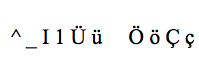
Despite that I am using the font AbhayaLibre that support turkish chars.
doc.setFont('AbhayaLibre')
Can I ask what is the situation with utf8 supporting as january 2018?
There is some unofficial workaround that can fix this problem?
Thanks!
 FrancescoMussi
on 18 Jan 2018
FrancescoMussi
on 18 Jan 2018
Reopened this issue, because still active.
Uzlopak
on 15 Feb 2018
Hi guys is there any support for creating a checkmark/sign in jspdf?
 thekingspaghettie
on 22 Feb 2018
thekingspaghettie
on 22 Feb 2018
Actually a check mark is easy. But because you can not select ZapfDingbats, you can not use it...
Actually would be
var doc = new jsPDF()
doc.setFont("ZapfDingbats")
doc.text("3")
But it will not work.
In the next release we will have basic utf-8 support and ZapfDingbats fixed.
Uzlopak
on 22 Feb 2018
@arasabbasi the next release will include also the justify alignment?
Do you know if the underline will be supported in the near future or the htmltopdf improved?
gpietro
on 22 Feb 2018
Yes justify will be part of next release.
Tbh, i read the PDF Reference for underline, but I dont know yet how to implement it smoothly.
Html2Pdf, idk. I like to improve the core instead of these plugins...
Uzlopak
on 22 Feb 2018
We have UTF-8 in master! We’re working on the next release.
MrRio
on 23 Feb 2018
@MrRio does that mean that jsPDF now supports FontAwesome icons? If yes. please can you show us how to make font awesome icons appear in PDFs?
 hanijazzar
on 28 Feb 2018
hanijazzar
on 28 Feb 2018
Hi @MrRio @arasabbasi when will the next release(with UTF-8 support) be released? We have issues when do export pdf for Japanses.
 wuxiaoqian726
on 3 Mar 2018
wuxiaoqian726
on 3 Mar 2018
I suppose we will release on monday.
Uzlopak
on 3 Mar 2018
Even with jspdf (ver1.3.2), it will be possible to output Japanese(UTF-8) as a little modification.
Output example(Click the link on the transition page to generate PDF.)
https://junichiwatanuki.github.io/jsPDFjp/ver_1.3.2/index.html
However, I think that it will be impossible unless you change it properly when it comes to general purpose.
 JunichiWatanuki
on 4 Mar 2018
JunichiWatanuki
on 4 Mar 2018
@JunichiWatanuki
That is an interesting solution. Seems like you are extending the basic fonts with the ability to be used with japanese kana writing.
Uzlopak
on 4 Mar 2018
@arasabbasi
I thought that I will output only Japanese (kanji), and I am making the following modifications.
(jspdf.debug.js)
https://github.com/JunichiWatanuki/jsPDFjp/commit/360b1d6e6b2c80812f96e889e0f3456539e7e79d#diff-3704f6a2cebe7dbeafb9ccf004a5b784
JunichiWatanuki
on 4 Mar 2018
@arasabbasi Hi, any updates on release date for UTF-8 support? :)
 eddieklc
on 6 Mar 2018
eddieklc
on 6 Mar 2018
@FrancescoMussi did you have any solution for turkish charackters ?
 alkincakiralar1996
on 6 Mar 2018
alkincakiralar1996
on 6 Mar 2018
@alkincakiralar1996 Yes I found a solution. I don't want to be unpolite on this thread :) but basically with pdfmake, a similar js library, it works perfectly with turkish characters.
FrancescoMussi
on 7 Mar 2018
What I really really really like of jspdf is the 67KB minified core. Hope the last rollup for UTF-8-support won't change this great job! As I have my own plugin for pagination, I am able to deliver a PDF solution on mobile under 90KB. Thanks guys! Just my two cents.
 deblocker
on 7 Mar 2018
deblocker
on 7 Mar 2018
Any updates on UTF8? I can't seem to get "ČĆ" to work.
 gradisarjoze
on 7 Mar 2018
gradisarjoze
on 7 Mar 2018
please solution for utf-8 charachkters
alkincakiralar1996
on 7 Mar 2018
@FrancescoMussi i set doc.setFont('AbhayaLibre'); but not working :( also i really did a lot of thing with this library i dont want to change this :(
alkincakiralar1996
on 7 Mar 2018
I have tried everything but could not manage to make it working with UTF8. I couldn't wait because we were going in production, so I had to choose another library.
This library is great.
If you have time to wait you can stick with this and wait for a fix.
Otherwise if you don't have time - is not difficult to use the other library.
FrancescoMussi
on 7 Mar 2018
Great work guys, utf-8 support would be awesome, hope we could have some updates on how thing are progressing and probable features and dates of the next release!
Keep up the good work!
 miljkovicmisa
on 9 Mar 2018
miljkovicmisa
on 9 Mar 2018
@FrancescoMussi which client side lib did you use, that had utf-8 support?
 trainoasis
on 15 Mar 2018
trainoasis
on 15 Mar 2018
@FrancescoMussi thanks, works great!
trainoasis
on 15 Mar 2018
Guys, is the next release coming anytime soon? Utf-8 support would be great.
 Souverin
on 19 Mar 2018
Souverin
on 19 Mar 2018
any updates about utf-8 support?
 TuralSuleymani
on 28 Mar 2018
TuralSuleymani
on 28 Mar 2018
Any alternative solution? Without utf-8 support, I can't use at all.
I tried html2canvas, but there were 2 problems:
- it handles only one page (that is manageable somehow)
- it generates a screenshot and not a real PDF. For me, it's a big problem.
Anybody?
 levipadre
on 16 Apr 2018
levipadre
on 16 Apr 2018
Hello, when can i wait the next release? Seems a bit weird this is open since 2012 :/ should i make a serverside code or just wait for you guys ?
 djbu
on 8 May 2018
djbu
on 8 May 2018
Any update when the long awaited UTF-8 will be available? It's almost now 6 years since this thread opened
 asalhani
on 18 May 2018
asalhani
on 18 May 2018
It is done, when it's done ;)
Uzlopak
on 18 May 2018
It is too complicated to put in the readme that it doesn't accept utf-8 yet? The idea is to help the other devs, right?
djbu
on 18 May 2018
@arasabbasi if you want, share with us your progress, and let's know if we can help to make this evil see the light. At the end, the idea of open source is to let other contribute.
Good luck
asalhani
on 18 May 2018

Well, technically, he didn't lie. He never said which Monday he's talking about.
This issue is opened since 2012...
Completely amateur work, dude don't call yourself a developer.
eddieklc
on 18 May 2018
@asalhani
It is in the repo. You just have to build it. And in the version of March 3rd it was buildable. So I don't hide any progress. And if you claim that you wait 6 years for this feature, then I highly doubt this.
So yeah..
@eddieklc
Well. Then don't call me a software developer. Who cares? But be aware of the fact, that I am not paid by you or any other person on this project. And just because this issue is made in 2012 doesn't mean that anybody is obliged to fix or realize it.
I could write so much, but at the end it is not important, because you have nothing to say in this case.
Best Regards
Aras
Uzlopak
on 19 May 2018
We will be very grateful if you could release fix with UTF-8 support <3 :)
Also I suggest that you should create profile on Open Collectives or Patreon to get some funds cause this library / package is pretty dope. It helps a lot and I think you deserve to get some money for that!
 pawel-miczka
on 21 May 2018
pawel-miczka
on 21 May 2018
Hello @pawel-miczka
It has nothing to do with getting paid. We are all here softwaredevelopers doing this in our free time. And we have a social life and are all busy. And when I get called a liar for something which is not in my powers, than I think that some people expect us to be their slaves, or what?
Uzlopak
on 21 May 2018
Now shipping in 1.4.0 🎉
MrRio
on 21 May 2018
Will you update documentation on how to set this up or could you send here some example because now I'm using 1.4.0 and I still don't have polish letters? Thanks anyway for update 👍
pawel-miczka
on 22 May 2018
If you want to use polish letters and if they are not part of ASCII you have to add a font which contains the polish letters-
Go To /examples/basic.html and check out the last tab "Using Fonts"
Uzlopak
on 22 May 2018
How do I add ℃ to my pdf ? I have tried to search for an example, but nothing was found. Thks for your effort to develop this library !!!!
 aonzuza
on 25 May 2018
aonzuza
on 25 May 2018
@arasabbasi to add a font that contains (some utf-8) letters, can you point to what is the proper way to add it ? it is not clear in the document if I should use addFont or setFont , thanks
I am trying to add fonts that support Arabic (like sans-serif for example)
 aelkoussy
on 11 Jul 2018
aelkoussy
on 11 Jul 2018
@arasabbasi how You get the variable - PTSans value from examples/basic.html ?
Is this some kinda hash that we can generate from googlefonts?
 lukkor89
on 26 Jul 2018
lukkor89
on 26 Jul 2018
is there any way to do a fallback font? the data I need to render in a generated pdf is dynamic, so some could be in spanish, some in japanese, etc.
 kelly-tock
on 7 Aug 2018
kelly-tock
on 7 Aug 2018
full base64 encoded ttffile is too big.....
 Angelki
on 25 Aug 2018
Angelki
on 25 Aug 2018
Day 2000... still no fix 😆
 jimfilippou
on 10 Sep 2018
jimfilippou
on 10 Sep 2018
Yeah, so what?
I added a font converter. I wrote last week a HTML-plugin which is custom fonts compatible and all that stuff last week. I rework right now the documentation generation. You can see under projects the jsPDF 1.4.2 issues which have to be solved till then and what I fixed till now.
https://github.com/MrRio/jsPDF/projects/4
Three big issues for jsPDF 1.4.2
Better ttfsupport, better Arabic support and an error in the text method.
So yeah. If you want you can participate. Everybody is invited to provide some good code and please don't forget the unit tests. Then we will have 1.4.2 in no time
Uzlopak
on 10 Sep 2018
Just my 2c, for those not afraid to go async. The base64 encoder is not mine, but can't find the original source anymore... This uses promises to download the font files and jspdf asynchronously, and set up everything in the browser.
Pros: fonts don't need preprocessing, can be transferred as binaries, easy to add more
Cons: requires async code, fetch requests may need some extra parameters to work
Note, this is a little awkward way to use it when pulled out of context, but the actual idea should be easy to adapt.
    function getBase64(file) {
      return new Promise((resolve, reject) => {
        const reader = new FileReader();
        reader.readAsDataURL(file);
        reader.onload = () => resolve(reader.result);
        reader.onerror = error => reject(error);
      });
    }

    let pFont = fetch("/fonts/font.ttf")
      .then(response => response.blob())
      .then(response => getBase64(response))
      .then(response => {
        return response.split(',')[1];
      });

    let pFontBold = fetch("/fonts/fontBold.ttf")
      .then(response => response.blob())
      .then(response => getBase64(response))
      .then(response => {
        return response.split(',')[1];
      });

    let pClass = import('jspdf');

    Promise.all([pFont, pFontBold, pLogo, pClass])
      .then(([font, fontBold, jsPDF]) => {
        let pdf = new jsPDF();
        pdf.addFileToVFS('Font.ttf', font);
        pdf.addFileToVFS('FontBold.ttf', fontBold);
        pdf.addFont('Font.ttf', 'font', 'normal');
        pdf.addFont('FontBold.ttf', 'font', 'bold');

        // add stuff to the pdf
        pdf.setFont('font');
        pdf.text(....);
        pdf.setFontStyle('bold');
        pdf.text(....);
        pdf.setFontStyle('normal');
        pdf.text(....);
    });
 msylw
on 16 Sep 2018
msylw
on 16 Sep 2018
How to use font for hindi text using jspdf version 1.4.0
..any idea??
@arasabbasi
 satyakshi27
on 17 Sep 2018
satyakshi27
on 17 Sep 2018
I've managed to produce PDFs with Hebrew. Used Arimo font (converted to Base64 online and stored as const in code) and of course added a reversing function of my own to support RTL.
reverseHebrew(str) {
var splitString = str.split("");
var reverseArray = splitString.reverse();
return reverseArray.join("");
}
Thanks @arasabbasi
 drbdvd
on 6 Oct 2018
drbdvd
on 6 Oct 2018
For some reason, UTF-8 support for doc.text() using the examples from /examples/basic.html is doable for me, but once changed to doc.fromHTML(), the whole thing breaks apart. Is there anyone who has an example for doc.fromHTML()?
 andreathniah
on 10 Oct 2018
andreathniah
on 10 Oct 2018
fromHTML is deprecated and will not be getting any updates or support. We will have a new html 2 pdf method in the next release.
Uzlopak
on 10 Oct 2018
@arasabbasi I used a custom font that contains polish letters but still got in the output the weird character þÿ .
when i use '.text' it's fine but in the parts where i use '.fromHTML' i got the weird character.
 sgh-mohamed
on 19 Oct 2018
sgh-mohamed
on 19 Oct 2018
Now shipping in 1.4.0 🎉
Hi Mr. Rio,
I am not sure what is shipped in 1.4.0. Does this mean that the library is supporting UTF-8 from 1.4.0 onwards? Please clarify.
 makrand1234
on 10 May 2019
makrand1234
on 10 May 2019
Locking to reduce possible Spam.
Uzlopak
on 15 May 2019
Related issues
 allenksun
·
3Comments
allenksun
·
3Comments
 centurianii
·
4Comments
centurianii
·
4Comments
 glaier
·
3Comments
glaier
·
3Comments
 mackersD
·
4Comments
mackersD
·
4Comments
 sajesh1985
·
5Comments
sajesh1985
·
5Comments
Most helpful comment
I hope one day to see UTF-8 support too...