Jspdf: file-saver package-lock method requires ssh to github
Thank you for submitting an issue to jsPDF. Please read carefully.
Are you using the latest version of jsPDF?
I had to rollback to 1.4.1 because of this bog
Have you tried using jspdf.debug.js?
Steps to reproduce
just compile from somewhere you don't have direct ssh access to github
Ideally a link too. Try fork this http://jsbin.com/rilace/edit?html,js,output
What I saw
15:49:10 npm ERR! Error while executing:
15:49:10 npm ERR! /usr/bin/git ls-remote -h -t ssh://[email protected]/eligrey/FileSaver.js.git
15:49:10 npm ERR!
15:49:10 npm ERR! ssh: Could not resolve hostname github.com: Name or service not known
15:49:10 npm ERR! fatal: Could not read from remote repository.
15:49:10 npm ERR!
15:49:10 npm ERR! Please make sure you have the correct access rights
15:49:10 npm ERR! and the repository exists.
15:49:10 npm ERR!
15:49:10 npm ERR! exited with error code: 128
What I expected
No ssh git access, only https method
My analysis
Not an npm expert but i saw this change btw 1.4.1 and 1.5.3 and 1.5.3 does'nt seem standard :
in package-lock.json:
1.4.1
    "file-saver": {
      "version": "1.3.8",
      "resolved": "https://registry.npmjs.org/file-saver/-/file-saver-1.3.8.tgz",
      "integrity": "sha512-spKHSBQIxxS81N/O21WmuXA2F6wppUCsutpzenOeZzOCCJ5gEfcbqJP983IrpLXzYmXnMUa6J03SubcNPdKrlg=="
    },
    "file-saver": {
     "version": "github:eligrey/FileSaver.js#e865e37af9f9947ddcced76b549e27dc45c1cb2e",
     "from": "github:eligrey/FileSaver.js#1.3.8"
    },
npmjs.org registry should probably be used instead of github ? this is the only package using this method.
 rhanka
All 77 comments
2203
 Uzlopak
on 28 Dec 2018
Uzlopak
on 28 Dec 2018
thx !!
rhanka
on 28 Dec 2018
I will revert the change and reopen the issue, because you reported it wrong. npm installs http://registry.npmjs.org/file-saver/-/file-saver-1.3.8.tgz, which contains 1.3.2 and not 1.3.8.
Uzlopak
on 1 Jan 2019
he reported it fine, enterprise organizations block ssh request and use a custom artifact store,
I think using version 1.3.2 is preferable to not being able to use jsPDF altogether
 amitoh
on 6 Jan 2019
amitoh
on 6 Jan 2019
I will make an appropriate fix. Something were I will get a working copy of jspdf. Just because a big company is too lazy to install openssl or mbedtls doesn't mean that the majority has to suffer.
Uzlopak
on 6 Jan 2019
+1 on this - our build images intentionally don't have git, so we should be able to install just from npmjs. we are similarly downgraded to 1.4.1.
 jnardone
on 17 Jan 2019
jnardone
on 17 Jan 2019
I will fix the stuff till the end of the week. Then you can hopefully progress
Uzlopak
on 17 Jan 2019
so 1.5.3 still use file-saver from github and need git? That's wrong behavior as in server do not need install git. And we also need downgrade the version which use file-saver not from github.
"dependencies": {

    "canvg": "1.5.3",

    "file-saver": "github:eligrey/FileSaver.js#1.3.8",

    "html2canvas": "1.0.0-alpha.12",

    "omggif": "1.0.7",

    "promise-polyfill": "8.1.0",

    "stackblur-canvas": "2.2.0"

  },
 dragon503
on 22 Jan 2019
dragon503
on 22 Jan 2019
Is ther any workaround for this? I tried 1.3.2, has the same problem.
I even tried 1.5.2, which throws an error while making an instance: var doc = new jsPDF();
TypeError: Cannot read property 'charAt' of undefined
    at new e (jspdf.min.js:9492)
I'm stuck!
 Roshdy
on 23 Jan 2019
Roshdy
on 23 Jan 2019
because everyone is complaining... i reverted to 1.3.8 directly but with the result,that probably the buid will fail. Maybe I should put file-saver as dev dependency.
Uzlopak
on 24 Jan 2019
Please, tag this changes - reinstall still looks on v.1.5.3 as latest but this is not true
 ozakha
on 8 Feb 2019
ozakha
on 8 Feb 2019
Package file-saver released V2.0.1 a few days ago. Maybe this solves the problems?
 mremolt
on 20 Feb 2019
mremolt
on 20 Feb 2019
I have the same issue occurring with me, it's trying to fetch file-saver from git, can you please revert to the npm version?
 amroessam
on 4 Mar 2019
amroessam
on 4 Mar 2019
has anyone found a fix for this issue. I too having the same issue during installing node modules with
npm install getting the same error
for installing jspdf it throws error like this
$ npm install jspdf --save
npm ERR! Error while executing:
npm ERR! C:Program FilesGitmingw64bingit.EXE ls-remote -h -t ssh://[email protected]/eligrey/FileSaver.js.git
npm ERR!
npm ERR! ssh: Could not resolve hostname github.com: Name or service not known
npm ERR! fatal: Could not read from remote repository.
npm ERR!
npm ERR! Please make sure you have the correct access rights
npm ERR! and the repository exists.
npm ERR!
npm ERR! exited with error code: 128
npm ERR! A complete log of this run can be found in:
npm ERR! debug.log
 chandrasekharu
on 12 Mar 2019
chandrasekharu
on 12 Mar 2019
@arasabbasi please bump the jsPDF version number in package.json and create a new release. I think that npm install will work fine on master, but we can't use that until you make a release out of it.
 SupernaviX
on 20 Mar 2019
SupernaviX
on 20 Mar 2019
I know your pain. But I am on making Changes so that we have in a week or so a new stable. And tbh file-saver on npm is faulty. Have to see if latest file-saver is gonna work or not.
Uzlopak
on 20 Mar 2019
Fixed with #2333
Uzlopak
on 23 Mar 2019
Still getting this issue. Could someone confirm the fix and solution NOT to have this issue again?
 As3toJs
on 26 Mar 2019
As3toJs
on 26 Mar 2019
@piyushkathayat
Do you use version 1.5.4?
Uzlopak
on 26 Mar 2019
Hi @arasabbasi, I don't have any prior installation. Just wanted to use jsPdf but on installation I am getting the same error.
tried npm install [email protected] but getting error No matching version found for [email protected]
As3toJs
on 26 Mar 2019
Yeah. I thought so.
Uzlopak
on 26 Mar 2019
Hello.
Have u got fixed this issue ?
 Skiso
on 29 Mar 2019
Skiso
on 29 Mar 2019
Yes, I fixed it. But!!!!!!!!!!!!!!!!! It is not released yet. I already wrote to James, that we should make the next release till end of this week. So hopefully this weekend we will have a new release.
Uzlopak
on 29 Mar 2019
Thank you for the update
 kghaggerty
on 29 Mar 2019
kghaggerty
on 29 Mar 2019
Will you be releasing a new version for this bug fix?
jspdf requires the file saver but gets the version via git and not npmjs.org ...
package-lock.json:
"jspdf": {
"version": "1.5.3",
"resolved": "https://registry.npmjs.org/jspdf/-/jspdf-1.5.3.tgz",
"integrity": "sha512-J9X76xnncMw+wIqb15HeWfPMqPwYxSpPY8yWPJ7rAZN/ZDzFkjCSZObryCyUe8zbrVRNiuCnIeQteCzMn7GnWw==",
"requires": {
"canvg": "1.5.3",
"file-saver": "github:eligrey/FileSaver.js#e865e37af9f9947ddcced76b549e27dc45c1cb2e",
"html2canvas": "1.0.0-alpha.12",
"omggif": "1.0.7",
"promise-polyfill": "8.1.0",
"stackblur-canvas": "2.2.0"
},
"dependencies": {
"file-saver": {
"version": "github:eligrey/FileSaver.js#e865e37af9f9947ddcced76b549e27dc45c1cb2e"
}
}
},
 chrisvreug
on 1 Apr 2019
chrisvreug
on 1 Apr 2019
@chrisvreug

Uzlopak
on 2 Apr 2019
Do you have any update on a release of 1.5.4 with the fix for that?
 carlo-mr
on 12 Apr 2019
carlo-mr
on 12 Apr 2019
Hey, 21 days ago you anounced a comming soon realese with the fix, but the last release I see is from december.
 sebrojas14
on 19 Apr 2019
sebrojas14
on 19 Apr 2019
no new version yet, if you are in enmergence, try this
npm install [email protected]
 fishenal
on 25 Apr 2019
fishenal
on 25 Apr 2019
Hello, I have the same problem, the status says closed, bumping up the versions as mentioned did not worked for me, git cannot be used in my Enterprise.
how can we fix this please?
 JavaaPassion
on 18 Jun 2019
JavaaPassion
on 18 Jun 2019
Hello, I have the same question, it look like:
65 error Error while executing:
65 error C:Program FilesGitcmdgit.EXE ls-remote -h -t ssh://[email protected]/eligrey/FileSaver.js.git
65 error
65 error ssh: Could not resolve hostname github.com: Name or service not known
65 error fatal: Could not read from remote repository.
65 error
65 error Please make sure you have the correct access rights
65 error and the repository exists.
65 error
65 error exited with error code: 128
66 verbose exit [ 1, true ]
I do not know why it still needs access git
 neal-wyz
on 25 Jun 2019
neal-wyz
on 25 Jun 2019
Is ther any workaround for this? I tried 1.3.2, has the same problem.
I even tried 1.5.2, which throws an error while making an instance:
var doc = new jsPDF();TypeError: Cannot read property 'charAt' of undefined at new e (jspdf.min.js:9492)I'm stuck!
Did you solve it i am facing the same issue
 krishnasai101
on 27 Jun 2019
krishnasai101
on 27 Jun 2019
Does this install from npm yet? I get an error at git.EXE ls-remote -h -t ssh://[email protected]/eligrey/FileSaver.js.git I'm behind corporate firewall like most and unable to install
 johnfabian
on 1 Jul 2019
johnfabian
on 1 Jul 2019
Try using version 1.4.1 as a workaround.
 atecey
on 2 Jul 2019
atecey
on 2 Jul 2019
Yes, I fixed it. But!!!!!!!!!!!!!!!!! It is not released yet. I already wrote to James, that we should make the next release till end of this week. So hopefully this weekend we will have a new release.
still i am facing same error
 NishaUpreti
on 2 Jul 2019
NishaUpreti
on 2 Jul 2019
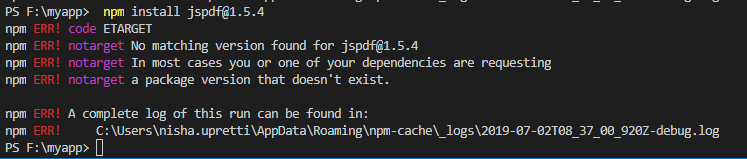
NishaUpreti
on 2 Jul 2019
I got the same error
npm ERR! path git
npm ERR! code ENOENT
npm ERR! errno ENOENT
npm ERR! syscall spawn git
npm ERR! enoent Error while executing:
npm ERR! enoent undefined ls-remote -h -t ssh://[email protected]/eligrey/FileSaver.js.git
npm ERR! enoent
npm ERR! enoent
npm ERR! enoent spawn git ENOENT
npm ERR! enoent This is related to npm not being able to find a file.
npm ERR! enoent
npm ERR! A complete log of this run can be found in:
npm ERR! C:UsersshivangiAppDataRoamingnpm-cache_logs2019-07-08T09_52_33_762Z-debug.log
i am stuck here. how i fix that?
 shivangi4742
on 8 Jul 2019
shivangi4742
on 8 Jul 2019
I am getting the same error. it seems like
npm ERR! enoent undefined ls-remote -h -t ssh://[email protected]/eligrey/FileSaver.js.git
cannot be connected through windows PC
Any help ?
 Mayurdoshi
on 12 Jul 2019
Mayurdoshi
on 12 Jul 2019
the error was really, someone got a solution?
 flpdev
on 13 Jul 2019
flpdev
on 13 Jul 2019
the error was really, someone got a solution?
The only solution I was able to make work was downgrading to jsPDF1.4.1
 colby2
on 18 Jul 2019
colby2
on 18 Jul 2019
Latest tagged version 1.5.3 references the git repo for file-server. In master this is corrected, but a new tag has not yet been rolled out. Its not clear why you went back to v1.4.1, did you consider trying 1.5.2?
"jspdf": "1.5.2",
 ghost
on 24 Jul 2019
ghost
on 24 Jul 2019
1.5.2 throws an error while making an instance: var doc = new jsPDF();
TypeError: Cannot read property 'charAt' of undefined
    at new e (jspdf.min.js:9492)
1.4.1 does not throw this error and also does not have the filesaver issue that 1.5.3 has hence why it has been recommended to use v1.4.1 by various different people (including myself) on this thread.
atecey
on 24 Jul 2019
1.5.2 throws an error while making an instance: var doc = new jsPDF();
TypeError: Cannot read property 'charAt' of undefined
at new e (jspdf.min.js:9492)1.4.1 does not throw this error and also does not have the filesaver issue that 1.5.3 has hence why it has been recommended to use v1.4.1 by various different people (including myself) on this thread.
Sorry, you are completely correct. Old habit, I read a load of the comments at the start of this issue and then skipped to the end. Missed the very helpful comment pointing out this very point. Thanks for putting me straight and saving me and others time.
ghost
on 24 Jul 2019
Any news on this release being put out?
 williamfalconeruk
on 9 Aug 2019
williamfalconeruk
on 9 Aug 2019
Hello everyone, I had a problem with jspdf and xlsx.
You need to install git and verify the environment variables "C:Program FilesGitcmd" and then you must to open a new console for the installation.
 Javeck
on 12 Aug 2019
Javeck
on 12 Aug 2019
Has anyone found fix yet ??
chandrasekharu
on 16 Aug 2019
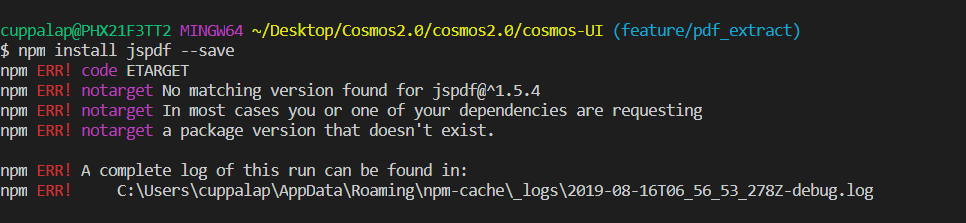
chandrasekharu
on 16 Aug 2019
We are also unable to use git on our servers. I wasn't able to rollback to version 1.4.1 due to problems with using "addImage".
I found a temporary work around that might help other people:
- I added file-saver directly to my package.json:
"file-saver": "^2.0.2",
- I updated my package-lock.json's jspdf entry
2a. Remove file-saver entry from the jspdf.requires section
2b. Update the jspdf.dependencies.file-saver: Remove resolved and integrity, Update "version" to say "2.0.2"
    "jspdf": {
      "version": "1.5.3",
      "resolved": "...",
      "integrity": "...",
      "requires": {
        "canvg": "1.5.3",
        "html2canvas": "1.0.0-alpha.12",
        "omggif": "1.0.7",
        "promise-polyfill": "8.1.0",
        "stackblur-canvas": "2.2.0"
      },
      "dependencies": {
        "file-saver": {
          "version": "2.0.2"
        }
      }
    },
- Delete node_modules package
- Run npm install
The npm install auto filled out the dependencies section of my package-lock.json for jspdf without using git
After that, it stopped trying to find file-saver through git and is working.
This is a horrible work around- but it helped us keep going until a version of jspdf is released that doesn't require git.
 hfcarbonell
on 16 Aug 2019
hfcarbonell
on 16 Aug 2019
We are also unable to use git on our servers. I wasn't able to rollback to version 1.4.1 due to problems with using "addImage".
I found a temporary work around that might help other people:
- I added file-saver directly to my package.json:
"file-saver": "^2.0.2",
- I updated my package-lock.json's jspdf entry
2a. Remove file-saver entry from the jspdf.requires section
2b. Update the jspdf.dependencies.file-saver: Remove resolved and integrity, Update "version" to say "2.0.2""jspdf": { "version": "1.5.3", "resolved": "...", "integrity": "...", "requires": { "canvg": "1.5.3", "html2canvas": "1.0.0-alpha.12", "omggif": "1.0.7", "promise-polyfill": "8.1.0", "stackblur-canvas": "2.2.0" }, "dependencies": { "file-saver": { "version": "2.0.2" } } },
- Delete node_modules package
- Run npm install
The npm install auto filled out the dependencies section of my package-lock.json for jspdf without using git
After that, it stopped trying to find file-saver through git and is working.
This is a horrible work around- but it helped us keep going until a version of jspdf is released that doesn't require git.
@
We are also unable to use git on our servers. I wasn't able to rollback to version 1.4.1 due to problems with using "addImage".
I found a temporary work around that might help other people:
- I added file-saver directly to my package.json:
"file-saver": "^2.0.2",
- I updated my package-lock.json's jspdf entry
2a. Remove file-saver entry from the jspdf.requires section
2b. Update the jspdf.dependencies.file-saver: Remove resolved and integrity, Update "version" to say "2.0.2""jspdf": { "version": "1.5.3", "resolved": "...", "integrity": "...", "requires": { "canvg": "1.5.3", "html2canvas": "1.0.0-alpha.12", "omggif": "1.0.7", "promise-polyfill": "8.1.0", "stackblur-canvas": "2.2.0" }, "dependencies": { "file-saver": { "version": "2.0.2" } } },
- Delete node_modules package
- Run npm install
The npm install auto filled out the dependencies section of my package-lock.json for jspdf without using git
After that, it stopped trying to find file-saver through git and is working.
This is a horrible work around- but it helped us keep going until a version of jspdf is released that doesn't require git.
thanks, you helped me out
 lidada123
on 20 Aug 2019
lidada123
on 20 Aug 2019
Is there a way to get this fix without waiting for the next release ?
 anisometropie
on 9 Sep 2019
anisometropie
on 9 Sep 2019
still waiting for a new release is pointless at this time! trying to find alternate lib.
 ShyamRaj
on 12 Sep 2019
ShyamRaj
on 12 Sep 2019
1.5.2 throws an error while making an instance: var doc = new jsPDF();
TypeError: Cannot read property 'charAt' of undefined
at new e (jspdf.min.js:9492)1.4.1 does not throw this error and also does not have the filesaver issue that 1.5.3 has hence why it has been recommended to use v1.4.1 by various different people (including myself) on this thread.
I am facing issue with the plugin 1.4.1.
I have installed by npm install [email protected] --save
but getting this issue when trying to generate pdf report.
my sample code
`
generatePDFReport () {
  var doc = new jsPDF();

  doc.setFontSize(40);

  doc.text(35, 25, 'Does this work?');

  doc.save('Testy.pdf');

},
`
vue.runtime.esm.js?2b0e:1888 TypeError: Cannot read property 'charAt' of undefined
    at new e (jspdf.min.js?e511:269)
    at VueComponent.generatePDFReport (UserHourLogs.vue?372f:503)
 naveenkumarmark
on 13 Sep 2019
naveenkumarmark
on 13 Sep 2019
Haven't been solved still now ?
 qrqhuang
on 18 Sep 2019
qrqhuang
on 18 Sep 2019
I have solved this issue by installing the jsPDF package from gitbash.
naveenkumarmark
on 18 Sep 2019
Have you installed Git?, try installing it and the run npm install again
 jersi2695
on 23 Sep 2019
jersi2695
on 23 Sep 2019
This is a pain!!!
 lcbdl
on 30 Sep 2019
lcbdl
on 30 Sep 2019
Same problem here...
 alexsandro-xpt
on 20 Nov 2019
alexsandro-xpt
on 20 Nov 2019
I'm getting the same error message on yarn install
An unexpected error occurred: "https://raw.githubusercontent.com/eligrey/FileSaver.js/e865e37af9f9947ddcced76b549e27dc45c1cb2e/package.json: connect ECONNREFUSED 151.101.0.133:443"
 JakeTompkins
on 5 Dec 2019
JakeTompkins
on 5 Dec 2019
Same issue here. why has this been marked as closed?
 AnthonyPhan
on 5 Feb 2020
AnthonyPhan
on 5 Feb 2020
getting the same error
jspdf version is 1.5.3, it has a dependencies "file-saver": "eligrey/FileSaver.js#1.3.8", who cause the error
  "dependencies": {
    "canvg": "1.5.3",
    "file-saver": "eligrey/FileSaver.js#1.3.8",
    "html2canvas": "1.0.0-alpha.12",
    "omggif": "1.0.7",
    "promise-polyfill": "8.1.0",
    "stackblur-canvas": "2.2.0"
  }
so now is year 2020, has anyone found fix yet ?
 tenadolanter
on 1 Mar 2020
tenadolanter
on 1 Mar 2020
Hi,
same error any update on how to fix this issue?

 kishore075
on 16 Apr 2020
kishore075
on 16 Apr 2020
I was getting the same issue, I followed these steps carefully after making sure I had version "jspdf": "^1.5.3":
- Added this to package.json
"file-saver": "^2.0.2". - Inside my package-lock.json, I searched for "jspdf" entry and inside it:
- Removed this line from "requires"
"file-saver": "github:eligrey/FileSaver.js#1.3.8" - Added these lines to "dependencies"
```
"file-saver": {
"version": "2.0.2"
}
- Removed this line from "requires"
- Deleted the folder "node_modules" and ran
npm installagain. This automatically fixes my "package-lock.json".
I dont think this is that bad solution but when you install a new package, it revert the package-lock.json back, so you have to keep a check on that. Anyways thanks be to this answer: https://github.com/MrRio/jsPDF/issues/2208#issuecomment-522016452
 m-haziq
on 17 Apr 2020
m-haziq
on 17 Apr 2020
Hi @m-haziq thanks that worked i cam install 1.4.1
kishore075
on 17 Apr 2020
Has anybody been working on this issue?
This is still happening although @m-haziq solution is working it is very fragile in a working env.
 hitautodestruct
on 11 May 2020
hitautodestruct
on 11 May 2020
2020 checking in, apparently this is still a problem scnr
Thanks for your code, though.
 martinderm
on 8 Jun 2020
martinderm
on 8 Jun 2020
The problem is that to install from github you should have git in variables list of your machine.
Follow instructions
In my case the git was in program files folder
After restart cmd and try to install jspdf again
 alexey13
on 19 Jul 2020
alexey13
on 19 Jul 2020
@alexey13 And for those of us that need an entirely offline build?
 kbreezy04
on 21 Jul 2020
kbreezy04
on 21 Jul 2020
How can you install any package from npm offline? After you installed packages you can build offline, I think.
alexey13
on 21 Jul 2020
You shouldn't rely on your NPM cache to build on your CI server. NPM offline caching methods, for instance Yarn offline mirror, won't cache dependencies from Git links. So that's not an option. You can use something like Artifactory, but the Git links break Artifactory unless you set up dependency re-writes. Unfortunately the link in jspdf package.json to FileSaver is not standard and breaks Artifactory re-write. This isn't just a problem with "big companies being lazy", any company should be fully offlining dependencies and having a Git link in your package.json breaks that.
kbreezy04
on 21 Jul 2020
With #2804 there will be no dependencies to GitHub anymore. And there will be a new release soon :)
 HackbrettXXX
on 21 Jul 2020
HackbrettXXX
on 21 Jul 2020
m-haziq commented on Apr 17 •
Thanks bro its working... i think uninstall node js install latest it may work...
 dhaneshRaj
on 4 Aug 2020
dhaneshRaj
on 4 Aug 2020
@HackbrettXXX Hi, When will we get the new release? Any dates?
 greatNetworker
on 10 Aug 2020
greatNetworker
on 10 Aug 2020
Hopefully this week.
HackbrettXXX
on 10 Aug 2020
@HackbrettXXX Thanks... Please do it... Though we can workaround this in local boxes by following above said workarounds, it is clumsy to maintain this package in CI/CD pipelines without your fix.
greatNetworker
on 10 Aug 2020
@HackbrettXXX is it released yet?
 monicat2504
on 1 Sep 2020
HackbrettXXX
on 2 Sep 2020
monicat2504
on 1 Sep 2020
HackbrettXXX
on 2 Sep 2020
I've fixed this by allowing GIT 9418 port and 22 port on the firewall settings, I don't know which fixed the problem though.
 laazaz
on 15 Dec 2020
laazaz
on 15 Dec 2020
Related issues
 sayo96
·
3Comments
sayo96
·
3Comments
 andmaltes
·
4Comments
andmaltes
·
4Comments
 Pinank
·
3Comments
Pinank
·
3Comments
 centurianii
·
4Comments
centurianii
·
4Comments
 MelanieCroce
·
4Comments
MelanieCroce
·
4Comments
Most helpful comment
This is a pain!!!