Jspdf: right align does not work properly if there is a "W" or a parenthesis in the text
Thank you for submitting an issue to jsPDF. Please read carefully.
Are you using the latest version of jsPDF?
using https://rawgit.com/MrRio/jsPDF/master/
Have you tried using jspdf.debug.js?
Steps to reproduce
Try with:
var doc = new jsPDF();

doc.text(10,10, "jspdf version " + jsPDF.version)

doc.setFont("helvetica");
doc.setFontType("bold");
doc.setFontSize(35)
doc.setFontStyle('bold')
doc.text(160,120, "aaaaa bbbbb cccc Wnnnnn\naaaa bbbb cccc nnnn", {align:'right'});
doc.text(160,150, "aaaaa bbbbb cccc wnnnnn\naaaa bbbb cccc nnnn", {align:'right'});
doc.text(160,180, "aaaaa bbbbb cccc wnnnnn\naaaa bbbb Wccc nnnn", {align:'right'});

doc.text(160, 40, ["...","III", "MMM", "M(M)M","M{i}M"],
{align:'right'})


doc.line(160, 0, 160, 190);
Ideally a link too. Try fork this http://jsbin.com/rilace/edit?html,js,output
What I saw

What I expected
In all cases the text lines should be right aligned properly.
But it is only the case if there is no "W".
 bwl21
bwl21
All 23 comments
Without debugging I would guess that it is an issue of precision.
I guess, that the code for calculating the width is ok, but writing it to the PDF causes the issue.
We do two digit precision usually. Maybe if we patch it to three digit precision would fix it?
 Uzlopak
on 19 Oct 2018
Uzlopak
on 19 Oct 2018
The stuff with "W" might be tolerated, but with "(" ")" is really significant. I played around with getTextWidth but could not find an anomaly with "(" ...
I played around by adding more lines. The deviation with "W" is about 1 mm, with "M" about 0.5 mm. but with "(" ist is about 4mm.
bwl21
on 19 Oct 2018
Pro Tip: Avoid paranthesis and the letters M and W
Uzlopak
on 19 Oct 2018

Uzlopak
on 19 Oct 2018
;-(
bwl21
on 19 Oct 2018
I think, that this can be solved, if we replace all the f2 and f3 calls to a new generic function which rounds the numbers to a specific precision. Then we can set the overall precision e.g. to 3 or 4 decimal after the comma. This should result in the expected behaviour.
Uzlopak
on 26 Dec 2018
But wit parenthesis it seems to be caused by something else, as the deviation is close to a character width.
bwl21
on 26 Dec 2018
Hmm. Still, could be a rounding problem. Will take a look in few days.
Uzlopak
on 26 Dec 2018
I dived a bit into the code and found, that somewhere ( in text is replaced by \(. The resulting string is used to compute the position in jspdf.debug.js line 13923
var getStringUnitWidth = API.getStringUnitWidth = function (text, options) {
I could not find a proper place to fix it ...
bwl21
on 28 Dec 2018
Hi @bwl21
thank you very much for your research. Because of your research i know now how to fix the bug.
more information:
The replacement is done by the to8bitStream-function in jspdf.js, because paranthesis are the delimiters for strings in pdf. The Escaping has to be done after all the other text-operations have been done.
To fix this, the Escaping, which you can find from the lines 1925 has to be moved after the call of events.publish('postProcessText', payload);
See #2210
Uzlopak
on 28 Dec 2018
The PR fixes the issue

Uzlopak
on 28 Dec 2018
I played with commit f4f700e6243d862553580af22e2a1c8cfde333bb which includes the precision parameter.
The issue with paranthesis is gone.
I played with it but could not find any effect with respect to the "W" issue.
The problem does not occur with "Courier" font. So I assume it is a matter of activeFont.metadata.widthOfGlyph
bwl21
on 29 Dec 2018
The question is, if we can achieve that precision which you want... or not. Do we expect jsPDF to be a high professional tool to generate high quality PDFs or if we expect jsPDF to be a nice to have tool to generate PDFs on the fly and expect the Adobe Suite being the real PDF tool.
Uzlopak
on 24 Mar 2019
@arasabbasi if we begin to position jdPSF to be not a "high professional tool" we really undersell it. So we should not go to this path.
it does not mean that we should solve the "W" problem regardless what the effort will be. But I feel it would be good to know the reason. Sometimes such tiny effects are the tip of the iceberg.
I just discover that it also happens with "V". This points to the direction of kerning.
bwl21
on 25 Mar 2019
Even with high precision of 16 digits, I get the same "error".
I think it is a problem in floating point precision in Javascript.
Uzlopak
on 25 Mar 2019
I have investigated this further. The problem happens with "V" as well. It appears that the font description does not have kerning information for "W" and "V". I can see this in src/modules/standard_fonts_metrics.js:317. I have no clue where these entries come from or how to maintain the same.
A possible Workaround would be to patch the the fontmetrics after unpacking the same but it will be an evil hack. Maybe if we find out where the standard_fonts_metrics stems from , we might find a fix there.
@dvdotsenko I see that you have committed these lines. would you be able to help us out?
bwl21
on 27 Mar 2019
I played around with patching the kerning tables for helvetica.
  kerning[111][87] = -0.8;
  kerning[87]={};
  kerning[87][111] = -0.8;
But of course this is a bad hack, and best would be indeed to have the right kerning information in src/modules/standard_fonts_metrics.js:317 But I could not find out how ...
bwl21
on 27 Mar 2019
Try this to test further ;)
var doc = new jsPDF({format: 'a0', unit:  'pt'});

function test (letter, expect) {
doc.setFontSize(1000);
doc.setLineWidth(1)
doc.text(letter, 0, 1000);
doc.line(expect,0, expect, 1000)
doc.setFontSize(300);
doc.text(String(expect), 1200, 600)
actual = doc.getStringUnitWidth(letter)*1000;
doc.line(actual,0, actual, 1000)


doc.text(String(doc.getStringUnitWidth(letter)*1000), 1200, 1000)
}
test('W', 928)
Thanks for the hint. I refined it such that we can now see the problem.
- in the first line, the text is provided character by chanracter
- in the second line, the text is provided as one string, right aligned according to the sum of getStringUnitWithds for each individual character.
So the solution will be in a rewrite of getStringUnitWidths. Stay tuned for a PR :-)
the script below yields
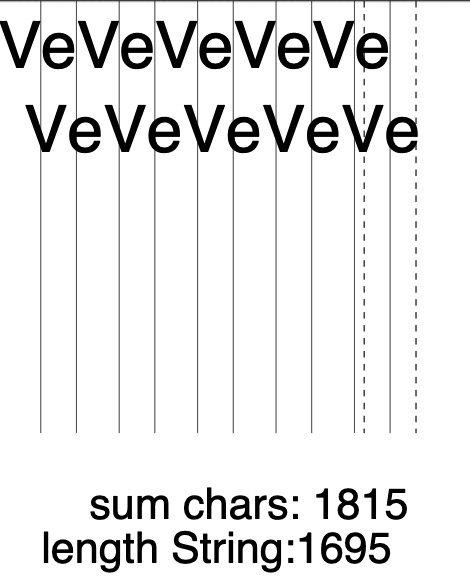
var doc = new jsPDF({format: 'a0', unit:  'pt'});

var fontsize = 300;
var x = 0;

function putChar(char){
    doc.text(char, x, 100, {baseline:'hanging'});
    doc.line(x, 0, x, 2000);
    x = x + doc.getStringUnitWidth(char) * fontsize;
}


function test (letter) {
   doc.setFontSize(fontsize);
   doc.setLineWidth(1)

   var length = letter.length;
   for (var i = 0 ; i < length; i++){
     putChar(letter[i]);
   }

   doc.text(letter , x , 100 + 2 * fontsize, {align:'right'});  // output with kerning

   doc.setFontSize(200);
   doc.text("    sum chars: " + String(x), 200, 2400);

   var stringsize = doc.getStringUnitWidth(letter)*fontsize
   doc.text("length String:" + String(stringsize), 200, 2600)
   doc.line(x, 0, x, 2000);

   var deviation =  x - stringsize;
   doc.setLineDash([30]);
   doc.line(stringsize, 0, stringsize, 2000);
   doc.line(x + deviation, 0, x + deviation, 2000);
}

//test('WoWWoWoWoWoWoWoWoWo')
test("VeVeVeVeVe")
Your code is kind of wrong:
var doc = new jsPDF({format: 'a0', unit:  'pt'});

var fontsize = 300;
var x = 0;

function putChar(char){
    x = x + doc.getStringUnitWidth(char) ;
    doc.text(char, x* fontsize, 100, {baseline:'hanging', align: 'right'});
    doc.line(x* fontsize, 0, x* fontsize, 2000);
}


function test (letter) {
   doc.setFontSize(fontsize);
   doc.setLineWidth(1)

   var length = letter.length;
   for (var i = 0 ; i < length; i++){
     putChar(letter[i]);
   }

   doc.text(letter , x* fontsize , 100 + 2 * fontsize, {align:'right'});  // output with kerning

   doc.text(letter , 0 , 500 + 2 * fontsize, {align:'left'});  // output with kerning

   doc.text(letter , doc.getStringUnitWidth(letter) * fontsize, 900 + 2 * fontsize, {align:'right'});  // output with kerning

   doc.setFontSize(200);
   doc.text("    sum chars: " + String(x), 200, 2400);

   var stringsize = doc.getStringUnitWidth(letter)
   doc.text("length String:" + String(stringsize), 200, 2600)
   doc.line(x* fontsize, 0, x* fontsize, 2000);

   var deviation =  (x - stringsize) * fontsize;
   doc.setLineDash([30]);
   doc.line(stringsize, 0, stringsize, 2000);
   doc.line(x + deviation, 0, x + deviation, 2000);
}

test('VeVeVeVe')
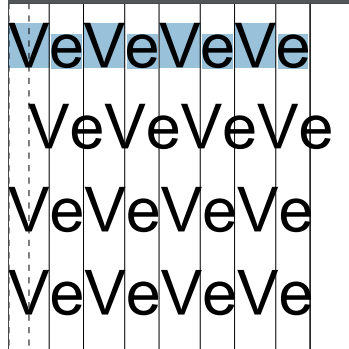
And you see the lines between the letters? Plus the kerning has to be removed. The methods work as expected.
Uzlopak
on 30 Mar 2019
Sorry, I disagree.
Row 2 should be right aligned to the anchor point (which is the most recent vertical line), but it is not.
Row 4 looks correct because the anchor point is left of the most recent vertical line)
nevertheless it is not really clear for me why Row 1 looks pretty similar to row 3 and four, in particular why the vertical linkes between the letters mark the swimlanes. This was the fact which brought me to the impression that no kerning takes place.
So most likely the root cause of the problem is that the font metics does not contain kerning specification for "W" and "V". I guess i will try with custom fonts next week.
bwl21
on 31 Mar 2019

PDF doesnt need kerning?
Uzlopak
on 2 Apr 2019
Is this completely solved? im still seeing the issue (using justify alignment) using latest version. Version 1.5.3
No new version after this fix?
 narc88
on 13 Dec 2019
narc88
on 13 Dec 2019
Related issues
 centurianii
·
4Comments
centurianii
·
4Comments
 tomkidumbuyo
·
4Comments
tomkidumbuyo
·
4Comments
 MaxCodeDE
·
4Comments
MaxCodeDE
·
4Comments
 arulmb0136
·
4Comments
arulmb0136
·
4Comments
 BarathArivazhagan
·
4Comments
BarathArivazhagan
·
4Comments