Jspdf: window is not defined (ReactJS + NextJS)
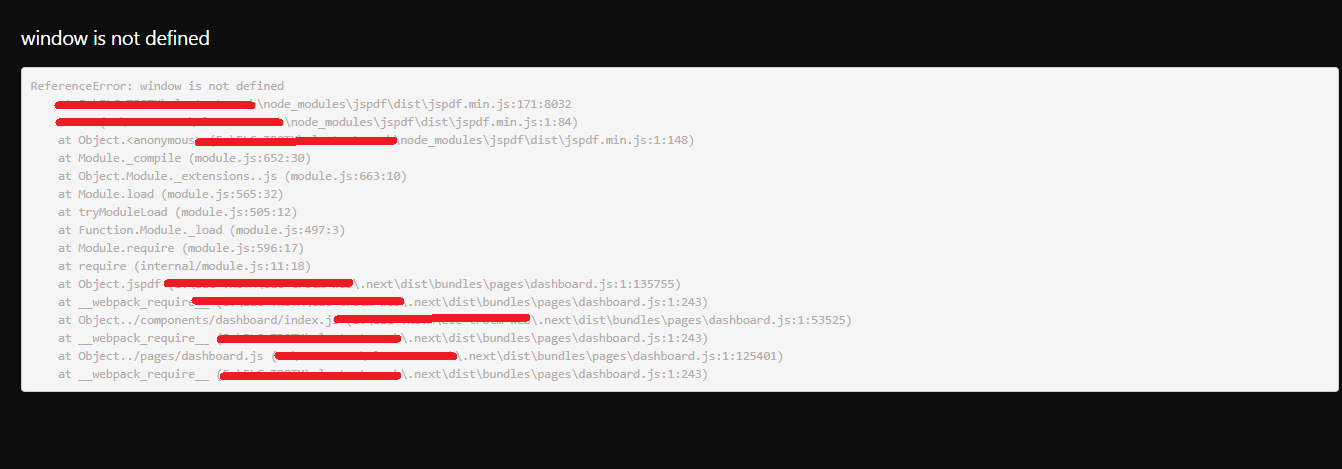
I have integrated jsPdf in my react application which has SSR. So 1st time when I land to a page, it works properly but when i refresh the page it throws "Reference Error: window is not defined"
Assume I have landing page say: "/" i click on a button and it navigates to "/dashboard" in this scenario it works.
But when i refresh on "/dashboard", it throws error.
Attached the screenshot of the error log.
 achhranitesh
All 14 comments
Please load jspdf.debug.js to get the correct line.
 Uzlopak
on 20 Sep 2018
Uzlopak
on 20 Sep 2018
For me its in GatsbyJS but I think it is the same issue. The line number is 11776:
11774 | };
11775 | view.Blob.prototype = getPrototypeOf(new view.Blob());
11776 | }(typeof self !== "undefined" && self || typeof window !== "undefined" && window || window.content || window));
11777 |
11778 | /* FileSaver.js
11779 | * A saveAs() FileSaver implementation.
 pippo111
on 1 Oct 2018
pippo111
on 1 Oct 2018
I found a workaround, which is conditional import, something like this:
if (typeof window !== 'undefined') {
const jsPDF = require('jspdf')
// now u can safely use jsPDF
module.exports = () => {
return true
}
} else {
module.exports = () => {
return false
}
}
although it would be nice if someone could fix jspdf code.
pippo111
on 1 Oct 2018
@arasabbasi @pippo111 @achhranitesh anyone know how to fix this in next js ?
 udahari
on 3 Nov 2018
udahari
on 3 Nov 2018
@udahari
tbh I am right now too lazy to set up an reactjs/nextjs environment just to debug it. If you provide a small nextjs project with the jsPDF code, which should work but doesnt, i could look for a bugfix.
Uzlopak
on 3 Nov 2018
Anyone active in this thread? I would need help for testing some possible changes?!
Uzlopak
on 12 Nov 2018
Is somebody here active so that we can search for a solution?
Uzlopak
on 4 Dec 2018
No reaction. Closing.
Uzlopak
on 18 Dec 2018
how to fix in nextjs ?
 thinhnguyen1105
on 8 Jan 2019
thinhnguyen1105
on 8 Jan 2019
yeah i found the solution
import script like that. It works in nextjs

thinhnguyen1105
on 8 Jan 2019
The error occurs because components in Next.js run on both the server and client side. When jsPDF is imported it attempts to access window but since the Node server does not have a global window object it will throw.
If your setup supports dynamic imports which Next.js does then you can conditionally load jsPDF on the client only.
let jsPDF = null;

if (typeof window !== "undefined") {
  import("jspdf").then(module => {
    jsPDF = module.default;
  });
}
You will have to wait for the import promise to resolve before being able to use jsPDF, but if you're using it inside of an event handler you shouldn't have to worry about it.
 alexharri
on 21 May 2019
alexharri
on 21 May 2019
The error occurs because components in Next.js run on both the server and client side. When
jsPDFis imported it attempts to accesswindowbut since the Node server does not have a globalwindowobject it will throw.If your setup supports dynamic imports which Next.js does then you can conditionally load jsPDF on the client only.
let jsPDF = null;

if (typeof window !== "undefined") {
  import("jspdf").then(module => {
    jsPDF = module.default;
  });
}
You will have to wait for the import promise to resolve before being able to use
jsPDF, but if you're using it inside of an event handler you shouldn't have to worry about it.
You can also disable ssr (this work for me)
const DynamicComponentWithNoSSR = dynamic(() => import('./Mycomponent'), { ssr: false });

const Index = () => {
  return <DynamicComponentWithNoSSR />;
};
 slumbering
on 4 Sep 2019
slumbering
on 4 Sep 2019
The error occurs because components in Next.js run on both the server and client side. When
jsPDFis imported it attempts to accesswindowbut since the Node server does not have a globalwindowobject it will throw.
If your setup supports dynamic imports which Next.js does then you can conditionally load jsPDF on the client only.let jsPDF = null; if (typeof window !== "undefined") { import("jspdf").then(module => { jsPDF = module.default; }); }You will have to wait for the import promise to resolve before being able to use
jsPDF, but if you're using it inside of an event handler you shouldn't have to worry about it.You can also disable ssr (this work for me)
const DynamicComponentWithNoSSR = dynamic(() => import('./Mycomponent'), { ssr: false });

const Index = () => {
  return <DynamicComponentWithNoSSR />;
};
How can i do this Dynamic import without being with a XML/REACT component?
I have a translate file and i need to use it.
import * as pt from "./pt";
import * as en from './en';

const traducao = () =>{
  let translate;
  if (!window) return

    if (window.navigator.language == 'pt-PT' || window.navigator.language == 'pt-BR') {
      translate = pt.default;
    } else {
      translate = en.default;
    }

  return translate
}

export default traducao
When i do this dynamic import it understand the EN/PT file return this error :
module "/home/adm55/Documentos/workbench/Site da 55/55tec_site/src/translate/index"
Argument of type '() => Promise<typeof import("/home/adm55/Documentos/workbench/Site da 55/55tec_site/src/translate/index")>' is not assignable to parameter of type 'DynamicOptions<{}> | (() => LoaderComponent<{}>) | LoaderComponent<{}>'.
  Type '() => Promise<typeof import("/home/adm55/Documentos/workbench/Site da 55/55tec_site/src/translate/index")>' is not assignable to type '() => LoaderComponent<{}>'.
    Type 'Promise<typeof import("/home/adm55/Documentos/workbench/Site da 55/55tec_site/src/translate/index")>' is not assignable to type 'LoaderComponent<{}>'.
      Type 'typeof import("/home/adm55/Documentos/workbench/Site da 55/55tec_site/src/translate/index")' is not assignable to type 'ComponentClass<{}, any> | FunctionComponent<{}> | { default: ComponentType<{}>; }'.
        Type 'typeof import("/home/adm55/Documentos/workbench/Site da 55/55tec_site/src/translate/index")' is not assignable to type '{ default: ComponentType<{}>; }'.
          Types of property 'default' are incompatible.
            Type '() => { header: { img_55logo_alt: string; button_header_btn: string; label_title_txt: string; label_sub_txt: string; label_opts_home: string; label_opts_clientes: string; label_opts_solucoes: string; ... 38 more ...; label_opts_sobre_sobre_blog: string; }; ... 8 more ...; homeBottomContainer: { ...; }; } | { ...; }' is not assignable to type 'ComponentType<{}>'.
              Type '() => { header: { img_55logo_alt: string; button_header_btn: string; label_title_txt: string; label_sub_txt: string; label_opts_home: string; label_opts_clientes: string; label_opts_solucoes: string; ... 38 more ...; label_opts_sobre_sobre_blog: string; }; ... 8 more ...; homeBottomContainer: { ...; }; } | { ...; }' is not assignable to type 'FunctionComponent<{}>'.
                Type '{ header: { img_55logo_alt: string; button_header_btn: string; label_title_txt: string; label_sub_txt: string; label_opts_home: string; label_opts_clientes: string; label_opts_solucoes: string; ... 38 more ...; label_opts_sobre_sobre_blog: string; }; ... 8 more ...; homeBottomContainer: { ...; }; } | { ...; }' is not assignable to type 'ReactElement<any, any>'.
                  Type '{ header: { img_55logo_alt: string; button_header_btn: string; label_title_txt: string; label_sub_txt: string; label_opts_home: string; label_opts_clientes: string; label_opts_solucoes: string; ... 38 more ...; label_opts_sobre_sobre_blog: string; }; ... 8 more ...; homeBottomContainer: { ...; }; }' is missing the following properties from type 'ReactElement<any, any>': type, props, keyts(2345)
How can i do that? I had a issue where in forum and i trying to solve whti this: https://github.com/vercel/next.js/discussions/20298
 lucasReghiniM
on 18 Dec 2020
lucasReghiniM
on 18 Dec 2020
OBS: Im using Typerscript
lucasReghiniM
on 18 Dec 2020
Related issues
 MelanieCroce
·
4Comments
MelanieCroce
·
4Comments
 sajesh1985
·
5Comments
sajesh1985
·
5Comments
 yankeeBrit
·
3Comments
yankeeBrit
·
3Comments
 sayo96
·
3Comments
sayo96
·
3Comments
 MaxCodeDE
·
4Comments
MaxCodeDE
·
4Comments
Most helpful comment
The error occurs because components in Next.js run on both the server and client side. When
jsPDFis imported it attempts to accesswindowbut since the Node server does not have a globalwindowobject it will throw.If your setup supports dynamic imports which Next.js does then you can conditionally load jsPDF on the client only.
You will have to wait for the import promise to resolve before being able to use
jsPDF, but if you're using it inside of an event handler you shouldn't have to worry about it.