This is a very good framework and i also use this, the only thing i would like to see is an option to align text.
 akshaybhoendie
All 36 comments
That would be nice indeed! In the meantime you could use the function attached below (from the jspdf-autotable plugin). It can be used like this doc.autoText("Hello", 10, 10, 'left'|'center'|'right', 'top'|'middle'|'bottom').
jsPDF.API.autoText = function (text, x, y, halign, valign) {
if (typeof x !== 'number' || typeof y !== 'number') {
console.error('The x and y parameters are required. Missing for the text: ', text);
}
let k = this.internal.scaleFactor;
let fontSize = this.internal.getFontSize() / k;
let splitRegex = /\r\n|\r|\n/g;
let splitText = null;
let lineCount = 1;
if (valign === 'middle' || valign === 'bottom' || halign === 'center' || halign === 'right') {
splitText = typeof text === 'string' ? text.split(splitRegex) : text;
lineCount = splitText.length || 1;
}
// Align the top
y += fontSize * (2 - FONT_ROW_RATIO);
if (valign === 'middle')
y -= (lineCount / 2) * fontSize * FONT_ROW_RATIO;
else if (valign === 'bottom')
y -= lineCount * fontSize * FONT_ROW_RATIO;
if (halign === 'center' || halign === 'right') {
let alignSize = fontSize;
if (halign === 'center')
alignSize *= 0.5;
if (lineCount >= 1) {
for (let iLine = 0; iLine < splitText.length; iLine++) {
this.text(splitText[iLine], x - this.getStringUnitWidth(splitText[iLine]) * alignSize, y);
y += fontSize;
}
return this;
}
x -= this.getStringUnitWidth(text) * alignSize;
}
this.text(text, x, y);
return this;
};
 simonbengtsson
on 12 Jan 2017
simonbengtsson
on 12 Jan 2017
You can also use the c2d plugin. HTML Context 2d has alignment and origin parameters for text.
 Flamenco
on 12 Jan 2017
Flamenco
on 12 Jan 2017
Hi,
Many thanks friend, what i basicaly need to do, are the following :
- make a new JS file in the plugin folder and attach the code to it
- use the doc.autoTableText("Hello", 10, 10, 'left'|'center'|'right',
'top'|'middle'|'bottom') in the code where i want the text in the autotable
to be aligned.
Are these the correct steps to do? Can you please correct me if i am wrong?
or send the correct instructions? i am new to javascript.
On Thu, Jan 12, 2017 at 6:44 PM, Flamenco notifications@github.com wrote:
You can also use the c2d plugin. HTML Context 2d has alignment and origin
parameters for text.—
You are receiving this because you authored the thread.
Reply to this email directly, view it on GitHub
https://github.com/MrRio/jsPDF/issues/1016#issuecomment-272293315, or mute
the thread
https://github.com/notifications/unsubscribe-auth/AXZNw51R0SI4dV3wZKt9pQydjttR-GKIks5rRp66gaJpZM4Lh_sD
.
--
MVG,
Akhsaykumar Bhoendie
Hannaslustweg #6
Wanica, Suriname
+(597)8549488
"It's hard enough to find an error in your code when you're looking for
it; it's even harder when you've assumed your code is error-free."
akshaybhoendie
on 13 Jan 2017
Do you need a table, or are you just using the function to align text on a single line?
Flamenco
on 13 Jan 2017
You can use the function directly without a table.
And you don't need to add the function to the plugin folder. You just have to include the code before you are using the function.
simonbengtsson
on 13 Jan 2017
I understand. If you are not working with tables there are other ways to align text.
Flamenco
on 13 Jan 2017
IIRC all the canvas text align and baseline functions are supported using the context2d API.
http://www.w3schools.com/TagS/canvas_textalign.asp
http://www.w3schools.com/tags/canvas_textbaseline.asp
Flamenco
on 13 Jan 2017
Ok, here is a screenshot and what i want to do is align the text in the
cells right. see screenshot.
[image: Inline image 1]
On Fri, Jan 13, 2017 at 9:24 AM, Flamenco notifications@github.com wrote:
IIRC all the canvas text align and baseline functions are supported using
the context2d API.http://www.w3schools.com/TagS/canvas_textalign.asp
http://www.w3schools.com/tags/canvas_textbaseline.asp—
You are receiving this because you authored the thread.
Reply to this email directly, view it on GitHub
https://github.com/MrRio/jsPDF/issues/1016#issuecomment-272431670, or mute
the thread
https://github.com/notifications/unsubscribe-auth/AXZNwwc6q8qLUUKRfrT5XdUY_MX1n6xHks5rR20MgaJpZM4Lh_sD
.
--
MVG,
Akhsaykumar Bhoendie
Hannaslustweg #6
Wanica, Suriname
+(597)8549488
"It's hard enough to find an error in your code when you're looking for
it; it's even harder when you've assumed your code is error-free."
akshaybhoendie
on 13 Jan 2017
Hi there,
this may also be handy, here is the function i wrote for it:
function createPDF() {
var url = "/coci/report/registry/2015";
DataApiService.callApi(url,null,"GET").then(function(reportData){
if(reportData){
var doc = new jsPDF('p', 'pt');
var row = 45;
addPdfHeader(doc, row, "");
/* doc.addPage(); */
doc.setFillColor(33, 150, 243);
doc.printingHeaderRow = true;
var columns = [ "Description", "2014", "2013",
"2012","2011","2010","% t.o.v.'13" ];
var rows = [];
for(var j=0; j<reportData.length; j++){
var obj = reportData[j];
if (!obj.description ) {obj.description = '';}
if (!obj.year5 ) {obj.year5 = '';}
if (!obj.year4 ) {obj.year4 = '';}
if (!obj.year3 ) {obj.year3 = '';}
if (!obj.year2 ) {obj.year2 = '';}
if (!obj.year1 ) {obj.year1 = '';}
if (!obj.delta ) {obj.delta = '';}
/*TODO : Align data right in grid*/
var singleRow =
[obj.description,obj.year5,obj.year4,obj.year3,obj.year2,obj.year1,obj.delta];
rows.push(singleRow);
}
doc.autoTable(columns, rows, {
theme : 'grid',
margin : {
top : 100
}
});
On Fri, Jan 13, 2017 at 9:50 AM, akshay bhoendie akshaybhoendie@gmail.com
wrote:
Ok, here is a screenshot and what i want to do is align the text in the
cells right. see screenshot.
[image: Inline image 1]On Fri, Jan 13, 2017 at 9:24 AM, Flamenco notifications@github.com
wrote:IIRC all the canvas text align and baseline functions are supported using
the context2d API.http://www.w3schools.com/TagS/canvas_textalign.asp
http://www.w3schools.com/tags/canvas_textbaseline.asp—
You are receiving this because you authored the thread.
Reply to this email directly, view it on GitHub
https://github.com/MrRio/jsPDF/issues/1016#issuecomment-272431670, or mute
the thread
https://github.com/notifications/unsubscribe-auth/AXZNwwc6q8qLUUKRfrT5XdUY_MX1n6xHks5rR20MgaJpZM4Lh_sD
.--
MVG,Akhsaykumar Bhoendie
Hannaslustweg #6
Wanica, Suriname
+(597)8549488 <+597%20854-9488>"It's hard enough to find an error in your code when you're looking for
it; it's even harder when you've assumed your code is error-free."
--
MVG,
Akhsaykumar Bhoendie
Hannaslustweg #6
Wanica, Suriname
+(597)8549488
"It's hard enough to find an error in your code when you're looking for
it; it's even harder when you've assumed your code is error-free."
akshaybhoendie
on 13 Jan 2017
Definitely go with the autotable approach for that usecase.
Flamenco
on 13 Jan 2017
sir,
i think that you dont understand me, i am already using autotable and want
to know how the data in the cells can be aligned right.
please see screenshot, i really need your help on how to align the data
(text) in the cells right. thats why i sent you the screenshot and also the
function. I really need your help
On Fri, Jan 13, 2017 at 9:56 AM, Flamenco notifications@github.com wrote:
Definitely go with the autotable approach with that usecase.
—
You are receiving this because you authored the thread.
Reply to this email directly, view it on GitHub
https://github.com/MrRio/jsPDF/issues/1016#issuecomment-272437170, or mute
the thread
https://github.com/notifications/unsubscribe-auth/AXZNw02W8Y19DkXDRdUfPmqk-x0xOU7Cks5rR3SRgaJpZM4Lh_sD
.
--
MVG,
Akhsaykumar Bhoendie
Hannaslustweg #6
Wanica, Suriname
+(597)8549488
"It's hard enough to find an error in your code when you're looking for
it; it's even harder when you've assumed your code is error-free."
akshaybhoendie
on 13 Jan 2017
Screenshot did not show up...
It looks like you might be able to tap into the hook, and then use the method provided by Simon to manually draw the cell right aligned when your target column is rendered.
drawCell: function (cell, data) {},
Here the screenshot, see atachment
On Fri, Jan 13, 2017 at 10:26 AM, Flamenco notifications@github.com wrote:
Screenshot did not show up...
It looks like you might be able to tap into the hook, and then use the
method provided by Simon to manually draw the cell right aligned when your
target column is rendered.drawCell: function (cell, data) {},see https://github.com/simonbengtsson/jsPDF-AutoTable#hooks
—
You are receiving this because you authored the thread.
Reply to this email directly, view it on GitHub
https://github.com/MrRio/jsPDF/issues/1016#issuecomment-272442246, or mute
the thread
https://github.com/notifications/unsubscribe-auth/AXZNw1TkiR6V8nVQnCk1nyhnpXrD0P1dks5rR3txgaJpZM4Lh_sD
.
--
MVG,
Akhsaykumar Bhoendie
Hannaslustweg #6
Wanica, Suriname
+(597)8549488
"It's hard enough to find an error in your code when you're looking for
it; it's even harder when you've assumed your code is error-free."
akshaybhoendie
on 13 Jan 2017
I'm still not seeing anything. Did you try the hook approach?

Flamenco
on 13 Jan 2017
oke i will send the pdf.
Do you have a example of a hook?
On Fri, Jan 13, 2017 at 10:34 AM, Flamenco notifications@github.com wrote:
I'm still not seeing anything. Did you try the hook approach?
[image: screen shot 2017-01-13 at 8 33 49 am]
https://cloud.githubusercontent.com/assets/819940/21931734/0617f5e2-d96b-11e6-8fe5-c241ff00d31f.png—
You are receiving this because you authored the thread.
Reply to this email directly, view it on GitHub
https://github.com/MrRio/jsPDF/issues/1016#issuecomment-272443840, or mute
the thread
https://github.com/notifications/unsubscribe-auth/AXZNw-wvlBJ2fjGVvLj5jEFbZI1wEEqpks5rR31jgaJpZM4Lh_sD
.
--
MVG,
Akhsaykumar Bhoendie
Hannaslustweg #6
Wanica, Suriname
+(597)8549488
"It's hard enough to find an error in your code when you're looking for
it; it's even harder when you've assumed your code is error-free."
akshaybhoendie
on 13 Jan 2017
I don't have an example, but the data parameter contains the cursor position, jsPDF instance. You should be able to use the cell to get your data, and then just draw the text.
Flamenco
on 13 Jan 2017
If you are using autotable things becomes easy as there is a halign style. It can be used like this:
doc.autoTable(columns, rows, {
styles: {
halign: 'right'
}
});
Hi,
Is there any plugin to align a text in justify?
 ghost
on 6 Sep 2017
ghost
on 6 Sep 2017
You can use the c2d plugin or :
doc.autoTable(columns, rows, {
styles: {
halign: 'center'
}
});
or
- use the doc.autoTableText("Hello", 10, 10, 'left'|'center'|'right',
'top'|'middle'|'bottom') in the code where i want the text in the
autotable to be aligned.
On Wed, Sep 6, 2017 at 7:38 AM, Md. Tahmidul Abedin <
[email protected]> wrote:
Hi,
Is there any plugin to align a text in justify?—
You are receiving this because you authored the thread.
Reply to this email directly, view it on GitHub
https://github.com/MrRio/jsPDF/issues/1016#issuecomment-327445043, or mute
the thread
https://github.com/notifications/unsubscribe-auth/AXZNw2kQHtYdWRoTGJG94OagItMTVyNoks5sfnYTgaJpZM4Lh_sD
.
--
MVG,
Akhsaykumar Bhoendie
Hannaslustweg #6
Wanica, Suriname
+(597)8549488
"It's hard enough to find an error in your code when you're looking for
it; it's even harder when you've assumed your code is error-free."
akshaybhoendie
on 6 Sep 2017
Any idea on how to get the right Tw (word spacing) by doing:
(pageWidth - textWidth) / (numberOfWords - 1)
Thanks
https://stackoverflow.com/questions/46181066/jspdf-justify-text
 gpietro
on 12 Sep 2017
gpietro
on 12 Sep 2017
@gpietro
Like this?
var doc = new jsPDF();
doc.text('Lorem ipsum dolor sit amet, consetetur abore et dolore magna aliquyam erat, sed diam voluptua. At vero eos et accusam et justo duo dolores et ea rebum. Stet clita kasd gubergren, no sea takimata sanctus est Lorem ipsum dolor sit amet.', 10,10, {maxWidth: 150, align: "justify"});
doc.save("justify.pdf");

1419
 Uzlopak
on 16 Sep 2017
Uzlopak
on 16 Sep 2017
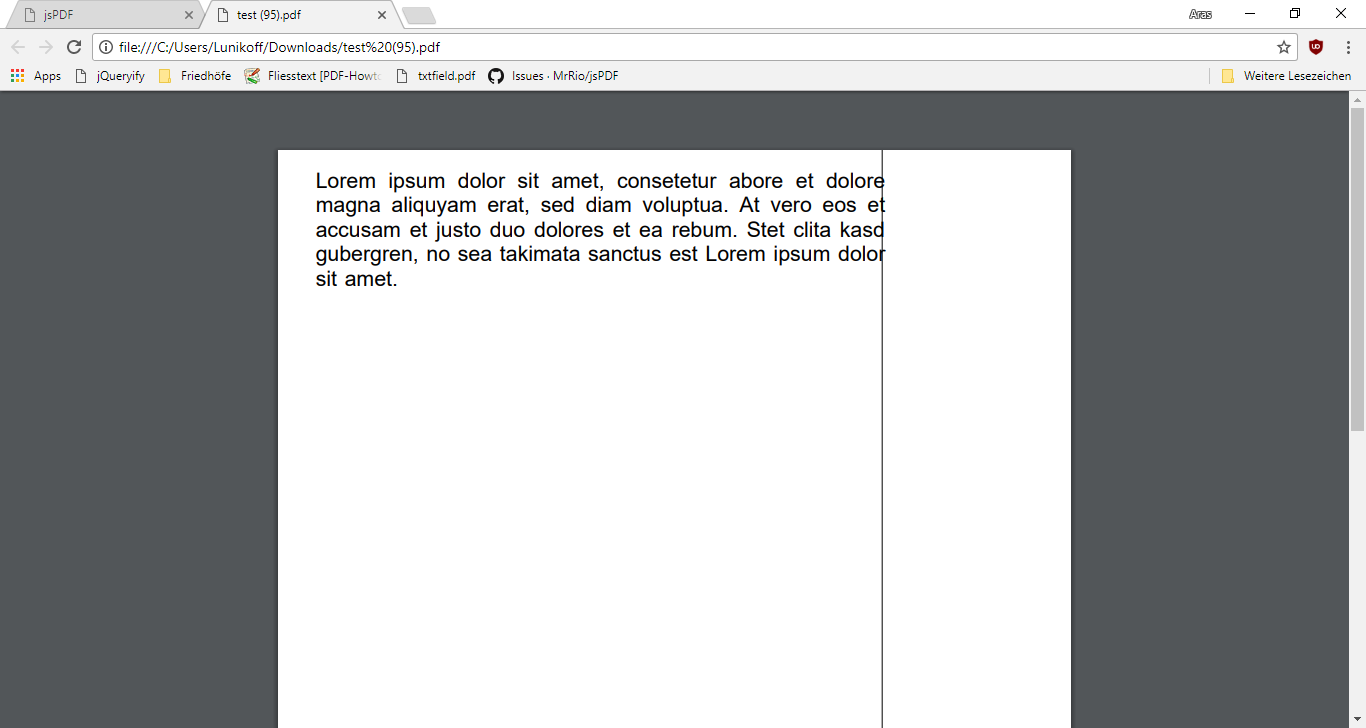
Forgot scaling... now we see a justify as expected. last line is left aligned
doc.text('Lorem ipsum dolor sit amet, consetetur abore et dolore magna aliquyam erat, sed diam voluptua. At vero eos et accusam et justo duo dolores et ea rebum. Stet clita kasd gubergren, no sea takimata sanctus est Lorem ipsum dolor sit amet.', 10,10, {maxWidth: 150, align: "justify"});

doc.line(160,0,160,300)
Uzlopak
on 16 Sep 2017
I did solve the problem without changing the API.
Here is my pull request: https://github.com/MrRio/jsPDF/pull/1469
gpietro
on 29 Sep 2017
But by this, you have to specify marginright?
Uzlopak
on 29 Sep 2017
By default is 0, and the result is the pageWidth - x (pos). Another way could be to pass the desired width. If you have a better approach is welcome. I tried to find the best fix by changing as little as possible.
gpietro
on 29 Sep 2017
Well I am still waiting for @MrRio to merge my pull requests or comment on them. I refactored the text function properly and it is passing all tests. It has more functionality now and works as expected. It should be possible to modify it so that i can handle e.g. bb-code or something like this to have in the text bold/cursive or links in the text.
The merge-stop is kind of sad, because I wrote the changes, because I am in need of a proper PDF-Generator for a project I want to write in few months.
Uzlopak
on 29 Sep 2017
Hi! I urgently need to have justified text in my pdf. My english level is low and I do not really understand how to justify a paragraph. A simple example:
var doc = new jsPDF({
          unit: 'cm',
          format: 'letter'
        });
        var text1 = 'Lorem ipsum dolor sit amet, consetetur abore et dolore magna aliquyam erat, sed diam voluptua. At vero eos et accusam et justo duo dolores et ea rebum. Stet clita kasd gubergren, no sea takimata sanctus est Lorem ipsum dolor sit amet.';
        var text2 = doc.splitTextToSize(text1, 10);
        doc.text(text2, 2,2);
        doc.save("doc.pdf");
I apply doc.splitTextToSize to see the text in several lines. I apply in my code {maxWidth: 150, align: "justify"} but does not justify the text. I will be grateful if you can help me!!!
 francisgbh
on 1 Oct 2017
francisgbh
on 1 Oct 2017
I apply in my code {maxWidth: 150, align: "justify"} but does not justify the text.
Obviously, because you would have to make modifications to the code.
Replace atleast jspdf.js with this jspdf.js
https://github.com/arasabbasi/jsPDF/blob/refactor_text/jspdf.js
and then use jspdf.js, standard_fonts_metrics.js and all the other plugins you need or build your own jspdf.debug.js or jspdf.min.js
Uzlopak
on 1 Oct 2017
@francisgbh unfortunately at the moment isn't possibile to justify text with jsPDF (that's why there still an open issue).
Me and @arasabbasi have proposed two PR to @MrRio to add this feature.
Meanwhile, you can choose to use one of the proposed solutions or implement your own.
gpietro
on 1 Oct 2017
I'm sorry for my bad english. Greetings, I don't know how to use your modifications into my code for use justify text with jsPDF, I use your https://github.com/arasabbasi/jsPDF/blob/refactor_text/jspdf.js
then the original jspdf.js
later the standard_fonts_metrics.js
in my js file:
doc.text('Lorem ipsum dolor sit amet, consetetur abore et dolore magna aliquyam erat, sed diam voluptua. At vero eos et accusam et justo duo dolores et ea rebum. Stet clita kasd gubergren, no sea takimata sanctus est Lorem ipsum dolor sit amet.', 10,10, {maxWidth: 150, align: "justify"});

doc.line(160,0,160,300)
doc.save('testpdf.pdf');
but I still can't get the result above of the justify text..
Please, give some help here, I really need this to my project! Thank you very much!
 SilvioRamirez
on 3 Jan 2018
SilvioRamirez
on 3 Jan 2018
Open jspdf.debug.js, find the code of the original jspdf.js and replace it with the new jspdf.js. use the manually updated jspdf.debug.js
If you need minified jspdf.min.js then minify the manually updated jspdf.debug.js
Uzlopak
on 3 Jan 2018
@SilvioRamirez if you want to give a try at my implementation on this fork. We use it in production. The only thing you need to change is:
- set a margin right if you want:
new jsPDF({ marginRight: margins.right}); - use property align: 'justify'
gpietro
on 4 Jan 2018
Will be solved with #1433
Uzlopak
on 15 Feb 2018
Forgot scaling... now we see a justify as expected. last line is left aligned
doc.text('Lorem ipsum dolor sit amet, consetetur abore et dolore magna aliquyam erat, sed diam voluptua. At vero eos et accusam et justo duo dolores et ea rebum. Stet clita kasd gubergren, no sea takimata sanctus est Lorem ipsum dolor sit amet.', 10,10, {maxWidth: 150, align: "justify"}); doc.line(160,0,160,300)
@arasabbasi
What did you mean about "Forgot scaling... now we see a justify as expected. last line is left aligned"??
I'm trying to align a text, but the first line of text not respond to the justify but the next ones applies the justifying.
Just as you posted before, also I've read that you made a refactored jsPDF.js, that solves that, and you posted a GITHUB URL:
[(https://github.com/arasabbasi/jsPDF/blob/refactor_text/jspdf.js)]
But the link is Broken :( :(
If you can help me, would be very nice, have a good day!
 voldemortkein
on 4 Jan 2019
voldemortkein
on 4 Jan 2019
How about using latest release of jspdf?
Uzlopak
on 4 Jan 2019
How about using latest release of jspdf?
I am using the latest one, justify works fine, but now linebreak in text won't work...
Before the update, \n worked in text. Now I can put in linebreak when the text is justified. ANy suggestions?
 attilaking
on 27 Sep 2019
attilaking
on 27 Sep 2019
Related issues
 bpmckee
·
70Comments
bpmckee
·
70Comments
 dusantrtica
·
28Comments
dusantrtica
·
28Comments
 eKoopmans
·
68Comments
eKoopmans
·
68Comments
 abdullah9said
·
63Comments
abdullah9said
·
63Comments
 larkin
·
28Comments
larkin
·
28Comments
Most helpful comment
@gpietro
Like this?
1419