Jspdf-autotable: not compatible with jsPDF 2.0.0 - Property 'autoTable' does not exist on type 'jsPDF'
Hello,
I tried to use jsPDF-AutoTable with jsPDF 2.0.0 but I cant find the way to solve the following compile error:
Property 'autoTable' does not exist on type 'jsPDF'
`
import jsPDF from 'jspdf';
import 'jspdf-autotable';
...
const doc = new jsPDF('landscape', 'mm', 'a4');
doc.autoTable({ body: [x.content], `
It worked with jsPDF 1.5.3
 cscsaba242
All 9 comments
I imported:
import { autoTable, RowInput } from 'jspdf-autotable';
import { jsPDF } from 'jspdf';
and used as:
(doc as jsPDF & { autoTable: autoTable }).autoTable({
head: [columnsTitles],
body: this.source as RowInput[],
(...)
});
and it worked.
 digit81
on 17 Aug 2020
digit81
on 17 Aug 2020
Updated the examples to work with jspdf 2.0. Do you have a different setup?
 simonbengtsson
on 17 Aug 2020
simonbengtsson
on 17 Aug 2020
Hello, I tried, the original compile error has gone, but I have new compile error :
_file-export.component.ts:82 FileExport.onClickPDF error: TypeError: this.jsPDFDocument.setFontStyle is not a function_
private readonly JSPDTHEME = 'grid';
...
autoTable(doc, { body: [x.content], startY, theme: this.JSPDTHEME });
Make sure that your file export component does not use setFontStyles. It was removed in jspdf 2.0.
simonbengtsson
on 18 Aug 2020
I dont use it, maybe the indirect call in theme setup calls it

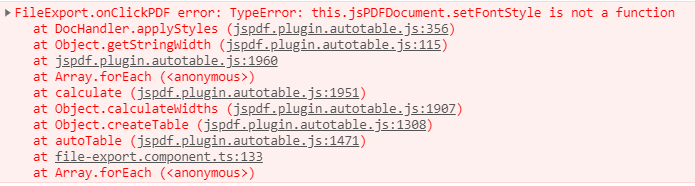
UPDATED
cscsaba242
on 18 Aug 2020
I imported:
import { autoTable, RowInput } from 'jspdf-autotable'; import { jsPDF } from 'jspdf';and used as:
(doc as jsPDF & { autoTable: autoTable }).autoTable({ head: [columnsTitles], body: this.source as RowInput[], (...) });and it worked.
As an alternative, you could create an interface wrapping the autoTable plugin. This effectively does the same, its just (imo) prettier:
import { jsPDF } from "jspdf";
import 'jspdf-autotable';
import { UserOptions } from 'jspdf-autotable';
interface jsPDFWithPlugin extends jsPDF {
autoTable: (options: UserOptions) => jsPDF;
}
Also, this lets you add any other plugins as new lines in the interface (ofc you could just AND it together like @digit81 proposed).
Then use it in your class:
export class PDFDocument {
protected doc: jsPDFWithPlugin;
constructor() {
this.doc = new jsPDF({
orientation: 'portrait',
unit: 'mm',
format: 'a4',
}) as jsPDFWithPlugin;
}
generate() {
this.doc.autoTable({
...
});
}
}
 cloakedch
on 21 Aug 2020
cloakedch
on 21 Aug 2020
Thanks for you replies guys, I didn't get compile error, but I get :
_jsPDFDcocument.setFontstyle is not a function_ at here:
autoTable(doc, { body: [x.content], startY, theme: this.JSPDTHEME });
In theory my colleague has solved this as well with jspdf 2.0 (im dont know how, because im on holiday)
cscsaba242
on 23 Aug 2020
Hello I have an similar error, I import the scripts like this:
      <script src="https://cdnjs.cloudflare.com/ajax/libs/jspdf/2.0.0/jspdf.umd.min.js"></script>
      <script type="text/javascript" src="https://cdnjs.cloudflare.com/ajax/libs/jspdf-autotable/3.5.6/jspdf.plugin.autotable.min.js"></script>
And want to use it like this:
    window.jsPDF = window.jspdf.jsPDF;

    function createInvoice(final){
      const doc = new jsPDF();
      console.log(window.autotable);

      doc.text("Hello world!", 10, 10);
      doc.autoTable({
        head: [['Name', 'Email', 'Country']],
        body: [
          ['David', '[email protected]', 'Sweden'],
          ['Castille', '[email protected]', 'Spain']
        ]
      });
      doc.save("a4.pdf");
    }
I have all times the doc.autoTable is not a function error.
 victoriaDrews
on 24 Aug 2020
victoriaDrews
on 24 Aug 2020
This issue has been automatically closed since the issues in this project are mainly used for bugs and feature requests. Questions are directed to stackoverflow.
![stale[bot] picture](https://avatars.githubusercontent.com/in/1724?v=4&s=40) stale[bot]
on 2 Sep 2020
stale[bot]
on 2 Sep 2020
Related issues
simonbengtsson
·
5Comments
simonbengtsson
·
4Comments
 ultra2
·
6Comments
ultra2
·
6Comments
 azakordonets
·
5Comments
azakordonets
·
5Comments
 JoakFlores
·
3Comments
JoakFlores
·
3Comments
Most helpful comment
Hello I have an similar error, I import the scripts like this:
And want to use it like this:
I have all times the doc.autoTable is not a function error.