Jspdf-autotable: Multi-section table - wrap table columns in the same page
Is it possible to create multiple columns on a page and have a table wrap its data among those columns?
This was brought up in #287 and closed but it does not appear it was ever addressed. I have tried looking through the commits and source code and have not found any parameters on how to accomplish this.

 bsparacino
All 8 comments
That's a very interesting idea.
Currently, the plugin doesn't support this out of the box .. but you can actually implement this yourself using hooks.
The general idea is very simple, add a hook for didDrawPage and then for each table page that should be drawn in the same page : doc.setPage(previous_page) and shift the table position to the right :
function createRows(count) {
  const rows = [];
  for (let i = 1; i <= count; i++) {
    rows.push([i, `Name ${i}`, `Email ${i}`])
  }
  return rows;
}

function generatePDF(save = false) {
  const doc = new jsPDF('p', 'mm', 'a4');

  // overall margin
  const margin = {
    left: 15,
    right: 15,
    top: 20,
    bottom: 20,
  };

  const rowsCount = 80;

  // number of table sections in the page
  const sections = 2;

  // space between each section
  const spacing = 5;

  // calculate each section width
  const printWidht = doc.internal.pageSize.width- (margin.left + margin.right);
  const sectionWidth = (printWidht - ((sections - 1) * spacing)) / sections;

  // add initial empty page that we will delete later,
  // we need it so when we activate it the next addPage()
  // for the second table page will be on the actial first page
  doc.addPage();

  doc.autoTable({
    head: [['ID', 'Name', 'Email']],
    body: createRows(rowsCount),
    tableWidth: sectionWidth,
    margin,
    rowPageBreak: 'avoid', // avoid breaking rows into multiple sections
    didDrawPage({table, pageNumber}) {
      const docPage = doc.internal.getNumberOfPages();
      const nextShouldWrap = pageNumber % sections;

      if (nextShouldWrap) {
        // move to previous page, so when autoTable calles
        // addPage() it will still be the same current page
        doc.setPage(docPage - 1);

        // change left margin which will controll x position
        table.settings.margin.left += sectionWidth + spacing;
      } else {
        // reset left margin for the first section in every page
        table.settings.margin.left = margin.left;
      }
    }
  });

  // delete unused empty page
  doc.deletePage(1)

  doc.save('multi-section table.pdf');
}
Here is the codepen
Also an html file you can download multi-section-table.zip
(I may add it as an example in the examples section of the repo)
@simonbengtsson what do you think?
 mmghv
on 5 Apr 2020
mmghv
on 5 Apr 2020
Wow thanks for this, the pdf you generated is exactly the type of output I am looking to achieve. Now I know what I will be working on in the morning.
bsparacino
on 5 Apr 2020
@mmghv
One option to add to the table is:
startY: margin.top
While working through my specific use case, I am adding hundreds of separate tables to the reports, each table is put onto a new page. After calling doc.addPage(), if the previous page's table was writing to the second section (right side section), then the new table added to the next page would have an incorrect startY value. The table was being offset down the page, it seemed like it was retaining the Y value from the previous table.
So it would be best practice to specify the startY value for each added table.
If you are only working with 1 table then it is not necessary to do this.
This is a pretty simple solution and I really appreciate how quickly you came up with a solution!
function createRows(count) {
  const rows = [];
  for (let i = 1; i <= count; i++) {
    rows.push([i, `Name ${i}`, `Email ${i}`])
  }
  return rows;
}

function generatePDF(save = false) {
  const doc = new jsPDF('p', 'mm', 'a4');

  // overall margin
  const margin = {
    left: 15,
    right: 15,
    top: 20,
    bottom: 20,
  };

  const rowsCount = 80;

  // number of table sections in the page
  const sections = 2;

  // space between each section
  const spacing = 5;

  // calculate each section width
  const printWidht = doc.internal.pageSize.width- (margin.left + margin.right);
  const sectionWidth = (printWidht - ((sections - 1) * spacing)) / sections;

  // add initial empty page that we will delete later,
  // we need it so when we activate it the next addPage()
  // for the second table page will be on the actial first page
  doc.addPage();

  doc.autoTable({
    startY: margin.top
    head: [['ID', 'Name', 'Email']],
    body: createRows(rowsCount),
    tableWidth: sectionWidth,
    margin,
    rowPageBreak: 'avoid', // avoid breaking rows into multiple sections
    didDrawPage({table, pageNumber}) {
      const docPage = doc.internal.getNumberOfPages();
      const nextShouldWrap = pageNumber % sections;

      if (nextShouldWrap) {
        // move to previous page, so when autoTable calles
        // addPage() it will still be the same current page
        doc.setPage(docPage - 1);

        // change left margin which will controll x position
        table.settings.margin.left += sectionWidth + spacing;
      } else {
        // reset left margin for the first section in every page
        table.settings.margin.left = margin.left;
      }
    }
  });

  // delete unused empty page
  doc.deletePage(1)

  doc.save('multi-section table.pdf');
}
Yes, of course you will need to customize it to your specific needs.
you may want to tweak it to print page header/footer, or to join multiple tables .. etc.
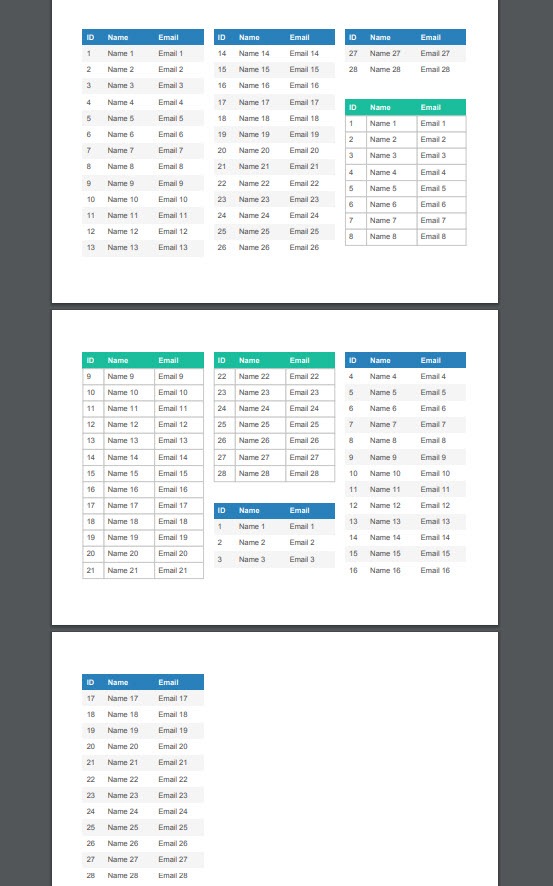
For example, here's a version that draws multiple tables in a joint continues section flow, it might be a little crazy but it shows how much control you have when using hooks :
mmghv
on 6 Apr 2020
Yep, I have a good understanding now of what you did and how to manipulate it, I spent all of yesterday creating different reports.
This is a pretty simple library used compared to the C# and PHP libraries I have previously used which just creates a mess of code.
bsparacino
on 6 Apr 2020
Adding an example sounds great @mmghv!
 simonbengtsson
on 8 Apr 2020
simonbengtsson
on 8 Apr 2020
Hello!
Thank you for the information on sections, but it just happened to me that my table ended right at the end of the sheet and it generates a new sheet for me.
Using your example the same thing happens if I generate the tables with a total of 32 rows, eg: if I have 3 tables with 32 rows this generates 3 sheets in the PDF.
What could I do to prevent it from turning the page in this case and generating it in the next section?
 PedidosClear
on 11 Apr 2020
PedidosClear
on 11 Apr 2020
@PedidosClear Fixed that now in the codepen :+1:
mmghv
on 11 Apr 2020
Related issues
simonbengtsson
·
4Comments
bsparacino
·
3Comments
simonbengtsson
·
5Comments
 webdream-fr
·
6Comments
mmghv
·
4Comments
webdream-fr
·
6Comments
mmghv
·
4Comments
Most helpful comment
That's a very interesting idea.
Currently, the plugin doesn't support this out of the box .. but you can actually implement this yourself using
hooks.The general idea is very simple, add a hook for
didDrawPageand then for each table page that should be drawn in the same page :doc.setPage(previous_page)and shift the table position to the right :Here is the codepen
Also an
htmlfile you can download multi-section-table.zip(I may add it as an example in the examples section of the repo)
@simonbengtsson what do you think?