Jspdf-autotable: The header font style does not change
My table in the Arabic language thus I used Amiri font. The Amiri font changes the text to the Arabic language for the entire table except of table header.
I used the following code
    const unit = "pt";
    const size = "A4"; // Use A1, A2, A3 or A4
    const orientation = "portrait"; // portrait or landscape

    const marginLeft = 40;
    const doc = new jsPDF(orientation, unit, size);

    // doc.setFontSize(15);
    doc.addFileToVFS("Amiri-Regular.ttf", AmiriRegular);
    doc.addFont('Amiri-Regular.ttf', 'Amiri', 'normal');

    doc.setFont('Amiri'); // set font
    doc.setFontSize(10);


    const title = "تقرير";
    const headers = [Object.keys(props.data[0])];

    const data = props.data.map(elt => {
        return Object.values(elt)
        // return [elt.name, elt.profession]
    });

    let content = {
        startY: 50,
        head: headers,
        body: data,
        fillColor: [155, 89, 182],
        styles: {
            font: 'Amiri'
        },
        headStyles: {font:'Amiri'},
    };

    doc.text(title, marginLeft, 40);
    doc.autoTable(content);
    doc.save("report.pdf")

 al-ani
All 7 comments
I can't reproduce it, I'm using an Arabic font and it's working as expected, although I added the font after converting it to a JS file using jsPDF font-converter.
 mmghv
on 31 Dec 2019
mmghv
on 31 Dec 2019
If you run the custom example @al-ani. Can you get that to work? What is the difference if so between yours and that example?
 simonbengtsson
on 2 Jan 2020
simonbengtsson
on 2 Jan 2020
If you run the custom example @al-ani. Can you get that to work? What is the difference if so between yours and that example?
This is an example of my code
https://jsfiddle.net/alaney/sg7q1mb9/1/#
al-ani
on 3 Jan 2020
This is tricky, the problem is, you added only the normal font-face, and the head style is bold so it doesn't find the bold variant of the font, to fix this, either add the bold font-face or just simply use the normal font-face for the heading like this :
headStyles: { font: "Amiri", fontStyle: 'normal', halign: "right" },
Many thanks @mmghv
al-ani
on 3 Jan 2020
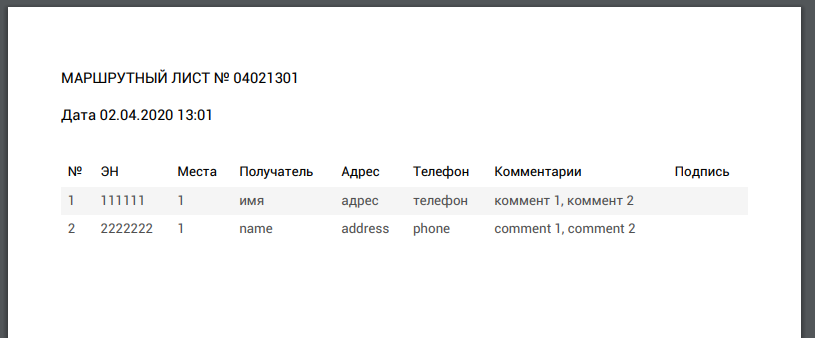
thank! Add fontStyle: 'normal', help for me too. I am using cyrillic fonts
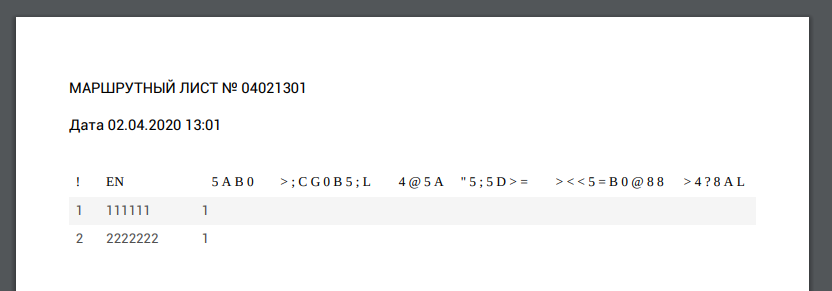
fixed
 Krasnopir
on 10 Apr 2020
Krasnopir
on 10 Apr 2020
thank! Add
fontStyle: 'normal',help for me too. I am using cyrillic fonts
fixed
Can I find out which font you used?
 RuslanCherkasArchysoft
on 9 May 2020
RuslanCherkasArchysoft
on 9 May 2020
Related issues
 webdream-fr
·
6Comments
webdream-fr
·
6Comments
 ayozebarrera
·
3Comments
mmghv
·
4Comments
ayozebarrera
·
3Comments
mmghv
·
4Comments
 AminBangash
·
5Comments
AminBangash
·
5Comments
 azakordonets
·
5Comments
azakordonets
·
5Comments
Most helpful comment
This is tricky, the problem is, you added only the
normalfont-face, and theheadstyle is bold so it doesn't find theboldvariant of the font, to fix this, either add theboldfont-face or just simply use thenormalfont-face for the heading like this :