Jspdf-autotable: Not supporting for custom fonts. Like arabic, japanse
I added Japanese custom fonts in jspdf. working fine in jspdf but not working in jspdf-autoable
 doc.addFileToVFS("MouhitsuBold.ttf", MouhitsuBold);
      doc.addFont('MouhitsuBold.ttf', 'Mouhitsu', 'bold');

      doc.setFont('Mouhitsu', 'bold'); // set font
      doc.setFontSize(20);

    // From HTML
    doc.autoTable({html: '.table'});


    // From Javascript
    let finalY = doc.previousAutoTable.finalY;
    doc.text("おはようございます", 14, finalY + 15);

    doc.autoTable({
        startY: finalY + 20,
        head: [
            ['おはようございます', 'おはようございます', 'Email', 'Country', 'IP-address'],
        ],
        body: [
            ['1', 'Donna', 'なに', 'China', '211.56.242.221'],
            ['2', 'Ruth' , '[email protected]', 'Ukraine', '38.36.7.199'],
            ['3', 'Ruth', '[email protected]', 'Trinidad and Tobago', '19.162.133.184'],
            ['4', 'Jason', '[email protected]', 'Brazil', '10.68.11.42'],
            ['5', 'Jane', '[email protected]', 'United States', '47.32.129.71'],
            ['6', 'Adam', '[email protected]', 'Canada', '18.186.38.37']
        ],
    });

    finalY = doc.previousAutoTable.finalY;
    doc.text("なに", 14, 10);
    doc.autoTable({
        startY: finalY + 20,
        html: '.table',
        useCss: true,
        styles: {
            font: 'Mouhitsu',
            lineColor: [44, 62, 80],
            lineWidth: 1
        },
    });

    return doc;

doc.text("なに", 14, 10); --- working fine for JSPDF
doc.autoTable .. data not working
 prakashsam
All 4 comments
Added an example for how to use custom fonts now in the custom example. It seems like everything is working? Take a look at your console and make sure you don't have any warnings/errors.
 simonbengtsson
on 3 Feb 2019
simonbengtsson
on 3 Feb 2019
@simonbengtsson Really thanks for implement custom fonts. Its working fine but
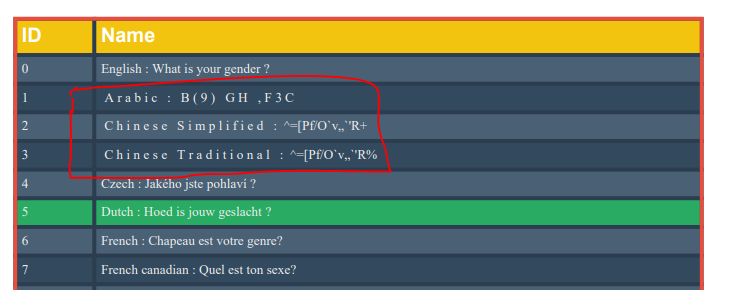
I have multiple languages in one PDF export using Anuglar5 ,JSPDF and Jspdf autotable. . how to do for multiple fonts in Jspdf autotable. Please refer the screenshots.
If i use Japanse or Arabic fonts working fine for particular language.
prakashsam
on 13 Feb 2019
I am facing this same issue. Arabic labels are not rendering on pdf table header. I am using jspdf autotable. here is the output

`  doc.autoTable(columns, row, {
      margin: {horizontal: 7},
      bodyStyles: { valign: 'top' },
      styles: { cellPadding:0.7, fontSize: 7, overflow: 'linebreak',startY: 20 },
      columnStyles: {
        text: {columnWidth: 5},
        },
      theme: 'grid'
    });
    doc.save("print001.pdf");`
 shalini-github
on 14 Mar 2019
shalini-github
on 14 Mar 2019
Hi @prakashsam
Am facing same issue,
as per your above comments, how did you resolved with custom fonts.
Can you please help me
 1202ajay
on 22 Mar 2020
1202ajay
on 22 Mar 2020
Related issues
 tapz
·
3Comments
simonbengtsson
·
5Comments
tapz
·
3Comments
simonbengtsson
·
5Comments
 Alorse
·
4Comments
Alorse
·
4Comments
 webdream-fr
·
6Comments
webdream-fr
·
6Comments
 mmghv
·
4Comments
mmghv
·
4Comments
Most helpful comment
Added an example for how to use custom fonts now in the
customexample. It seems like everything is working? Take a look at your console and make sure you don't have any warnings/errors.