Jsoneditor: Autocomplete firing on dragging
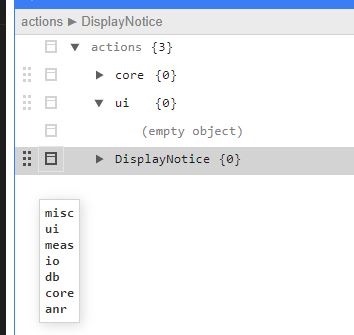
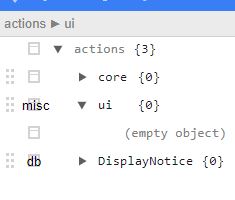
When dragging items around in tree view I am getting a spurious autocomplete prompt. Autocomplete options are the following:
autocomplete: {
    filter: "contain",
    trigger: "focus",
    getOptions: function (text, path, input, editor) {
...
    },
}
 natankeddem
All 8 comments
Thanks for reporting. I tried to reproduce the issue you describe by putting the options in one of the existing autocomplete examples but didn't manage to reproduce it.
Can you create a minimal example demonstrating the issue? Maybe based on one of the autocomplete examples?
 josdejong
on 19 Aug 2020
josdejong
on 19 Aug 2020
Sorry for the brief description, I was in a bit of a rush and figured sooner was better than perfect. This is the most minimal I could come up with:
<!DOCTYPE html>
<html>
  <head>
    <meta http-equiv="Content-Type" content="text/html;charset=utf-8" />
    <link href="dist/jsoneditor.min.css" rel="stylesheet" type="text/css" />
    <script src="dist/jsoneditor.min.js"></script>
  </head>
  <body>
    <div id="jsoneditor" style="width: 800px; height: 800px;"></div>
    <script>
      const container = document.getElementById("jsoneditor");
      const options = {
        mode: "tree",
        modes: ["tree"],
        name: "actest0",
        autocomplete: {
          trigger: "focus",
          getOptions: function (text, path, input, editor) {
            return ["hi", "bye"];
          },
        },
      };
      const editor = new JSONEditor(container, options, {});
      const updatedJson = editor.get();
      console.log(data);
    </script>
  </body>
</html>
I think the main cause stems back to using "trigger: "focus"" because once I add that even the built in examples show the bug. To easily trigger the bug to happen click on the 6 dots on the left on a tree element and it should immediately pop up the autocomplete list. Note on my example I don't populate the tree to start so you will need to add something first.
natankeddem
on 19 Aug 2020
Thanks! I can reproduce the issue when loading your code example, then inserting one new property, and after that clicking on the drag icon left of the created property. So it's a clear bug that should be fixed.
josdejong
on 19 Aug 2020
Not sure if it is related but I am also getting the auto complete on clicking arrows for expanding objects once I added the "onEditable" function option.
    onEditable: function ({ path, field, value }) {
      return { field: true, value: true };
    },
I think that is the same problem as we see when clicking the drag icon, thanks!
josdejong
on 20 Aug 2020
Workaround until a fix is implemented seems to be checking for a (input != ""). Checking this before populating the array seems to cover up the problem at least.
natankeddem
on 25 Aug 2020
This issue has been fixed now in v9.0.5, would be great if you can give it a try Natan.
josdejong
on 9 Sep 2020
Looks good, thank you!
natankeddem
on 9 Sep 2020
Related issues
 azakordonets
·
6Comments
azakordonets
·
6Comments
 MarkHerhold
·
3Comments
MarkHerhold
·
3Comments
 jaunt
·
4Comments
jaunt
·
4Comments
 PeterBurner
·
3Comments
PeterBurner
·
3Comments
 guiferrpereira
·
6Comments
guiferrpereira
·
6Comments