Jsoneditor: Events for built-in actions in context menu (in tree mode)
It's my first opening issue in github ever so I apologize in advance.
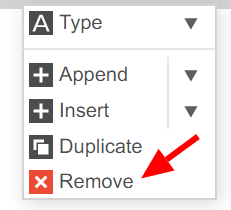
@josdejong is it possible to add event support for built-in actions in context-menu that is available in tree mode? I specifically interested in 'Remove' action that deletes key-value pair (and it's children if any) from json object. How can I detect that remove action has occurred by pressing the remove button in context menu? I see that editor updates with modified json but how can I capture that event?
I tried to capture it via 'click' event via jQuery and pure JS on button class name in context menu but it doesn't work as (it's my guess) the button (and the whole menu) deletes with the row.
I'm kinda stuck with no options at this moment.
 keshon
All 8 comments
I think you could use the onCreateMenu option to monkey-patch the click function of the desired menu item.
See API documentation and the example 21_customize_context_menu
 davebaol
on 26 May 2020
davebaol
on 26 May 2020
What @davebaol says is indeed the best option.
But @keshon maybe you can explain _why_ you need this?
 josdejong
on 27 May 2020
josdejong
on 27 May 2020
I think you could use the
onCreateMenuoption to monkey-patch theclickfunction of the desired menu item.
See API documentation and the example 21_customize_context_menu
@davebaol I did check this example in a first place but not sure how this solution might work because this example shows that I can create custom menu items (or override existing e.g. built-in) with my own custom functions. And the example shows how to do with with 'pathTojq' function.
If I do this for existing 'Remove' method like so :
items.forEach(function (item, index, items) {

    if (items[index].text == "Remove") {

        items[index].click = () => {
            console.log('Override click method');
        };

    }
});
.. I can capture click event for it but it stops doing it original purpose: removing items from editor so I have to imply my own logic to do the operation and this complicates the task.
Or I'm missing the idea you've proposed.
keshon
on 27 May 2020
What @davebaol says is indeed the best option.
But @keshon maybe you can explain _why_ you need this?
@josdejong yes of course but this may take time.
The project I'm working on uses Jsoneditor as an editor on real JSON file that is being pulled up from back-end side to front-end upon page load.
User makes changes inside editor which updates in real time, basically I make a (post) request to Rest API endpoint with up-to-date json data from editor (via editor.get()). Back-end overwrites existing json file with this new data.
Originally I used onChangeJSON callback to make this request to Rest API and there weren't any problems with constantly updating data in real time. Well except the fact that during typing names for keys or values requests were made after each character typed in - not very wise.
To solve this issue I switched to another callback which is onEvent. I moved my logic for request there and was able to write a wrap function around that sets interval between user's keyup event type to decide if it's a right time to send request to backed with updated data.
For example if user types too fast there is no requests as interval between each key is too short.
When user stops the interval after last typed key passes the threshold (it's a timer) and request finally being made to backend.
Now the _problem_ arise. Because I moved from onChangeJSON callback I cannot capture click event of 'Remove' built-in method and make a request to my backend. onChangeJSON callback captures any changes to json data with no difference if it was typing a new name or removing, duplicating etc. As I took control over typing via 'keyups' I need to separate this two events: typing multiple character and save vs deleting and save immediately.
As I said before I tried to capture click event via raw JS or Jquery but it's not working for buttons in context menu for some reason (it works on Undo/Redo in top menu though).
If I had ability to capture events of built-in actions inside context menu I would be able to attach my requests to backend after action's default "action" it was designed for.
Sorry for this wall of text and my English (it's not native).
keshon
on 27 May 2020
If I do this for existing 'Remove' method like so :
items.forEach(function (item, index, items) {

    if (items[index].text == "Remove") {

        items[index].click = () => {
            console.log('Override click method');
        };

    }
});
.. I can capture click event for it but it stops doing it original purpose: removing items from editor so I have to imply my own logic to do the operation and this complicates the task.
Or I'm missing the idea you've proposed.
@keshon yes you're missing the call to the original click function. I mean, something like that
items.forEach(function (item, index, items) {

    if (items[index].text == "Remove") {
        let originalClick = items[index].click;
        items[index].click = () => {
            console.log('Do something BEFORE the original click method');
            originalClick();
            console.log('Do something AFTER the original click method');
        };

    }
});
If I do this for existing 'Remove' method like so :
items.forEach(function (item, index, items) {

    if (items[index].text == "Remove") {

        items[index].click = () => {
            console.log('Override click method');
        };

    }
});
.. I can capture click event for it but it stops doing it original purpose: removing items from editor so I have to imply my own logic to do the operation and this complicates the task.
Or I'm missing the idea you've proposed.@keshon yes you're missing the call to the original click function. I mean, something like that
items.forEach(function (item, index, items) {

    if (items[index].text == "Remove") {
        let originalClick = items[index].click;
        items[index].click = () => {
            console.log('Do something BEFORE the original click method');
            originalClick();
            console.log('Do something AFTER the original click method');
        };

    }
});
@davebaol yes, exactly but what's real name of this original function that deletes element from json object? Is it a public method that I can call manually like in this example? Or do I have to write my own originalClick function with the logic for deletion that actually duplicates behavior of existing original click function used by _jsoneditor_?
keshon
on 27 May 2020
@keshon Why do you need its name? Just call it!
Maybe you're missing this line from my example?
let originalClick = items[index].click;
@keshon Why do you need its name? Just call it!
Maybe you're missing this line from my example?let originalClick = items[index].click;
Oh man! I actually missed this line (it was late at night when I responded). Now it's working and totally make sense now. I wish examples had this case scenario.
@davebaol thank you!
keshon
on 28 May 2020
Related issues
 azakordonets
·
6Comments
azakordonets
·
6Comments
 realtebo
·
3Comments
realtebo
·
3Comments
 champ51
·
6Comments
champ51
·
6Comments
 CodeVam
·
3Comments
CodeVam
·
3Comments
 shinyamade
·
5Comments
shinyamade
·
5Comments