Jsoneditor: Implement onValidationError option and a public validate API method
It would be nice to have a callback function and a method to run/listen for validation errors. This can be used for example to check whether a document is valid before submitting it, or to render validation errors on a different or more prominent place in a web application.
We should think about how this API should look exactly: think about the how to treat both JSON parse errors, JSON Schema validation errors, and custom validation errors.
Followup from discussion here: https://github.com/josdejong/jsoneditor/pull/560#issuecomment-445551510
 josdejong
All 46 comments
If anyone is interested in implementing this feature please let me know!
josdejong
on 10 Dec 2018
We will have a look into it but I am not certain yet that we can provide a solution on short term.
For anyone interested, the following quick fix is what we are currently using. It requires to load ajv seperately from json-editor.
// load ajv (JSON schema validator)
var AJV = new window.Ajv({
    allErrors: true,
    verbose: true
});

// add a JSON schema to ajv
// schemaSrc = JSON schema object
function add_schema(name, schemaSrc) {
    AJV.addSchema(schemaSrc, name);
    return AJV.getSchema(name).schema;
}

// validate json against schema
function validate_schema(name, json) {
    return AJV.validate(name, json) || AJV.errorsText(); // ajv can return more details, the .errorsText() method is a easy shortcut that serves any error(s)
}

// onChange event in JSON editor options
new JSONEditor('container', {
    /* ... */
    onChange: function() {

        try {
            var json = critical_json_editor.get();
        } catch (e) {
            return;
        }

        var errors = validate_schema(name, json);
        if (typeof errors === 'text') { /* process json errors */ }
    }
}
The disadvantage of the solution is that AJV will run 2x and requires additional parsing. An onValidationError callback would provide better performance.
 optimalisatie
on 22 Dec 2018
optimalisatie
on 22 Dec 2018
:+1: thanks for sharing this workaround Jan Jaap.
as a workaround, I think you could also do:
var errors = myJsonEditor.validateSchema(json)
instead of setting up AJV yourself. No official API but should work for now as a workaround.
josdejong
on 22 Dec 2018
+1 For this feature
 tscislo
on 24 Feb 2019
tscislo
on 24 Feb 2019
@josdejong I don't think it's possible to reference the jsonEditor object in this scenario, since it doesn't seem possible to edit the options after initialization:
var jsonEditor = new JSONEditor('container', {
    /* ... */
    onChangeJson: function(json) {
        // `jsonEditor` doesn't exist yet... and `this` in this context returns the `options` object
        var errors = jsonEditor.validateSchema(json);
        if (typeof errors === 'text') { /* process json errors */ }
    }
}
I believe @optimalisatie (and myself) are trying to validate the schema of the JSON from within the onChange callback, which is passed to the options object _on_ initalization.
At least, in the current docs, I couldn't find a way to reference it otherwise.
 JohnBDonner
on 23 Apr 2019
JohnBDonner
on 23 Apr 2019
@JohnBDonner so in your case you want to display the current validation errors somewhere in a side bar or header or footer? Maybe an a callback method onChangeValidationErrors(errors) which triggers with every change in the errors, both when new errors occur but _also_ when errors are resolved again?
josdejong
on 24 Apr 2019
@josdejong Yes, a callback method like onChangeValidationErrors(errors) would be helpful.
My use case is I'd like to disable a form button when the JSON is invalid, and enable the button again when it's valid, where the JSON is invalid based on a schema I've passed in.
JohnBDonner
on 24 Apr 2019
That makes sense. Thanks for explaining!
josdejong
on 26 Apr 2019
onChangeValidationErrors(errors) would be good.
I am use var errors = myJsonEditor.validateSchema(json) for now.
Thanks @josdejong
 hcsgzh
on 20 May 2019
hcsgzh
on 20 May 2019
when i use myJsonEditor.validateSchema(json), i get a true or false, how i can get the error message
 littlebearbbb
on 24 May 2019
littlebearbbb
on 24 May 2019
@littlebearbbb you can read that from myJsonEdtior.validateSchema.errors in case validation returned false.
josdejong
on 25 May 2019
@josdejong validateSchema is just what I needed, thank you. Please consider adding it to the API documentation, as I spent a long time fiddling around with Ajv when I could have just used this from the start.
 jackfrankland
on 18 Jul 2019
jackfrankland
on 18 Jul 2019
Thanks for your feedback @jackfrankland . Using the internal validateSchema is a workaround, we should expose a proper method for it instead, since the internals may change in the future.
josdejong
on 20 Jul 2019
Hi Jos,
I am using OnValidation option instead of schema for validation. Is it possible to get errors without using schema.
 Puneetsharma891
on 1 Aug 2019
Puneetsharma891
on 1 Aug 2019
@Puneetsharma891 I'm not sure what you mean. If you provide your own onValidate(json) function, you can simply call the function yourself with the current json and see if it returns errors.
josdejong
on 1 Aug 2019
@josdejong this is a big hassle, I'm using integrated ajv, just put a schema to the JSONEditor, everything works fine but I can't just get feedback that is json valid or not. To do that I should create my own Ajv instance and then test json against schema... this as twice job to do as is should be done.
 piotrkochan
on 19 Aug 2019
piotrkochan
on 19 Aug 2019
I know it's not ideal.
Again: If anyone is interested in implementing this feature please let me know!
josdejong
on 19 Aug 2019
@josdejong I will have a further look but from the first sight it sounds like something like that:
- Extend the JSONEditor API with an option to provide a callback function
- Execute the callback function on the internal
validate()call
Am I missing something here?
 meirotstein
on 21 Aug 2019
meirotstein
on 21 Aug 2019
@meirotstein thanks!
Yes I think so, a callback onValidationError(errors) and a method validate().
I think the onValidationError callback should fire on any change in the validation errors: both when there are new errors or the errors change, and also when there where errors that are gone now, else you don't get a trigger when the document changes from invalid to valid. What do you think?
josdejong
on 21 Aug 2019
@josdejong I agree. Will add it on the next days hopefully.
meirotstein
on 21 Aug 2019
Cool!
josdejong
on 21 Aug 2019
@josdejong I was just wondering if onChangeValidationErrors(errors) callback is available. I have a use case exactly same as @josdejong has. I want to disable/enable a button based on the validation result. Thank you.
 yzhaopost
on 9 Oct 2019
yzhaopost
on 9 Oct 2019
@yzhaopost onValidationError is not yet implemented.
josdejong
on 9 Oct 2019
@josdejong I was extending the _next days_ a bit; but finally, I found the time to add this PR :smiley:
Better late than ever I guess...
meirotstein
on 29 Nov 2019
:joy: yeah time flies. Thanks for picking this up Meir!
josdejong
on 1 Dec 2019
onValidationError is now available in v7.4.0. Thanks again Meir!
josdejong
on 1 Dec 2019
@meirotstein @josdejong Thank you for providing the "onValidationError" callback. This is awesome!
Now I can catch the validation errors and based on this to enable/disable my button. Thank you!
Just one thing I noticed, for example, I have properties "top", "left", and "width" defined as "number" in my schema.
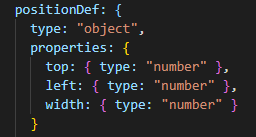
In the Tree mode, when I have the "top" field empty or type in a character instead, it will report the error message "should be a number" in Json editor, and at the same time I get the same error message from the callback. Great!
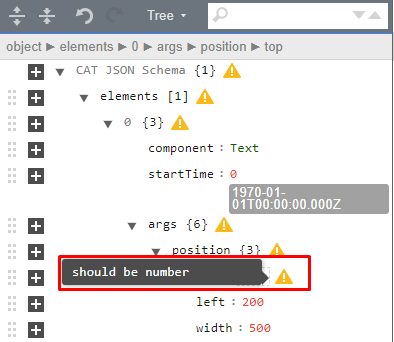
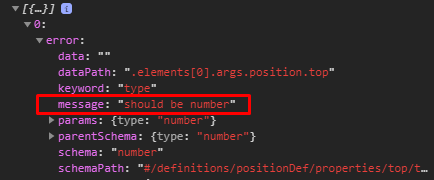
In the Code or Text mode, if I do the same thing described above (with an empty "top" field), the error shows in Json editor. But the callback gives no error.
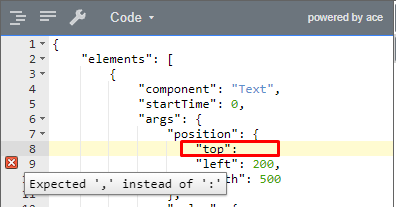

I understand that the above error (in Code and Text mode) is kind of not a real validation error, actually it is a parser error somehow. But, can we still get this error from the callback? I mean it will be great to receive ALL kinds of errors which are showing in the Json editor. In this case, I can disable my button once there is a Json editor reported error (any errors shown in Json editor).
Thanks again for implementing the "onValidationError" callback!
yzhaopost
on 3 Dec 2019
Ah, that is an interesting point Yong, I have to double check but I suppose that currently only validation errors are reported. It would be useful indeed to also report parse errors. What do you think @meirotstein?
josdejong
on 3 Dec 2019
@josdejong @yzhaopost I'm super excited that this option is useful already!
It is correct, my implementation reports only scheme validation errors (as the name of this option states).
I can extend it to report also in a case of a parsing error, maybe in a second parameter - so it will preserve the different error types and will be backward compatible (for the very early adopters, such as @yzhaopost 😃)
It will be something like that:
onValidationError(schemeErrors, parseErrors)
What do you think?
meirotstein
on 4 Dec 2019
I think most neat would be to extend the current list with schemaErrors to also contain parse errors. We can argue that this not a breaking change in the API, only and extension by reporting _more_ errors. The current schema errors already contain a field type: 'validation', so you can already distinguish parse and validation errors.
josdejong
on 4 Dec 2019
@josdejong @meirotstein I like the idea of extending the current list with schemaErrors to also contain parse errors. Thank you all for implementing this very very useful callback!
yzhaopost
on 4 Dec 2019
I agree that this is the most cleaner solution, however it is not that backward compatible because if one expect the error array to be empty only on successful validation now it can return also different types of errors - this can break existing behavior.
On the other hand, this is a very new addition, so the probability for this to happen is quite low. so if you prefer to go in this direction I think it also ok
meirotstein
on 4 Dec 2019
It's a bit of a gray area, you're right. Thanks for being so careful in this regard!
I say let's go for it and extend the existing list with parse errors.
josdejong
on 4 Dec 2019
@josdejong I have added a new PR with these changes - pls review. thanks!
meirotstein
on 5 Dec 2019
Nice, I love it!
josdejong
on 8 Dec 2019
Parse errors are now also reported via onValidationError in v7.5.0. Thanks again Meir!
josdejong
on 8 Dec 2019
@josdejong @meirotstein Thank you! I updated to the 7.5.0 and I can see the parse error reported via onValidationError.
But, I did have another issue. Here is my onValidationError. I want to enable/disable a button based on the validation result.
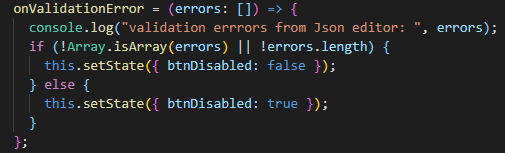
In Code mode, when I generate a Parse error, I always receive a cross origin error and system crashed:

If it is a Validation error, it works great. No any issues, and I could disable the button.
I searched and react Docs suggest to add crossorigin attribute to
Related issues
 sergibondarenko
·
4Comments
sergibondarenko
·
4Comments
 azakordonets
·
6Comments
azakordonets
·
6Comments
 safaorhan
·
5Comments
safaorhan
·
5Comments
 tanmayrajani
·
4Comments
tanmayrajani
·
4Comments
 shinyamade
·
5Comments
shinyamade
·
5Comments
Most helpful comment
:+1: thanks for sharing this workaround Jan Jaap.
as a workaround, I think you could also do:
instead of setting up AJV yourself. No official API but should work for now as a workaround.