Jsgrid: How to make inline edit with rowDoubleClick in JsGrid
// rowDoubleClick: function(args) {
// if(this.editing.item.rowClick) {
// this.editItem($(args.event.target).closest(this, args));
// }
// },
// rowDoubleClick: function (args) {
// if(args.item.rowClick) {
// jsGrid.Grid.prototype.editing.call(this, args);
// }
// },
This is script which I have created, but doesn't works. Could you help me to solve problem it.
Thank you!
 aqrohadi
All 7 comments
try this easy one
rowClick:function(args)
{
//do something or leave it without removing the rowClick section
},
rowDoubleClick:function(args)
{
$("#jsGrid .jsgrid-edit-button").trigger("click");
}
Note: its is using Jquery please import jquery plugin before jsGrid.js
 nandakumar-a
on 3 Mar 2021
nandakumar-a
on 3 Mar 2021
Thanks for the response, @nandakumardtc
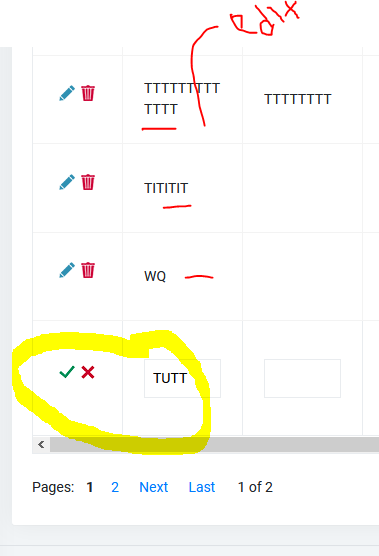
the script code that you sent, it's works, but it's just that when I double-click on the free field and what happens is that the bottom field of the table is available to edit, are you any solution to the problem it ?
The point is from the your script, double-click it's works, but doesn't match what inline to edit. So the conclusion, every time me double-click on a certain field, which is open for editing it is always the bottom field. Look at the SS of the image below.
aqrohadi
on 3 Mar 2021
yeah i got it @aqrohadi try this one
var clients = [
        { "Name": "Otto Clay", "Birthday": "December, 17 2014" },
        { "Name": "Connor Johnston", "Birthday": "March, 5 2012" },
        { "Name": "Lacey Hess", "Birthday": "August, 2 2000" }
    ];

    $("#jsGrid").jsGrid({
        width: "600px",
        height: "400px",

        inserting: true,
        editing: true,
        sorting: true,
        paging: true,

        data: clients,

        fields: [
            { name: "Name", type: "text", width: 150, validate: "required" },
            { name: "Birthday",
              type: "text",
              align: "right",
              width: 150
            },
          {
            type: "control"
          },

          ],
      rowClick:function(args)
      {

      },

    });
$("#jsGrid").on("dblclick","tr:not(.jsgrid-edit-row)",function(){
  $(this).find(".jsgrid-edit-button").trigger("click");
});
Woww, rowDoubleClick it's works! Thank you so much @nandakumardtc !
aqrohadi
on 4 Mar 2021
Welcome, I am glad you got a solution @aqrohadi
nandakumar-a
on 4 Mar 2021
There is another solution also i have attached this
nandakumar-a
on 5 Mar 2021
better
aqrohadi
on 5 Mar 2021
Related issues
 flyinmryan
·
3Comments
flyinmryan
·
3Comments
 jufei
·
3Comments
jufei
·
3Comments
 bradybray
·
3Comments
bradybray
·
3Comments
 aidankilleen
·
5Comments
aidankilleen
·
5Comments
 vahidhiv
·
5Comments
vahidhiv
·
5Comments
Most helpful comment
yeah i got it @aqrohadi try this one