Jsgrid: html templates on 'typed' fields
Hello.
I'm trying to inject my own insertTemplate and editTemplate on standard fields (text, number, etc.) just to have html5 properties in order to have naive validation (maxlength, min, max, etc properties)
The html is inserted but jsgrid doesn't find the control when submitting the new row!
For example, this is my code:
    { name: "maxConsum",title:"Consumo máximo", type: "number", filtering: false,
        insertTemplate: function(){
            return  $("<input>").attr({type:"number",min:0});
        }
    }
This is the console error:
Uncaught TypeError: Cannot read property 'val' of undefined
The jsGrid line:
    insertValue: function() {
        return this.insertControl.val();
    },
There isn't insertControl in 'this' object.
It doesn't happen when I don't use the type property but in that case my control is not an 'input number' anymore and strings instead of numbers are send in the json.
Is this a bug or a feature?
Thanks.
 julmarci
All 4 comments
If you take a look at docs explaining how to create custom field http://js-grid.com/docs/#custom-field, it see the insertValue function. It returns the value. If you just redefine insertTemplate jsGridcould not know how to get the value from your insert field. Thus you should redefine bothinsertTemplateandinsertValue`.
Or looking at the text field source code https://github.com/tabalinas/jsgrid/blob/master/src/jsgrid.field.text.js we see that you could just save your $(<input>) into this.insertControl before returning. Thus the field will pick up your input.
 tabalinas
on 15 Oct 2015
tabalinas
on 15 Oct 2015
Oh, yes, my fault :sweat:
Finally I did it this way (in case someone wanted do the same):
    { name: "maxConsum",title:"Consumo máximo", type: "number", filtering: false,
        insertTemplate: insertHtml5NumberTemplate(0),
        editTemplate: editHtml5NumberTemplate(0)
    }

    function insertHtml5NumberTemplate(minValue){
        return function(){
            return  this.insertControl = $("<input>").attr({type:"number",min:minValue});
        }
    }

    function editHtml5NumberTemplate(minValue){
        return function(value){
            var $result = this.editControl = $("<input>").attr({type:"number",min:minValue})
            $result.val(value);
            return $result;
        }
    }
Unfortunalety html5 validation doesn't work thoroughly because there isn't form submit event. In fact I had to do an 'enter keypress' event handler in order to turn the data-entry interface into something more user-friendly. Maybe you could kill two birds with one stone introducing the controls into a form some way.
Thank you very much.
julmarci
on 15 Oct 2015
The build-in validation currently is an upcoming feature. It has top priority since there are lots of requests.
Currently you can use onItemInseting callback to validate inputs (supported since v1.2.0). If item fields are wrong cancel insertion and notify the user about it. Having links to the input you can attach a class and put focus.
tabalinas
on 16 Oct 2015
Hi, I am facing one issue. Please guide me on it. I am trying to add % after text just for representation.
Here is code:
{ name: "Reinstate Prime 1st Coat", type: "text", width: 100,
itemTemplate:function(value){
if( typeof value === "undefined" ){
value = 0;
}
return value+"%";
}, editTemplate:function(value, item){
if( typeof value === "undefined" ){
value = 0;
}
return this._editPicker = $("").val(value.toString().replace("%",""));
}, insertTemplate: function (value){
value = value+"%";
return $("").val(value);
}, insertValue: function() {
return $("").val();
}
},
Its showing % in grid after change text its not updating following error is coming.
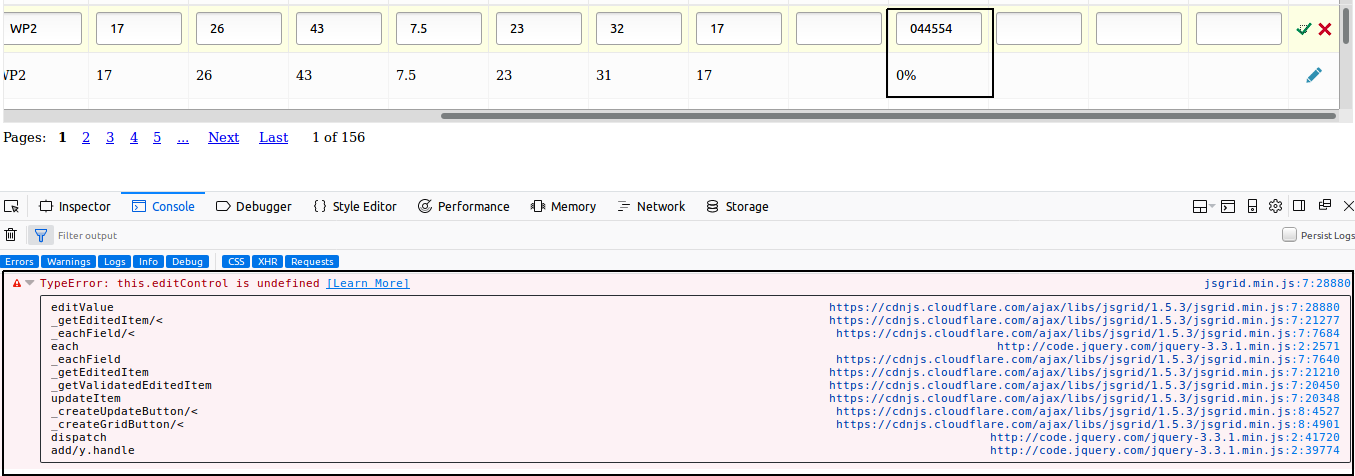
 VishalSuriMcc
on 9 Feb 2018
VishalSuriMcc
on 9 Feb 2018
Related issues
 fredericoregateiro
·
3Comments
fredericoregateiro
·
3Comments
 andymacourek
·
3Comments
andymacourek
·
3Comments
 comiscienceknight
·
3Comments
comiscienceknight
·
3Comments
 danielson317
·
3Comments
danielson317
·
3Comments
 Julian-B90
·
4Comments
Julian-B90
·
4Comments