Jsforce: Getting results back from batch query job
I have something like this, where I want to send a query as a bulk batch job.
  const job = conn.bulk.createJob('Account', 'query');
  var batch = job.createBatch();
  let endBatch;
  batch.execute(theQuery);
  batch.on('queue', batchInfo => {
    console.log('in queue');
    endBatch = conn.bulk.job(batchInfo.jobId).batch(batchInfo.batchId);
    endBatch.poll(500, 20000);

    endBatch.on('response', response => {
      console.log('response', response);
      endBatch.check().then(yo => {
        console.log('check', yo);
      });
      endBatch
        .retrieve()
        .then(results => {
          console.log('end', results);
        })
        .catch(handleError);
    });
  });
However, all I ever get back from the retrieve() is something like this, without the actual results themselves.
end [ { id: '75261000008FPXW',
 batchId: '7516100000GnBSwAAN',
 jobId: '7506100000CtuBwAAJ' } ]
My check also shows that everything has completed, but I never get the results back:
check { '$': { xmlns: 'http://www.force.com/2009/06/asyncapi/dataload' },
 id: '7516100000GnBSwAAN',
 jobId: '7506100000CtuBwAAJ',
 state: 'Completed',
 createdDate: '2018-08-01T18:36:12.000Z',
 systemModstamp: '2018-08-01T18:36:12.000Z',
 numberRecordsProcessed: '2',
 numberRecordsFailed: '0',
 totalProcessingTime: '0',
 apiActiveProcessingTime: '0',
 apexProcessingTime: '0' }
Looking at the actual code in api_bulk.js, it seems like results are never actually getting returned. - Am I missing something here? Is there another event I should be listening for?
 shomanishikawa
All 7 comments
You should use Batch#result(resultId) instead of Batch#retrieve() which is done by Batch#poll() internally. The response event of batch query will notify the list of results, which can be used for the parameter of Batch#result().
 stomita
on 2 Aug 2018
stomita
on 2 Aug 2018
@stomita Thank you for the help.
I've modified my code below, but I'm unfortunately not seeing any results:
const job = conn.bulk.createJob('Account', 'query');
const batch = job.createBatch();
batch.execute(theQuery);
batch.on('queue', batchInfo => {
console.log('in queue');
batch.poll(500, 20000);
});
batch.on('response', response => {
console.log('response', response);
batch.result(response[0].id).then(res => {
console.log('result', res);
});
});
It gets as far as logging the response in the .on('response') callback, but it never goes into the result callback. The console log from .on('response') shows this:
[0] response [ { id: '75261000008FdW8',
[0] batchId: '7516100000GnaQCAAZ',
[0] jobId: '7506100000Cu88wAAB' } ]
I have also tried calling batch.result(response[0].batchId), but that doesn't work either.
Thanks again! I apologize if I'm missing something obvious.
shomanishikawa
on 2 Aug 2018
I'm also seeing weird issues with bulk queries not returning.
I'm suspicious that webpack+jsforce compatibility is somehow causing the issue. @shomanishikawa is your jsforce being processed by webpack? I'm building an Electron app based on electron-react-boilerplate, which uses webpack to package app dependencies.
My code is below. When jsforce is outside of webpack processing (i.e. shipped as a runtime dependency alongside my app), everything works fine. When jsforce is being packaged by webpack, it seems as if 'end' or 'error' are never emitted on recordStream, causing the Promise I have wrapped around this code to never resolve.
const recordStream = client.bulk.query(soql);
recordStream.on('record', (record) => {
count += 1;
batchCount += 1;
records.push(record);
// Watch for CPU overuse
if (batchCount === batchLimit) {
log.debug(`Received ${batchCount} more records (${count}), pausing stream for ${pauseMs}ms`);
batchCount = 0;
recordStream.pause();
setTimeout(() => {
log.debug(`Resuming stream for 100 records`);
recordStream.resume();
}, pauseMs);
}
});
return new Promise((resolve, reject) => {
recordStream.on('end', async () => {
// do stuff...
log.info(`Done getting ${count} ${tableName} records`);
resolve();
});
recordStream.on('error', (error) => {
log.warn(`There was an error with reading ${tableName} records: ${error}`);
if (error.name === 'PollingTimeout') {
// Upstream error:
// https://github.com/jsforce/jsforce/blob/a091f2f72b0fa5bb784cf098b60988f707e720ef/lib/api/bulk.js#L574
const extraData = {
upstreamName: error.name,
upstreamJobId: error.jobId,
upstreamBatchId: error.batchId,
tableName: tableName,
};
const apiOutageError = new APIOutageError(account, this, extraData);
reject(apiOutageError);
} else {
reject(error);
}
});
Any ideas? Are there doc on how to use jsforce with webpack 4? I'm using webpack 4.22.0. The last webpack docs seem to be for webpack 1 (if I try to include the json loader as instructed, I get a warning saying that with webpack 2+ json will be automatically loaded.)
I don't know what about webpack/babel would cause a callback not to be fired. It's very odd. Any ideas are welcome.
Also, I tried debugging the issue myself by yarn linking jsforce to my project, but when I run the project with jsforce linked I get this error:
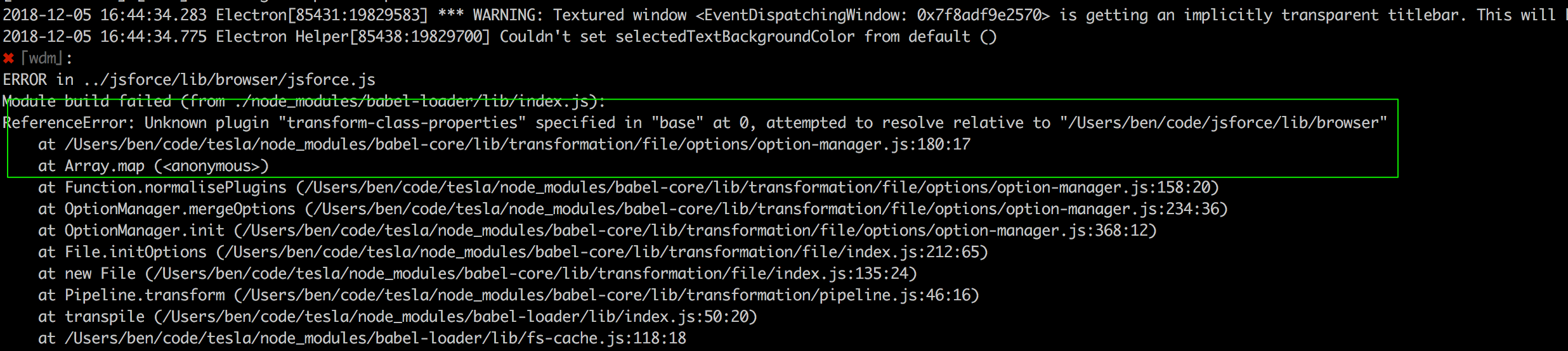
I'm happy to spend some time debugging if you have any ideas.
 aguynamedben
on 6 Dec 2018
aguynamedben
on 6 Dec 2018
Hey guys, first thanks for this great library, it's really making my life a lot easier.
I also have troubles with getting results from bulk query. I tried with Bulk#query method and events like in documentation here but that console log in "record" listener logs nothing. as I can see in chrome devtools network tab results are returned from SF but that event listener is not triggered.
Results from this bulk query should be saved to local database, if that's important to you maybe.
I even tried doing it manually with Batch methods but that didn't work either. Can you please explain how can I get results?
 supermarioim
on 13 Feb 2019
supermarioim
on 13 Feb 2019
@supermarioim Here's how we're doing large fetches of Salesforce tables via Bulk API, if this helps. We decided to just handle the RecordStream ourselves to have finer control of what's happening, see the comments.
We're still debugging some occasional Salesforce polling timeouts that seem customer-specific (i.e. maybe certain Salesforce instances have a ton of records, the Bulk API queue is backed up, etc.). We might resort to getting fewer records via the REST API in that case.
Hopefully this helps!
export default class SalesforceBulkAPI {
  static async getSalesforceRecords(client, table) {
    const countSoql = `SELECT COUNT() FROM ${table.tableName}`;
    const result = await client.query(countSoql);
    const { totalSize } = result;

    const limit = 10000;
    const soql = tableExportSoql(table, limit);
    log.info(`There are ${totalSize} ${table.tableName} records (limit is ${limit})`);

    /**
     * Don't trust jsforce's stream handling, use our own
     * https://github.com/jsforce/jsforce/issues/691#issuecomment-341107251
     * https://stackoverflow.com/questions/10623798/writing-node-js-stream-into-a-string-variable/35530615#35530615
     */

    const t1 = performance.now();

    const csvParser = csvParse({ delimiter: ',', columns: true });
    // We still need recordStream to listen for errors. We'll access the stream
    // directly though, bypassing jsforce's RecordStream.Parsable
    const recordStream = client.bulk.query(soql);
    const readStream = recordStream.stream();
    readStream.pipe(csvParser);

    const records = [];
    let recordBatches = 0;

    // https://csv.js.org/parse/api/
    csvParser.on('readable', () => {
      let record;
      while (record = csvParser.read()) { // eslint-disable-line no-cond-assign
        records.push(record);
      }
      recordBatches += 1;
    });

    return new Promise((resolve, reject) => {
      recordStream.on('error', (error) => {
        log.error(error);
        if (error.name === 'PollingTimeout') {
          // https://github.com/jsforce/jsforce/blob/a091f2f72b0fa5bb784cf098b60988f707e720ef/lib/api/bulk.js#L574
          reject(new Error(`The Salesforce Bulk API had a polling timeout`));
        } else {
          reject(new Error(`Couldn't download results from Salesforce Bulk API`));
        }
      });

      csvParser.on('error', (error) => {
        log.error(error);
        reject(new Error(`Couldn't parse results from Salesforce Bulk API`));
      });

      csvParser.on('end', async () => {
        const t2 = performance.now();
        log.info(`Received ${records.length} of ${totalSize} (limit ${limit}) ${table.tableName} records in ${recordBatches} batches in ${timeHelpers.msString(t2, t1)}`);
        resolve(records);
      });

      // Throw fake PollingTimeout error from jsforce
      if (false && isDev) {
        const err = new Error(`Polling time out. Job Id = fake , batch Id = fake`);
        err.name = 'PollingTimeout';
        err.jobId = 'abc';
        err.batchId = 'def';
        recordStream.emit('error', err);
      }
    });
  }
}
Usage would be something like:
const recordsForTable = SalesforceBulkAPI.getSalesforceRecords(jsforceClient, 'Account');
Note: During these requests, an error with error.name === 'invalid_grant' maybe be triggered, so watch out for that! We wrap our calls to getSalesforceRecords with some error handling that catches invalid_grant and triggers our apps token refresh logic.
aguynamedben
on 21 Feb 2019
@shomanishikawa To get the results back from the batch, what I did was call batch.result(resultId) and converted it to a node stream and read the chunks of data coming in from the stream. Something like this:
batch.execute(query)
  .on('response',  (responses)=> {
     const results = [];
     for (const response of responses) {
        batch.result(response.id)
           .stream()
           .on('data', (chunk)=> {
                results.push(chunk.toString());
           })
           .on(end, ()=> {
                console.log(results)
           })
    }
  })
Of course you can handle the results however you want to
 jdestep93
on 17 Mar 2019
jdestep93
on 17 Mar 2019
Does anyone have a recommendation on how to retrieve the results when working in typescript?
 mprown
on 28 Mar 2019
mprown
on 28 Mar 2019
Related issues
 MarkBolden
·
3Comments
MarkBolden
·
3Comments
 sureshshamanth
·
6Comments
sureshshamanth
·
6Comments
 MGarfOppLoans
·
7Comments
MGarfOppLoans
·
7Comments
 freshlogic
·
8Comments
freshlogic
·
8Comments
 CodisRedding
·
4Comments
CodisRedding
·
4Comments
Most helpful comment
@supermarioim Here's how we're doing large fetches of Salesforce tables via Bulk API, if this helps. We decided to just handle the RecordStream ourselves to have finer control of what's happening, see the comments.
We're still debugging some occasional Salesforce polling timeouts that seem customer-specific (i.e. maybe certain Salesforce instances have a ton of records, the Bulk API queue is backed up, etc.). We might resort to getting fewer records via the REST API in that case.
Hopefully this helps!
Usage would be something like:
Note: During these requests, an error with
error.name === 'invalid_grant'maybe be triggered, so watch out for that! We wrap our calls to getSalesforceRecords with some error handling that catches invalid_grant and triggers our apps token refresh logic.