Jsdoc: How to document @property having spaces in name
As title, I am trying to document an object using @typedef and @property, for example:
  /**
   * @typedef {object} theObj
   * @property Prop 1 {string} property one
   */
  const theObj = {
    'Prop 1': 'property 1'
  }
And the document table of theObj shows
Name | Type | Description |
| ---- | ------- | ----------- |
Prop | string | 1 property one |
I have no idea how to make jsdoc display
Name | Type | Description |
| ---- | ------- | ----------- |
Prop 1 | string | property one |
BTW, I am using template DocStrap, not sure if this relates to it.
 vcshox
All 13 comments
  /**
   * @typedef {object} theObj
   * @property {string} [Prop 1] property one
   */
That did work for me but marks the property as optional for me. Also syntax highlighting in VS Code got messed up.
 nschikora
on 13 Jun 2019
nschikora
on 13 Jun 2019
Ended up with the same problem -- turns out backticks tend to work here, too.
/**
 * @typedef {object} theObj
 * @property {string} `Prop 1` property one
 */

To confirm, here's an example showing that JSDoc isn't just taking the backticks literally:

 colinking
on 21 Jul 2019
colinking
on 21 Jul 2019
While this appears to work in VSCode, the HTML output from jsdoc does not. Even when the markdown plugin is enabled.
 azcn2503
on 20 Sep 2019
azcn2503
on 20 Sep 2019
Is there a solution today?
 Micka33
on 24 Apr 2020
Micka33
on 24 Apr 2020
I'd like this to work better as well
 geoffatsource
on 8 May 2020
geoffatsource
on 8 May 2020
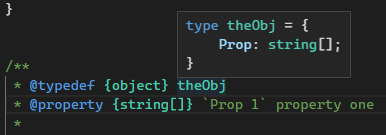
Just to note, the backtick way does not work anymore on VSCode.
 saschanaz
on 18 Jul 2020
saschanaz
on 18 Jul 2020
Maybe this could be implemented to leverage the namepath way of escaping, but providing a top-level escaping mechanism such as an empty dot which can immediately precede the escaping double quotes (to distinguish the segment from a string):
 /**
   * @typedef {object} theObj
   * @property {string} ."Prop 1" property one
   */
  const theObj = {
    'Prop 1': 'property 1'
  }
This mechanism would also provide escaping for the likes of . as used for nested properties like:
/**
 * @typedef {object} Config
 * @property {object} innerConfig
 * @property {string} innerConfig.prop1 - This is a direct property of `innerConfig`
 * @property {string} ."innerConfig.prop1" - This is a direct property of `Config`
 */
 brettz9
on 29 Aug 2020
brettz9
on 29 Aug 2020
For the time-being at least, however, it seems that jsdoc's type parser (catharsis) supports Identifier within PropertyIdentifier (and NameExpression) which supports UnicodeEscapeSequenceLiteral, so, though I haven't tested it, it seems like it could use the following in place of a space: \u0020 (and \u002E for a dot).
I.e., for the original:
 /**
   * @typedef {object} theObj
   * @property {string} Prop\u00201 property one
   */
  const theObj = {
    'Prop 1': 'property 1'
  }
While that is pretty ugly, hopefully tools can at least properly unescape it.
brettz9
on 29 Aug 2020
Hijacking the conversation to say we need to be able to really escape any character. \u0020 doesn't seem to work on VSCode.
I'm trying to document https://tools.ietf.org/html/rfc7515#section-4.1.8 :
4.1.8. "x5t#S256" (X.509 Certificate SHA-256 Thumbprint) Header
ParameterThe "x5t#S256" (X.509 certificate SHA-256 thumbprint) Header
Parameter is a base64url-encoded SHA-256 thumbprint (a.k.a. digest)
of the DER encoding of the X.509 certificate [RFC5280] corresponding
to the key used to digitally sign the JWS. Note that certificate
thumbprints are also sometimes known as certificate fingerprints.
Use of this Header Parameter is OPTIONAL.
Trying to do * @prop {string} x5t#S256 won't work at all.
 clshortfuse
on 11 Dec 2020
clshortfuse
on 11 Dec 2020
If \u0020 doesn't work on VSCode, file it as an issue with them. The way JSDoc works is to allow such escaping.
And that approach should indeed work with any character as "0020" is the hexadecimal Unicode escape sequence for a space. \u0023 is the code for # (familiarize yourself with Unicode escapes in JavaScript to find for others).
brettz9
on 12 Dec 2020
@brettz9 Out of curiosity, is that requirement documented somewhere?
saschanaz
on 12 Dec 2020
It is not documented as far as I am aware.
However, as mentioned in https://github.com/jsdoc/jsdoc/issues/1468#issuecomment-683214334 , the JSDoc software relies on catharsis, a PEG.js grammar parser, and in the grammar, in this context PropertyIdentifier is used which in turn supports Identifier which supports IdentifierName which supports IdentifierStart which supports UnicodeEscapeSequenceLiteral which is composed of a backslash and UnicodeEscapeSequence (where the latter is defined as "u" + 4 hex digits). The latter also makes clear from the JavaScript used that this is indeed for JavaScript Unicode escapes. (The grammar does not support ES6 6-digit Unicode escapes which are more convenient for representing characters outside of the "Basic Multilingual Plane" such as many emojis, but you can figure this out what they are for a character by running:
const getCharCodes = (s) => s.split('').reduce((s, ch) => s + '\\u' + ch.charCodeAt().toString(16), '');

// Use against an emoji, e.g., in JavaScript console, noting that when using in JSDoc, one will need to drop the doubling of backslashes on the result.
getCharCodes('🖥'); // "\\ud83d\\udda5" which should be used in JSDoc as "\ud83d\udda5"
@brettz9 Thanks!
I had used \u0023 and it didn't work either (even with backticks). I wasn't sure if it was a JSDoc issue or a VSCode issue since this was still open. I have no problem escaping with unicode, so I'll file the issue with the VSCode/Typescript team to let them know it's a valid syntax and should likely be supported.
clshortfuse
on 12 Dec 2020
Related issues
 cowwoc
·
29Comments
cowwoc
·
29Comments
 samskivert
·
13Comments
samskivert
·
13Comments
 FezVrasta
·
23Comments
FezVrasta
·
23Comments
 lukeapage
·
34Comments
lukeapage
·
34Comments
 alphanull
·
15Comments
alphanull
·
15Comments
Most helpful comment
@brettz9 Thanks!
I had used \u0023 and it didn't work either (even with backticks). I wasn't sure if it was a JSDoc issue or a VSCode issue since this was still open. I have no problem escaping with unicode, so I'll file the issue with the VSCode/Typescript team to let them know it's a valid syntax and should likely be supported.