Jsdoc: Documenting large apps, group modules into @categories
I am working on an app wich will become quite huge in time. I have decided to use JsDoc3 and DocStrap to document all modules. Modules are defined via require.js and in some places they are nested up to 3 or 4 levels deep.
Untill now I understand that JsDoc documentation is split into generic sections: Modules, Classes, Tutorials, Globals, etc. Each section has a header dropdown menu and a sidebar each of them listing all of the modules in liniar fashion, alphabetically.
I was wondering if there are options to display/group modules and Classes somehow to reflect the project structure. I saw a git repository that document all the classes with lots of slashes module1/submodule1/class1, but it feels really though to diggest this type of navigation. Not to mention that the layout was having trouble with long titles overflowing from the sidebar.
Currently I have a project layout similar to the schema from bellow. It's wide and deep and I expect it to grow further.
/Editor
---/Services
------/UI
------...
---...
---editorApp.js
/Engine
---/Core
------/...
---/Entities
------/...
---/Graphics
------/...
---/...
...
engine.js
/Web
---/Services
------/UI
------...
---...
---webApp.js
 adrian-moisa
All 19 comments
Eventually I redesigned the .css file of the docstrap template I am using, making the following adjustments:
- I moved the top menu on the left side
- I have expanded the dropdowns into full view, making them always visible.
- I am using module prefix naming convention. I hate it at best.
- I preserved the original adaptive rules that apply bellow 1200px (menu on top).
This has the advantage of allways showing the full extent of the documentation, making it easy to get an overview of the whole architecture. I was following the design of other documentations such as undescore, angular and moment.js
Wish there was @category tag to allow grouping of modules in separate categories.
Also with @memberof SomeCategory it would be nice to do subcategories.

adrian-moisa
on 5 Jan 2016
+1
I'm facing the same problem of documenting a large Node.js app that itself consists of several packages with sub-packages. I see no way to annotate these packages so that the hierarchical structure is still reflected in the generated documentation.
Here is a simplified structure that demonstrates this (see app.zip):
├── api
│   ├── index.js
│   └── package.json
├── core
│   ├── index.js
│   ├── lib
│   │   ├── factory
│   │   │   ├── index.js
│   │   │   └── personFactory.js
│   │   └── model
│   │       ├── Person.js
│   │       └── index.js
│   └── package.json
└── package.json
Person is a simple JavaScript class that can be instantiated via new so it will be annotated with @class. personFactory is a ready-to-use singleton module with a static create()-method so it will become a JSDoc @module.
The question is how to annotate the entire application in such a way that the generated documentation reveals the structure as it needs to be known for importing (e.g. to use Person you need to import it via require('core').model.Person).
In this example there a 2 packages (api and core). These packages may contain nested packages/modules (e.g. factory and model) that themselves can have nested "real" modules (personFactory) and so on.
The only JSDoc tag that allows nesting seems to be @namespace but a namespace must not contain a module so the nesting path namespace[core] -> namespace[factory] -> module[personFactory] is not supported. Another approach using modules like module[core] -> module[factory] -> module[personFactory] does not work as nesting of modules like this is not supported:
@module factory
@memberof module:core
The JSDoc documentation suggests defining modules like @module core/factory/personFactory but this is only a workaround via naming conventions. The real structure is lost which is visible in the generated documentation as the intermediate modules (e.g. core/factory) are empty and do not contain their child modules. Moreover semantically a module that provides functionality is something different than a package which is a structuring element and does not contain functionality.
In my opinion there should be a dedicated JSDoc tag that supports the documentation of a nested package structure like package[core] -> package[factory] -> module[personFactory]. Alternatively the module tag should be extended to support nested modules.
 akloeber
on 10 Jan 2016
akloeber
on 10 Jan 2016
:+1:
 cdutson
on 26 Feb 2016
cdutson
on 26 Feb 2016
:+1:
 philipnilsson
on 7 Mar 2016
philipnilsson
on 7 Mar 2016
Hi,
It would be a must, but isn't it more a template side functionnality?
So it would not result in an @categories to be added, but in an additionnal parsing in the module name when building the nav's "Modules" section... (just an idea, so tell me if I'm wrong or if I misinterpreted your request)
 Cobraeti
on 30 Apr 2016
Cobraeti
on 30 Apr 2016
:+1:
 lwlewy
on 9 Jan 2017
lwlewy
on 9 Jan 2017
I have the same structure that @akloeber described.
I'm using a combination of modules and namespaces, but that is not very friendly. This is what I do:
/**Parent module
* @module package-name
*/

/**Child of the parent module
* @namespace firstChild
* @memberof module:package-name
*/
This has a problem: I have to specifically document all the members of the namespace. Module has the great addition that it automatically picks lots of the functions contained on the module.
If anyone ends with a better solution I would love to hear it
 danielo515
on 15 Feb 2017
danielo515
on 15 Feb 2017
@adrian-moisa I really like your sidebar, could you share how you did it?
danielo515
on 15 Feb 2017
+1 for a tag for categorizing modules.
 amertis
on 17 Mar 2017
amertis
on 17 Mar 2017
I'm having this problem too when trying to get documentation for my library. It would be nice if @memberof would work alongside @namespace and @module. One of the problems I've been having is understanding when I should be using namespace or module since it seems mostly arbitrary. I would actually posit that the use / introduction of @category is not a very strong solution as it is essentially a flat structure and would quickly have limited use. Instead trying to imply a (nested) structure from filepath that can be overridden.
Lodash uses a flat structure and a @category tag for grouping, but they have a flat list of categories. I use a nested tree structure and frequently find all files in a folder are imported into an index which is then re-exported.
Maybe this discussion could find some sort of concrete conclusion that covers most cases that we can propose rather than just citing the problem.
How do you guys use namespace vs module? I find that my filepath and object path are not identical, yet are frequently related. I'd also like it if the auto-membering of @module was extended out to other cases (such as namespaces) or worked when members are spread out across multiple files. How relevant is module really when most common practices for open-source libraries do not encourage directly importing specific source files / modules and instead suggest traversing objects? Lodash seems like an interesting example since you can get all the utilities packaged together or individually. I wonder why they didn't use folders to imply categories vs extra documentation tags.
 ProLoser
on 10 Apr 2017
ProLoser
on 10 Apr 2017
I managed to successfully document a complex project using @namespace for sub-packages and lots of @memberof, however remembering and manually adding @memberof tags was a nuisance so I've written a simple plugin to add it automatically based on @namespace defined in index files.
 kozhevnikov
on 18 Jul 2017
kozhevnikov
on 18 Jul 2017
@kozhevnikov I was using the same structure (see my comment above ). Glad you xlhave created a plug-in that will just work out of the box with my setup (my template already adds a namespace to every index ). I'll check it out
danielo515
on 19 Jul 2017
+1
I'm running into the same problem with a React app. This would be a life saver.
 callmeaponte
on 3 Nov 2017
callmeaponte
on 3 Nov 2017
Please use reactions instead of +1 comments. The advantages are numerous and no one gets spammed.
ProLoser
on 15 Dec 2017
linking this to an identical question on StackOverflow
 chharvey
on 15 Dec 2017
chharvey
on 15 Dec 2017
I've just published a new version of better-docs template which supports @category tag. Long story short you can add @category tag to your class/module/whatever and it will be namespaced in the sidebar. Hope this will help you.
 wojtek-krysiak
on 29 Jan 2019
wojtek-krysiak
on 29 Jan 2019
I've just published a new version of better-docs template which supports
@categorytag. Long story short you can add@categorytag to your class/module/whatever and it will be namespaced in the sidebar. Hope this will help you.
@wojtek-krysiak Your packages do too many thing (and install react...),you should split it. If I only want to use @category without @component, I should have package without react dependancies. lerna is a good tool to split project in several package.
 A-312
on 31 Mar 2020
A-312
on 31 Mar 2020
@wojtek-krysiak @category works fine and I get category name in the sidebar as heading but the same is not happening wit @subcategory . Used @subcategory Reducer but in navigation sidebar I'm getting GLOBAL as heading and nowhere I'm getting the subcategory name "Reducer" as heading.
In this file I gave @category & @subcategory as below 👍 /**
- @category Pagination
- @subcategory Reducer
*/
const paginationReducer = (state, action) => {
switch(action.type){
case 'UPDATE_PAGENUMBER' :
return action.payload ;
default :
return state;
}
}
export default paginationReducer;
But output file shows like below :
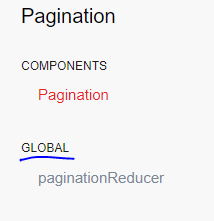
GLOBAL overrides the subcategory name. How to override @global with @subcategory ?
 dhiren-eng
on 23 Jul 2020
dhiren-eng
on 23 Jul 2020
@adrian-moisa unfortunately subcategory doesn't work for global things. We implemented it in a way that it adds / subcategory to the Type (other than global). Take a look here: adminbro.com/docs.html (in the sidebar there is COMPONENTS / APPLICATION - application is a subcategory)
wojtek-krysiak
on 23 Jul 2020
Related issues
 gocreating
·
18Comments
gocreating
·
18Comments
 opvasger
·
31Comments
opvasger
·
31Comments
 cowwoc
·
29Comments
cowwoc
·
29Comments
 kilianc
·
89Comments
kilianc
·
89Comments
 lukeapage
·
34Comments
lukeapage
·
34Comments
Most helpful comment
+1
I'm facing the same problem of documenting a large Node.js app that itself consists of several packages with sub-packages. I see no way to annotate these packages so that the hierarchical structure is still reflected in the generated documentation.
Here is a simplified structure that demonstrates this (see app.zip):
Personis a simple JavaScript class that can be instantiated vianewso it will be annotated with@class.personFactoryis a ready-to-use singleton module with a staticcreate()-method so it will become a JSDoc@module.The question is how to annotate the entire application in such a way that the generated documentation reveals the structure as it needs to be known for importing (e.g. to use
Personyou need to import it viarequire('core').model.Person).In this example there a 2 packages (
apiandcore). These packages may contain nested packages/modules (e.g.factoryandmodel) that themselves can have nested "real" modules (personFactory) and so on.The only JSDoc tag that allows nesting seems to be
@namespacebut a namespace must not contain a module so the nesting pathnamespace[core] -> namespace[factory] -> module[personFactory]is not supported. Another approach using modules likemodule[core] -> module[factory] -> module[personFactory]does not work as nesting of modules like this is not supported:The JSDoc documentation suggests defining modules like
@module core/factory/personFactorybut this is only a workaround via naming conventions. The real structure is lost which is visible in the generated documentation as the intermediate modules (e.g.core/factory) are empty and do not contain their child modules. Moreover semantically a module that provides functionality is something different than a package which is a structuring element and does not contain functionality.In my opinion there should be a dedicated JSDoc tag that supports the documentation of a nested package structure like
package[core] -> package[factory] -> module[personFactory]. Alternatively the module tag should be extended to support nested modules.