Js-ipfs: Adding 50Mb+ Files to a browser js-ipfs crashes Chrome
- Version: 0.25.1
- Platform: Ubuntu 16.04 4.4.0-42-generic , Chrome Version 57.0.2987.133 (64-bit) and Win 10 (64-bit) Chrome Version 60.0.3112.90 (Official Build) (64-bit)
- Subsystem:
files.add
Type: Bug
Severity: Critical
Description: When trying out the exchange-files-in-browser example, uploading a file larger than 50MB crashes the browser, The Ram gradually starts filling up till it crashes.
Steps to reproduce the error:
- go to the
exchange-files-in-browserexample directory. - run
npm install npm start- follow along with the README.md , but upload a large file, around 90MB.
Edit: Version fix.
 ya7ya
ya7ya
All 17 comments
@ya7ya Thanks for the report!
I believe this issue to be related to the use of WebRTC and not necessarily with large files.
 daviddias
on 1 Sep 2017
daviddias
on 1 Sep 2017
@ya7ya wanna try disabling WebRTC and adding a large file?
daviddias
on 1 Sep 2017
@diasdavid hey, I'll try that now 👍
ya7ya
on 1 Sep 2017
Hey @diasdavid , I tried to disable WebRTC and it still crashed, However I had an idea and it kinda worked.
instead of adding the file buffer using files.add , I used a createAddStream and chunked the file into a Readable stream.
readFileContents(file).then((buf) => {
      // create Readable Stream from buffer. requires 'stream-buffers'
      let myReadableStreamBuffer = new streamBuffers.ReadableStreamBuffer({
        chunkSize: 2048  // in bytes.
      })

      window.ipfs.files.createAddStream((err, stream) => {
        if (err) throw err

        stream.on('data', (file) => {
          console.log('FILE : ', file)
        })

        myReadableStreamBuffer.on('data', (chunk) => {
          myReadableStreamBuffer.resume()
        })

        // add ReadableStream to content
        stream.write({
          path: file.name,
          content: myReadableStreamBuffer
        })
       // add file buffer to the stream
        myReadableStreamBuffer.put(Buffer.from(buf))
        myReadableStreamBuffer.stop()

        myReadableStreamBuffer.on('end', () => {
          console.log('stream ended.')
          stream.end()
        })

        myReadableStreamBuffer.resume()
      })
    })
the browser didn't crash, but chrome got super resource hungry and ate up alotta ram. What I did is instead of adding the content as 1 big buffer, i chunked it into a stream to throttle it. it took alot longer but it didn't crash.
ya7ya
on 1 Sep 2017
That tells me that we need stress tests sooner than ever. Thank you @ya7ya!
daviddias
on 1 Sep 2017
Having this same issue. I watched resources go to nearly 12GB of swap and 6GB of ram in about 20 minutes before killing the Chrome Helper process. Running js-ipfs in browser.
How could a 80mb file possibly cause all of this without some sort of severe memory leak occurring?
 pyromaticx
on 2 Sep 2017
pyromaticx
on 2 Sep 2017
I'm curious to see if https://github.com/libp2p/js-libp2p-secio/issues/92 and https://github.com/crypto-browserify/browserify-aes/pull/48 will actually mitigate this problem.
daviddias
on 4 Sep 2017
If you're interested to see if the two issues @diasdavid linked above would help with this one (952) and you're using webpack, you could try adding "browserify-aes": "github:crypto-browserify/browserify-aes#master" to your package.json to use the latest version of browserify-aes, which potentially fixes this issue.
 victorb
on 4 Sep 2017
victorb
on 4 Sep 2017
Did some tests with that, and it worked nicely with a 70mb file for me. Doing some more perf analysis it seems we still have a few places where we do a lot of Buffer copies which get expensive and we should look into optimising those away:
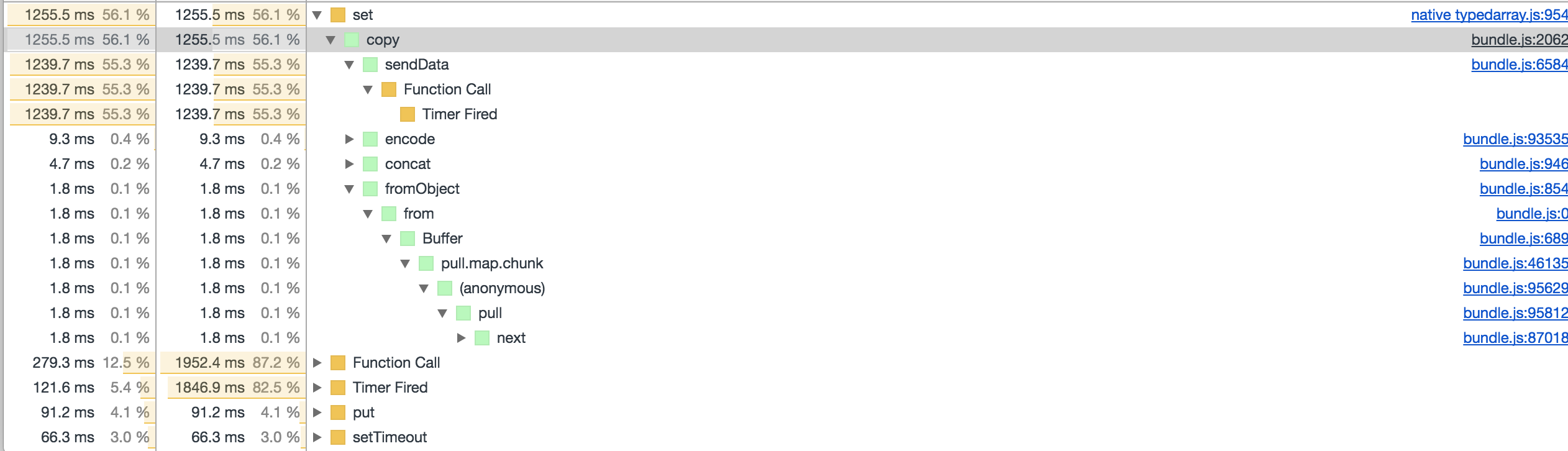
Where the first sendData is an internal methods in streams, probably called from browserify-aes (streaming api)
 dignifiedquire
on 4 Sep 2017
dignifiedquire
on 4 Sep 2017
Turned out all the stream issues from above where coming from the example and using the node stream api. Switched things to pull-streams and now we are fast and no crashing even with 300Mb: https://github.com/ipfs/js-ipfs/pull/988
dignifiedquire
on 4 Sep 2017
@dignifiedquire Thanks 👍 , This is a much more elegant solution. That's what I had in mind in the first place but my pull-streams game is still weak 😄.
ya7ya
on 4 Sep 2017
@dignifiedquire I have a noob question Regarding this file uploader, How do you measure progress in a pull-stream, Like How much of the data was pulled to files.createAddPullStream so far? That would be useful for creating a progress bar for large files
pull(
      pull.values(files),
      pull.through((file) => console.log('Adding %s', file)),
      pull.asyncMap((file, cb) => pull(
        pull.values([{
          path: file.name,
          content: pullFilereader(file)
        }]),
        node.files.createAddPullStream(),
        pull.collect((err, res) => {
          if (err) {
            return cb(err)
          }
          const file = res[0]
          console.log('Adding %s finished', file.path)
          cb(null, file)
        }))),
      pull.collect((err, files) => {
        if (err) {
          throw err
        }
        if (files && files.length) {
          console.log('All Done')
        }
      })
    )
- Option 1. Wait for the progress api, which is being worked on in https://github.com/tableflip/js-ipfs/pull/2
- Option 2. you can use
pull.throughlike this probably
content: pull(
  pullFilereader(file),
  pull.through((chunk) => updateProgress(chunk.length))
)
@dignifiedquire Thanks alot dude 👍 , It works. I appreciate the help.
ya7ya
on 5 Sep 2017
Perhaps https://github.com/dignifiedquire/pull-block/pull/2 would solve the crashes with the original files.add approach you had?
 Beanow
on 11 Sep 2017
Beanow
on 11 Sep 2017
I ran the old example and indeed it should be much better with pull-block 1.4.0 landing there.
Beanow
on 16 Nov 2017
Lot's of improvements added indeed! Let's redirect our attention to PR https://github.com/ipfs/js-ipfs/pull/1086#issuecomment-345365729, I successfully managed to upload more than 750Mb and fetch it through the gateway.
daviddias
on 17 Nov 2017
Related issues
daviddias
·
3Comments
daviddias
·
3Comments
 fazo96
·
3Comments
ya7ya
·
3Comments
daviddias
·
3Comments
fazo96
·
3Comments
ya7ya
·
3Comments
daviddias
·
3Comments
Most helpful comment
That tells me that we need stress tests sooner than ever. Thank you @ya7ya!