Js-graphql-intellij-plugin: [V2] Schema types not available for completion and error highlighting
Version and Environment Details
__Operation system__: macOs Mojave (10.14.4)
__IDE name and version__: WebStorm 2019.1 (March 21, 2019)
__Plugin version__: 2.0.0
Expected Behaviour
Parser queries according to schema properly.
Actual Behaviour
Displaying errors (on all fields) about unknown fields then suggesting an object of the exact same name.
Steps to Reproduce / Link to Repo with Reproduction and Instructions

Apologies for not being able to share schema or full query, this is a commercial product. The older version plugin didn't have this problem. I recently upgraded the version of the IDE and the plugin was not installed with the upgrade, so this is a fresh install of plugin.
 poqeteer
All 16 comments
have same problem.
To add some more context - in schema file (which I can show if I go to type definition from searching type in plugin window) it does not recognize any Type apart from Built-In primitives (String, Float etc.)
Any type which is defined in schema explicitly is marked as unknown, even Query, Mutation and Subscription.
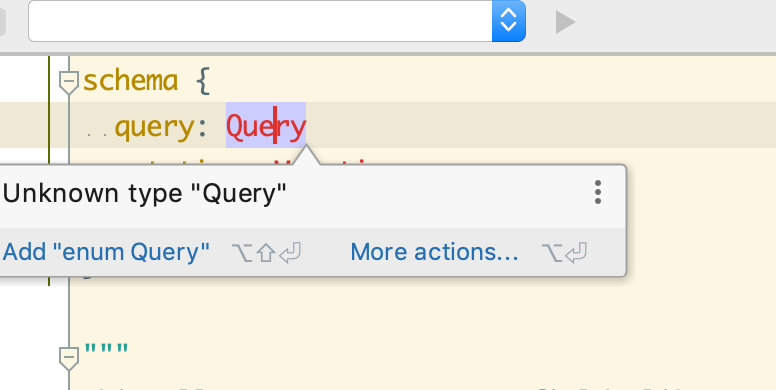
one more bit - despite it shows fields as unknown in *.graphql files, autocomplete working well.
 Karabur
on 12 Apr 2019
Karabur
on 12 Apr 2019
Hi.
Thanks for using the plugin.
I think this relates to using a JSON file as the schema path, but I haven't had time to verify this.
As a workaround you should be able to get this sorted by using GraphQL SDL to describe the schema, e.g. by letting the schema discovery process all GraphQL SDL in your project for a local schema, or by using an introspection to fetch your remote schema as described in https://github.com/jimkyndemeyer/graphql-config-examples/tree/master/remote-schema-introspection
I'll update once I know more about the underlying cause and a fix.
 jimkyndemeyer
on 12 Apr 2019
jimkyndemeyer
on 12 Apr 2019
@poqeteer @Karabur So my theory that this was based on having a JSON schemaPath didn't hold up.
I realize that you might not be able to share your schemas due to commercial projects, but I'm unable to reproduce using the current information.
A minimal example to reproduce the issue might be required to progress, but before that please try the following:
- In the schemas panel, double click on the "Schema discovery summary" tree node and search for your root type, e.g. "Query", and select it. This should take you to where the schema discovery picked up the type. Is this part working as expected? Do you see the right number of types in the summary?
- Based on the GraphQL stack you're using, can you reproduce using their examples and link to it?
Thanks,
Jim.
jimkyndemeyer
on 13 Apr 2019
@jimkyndemeyer I appreciate your dilemma... I'll see if I can get it to reproduce in a sample case... Unfortunately, in a bit of a crunch right now so will try to get back to this in a bit.
poqeteer
on 18 Apr 2019
I was having a problem like this, it was because my schemas was excluded, than I removed the exclusion and it worked well
 sibelius
on 21 Apr 2019
sibelius
on 21 Apr 2019
After updateing to 2.1.0 I have all fields highlighted red and WebStrom offers me to each field to the field with the same name. Autocomplete works fine.

 jimmyn
on 22 Apr 2019
jimmyn
on 22 Apr 2019
@jimmyn If you clone https://github.com/jimkyndemeyer/graphql-config-examples and open it in webstorm, does it work? I expect this is related to project structure somehow, but I'll need a minimal example to reproduce before a fix can be found. Another thing to check is to use the "Invalidate caches and restart" option in the file menu. The index may have become invalid.
jimkyndemeyer
on 22 Apr 2019
@jimkyndemeyer this is indeed related to project structure. I have a monorepo with the following structure
/frontend
/backend
schema.json
.graphqlconfig
.graphqlconfig
{
"schemaPath": "./schema.json"
}
Everything works well in another project with a flat structure.
jimmyn
on 22 Apr 2019
@jimkyndemeyer can we make schema discover schemas that are excluded?
sibelius
on 22 Apr 2019
@jimmyn The issue might be that the content roots in the project don't include the schema, because the structure doesn't have to be flat. I'm off on vacation and won't be back for a week, so you may need to move/copy your schema and config file into the different directories to get this working until I have time to look at a fix.
@sibelius Not sure how to do that without potentially incurring a huge performance hit, which is why the scope is the "Project scope". You can include specific folders into the project scope, e.g. certain node packages, or you can configure additional "content roots" in the Idea/WebStorm project structure dialog.
jimkyndemeyer
on 22 Apr 2019
I encounter the same issue during removing apollo-codegen, after updating JSON schema generation as follows
apollo-codegen introspect-schema to apollo schema:download
The only difference in generated schemas was one prop that nests schema
This works:
{
  "data": {
    "__schema": { ...},
  }
}
and this doesn't
{
  "__schema": { ...}
}
 jtwozniak
on 30 Apr 2019
jtwozniak
on 30 Apr 2019
@jimmyn I've tried to setup up a structure that is similar to what you outlined, but I don't have any issues with schema discovery:
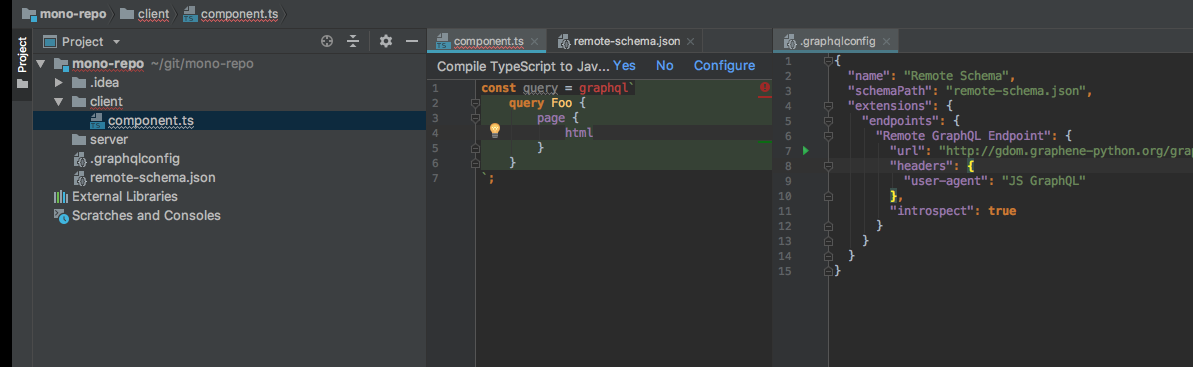
Could you please attach a complete zipped project that demonstrates the issue.
jimkyndemeyer
on 3 May 2019
I can confirm - my schema generated with "_schema" as top level property and problem arises.
{
  "__schema": {
    //schema here
  }
}
but if I wrap it manually to "data" property - it starts to work fine with no errors, autocomplete works, etc.
{
 "data":{
  "__schema": {
    //schema here
  }
 }
}
I've made minimal reproduce example.
tmp-gql.zip
if you goto ui/src/test.graphql file, it will show fields as errorneous (but autocomplete still works):

But if you go to shared/schema.json and wrap "__schema" to "data" field - it will start to work fine


Karabur
on 3 May 2019
@Karabur Thanks for the reproduction. I've implemented a fix for the upcoming 2.1.1 release.
jimkyndemeyer
on 31 May 2019
2.1.1 published, pending JetBrains approval.
jimkyndemeyer
on 12 Jun 2019
Related issues
 BerndWessels
·
5Comments
jimkyndemeyer
·
6Comments
BerndWessels
·
5Comments
jimkyndemeyer
·
6Comments
 vjpr
·
4Comments
vjpr
·
4Comments
 tkvlnk
·
3Comments
tkvlnk
·
3Comments
 CarsonF
·
5Comments
CarsonF
·
5Comments
Most helpful comment
I encounter the same issue during removing apollo-codegen, after updating JSON schema generation as follows
apollo-codegen introspect-schematoapollo schema:downloadThe only difference in generated schemas was one prop that nests schema
This works:
and this doesn't