Js-cookie: expires alone with sameSite: 'strict' seems does not work with Safari
Describe the bug
Set both expires: 10 and sameSite: 'strict' at the same time seems lost strict in Safari.
It is not a problem of this library per se since manually setting the cookie in Safari would also destroy strict.
To Reproduce
    Cookies.set('foo', 'bar');
    Cookies.set('strictFoo', 'strictBar', { sameSite: 'strict' });
    Cookies.set('strictFooWithExpires', 'strictBarWithExpires', { expires: 10, sameSite: 'strict' });
Expected behavior
strictFooWithExpires should be strict in sameSite field
Screenshots

Desktop (please complete the following information):
- OS: macOs 10.15.3
- Browser Safari
- Version 13.0.5 (15608.5.11)
Additional context
Works fine with chrome
 edwardfhsiao
All 8 comments
It is not a problem of this library per se since manually setting the cookie in Safari would also destroy strict
So it‘s a bug in Safari?
 carhartl
on 9 May 2020
carhartl
on 9 May 2020
@carhartl Yeah, I think so.
I would not tag a 'Bug' label if there is a 'General info' option for me to create an issue though. However, I think it might be helpful to keep it track here for potential inquiries.
edwardfhsiao
on 9 May 2020
@edwardfhsiao
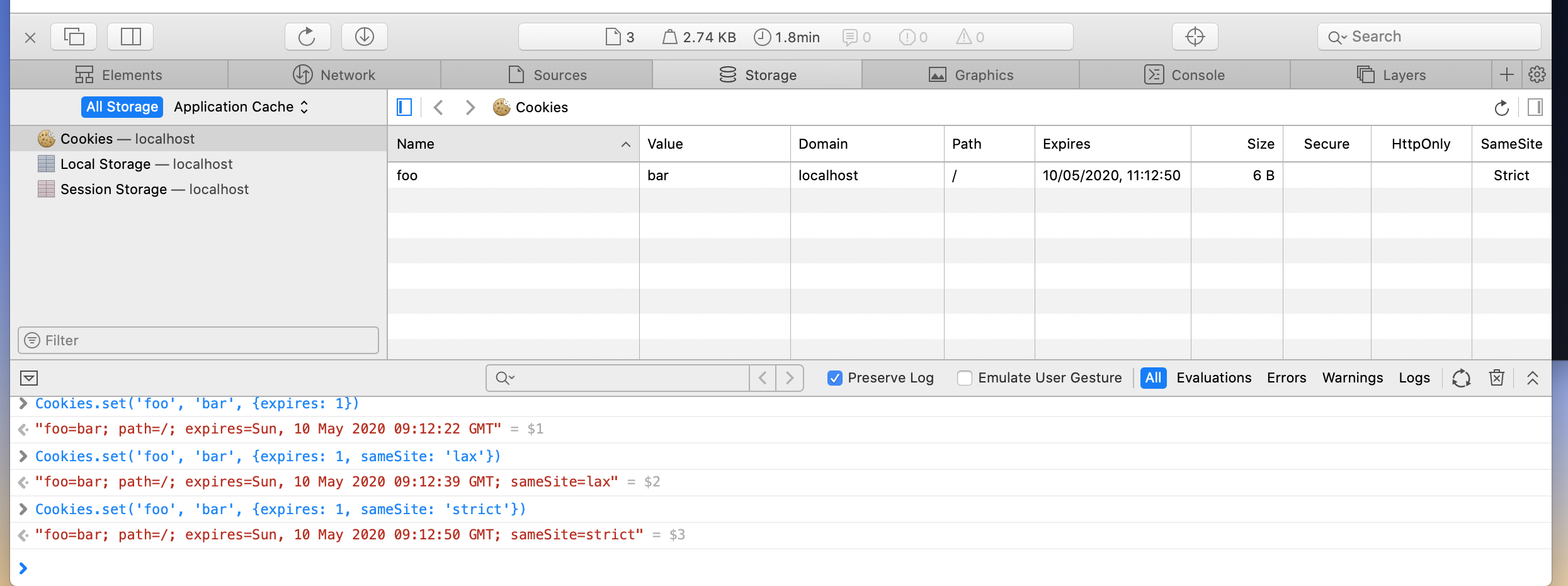
I've tried it myself and it works for me... could you try with all cookies cleared before and maybe check whether you have some extensions active that may interfere?
carhartl
on 9 May 2020


Found the problem
   // does work when expire days below 7
   Cookies.set('strictFooWithExpires', 'strictBarWithExpires', { expires: 7, sameSite: 'strict' });
   // doesnot work when expire days over 7
   Cookies.set('strictFooWithExpires', 'strictBarWithExpires', { expires: 8, sameSite: 'strict' });
It probably means that Safari automatically narrows days down to 7 if the number is greater than 7.
But I don't know why it destroys sameSite field as well.
edwardfhsiao
on 9 May 2020
Great find, wow... very interesting, seeing it as well.
carhartl
on 9 May 2020
Capping to 7 days is part of Safari‘s intelligent tracking prevention:
=> https://webkit.org/blog/8613/intelligent-tracking-prevention-2-1/
I guess that it‘s also stripping the SameSite attribute is a bug.
carhartl
on 9 May 2020
I wasn‘t aware of that until now.. Mentioning this behavior is probably worth adding to the FAQ.
carhartl
on 9 May 2020
absolutely, cheers :partying_face:
edwardfhsiao
on 9 May 2020
Related issues
 oninross
·
9Comments
oninross
·
9Comments
 migsyboy
·
7Comments
migsyboy
·
7Comments
 yaconnn
·
6Comments
yaconnn
·
6Comments
 junglized
·
5Comments
junglized
·
5Comments
 Neve12ende12
·
3Comments
Neve12ende12
·
3Comments