Js-buy-sdk: APPLYING DISCOUNT CODE? (improvement, not issue)
Is there any way of applying a discount code to the checkout to be passed through, similar to how line items are passed through, etc?
I haven't been able to find this in the docs, so if it does exist I'd love to know how to do it. If not, this would be a very welcome improvement!
 24dev
24dev
All 29 comments
pass it thru to the checkout URL as a query parameter so like (checkout url)?key=....&discount=PROMOCODEHERE
kind of like: https://help.shopify.com/manual/promoting-marketing/discount-codes/discounts-for-abandoned-checkout-recovery-emails
 oscarpan
on 6 Jan 2018
oscarpan
on 6 Jan 2018
There is a mutation that does that: https://help.shopify.com/api/storefront-api/reference/mutation/checkoutdiscountcodeapply
 tomkeysers
on 16 Jan 2018
tomkeysers
on 16 Jan 2018
Is this currently possible outside the query param? It'd be great to add/remove discount codes and recalculate pricing/totals _before_ redirecting to the webUrl.
 isaachinman
on 17 May 2018
isaachinman
on 17 May 2018
As @tomkeysers mentioned, we have support for this in the API but it's not directly supported by JS Buy SDK. We'd welcome a pull request to add it though 👍
 swalkinshaw
on 17 May 2018
swalkinshaw
on 17 May 2018
@swalkinshaw Yes, I'm aware of that mutation in the GraphQL API. What I am not aware of, however, is any way to subsequently see discounts that have been applied to a checkout. If you take a look at the Checkout object reference here, there is no discount(s) field.
isaachinman
on 17 May 2018
Ah good point. I'll pass that note along as a feature request.
swalkinshaw
on 17 May 2018
@swalkinshaw So you can confirm it's not currently possible?
The discount code definitely _is_ being stored somewhere, I have a feeling it's just not being exposed on that Checkout endpoint.
isaachinman
on 17 May 2018
Yeah sorry, you're correct it's not possible to get the applied discounts on a Checkout using the Storefront API. We'd need to expose that information as you said.
swalkinshaw
on 17 May 2018
@swalkinshaw Thanks. As soon as this info is exposed in the Storefront API, I'd be happy to submit a PR as I'd be building out that exact functionality anyways for an ongoing project.
isaachinman
on 17 May 2018
We could always add applying a discount to js-buy-sdk in the meantime as well since that is supported. So in case anyone wants/needs that, it would be useful as well.
swalkinshaw
on 17 May 2018
I actually tried this, hence my familiarity with the subject. In my opinion it's pretty unwise to apply a discount code to a checkout, and then have no real idea whether it's applied, invalid, or how much discount it actually provided.
There needs to be an addDiscountCode (or similar) method in this lib, whose promise returns the new checkout which would then include updated totals/subtotals, and a discounts array.
isaachinman
on 17 May 2018
@swalkinshaw Sorry to bother again, but would you have any idea as to the timeframe for that discount code info being exposed? It is the sole thing blocking me from implementing a custom Shopify cart inside a cross-platform React Native app. It seems like an initial oversight and unfortunately it's forcing me to have to go with a webview-based checkout which has numerous drawbacks.
isaachinman
on 18 May 2018
I agree it's mostly an oversight. There's no timeframe but I've passed this request along.
swalkinshaw
on 23 May 2018
@swalkinshaw If there's no timeframe, may I ask: do you know of _any_ possible way with any of Shopify's APIs to programmatically calculate a checkout/order/draft order's total, given some line items and a discount code? I cannot find this functionality anywhere - the oversight seems to extend beyond the js-buy-sdk.
isaachinman
on 27 May 2018
@isaachinman what about the Checkout endpoints in the Admin API? https://help.shopify.com/api/reference/sales_channels/checkout
swalkinshaw
on 29 May 2018
@swalkinshaw That was actually the first thing I came across, on day 1 of this month-long adventure.
If you try POSTing to the checkout creation endpoint with a "normal" private app, you'll get the following 403:
This action requires merchant approval for write_checkouts scope
A quick Google returns this thread:
The Checkout API is also only available to apps utilizing our Sales Channel SDK - so if your app is not a Sales Channel, you won't be able to use the Checkout API. It sounds like that might be the source of the problems you're having at the moment.
Basically, it's not even available to regular users.
isaachinman
on 30 May 2018
@isaachinman , I created a PR to support discount codes https://github.com/Shopify/js-buy-sdk/pull/546. Feel free to test out the PR.
Here is some example code on how to apply the discount code:
const checkoutId = 'Z2lkOi8vc2hvcGlmeS9Qcm9kdWN0SW1hZ2UvMTgyMTc3ODc1OTI='; // ID of an existing checkout
const discountCode = 'best-discount-ever';

// Add an item to the checkout
client.checkout.addDiscount(checkoutId, discountCode).then(checkout => {
  // Do something with the updated checkout
  console.log(checkout);
});
Let me know if you have any question related to this feature.
 itsdarrylnorris
on 26 Jun 2018
itsdarrylnorris
on 26 Jun 2018
Sorry @darol100, but did you read the entire thread here?
I actually tried this, hence my familiarity with the subject. In my opinion it's pretty unwise to apply a discount code to a checkout, and then have no real idea whether it's applied, invalid, or how much discount it actually provided.
Unless there is adding/removal of discount codes, _and_ discount data present when fetching subsequent checkouts, it's not of much practical use (in my opinion).
Cheers for the PR, but what's required here is API work on the Shopify side, I believe.
isaachinman
on 26 Jun 2018
It looks like Shopify added the ability to remove the discount code on checkout. https://help.shopify.com/en/api/custom-storefronts/storefront-api/reference/mutation/checkoutdiscountcoderemove
itsdarrylnorris
on 13 Jul 2018
Any API progress on this?
@darol100 thank you for the discount support PR, have used in a project and is perfect.
I do agree with @isaachinman though.
Adding a discount to a checkout returns no indication that the checkout contains a discount code at all, except for the reduced total price.
Furthermore I believe there is a bug in the API.
It states that subtotalPrice and totalPrice should be different based on shipping/taxes/discounts not included and included respectively, however they both return the reduced amount.
 ilievskizoran
on 11 Sep 2018
ilievskizoran
on 11 Sep 2018
@ilievskizoran My advice would be find your own way, and work on the assumption that Shopify will not assist in any way.
isaachinman
on 11 Sep 2018
Hey there! We are actively working on a way to model this, and it's almost done. Most of the debate is currently around what we show when a discount fails to be applied. We will update our storefront API docs when the change is out, and at that point we will add that functionality here.
@isaachinman I would ask you to be mindful of our code of conduct. Specifically: disparaging, derogatory, and trolling comments are not welcome. Thanks!
 minasmart
on 11 Sep 2018
minasmart
on 11 Sep 2018
Was my comment disparaging or derogatory? I'm giving candid advice to a fellow developer. I lost quite a lot of time with Shopify's various APIs and have found support to be basically non-existent. This issue, for example, has been open for eight months and represents, in my opinion, basic functionality.
Feel free to contact me privately if you feel my comment violates your code of conduct. Frankly I think that's a bit over the top.
isaachinman
on 11 Sep 2018
i really need to add multiple discounts and have them be added together to achieve a very simple thing: allowing a customer to get a completely free item (100% off product discount + free shipping discount). Currently if i add a 100% off product discount and then try to add a free shipping discount it rejects one or the other always leaving customer with some amount to pay (product price or shipping price). If i could add both discounts my problem would be solved. My only current workaround is horrible: duplicate all products with a price of $0 and then allow customer to apply free shipping discount to the free product (this sucks because i have to duplicate all my products). Thanks for any help :)
 brendanmurphy
on 18 Sep 2018
brendanmurphy
on 18 Sep 2018
@brendanmurphy ,
i really need to add multiple discounts
As far I know Shopify does not support multiple discount codes per order. https://ecommerce.shopify.com/c/shopify-discussion/t/enable-multiple-discount-codes-in-one-order-343518
itsdarrylnorris
on 18 Sep 2018
@ilievskizoran,
Adding a discount to a checkout returns no indication that the checkout contains a discount code at all, except for the reduced total price.
My current workaround, which is not great but it works until Shopify update their API.
This what I do to display the discount amount:
- On page load
- If there is any discount code in the checkout, I will remove it, which force the user to enter the discount code if they refresh the page.
- I calculate the total price and store it on a variable.
- When the user adds the discount code and calculate
var discountDiff = oldTotalPrice - newTotalPriceWithDiscount. Using the discountDiff I can display the amount that was discounted. - When the user adds the discount code, I store on a variable.
- When the user adds the discount code and calculate
This works perfectly for me because I finished the order using the order API and not the storefront API. This gives me the ability to have full control of what I sent to the order itself, which I can send it with the discount amount applied and the proper amount.
I hope this information helps you in any way. If you decide to do something simlar to this logic you need to have the discount code remove mutation. You can find an example in here - https://github.com/shoppad/js-buy-sdk/commit/5d58262a864f5b330242dfba30338b617b4d99f6.
itsdarrylnorris
on 18 Sep 2018
Discounts are exposed in the SDK as of version 1.9.1.
They are available on the checkouts object in the discountApplications field: https://github.com/Shopify/js-buy-sdk/blob/master/src/graphql/CheckoutFragment.graphql#L39-L49
and on checkout line items in the discountAllocations field: https://github.com/Shopify/js-buy-sdk/blob/master/src/graphql/CheckoutFragment.graphql#L115-L122
 rebeccajfriedman
on 7 Nov 2018
rebeccajfriedman
on 7 Nov 2018
@rebeccajfriedman could you please elaborate on your comment above? I'm trying to add a discount code + free shipping (so that entire order is free). Could you please specify how i could do that using the js buy sdk?
Thnaks!
b
brendanmurphy
on 1 Dec 2018
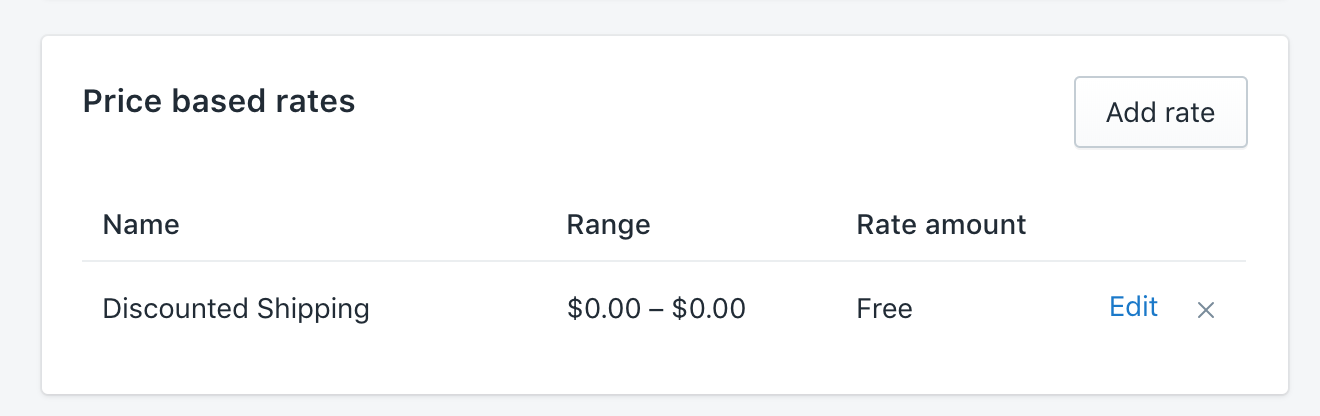
@brendanmurphy You can only apply one discount code to a checkout. This means that you can make a discount code for 100% off the purchase price. For the free shipping, you can configure a price-based shipping rate that allows for free shipping when the price is $0.
rebeccajfriedman
on 17 Dec 2018
Related issues
 v1nk0
·
3Comments
v1nk0
·
3Comments
 richgcook
·
3Comments
richgcook
·
3Comments
 jibinycricket
·
3Comments
jibinycricket
·
3Comments
 agos
·
5Comments
agos
·
5Comments
 FistMeNaruto
·
3Comments
FistMeNaruto
·
3Comments
Most helpful comment
Discounts are exposed in the SDK as of version 1.9.1.
They are available on the checkouts object in the
discountApplicationsfield: https://github.com/Shopify/js-buy-sdk/blob/master/src/graphql/CheckoutFragment.graphql#L39-L49and on checkout line items in the
discountAllocationsfield: https://github.com/Shopify/js-buy-sdk/blob/master/src/graphql/CheckoutFragment.graphql#L115-L122