Jq: Passing bash shell variable to jq filter
Hi,
I am trying to pass userGivenName and userSurname instead of static values abc and xyz but it is not working. What is the mistake in the second image/syntax?
With Static Values - Works

With Dynamic Values - Not working

 sprider
All 15 comments
Note that jq cannot read the shell variables nor does not read the environment variables automatically. Use --arg or --argjson to bind a shell variable to jq variable.
 itchyny
on 18 Feb 2020
itchyny
on 18 Feb 2020
@itchyny - please note that all the environment variables are available within jq via both env and $ENV. Note also the technique illustrated by:
X=foo jq -n 'env.X'
 pkoppstein
on 18 Feb 2020
pkoppstein
on 18 Feb 2020
@itchyny, I have tried with argument option as well. Could you please review this sample code with test data?
#!/bin/bash
# requires jq: https://stedolan.github.io/jq/

defaultIFS=$IFS
IFS=$'\n'

users='[{"id":"123","givenName":"jose","surname":"sam"},{"id":"456","givenName":"anbu","surname":"velliah"},{"id":"789","givenName":"test","surname":"user"}]'
groups='[{"id":"1","mail":"[email protected]"},{"id":"2","mail":"[email protected]"},{"id":"3","mail":"[email protected]"}]'

for user in `echo $users | jq -c '.[]'`; do

    userGivenName=`echo $user | jq '.givenName'`
    userSurname=`echo $user | jq '.surname'`

    groupsMatch=$(echo $groups | jq -c --arg GivenName "$userGivenName" --arg Surname "$userSurname" 'map(select((.mail|contains($GivenName)) or (.mail|contains($Surname))))')

    for group in `echo $groupsMatch | jq -c '.[]'`; do
        groupId=`echo $group | jq '.id'`
        groupMail=`echo $group | jq '.mail'`
        groupObject=$(jq -n -c \
                --arg id ${groupId} \
                --arg gm ${groupMail} \
                --arg gn ${userGivenName} \
                --arg sn ${userSurname} \
                '{groupId: $id, groupMail: $gm, userGivenName: $gn, userSurname: $sn}')

        groupsToFlag+=($groupObject)
    done

done

echo ${groupsToFlag[@]} | jq -csr '(.[0] |keys_unsorted | @tsv), (.[]|.|map(.) |@tsv)' | column -s$'\t' -t

IFS=defaultIFS
exit 1
Please use -r flag here.
    userGivenName=`echo $user | jq -r '.givenName'`
    userSurname=`echo $user | jq -r '.surname'`
Also I recommend using double quotes to avoid variable splitting here.
        groupId=`echo $group | jq -r '.id'`
        groupMail=`echo $group | jq -r '.mail'`
        groupObject=$(jq -n -c \
                --arg groupId "$groupId" \
                --arg groupMail "$groupMail" \
                --arg userGivenName "$userGivenName" \
                --arg userSurname "$userSurname" \
                '{ $groupId, $groupMail, $userGivenName, $userSurname }')
@itchyny, It works with my sample code & data but its not working with runtime data. Am I doing any syntax mistake in the below code?
#!/bin/bash
# requires jq: https://stedolan.github.io/jq/

defaultIFS=$IFS
IFS=$'\n'

groupsToFlag=()
users=`o365 aad user list --properties 'displayName,givenName,surname' -o json`
groups=`o365 aad o365group list  -o json`

for user in `echo $users | jq -c '.[]'`; do

    userGivenName=`echo $user | jq -r '.givenName'`
    userSurname=`echo $user | jq -r '.surname'`

    groupsMatch=$(echo $groups | jq -c --arg GivenName "$userGivenName" --arg Surname "$userSurname" 'map(select((.mail|contains($GivenName)) or (.mail|contains($Surname))))')

    for group in `echo $groupsMatch | jq -c '.[]'`; do
        groupId=`echo $group | jq  -r '.id'`
        groupDisplayName=`echo $group | jq  -r '.displayName'`
        groupMail=`echo $group | jq  -r '.mail'`
        groupObject=$(jq -n -c \
                --arg id ${groupId} \
                --arg dn ${groupDisplayName} \
                --arg gm ${groupMail} \
                --arg gn ${userGivenName} \
                --arg sn ${userSurname} \
                '{groupId: $id, groupDisplayName: $dn, groupMail: $gm, userGivenName: $gn, userSurname: $sn}')

        groupsToFlag+=($groupObject)
    done

done

echo ${groupsToFlag[@]} | jq -csr '(.[0] |keys_unsorted | @tsv), (.[]|.|map(.) |@tsv)' | column -s$'\t' -t

IFS=defaultIFS
exit 1
@sprider Did you try fixing groupObject as I said at https://github.com/stedolan/jq/issues/2058#issuecomment-587278999? I would suggest attaching what you get and what you expect on reporting an issue. Also if you can provide the json data (with masking if you want), it's appreciated.
itchyny
on 18 Feb 2020
@itchyny Please check the code here:
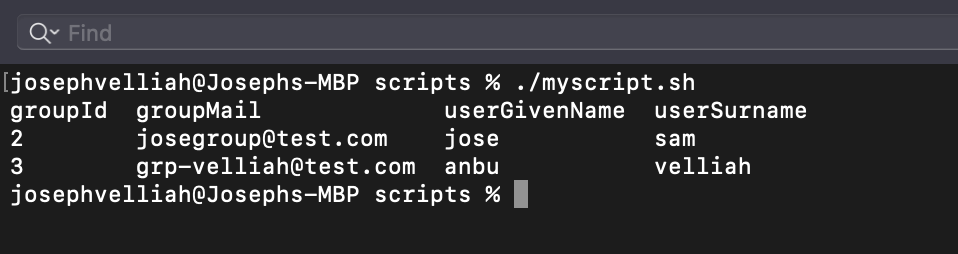
Outcome of the dynamic value section will be something similar to static value section but it is not working. Static data works perfectly fine...
#!/bin/bash
# requires jq: https://stedolan.github.io/jq/

defaultIFS=$IFS
IFS=$'\n'

groupsToFlag=()

# Dynamic Value
#users=`o365 aad user list --properties 'displayName,givenName,surname' -o json`
#groups=`o365 aad o365group list  -o json`
# Dynamic Value

# Static Value
users='[{"id":"123","givenName":"jose","surname":"sam"},{"id":"456","givenName":"anbu","surname":"velliah"}]'
groups='[{"id":"1","mail":"[email protected]"},{"id":"2","mail":"[email protected]"},{"id":"3","mail":"[email protected]"}]'
# Static Value

for user in `echo $users | jq -c '.[]'`; do

    userGivenName=`echo $user | jq -r '.givenName'`
    userSurname=`echo $user | jq -r '.surname'`

    groupsMatch=$(echo $groups | jq -c --arg GivenName "$userGivenName" --arg Surname "$userSurname" 'map(select((.mail|contains($GivenName)) or (.mail|contains($Surname))))')

    for group in `echo $groupsMatch | jq -c '.[]'`; do
        groupId=`echo $group | jq  -r '.id'`
        groupMail=`echo $group | jq  -r '.mail'`
        groupObject=$(jq -n -c \
                --arg id "$groupId" \
                --arg gm "${groupMail}" \
                --arg gn "${userGivenName}" \
                --arg sn "${userSurname}" \
                '{groupId: $id, groupMail: $gm, userGivenName: $gn, userSurname: $sn}')

        groupsToFlag+=($groupObject)
    done

done

echo ${groupsToFlag[@]} | jq -csr '(.[0] |keys_unsorted | @tsv), (.[]|.|map(.) |@tsv)' | column -s$'\t' -t

IFS=defaultIFS
exit 1
Expected output
sprider
on 18 Feb 2020
but it is not working
What do you get instead? Error message of jq or output nothing or incorrect data or something else.
itchyny
on 18 Feb 2020
but it is not working
What do you get instead? Error message of jq or output nothing or incorrect data or something else.
This is the error message
jq: error (at
sprider
on 18 Feb 2020
Please paste the entire output with set -x at the top of the script.
itchyny
on 18 Feb 2020
@itchyny, if i am not wrong, we found the issue. Is the contains operator accepts case sensitive values here?
We need to convert mail, GivenName and Surname to lowercase before comparing. How to do that with jq?
groupsMatch=$(echo $groups | jq -c --arg GivenName "$userGivenName" --arg Surname "$userSurname" 'map(select((.mail|contains($GivenName)) or (.mail|contains($Surname))))')
sprider
on 18 Feb 2020
.mail|ascii_downcase | contains($GivenName|ascii_downcase)
itchyny
on 18 Feb 2020
Looks great. This is my first expereicne with bash and jq. Thank you so much @itchyny.
sprider
on 18 Feb 2020
Please close this issue.
sprider
on 18 Feb 2020
Related issues
 kaihendry
·
4Comments
kaihendry
·
4Comments
 ghost
·
4Comments
ghost
·
4Comments
 tischwa
·
4Comments
tischwa
·
4Comments
 benjamin-bin-shen
·
3Comments
benjamin-bin-shen
·
3Comments
 tbelaire
·
4Comments
tbelaire
·
4Comments