Joplin: Joplin Portable v1.4.16 strange start behaviour
Hi there. I'm just using the last 1.4.16 portable version under Windows and i noticed this strange behaviour: when you start the exe, the process starts but without GUI. In the system's temp folder it creates a tmp folder named with a random string (like 1ksvDmTTQ25l3KbZiazQpmNO06z) and it will starts to populate with files inside. The folder will become about 470MB with 28260 files inside. Only when this process is ended, the GUI will shows up. I think that something went wrong with some flags during the last build.
 graphixillusion
All 3 comments
I've disabled asar packing to fix notifications on macOS, but looks like it means it's unpacking the whole app every time it starts now. I'll re-enable it and try to find a better fix.
 laurent22
on 27 Nov 2020
laurent22
on 27 Nov 2020
I also had this problem so I reverted to v1.4.12.
It has not been improved even in v1.4.16.
 ina6ra
on 27 Nov 2020
ina6ra
on 27 Nov 2020
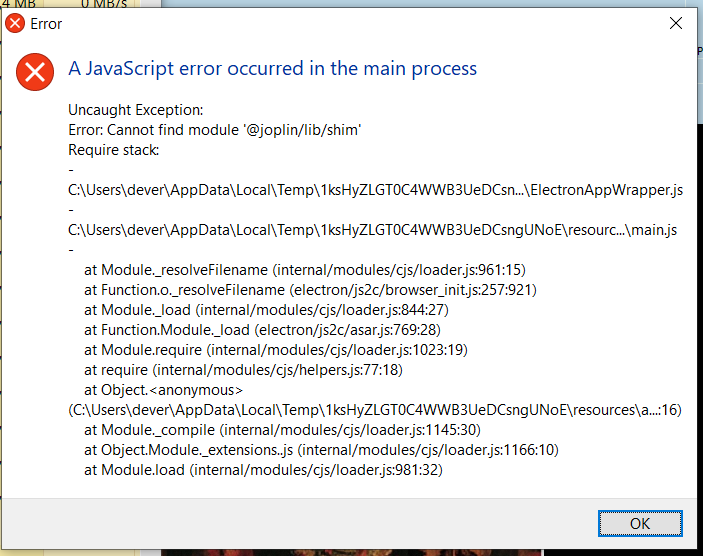
On Windows 10 Joplin v1.4.16 will not show. The process is started and get ~95 MB of memory. However, the app window never appears. Then, I get this error:
 alexdevero
on 28 Nov 2020
alexdevero
on 28 Nov 2020
Related issues
 jacobgonzales20
·
3Comments
jacobgonzales20
·
3Comments
 seagoj
·
3Comments
seagoj
·
3Comments
 christianlupus
·
3Comments
christianlupus
·
3Comments
 LifeIsAParadox
·
3Comments
LifeIsAParadox
·
3Comments
 alexanderadam
·
3Comments
alexanderadam
·
3Comments
Most helpful comment
I've disabled asar packing to fix notifications on macOS, but looks like it means it's unpacking the whole app every time it starts now. I'll re-enable it and try to find a better fix.