Joplin: Capital letters in tags after importing Evernote .enex as Markdown sort above tags with lowercase letters
Situation:
Some tags from Evernote were imported with capital letters as they were in Evernote (e.g. "Family-Mom"). But future work doesn't allow you to create tags with capital letters.
Issue:
As a result, tags with capital letters and small letters don't sort well because capital letters go above and lower letters go to the bottom.
For example, tags will sort in this order:
- Family-Mom
- SuperTag
- ZduperTag
- family-son
I pressed "rename" and Enter on each tag with capital letters to transform them into small letters to fix it.
Environment
Joplin version:
Joplin for Desktop
Copyright © 2016-2020 Laurent Cozic
Joplin 1.2.6 (prod, win32)
Sync Version: 2
Profile Version: 34
Keychain Supported: Yes
Revision: f5f117cb (master)
Platform:
OS Name Microsoft Windows 10 Pro
OS specifics:
Version 10.0.19041 Build 19041
Steps to reproduce
- Create tags with capital letters in Evernote
- Import .enex as Markdown
- See tags sorting
Describe what you expected to happen
Either possibility to use capital letters in tags or creating tags lowercase in import.
Logfile
Not needed in that issue.
 k-slava
All 12 comments
I have the same problem. Are we not allow to create tag in Capitalised format? Is this by design in Joplin or is this a bug?
 milynot
on 16 Oct 2020
milynot
on 16 Oct 2020
Is this by design in Joplin or is this a bug?
Tags in lower cases are by design. There is a discussion about it in the forum.
But creating UPPER cases in importing .enex files is a bug. Because it brokes sorting of tags as I wrote above. To fix it you have to rename each tag imported from Evernote. It is a very boring and consuming task if you have many of them, so I asked for fixing Evernote import.
k-slava
on 19 Oct 2020
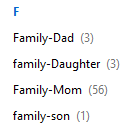
Yes, I found out from the source code that it deliberately coverts the tag to lower case when a tag is created/renamed. It didn't do that for Evernote import, which is a blessing to me. I currently use this feature to import all the tags I have/want from Evernote, in Capitalised format.
As you can see, the discussion has evolved into the possibility of allowing lowercase and uppercase (or Capitalised) to co-exist.
For your sort problem, I think it can be easily solved by changing a certain sort order. Like what we are having in Evernote.
milynot
on 19 Oct 2020
which is a blessing to me
No, you are actually cursed now :) As I was when I imported .enex.
The problem will start when you decide to create any new tag in Joplin. If you add any tag now, it is not being sorted with your tags from Evernote.
While we have lowercase tags in Joplin, the importer should work in a lowercase way. Otherwise, we have sorting problems. Or show me how to change the sorting order for tags in Joplin.
k-slava
on 19 Oct 2020
I don't have this issue currently. I have imported all my Capitalised tags from Evernote to Joplin. For any new tags I need, I create in Evernote and import it in, for the time being. Once the upper case (Capitalised) feature is implemented, then will I create new tag in Joplin.
The sorting order is a bug, I think. Because, in my iOS devices, it is sorted correctly as my previous post. Can you please check your Android device if it is sorted correctly? If you have a Mac, can you please check that as well? Once we confirm how many type of platform are affected, we can make the change altogether.
You cannot change the sort order at application level. However, it can be easily changed at source code level.
milynot
on 22 Oct 2020
Hi @laurent22 do you know what the final word is on this issue? I have just imported my notes/notebooks from Evernote and am indeed hit by this - I wouldn't mind normalising the case of tags on import, but since we _can_ import tags with mixed case, a case-insensitive tag sorting in the desktop UI would at least solve the short-term problem...
 msbentley
on 22 Oct 2020
msbentley
on 22 Oct 2020
The sorting order is a bug, I think. Because, in my iOS devices, it is sorted correctly as my previous post
I see. I thought it was a cross-platform issue. No, I had a problem with my Windows client. I thought because capital letters in ACSII go first.
k-slava
on 22 Oct 2020
Hi @laurent22 do you know what the final word is on this issue? I have just imported my notes/notebooks from Evernote and am indeed hit by this - I wouldn't mind normalising the case of tags on import, but since we _can_ import tags with mixed case, a case-insensitive tag sorting in the desktop UI would at least solve the short-term problem...
Not sure what's best actually. Ideally we should allow users to set their tags to whatever they want, but as it has been discussed, it's not clear how easy it would be to implement this.
 laurent22
on 22 Oct 2020
laurent22
on 22 Oct 2020
a case-insensitive tag sorting in the desktop UI would at least solve the short-term problem...
That should be easy though, probably just one line of code somewhere.
laurent22
on 22 Oct 2020
That should be easy though, probably just one line of code somewhere.
Great! Should that be done on the back of this issue (which is about tags on import), or do you want a new issue?
msbentley
on 23 Oct 2020
please do not force lowercase on import. just change the case-insensitive tag sorting in the desktop UI. using COLLATE NOCASE will solve the sort problem.
milynot
on 23 Oct 2020
Hey there, it looks like there has been no activity on this issue recently. Has the issue been fixed, or does it still require the community's attention? This issue may be closed if no further activity occurs. You may comment on the issue and I will leave it open. Thank you for your contributions.
![stale[bot] picture](https://avatars3.githubusercontent.com/in/1724?v=4&s=40) stale[bot]
on 22 Nov 2020
stale[bot]
on 22 Nov 2020
Related issues
 LifeIsAParadox
·
3Comments
LifeIsAParadox
·
3Comments
 hakim89
·
3Comments
hakim89
·
3Comments
 seagoj
·
3Comments
seagoj
·
3Comments
 deftdawg
·
3Comments
deftdawg
·
3Comments
 okoetter
·
3Comments
okoetter
·
3Comments
Most helpful comment
please do not force lowercase on import. just change the case-insensitive tag sorting in the desktop UI. using COLLATE NOCASE will solve the sort problem.