Joplin: Editor should only highlight valid Emojis when emoji plugin is enabled
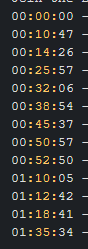
In the latest stable build of Joplin, Joplin 1.1.4 (prod, win32), the new codemirror has unexpected highlighting between colons (:).
For example:
Joplin for Desktop
Copyright © 2016-2020 Laurent Cozic
Joplin 1.1.4 (prod, win32)
Client ID: b7a727facab94c808ab6610bcaf55829
Sync Version: 2
Profile Version: 34
Keychain Supported: Yes
Revision: 9610b7e6 (master)
 itpropaul
All 19 comments
Hi @itpropaul
The new version has an updated editor which supports a larger range of highlighting. In this case it is recognizing anything between two : as an emoji and highlighting them as such.
If you want to disable this highlighting you can place the following css in your userchrome.css file
.cm-builtin {
    color: inherit !important;
}
I'm going to re-label this as an enhancement because it's not a big deal and would make a good first issue for new contributors.
 CalebJohn
on 23 Sep 2020
CalebJohn
on 23 Sep 2020
For anyone reading this looking for an issue to work on, here are some details.
For enabling/disabling emoji syntax highlighting you will need to change the markdown mode config in (emoji value should be false)
ElectronClient/gui/NoteEditor/NoteBody/CodeMirror/utils/useJoplinMode.ts
and the markdown highlighting is handled by
ElectronClient/node_modules/codemirror/mode/markdown/markdown.js
You might have to patch this file in order to add smarter highlighting.
Being able to toggle emoji syntax highlighting with the plugin setting would be enough to close this issue out. Adding smarter highlighting would be a nice-to-have extension.
CalebJohn
on 23 Sep 2020
Hi @itpropaul
The new version has an updated editor which supports a larger range of highlighting. In this case it is recognizing anything between two
:as an emoji and highlighting them as such.If you want to disable this highlighting you can place the following css in your userchrome.css file
.cm-builtin {
    color: inherit !important;
}
I'm going to re-label this as an enhancement because it's not a big deal and would make a good first issue for new contributors.
Thanks for this @CalebJohn . Does your recommended css snippet only affect highlighting between colon's? Or does it affect any other formatting in the codemirror editor? Either way, is there a link you could provide that I could reference for making other similar changes with the codemirror editor?
Thanks!
itpropaul
on 25 Sep 2020
@itpropaul
Does your recommended css snippet only affect highlighting between colon's?
Thats right.
Either way, is there a link you could provide that I could reference for making other similar changes with the codemirror editor?
We don't currently have every possibility enumerated but there is a forum post that has a lot of different specific customizations you might want. You can also checkout this comment to learn how to use the debug tools to grab specific item classes. You can also search around the forum a bit, there are a few posts that share some customizations.
CalebJohn
on 25 Sep 2020
Hey, I'd love to take up this issue and work on it. Should I go ahead or is it being done by someone?
 rahil1304
on 27 Sep 2020
rahil1304
on 27 Sep 2020
Go ahead @rahil1304 I'll assign you.
Let me know if you get stuck and I can give you some help.
CalebJohn
on 27 Sep 2020
Thanks @CalebJohn
I needed some help in reproducing this issue. So it only arises in the terminal application right?
rahil1304
on 27 Sep 2020
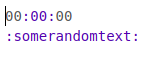
@rahil1304 it only happens in the desktop application when using the code view editor. Some examples that are highlighted include
00:00:00
:Somerandomtext:
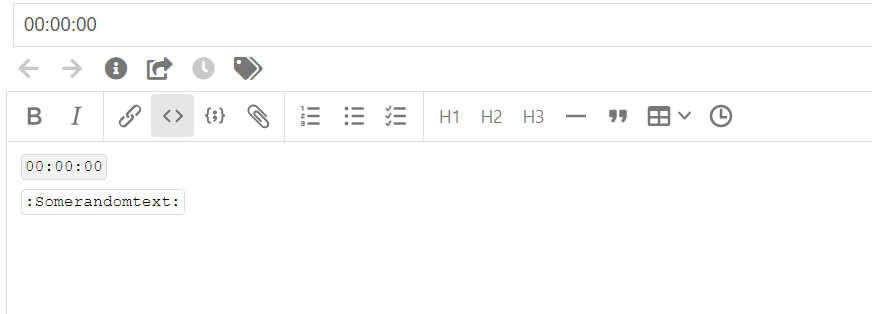
Hey so I tried reproducing it, but it doesn't show the yellow color that is supposed to be. Is there some dark mode setting I need to activate before reproducing this issue? @CalebJohn
rahil1304
on 27 Sep 2020
@rahil1304 you're using a code block in the WYSIWYG editor, but you must be using the other editor. And don't put the text I gave you in a code block.
CalebJohn
on 27 Sep 2020
@CalebJohn So you mean I open it using an external editor? That opens the note by default in my code editor (vscode) which also doesn't show the issue. Do I need to open it in typora?
rahil1304
on 27 Sep 2020
@rahil1304 No. Please press this button in Joplin
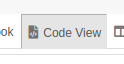
Joplin supports 2 editors, a WYSIWYG editor (still experimental, but that's what you took a screenshot of) and the code view editor. The code view editor is the default editor in Joplin and the one that exhibits this bug.
Also please make sure that you are using version 1.1.4 or higher.
CalebJohn
on 27 Sep 2020
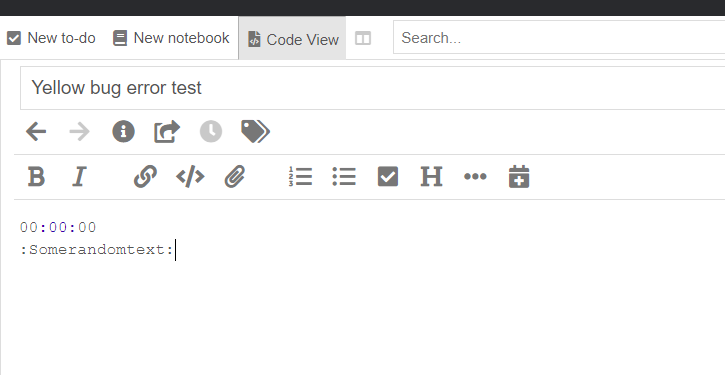
@CalebJohn Joplin version 1.1.4
Does not show the bug.
rahil1304
on 28 Sep 2020
Also, probably a stupid question, but I wanted to ask if there is a quick way to change between different versions? or do I need to clone the particular version code itself?
rahil1304
on 28 Sep 2020
@rahil1304 the bug is present in your screenshot, look closer at the :00:, it's in blue and should not be, you can change the theme to a different one to make it more obvious. :Somerandomtext: should be :somerandomtext:, that was my mistake (phone auto capitalisation). Here is the examples from my computer, the font is different so it's a little more obvious.
Also, probably a stupid question, but I wanted to ask if there is a quick way to change between different versions? or do I need to clone the particular version code itself?
You can just use git checkout like normal. If you switch to a much older version you will need to delete your database.
CalebJohn
on 28 Sep 2020
For anyone reading this looking for an issue to work on, here are some details.
For enabling/disabling emoji syntax highlighting you will need to change the markdown mode config in (emoji value should be false)
ElectronClient/gui/NoteEditor/NoteBody/CodeMirror/utils/useJoplinMode.tsBeing able to toggle emoji syntax highlighting with the plugin setting would be enough to close this issue out. Adding smarter highlighting would be a nice-to-have extension.
So just confirming, all I need to do is toggle the boolean emoji variable to false to close this issue right? Because you said smart highlighting is not required as of now.
@CalebJohn
rahil1304
on 29 Sep 2020
@rahil1304 That's correct, when the user disables the emoji plugin in settings it should disable emoji highlighting in the CodeMirror editor.
CalebJohn
on 29 Sep 2020
Hey @CalebJohn
I have raised a PR making the change. Let me know if there's something else I need to do to close this issue. https://github.com/laurent22/joplin/pull/3852
rahil1304
on 30 Sep 2020
Fixed by #3852 , This will be fixed in release 1.3! Thanks @rahil1304
CalebJohn
on 9 Oct 2020
Related issues
 kopfuss
·
3Comments
kopfuss
·
3Comments
 LifeIsAParadox
·
3Comments
LifeIsAParadox
·
3Comments
 okoetter
·
3Comments
okoetter
·
3Comments
 jmcastagnetto
·
3Comments
jmcastagnetto
·
3Comments
 yschutz
·
3Comments
yschutz
·
3Comments