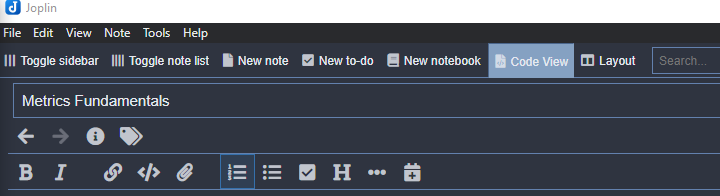
Joplin: Edit in external editor button disappeared
Environment
Joplin version: 1.0.214 (prod, win32)
Platform: Windows
OS specifics: Windows 10 Home edition
Steps to reproduce
- Upgrade to latest prod version
Describe what you expected to happen
I don't see any note on this in the version release changelog so I'm not sure if it's deliberate or not. I know there's a shortcut for it, but I used to pressing the button
 SilvM
SilvM
All 8 comments
It's under Note menu, or press Ctrl+E
 laurent22
on 23 May 2020
laurent22
on 23 May 2020
This is not super convenient if you use external editing a lot.
Can we make the button appear again, e.g. only if an external editor is configured?
 stefan2904
on 26 May 2020
stefan2904
on 26 May 2020
I agree with stefan2904's words. Now it‘s inconvenient if we finish editing in external editor because there is not shortup keys of stop external editing. So can we add the shortup key of stop stop external editing or make the button again?
 riversHYD
on 27 May 2020
riversHYD
on 27 May 2020
The lack of the button removes an important visual indicator that a note is or is not still open in an external editor. It's also, as others have mentioned, just convenient. I cannot understand the value in removing this. Is it safe to go back to an earlier version until this is fixed?
 Neurogami
on 3 Jun 2020
Neurogami
on 3 Jun 2020
you can still see them being open in an external editor but I agree it's like the feature is hidden away in the menu

SilvM
on 8 Jun 2020
Interesting. Hadn't noticed that (which may mean it is took small an indicator).
Still have no idea what user problem was solved or user value created by removing the button.
Neurogami
on 8 Jun 2020
That button is back in the latest version
laurent22
on 9 Jun 2020
Thank you.
Neurogami
on 9 Jun 2020
Related issues
 hakim89
·
3Comments
hakim89
·
3Comments
 v-marinkov
·
3Comments
v-marinkov
·
3Comments
 jurgenhaas
·
3Comments
jurgenhaas
·
3Comments
 xfrose
·
3Comments
xfrose
·
3Comments
 deftdawg
·
3Comments
deftdawg
·
3Comments
Most helpful comment
That button is back in the latest version