Joplin: Some mathematical symbols appear as bullets
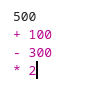
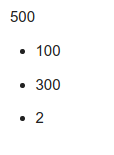
Whenever I add mathematical symbols like (+), (-), and (*) at the beginning of any line, they appear as bullets.
Example:
Environment
Joplin version: 1.0.201
Platform: Linux
OS specifics: Kubuntu 20.04
bug
 Ahmed-E-86
All 2 comments
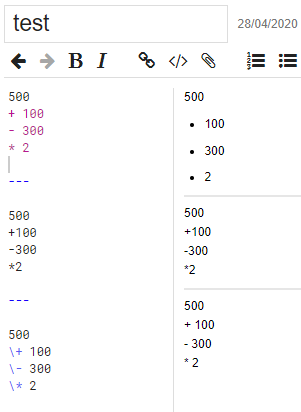
I believe that this is intended behaviour and not a bug as these symbols at the start of a line and followed by a space are Markdown codes for bullet points.
If you want to see them as mathematical symbols you can either omit the space or "escape" the symbol (i.e. tell Joplin it is not a Markdown code) by preceding it with a backslash.
 dpoulton-github
on 28 Apr 2020
dpoulton-github
on 28 Apr 2020
👍2
Thanks :+1:
Ahmed-E-86
on 28 Apr 2020
Was this page helpful?
0 / 5 - 0 ratings
Related issues
 yschutz
·
3Comments
yschutz
·
3Comments
 GingerPapa
·
3Comments
GingerPapa
·
3Comments
 jurgenhaas
·
3Comments
jurgenhaas
·
3Comments
 Rahulm2310
·
3Comments
Rahulm2310
·
3Comments
 v-marinkov
·
3Comments
v-marinkov
·
3Comments
Most helpful comment
I believe that this is intended behaviour and not a bug as these symbols at the start of a line and followed by a space are Markdown codes for bullet points.
If you want to see them as mathematical symbols you can either omit the space or "escape" the symbol (i.e. tell Joplin it is not a Markdown code) by preceding it with a backslash.