Joplin: Implement font picker in desktop application
It is already possible to set the font used in the editor from the config screen:

However, the user has to manually type the name of the font, which is not convenient.
We would like to add a font picker to make this process easier. It would work like so:
- The existing text input field remains unchanged
- Next to it, add a button "Pick font" which will open the font picker
- The font picker will only display monospace fonts
- Once a font is picked, the font name populates the text input field
- It needs to work on Windows, macOS and Linux. If one or more of the OS cannot be supported, the button should be hidden.
 laurent22
All 30 comments
Can I take the issue?
 daukadolt
on 28 Feb 2020
daukadolt
on 28 Feb 2020
Looks good I'd like to work on it!
 Rishabh-malhotraa
on 28 Feb 2020
Rishabh-malhotraa
on 28 Feb 2020
It is already possible to set the font used in the editor from the config screen:
However, the user has to manually type the name of the font, which is not convenient.
We would like to add a font picker to make this process easier. It would work like so:
- The existing text input field remains unchanged
- Next to it, add a button "Pick font" which will open the font picker
- The font picker will only display monospace fonts
- Once a font is picked, the font name populates the text input field
- It needs to work on Windows, macOS and Linux. If one or more of the OS cannot be supported, the button should be hidden.
Suggestion rather than incorporating a button incorporate a drop-down button which has all the monospace fonts.
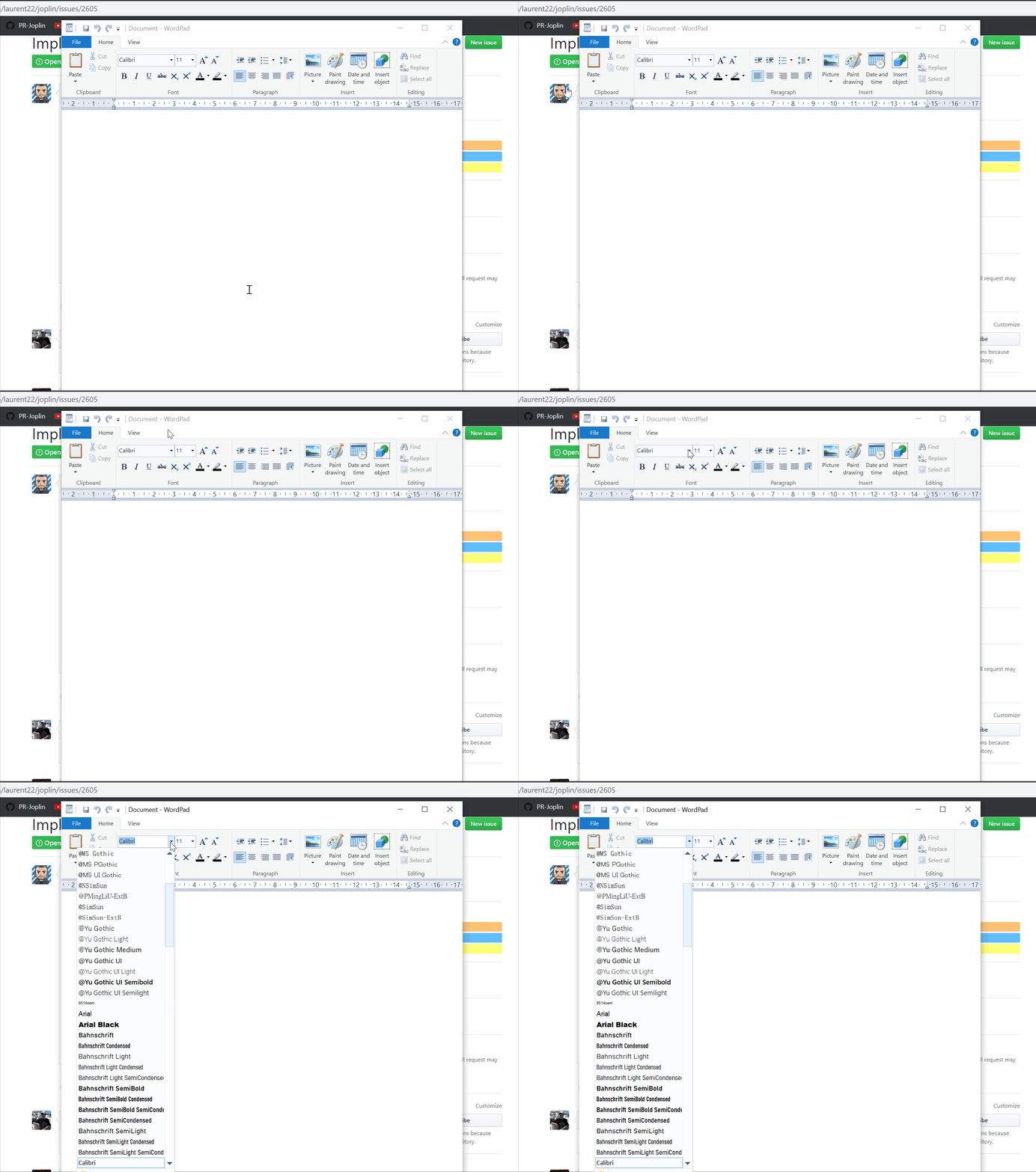
What do you think about it?
Rishabh-malhotraa
on 28 Feb 2020
Dropdown lists with type-in introduce all kind of problems so I prefer a separate button for now.
laurent22
on 29 Feb 2020
@laurent22 @PackElend , I would like to work on this issue.
Can you please assign it to me.
 AkshatSachan
on 29 Feb 2020
AkshatSachan
on 29 Feb 2020
@AkshatSachan Hey I think @Rishgod is working on this.
 rabeehrz
on 29 Feb 2020
rabeehrz
on 29 Feb 2020
Ok , thats fine I will look into some other issue.
AkshatSachan
on 29 Feb 2020
@Rishgod can you comment on your status? Because I'm halfway there, and I thought that you were working on this issue
daukadolt
on 1 Mar 2020
@Rishgod can you comment on your status? Because I'm halfway there, and I thought that you were working on this issue
@daukadolt you can go ahead with completing this, I'm just done 20% :)
Rishabh-malhotraa
on 1 Mar 2020
@Rishgod can you comment on your status? Because I'm halfway there, and I thought that you were working on this issue
@daukadolt you can go ahead with completing this, I'm just done 20% :)
thanks @Rishgod :)
daukadolt
on 1 Mar 2020
I wonder if adding a font directory to where Joplin stores its config files and then reading the fonts from there would be a compromise that would work better long term? That's a pretty standard way of handling it for many other apps. Then Joplin would just read the fonts in that directory and give those as an option.
 bedwardly-down
on 2 Mar 2020
bedwardly-down
on 2 Mar 2020
@Rishgod can you comment on your status? Because I'm halfway there, and I thought that you were working on this issue
@daukadolt you can go ahead with completing this, I'm just done 20% :)
thanks @Rishgod :)
Hey, @daukadolt just let me know if you need any help or if you want to abandon the PR okay? :)
Rishabh-malhotraa
on 5 Mar 2020
@Rishgod can you comment on your status? Because I'm halfway there, and I thought that you were working on this issue
@daukadolt you can go ahead with completing this, I'm just done 20% :)
thanks @Rishgod :)
Hey, @daukadolt just let me know if you need any help or if you want to abandon the PR okay? :)
Last few days were very busy, but I'm finally more or less free. If you have any ideas or suggestions, I could possibly use some
daukadolt
on 5 Mar 2020
Is anybody currently working on this ?
if not then could I work on this one ?
@Rishgod @daukadolt
 Chhekur
on 7 Mar 2020
Chhekur
on 7 Mar 2020
you should ask @daukadolt I'm not working on it.
Rishabh-malhotraa
on 7 Mar 2020
@Chhekur I'm working on the issue, it's just that I'm kinda slow 😅
daukadolt
on 9 Mar 2020
@daukadolt Are you still working on this? Can I take up this issue?
rabeehrz
on 3 Apr 2020
I was thinking of using this package, font-manager.
It supports all the platforms.
rabeehrz
on 3 Apr 2020
@rabeehrz, if you decide to use that, you’ll need to understand how to fix it if it breaks. It doesn’t have much active development on it with most of the latest commits being quite old. But super cool find, nonetheless
bedwardly-down
on 3 Apr 2020
Well, that is the only way I found to get system fonts for Electron. Other way is adding a fonts directory to Joplin, like you suggested.
I wonder if adding a font directory to where Joplin stores its config files and then reading the fonts from there would be a compromise that would work better long term? That's a pretty standard way of handling it for many other apps. Then Joplin would just read the fonts in that directory and give those as an option.
rabeehrz
on 3 Apr 2020
Are React Native libraries only usable for mobile apps or could they be leveraged for Desktop also? I found a highly active one that could possibly be used to allow picking fonts on mobile but might be usable here, too.
It has web support too, so should be usable with Electron.
bedwardly-down
on 3 Apr 2020
Are React Native libraries only usable for mobile apps or could they be leveraged for Desktop also?
There's this: https://github.com/microsoft/react-native-windows but seems it's only Windows 10 and it's not yet stable
 roman-r-m
on 3 Apr 2020
roman-r-m
on 3 Apr 2020
Joplin is cross platform so it has to be a library that supports Windows, mac and Linux.
bedwardly-down
on 3 Apr 2020
Quick googling returned this: https://github.com/status-im/react-native-desktop
It seems actively developed.
roman-r-m
on 3 Apr 2020
Quick googling returned this: https://github.com/status-im/react-native-desktop
It seems actively developed.
But doesn't this mean that we'd have to convert Electron to React Native Desktop?
rabeehrz
on 4 Apr 2020
I guess I misunderstood the original question.
roman-r-m
on 4 Apr 2020
I've had this picture in my mind, please correct me if I'm wrong.

- Selection button in the "Appearence" tab of the Configuration page.

2.1. Child BrowserWindow which opens a new React Component that utilizes library like the one @rabeehrz has mentioned.
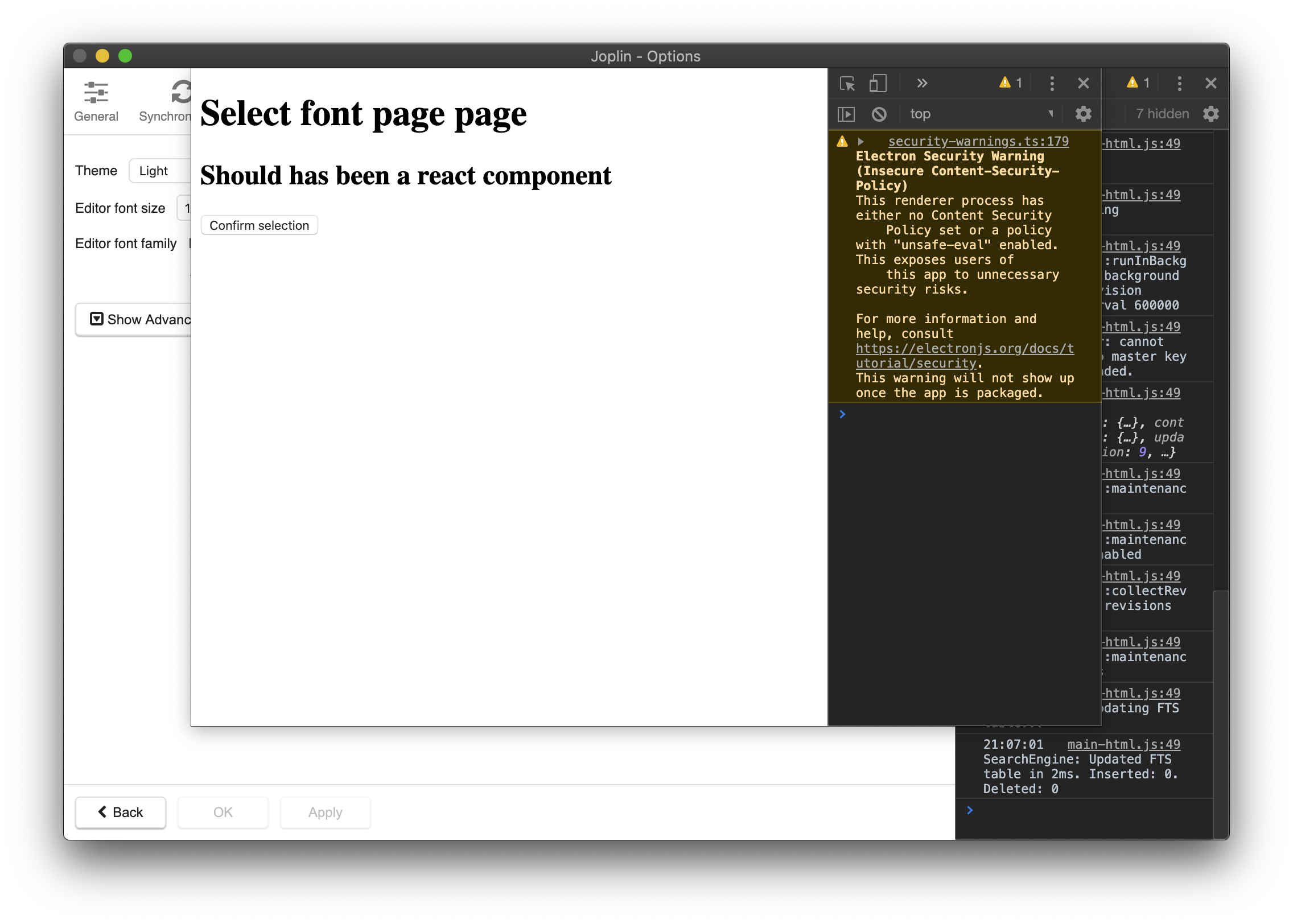
2.2. Alternative, modal child BrowserWindow.
Looking forward for a feedback on the vision in screenshots.
The problem I've had was with opening a React component inside this very child BrowserWindow. I a little new to React, so I've been having issues with opening it inside Electron. The examples on screenshots use plain html page.
The exact procedure of how these components are mounted and navigated inside Electron app is what, unfortunately, I've failed to understand.
I looked through the gulp scripts but still am a little confused
daukadolt
on 13 Apr 2020
I was thinking of implementing a dialog with a simple drop-down, like the note properties.
But Laurent had said we need to have a proper dialog framework in place before he accepts any more PR related to it. Also, there are a lot of bugs to fix and he's not going to accept any more new features as of now. That's why I've waited on this. I do plan to work on this.
rabeehrz
on 14 Apr 2020
I was thinking of implementing a dialog with a simple drop-down, like the note properties.
But Laurent had said we need to have a proper dialog framework in place before he accepts any more PR related to it. Also, there are a lot of bugs to fix and he's not going to accept any more new features as of now. That's why I've waited on this. I do plan to work on this.
could you help me out with my problems above? If you want, I won't proceed any further with the feature request, but I'd like to learn how to integrate my custom React components.
daukadolt
on 14 Apr 2020
I'd like to learn how to integrate my custom React components.
If you take a look at the folder gui inside ElectronClient, You can see a lot of .jsx files. Most of them (if not all) are custom components. Let us take ToolbarButton.jsx for example. It takes in some parameters and ultimately generates an anchor tag <a>. Then we just export it and use
I think it would really help if you create a Topic in the forums so that everyone can give their input.
rabeehrz
on 14 Apr 2020
Related issues
 hakim89
·
3Comments
hakim89
·
3Comments
 Cybernemo
·
3Comments
laurent22
·
3Comments
Cybernemo
·
3Comments
laurent22
·
3Comments
 deftdawg
·
3Comments
deftdawg
·
3Comments
 Rahulm2310
·
3Comments
Rahulm2310
·
3Comments
Most helpful comment
@AkshatSachan Hey I think @Rishgod is working on this.