Joplin: iOS Bug: Last line of text hidden, unable to scroll down to see
Operating system
- iOS [v. 12.2 (16E227)] [iPhone XR]
Application
- Mobile [Joplin v.10.0.30, Database v18]
Bug Report and Attachments
On Joplin for iOS (latest versions of all, annotated above) on iPhone XR the last row of text and the cursor is hidden when trying to edit text.
A picture is worth a thousand words, so hopefully the attached screenshot helps a bit! :)
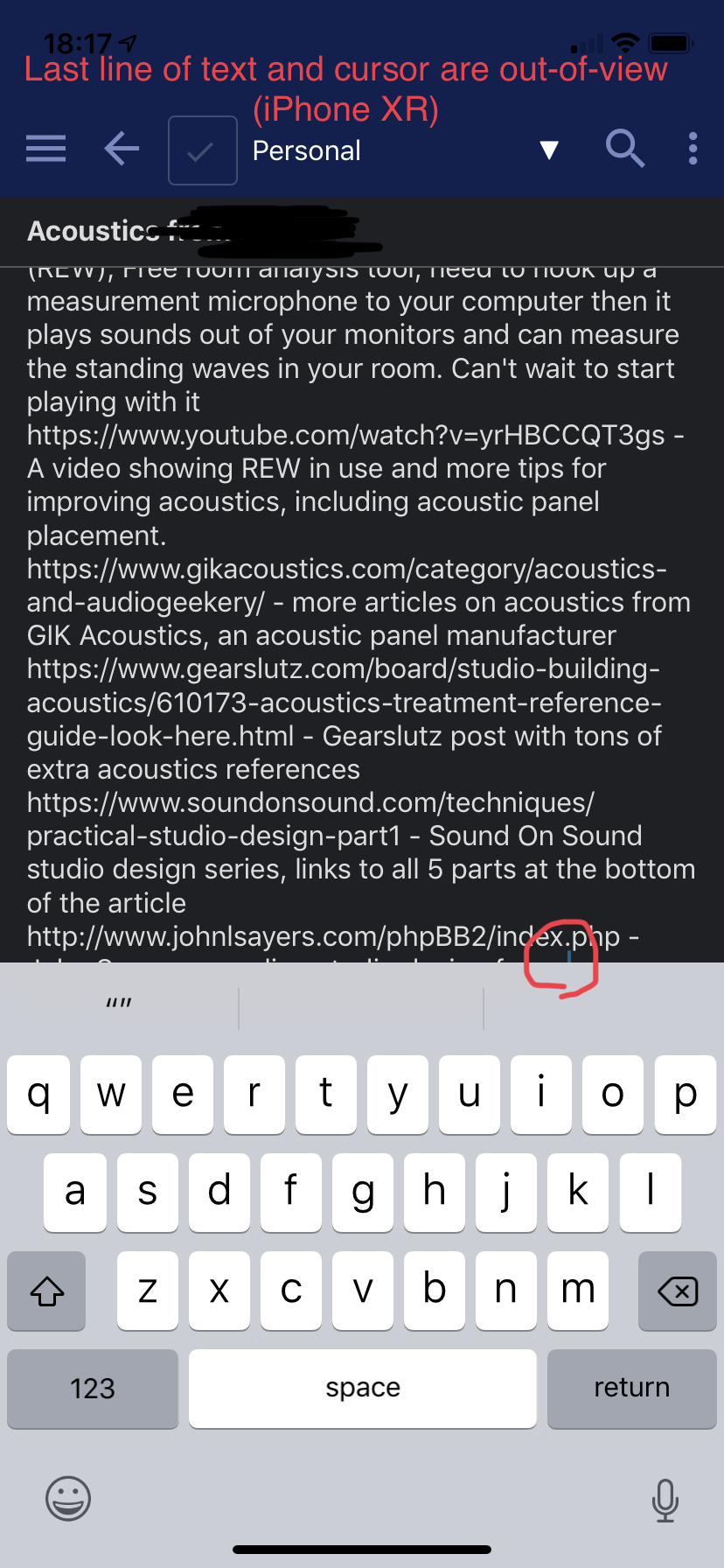
Current Workaround
Although awkward at best, I'm able to get around this for now by mashing enter several times, inserting a single character or word, then tapping further up to select the row I was trying to edit. (now, the new "lower" row is hidden instead)
Hope this report helps! :)
 diver-down
All 9 comments
Hey there, it looks like there has been no activity on this issue recently. Has the issue been fixed, or does it still require the community's attention? This issue may be closed if no further activity occurs. You may also label this issue as "backlog" and I will leave it open. Thank you for your contributions.
![stale[bot] picture](https://avatars3.githubusercontent.com/in/1724?v=4&s=40) stale[bot]
on 23 Sep 2019
stale[bot]
on 23 Sep 2019
JFC, silly bot, yes this is still a problem
diver-down
on 23 Sep 2019
Note: best solution would be to include a large white space below editable so that it can be scrolled as needed.
 laurent22
on 5 Dec 2019
laurent22
on 5 Dec 2019
@diver-down I can confirm that this is still a big issue with 13.3 on all iOS keyboards. One fix I implemented despite being a pain when I'm out and about for work and want to take a quick note: carry my bluetooth keyboard around and type with it when I have downtime at work.
 bedwardly-down
on 14 Jan 2020
bedwardly-down
on 14 Jan 2020
@diver-down I can confirm that this is still a big issue with 13.3 on all iOS keyboards. One fix I implemented despite being a pain when I'm out and about for work and want to take a quick note: carry my bluetooth keyboard around and type with it when I have downtime at work.
Same on my end — still an issue on iPad Pro (10.5”), iPhone (5S, 6S, and XR).
Two workarounds I’ve found:
1) Use a bluetooth keyboard
2) Insert a single character (./-/etc) and several line-returns above, and then go back to typing. This created the white-space needed. Problem with this: entering a note to edit positions the cursor at the last character (normal and expected, so thanks!) which means I have to reposition my cursor above the generated white-space every time I use this workaround.
Just to clarify: I’m not complaining, just confirming the issue also still exists from my end as well!
(love Joplin, on Patreon, and use it every day for work and personal life!)
diver-down
on 14 Jan 2020
@diver-down I can confirm that this is still a big issue with 13.3 on all iOS keyboards. One fix I implemented despite being a pain when I'm out and about for work and want to take a quick note: carry my bluetooth keyboard around and type with it when I have downtime at work.
Same on my end — still an issue on iPad Pro (10.5”), iPhone (5S, 6S, and XR).
Two workarounds I’ve found:
- Use a bluetooth keyboard
- Insert a single character (./-/etc) and several line-returns above, and then go back to typing. This created the white-space needed. Problem with this: entering a note to edit positions the cursor at the last character (normal and expected, so thanks!) which means I have to reposition my cursor above the generated white-space every time I use this workaround.
Just to clarify: I’m not complaining, just confirming the issue also still exists from my end as well!
(love Joplin, on Patreon, and use it every day for work and personal life!)
Glad I'm not the only one with a bluetooth keyboard for their phone. I may have to implement your second method, though. Thanks.
I'm on an iPhone XR and should have clarified that all iOS keyboard apps I've used on my phone have had the same bug happen.
bedwardly-down
on 14 Jan 2020
Bug persists. (Edit: see below). Running v. 10.0.46 on iOS, iPhone XR, Database v.28
EDIT 2: Just noticed that the commit/fix linked isn’t in the App Store yet. I’ll report back once I download the next update. :)
diver-down
on 8 Apr 2020
EDIT: Just noticed that the commit/fix linked isn’t in the App Store yet. Will report back once I’ve downloaded the next version.
Was able to grab a quick screencap. This is the furthest down I’m able to scroll (the entire last line of text is hidden)

diver-down
on 8 Apr 2020
It will be in the next release.
laurent22
on 8 Apr 2020
Related issues
 jmcastagnetto
·
3Comments
laurent22
·
3Comments
jmcastagnetto
·
3Comments
laurent22
·
3Comments
 jurgenhaas
·
3Comments
jurgenhaas
·
3Comments
 christianlupus
·
3Comments
christianlupus
·
3Comments
 yschutz
·
3Comments
yschutz
·
3Comments
Most helpful comment
It will be in the next release.