Joplin: [feature request] folder chooser for filesystem sync on Andoird
Operating system
- Windows
- macOS
- Linux
- [x] Android
- iOS
Application
- Desktop
- [x] Mobile
- Terminal
Hi,
I have been using Joplin with the filesystem synchronisation so far, to be used with another sync app.
When trying to setup the filesystem sync on Android, I have difficulties to set the right folder, since i have to specify the path manually.
In fact, so far, i havent' been able to set the right path, the application telling me that this path doesn't exist.
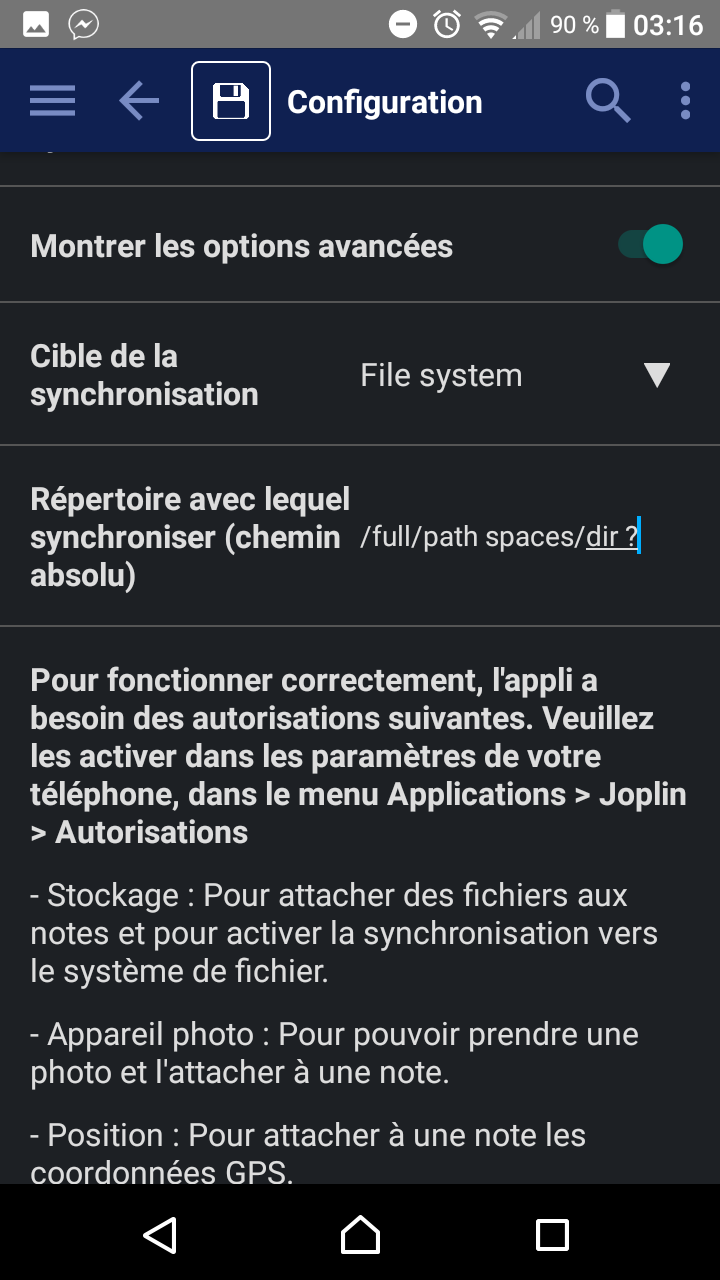
-> Would it be possible to open a folder chooser to let the user select a given folder instead of manually typing the full path to the directory ?
Besides that, it's an amazing app, and it improved my producitivty :) :+1: :100:
Thanks !
 Wenzel
All 9 comments
hi @laurent22 ,
just wanted to know if you had considered this feature, and if implementing it would be rather easy (the task chooser is a simple API call, accessible on all platforms), or complicated (many APIs, platform specific code)
I still can't make use of Joplin on Android because of this :/
Thanks !
Wenzel
on 8 Dec 2018
This would really simplify the setup so much !
 borisrorsvort
on 22 Jan 2019
borisrorsvort
on 22 Jan 2019
I had the same issue, this feature would be really helpful.
So far i had success with this path try it maybe it works for you too:
/storage/emulated/0/Notes
i created the Notes folder on the root of my phone, the root the file explorer lets me see my phone is not rooted or anything, then just give storage permissions to Joplin and i sync everything with MEGA.
So far so good.
Thanks guys this is a really cool app.
 gibranlp
on 1 Apr 2019
gibranlp
on 1 Apr 2019
@gibranlp
How did you sync the folder with MEGA?
 kylejbrk
on 12 Apr 2019
kylejbrk
on 12 Apr 2019
@kylejbrk
I'm usign an app called MegaSync, which syncs some folders from MEGA to the phone locally, it actually downloads the content, i'm using specifically just for Joplin.
i'm using the folder i described above
/storage/emulated/0/Notes
cheers
gibranlp
on 12 Apr 2019
@gibranlp
Im a bit confused.
MegaSync is a desktop app which does as you describe.
The official android Mega app has a save for offline feature, but I believe that transaction is only one way.
Are you using the official Mega app or something else?
kylejbrk
on 12 Apr 2019
@kylejbrk
Yes but is also an App for android.
gibranlp
on 12 Apr 2019
Hey there, it looks like there has been no activity on this issue recently. Has the issue been fixed, or does it still require the community's attention? This issue may be closed if no further activity occurs. You may also label this issue as "backlog" and I will leave it open. Thank you for your contributions.
![stale[bot] picture](https://avatars3.githubusercontent.com/in/1724?v=4&s=40) stale[bot]
on 22 Sep 2019
stale[bot]
on 22 Sep 2019
Closing this issue after a prolonged period of inactivity. If this issue is still present in the latest release, please feel free to create a new issue with up-to-date information.
stale[bot]
on 29 Sep 2019
Related issues
 jacobgonzales20
·
3Comments
jacobgonzales20
·
3Comments
 deftdawg
·
3Comments
deftdawg
·
3Comments
 okoetter
·
3Comments
okoetter
·
3Comments
 kopfuss
·
3Comments
kopfuss
·
3Comments
 alexanderadam
·
3Comments
alexanderadam
·
3Comments
Most helpful comment
This would really simplify the setup so much !