Joplin: Add indicator to note properties
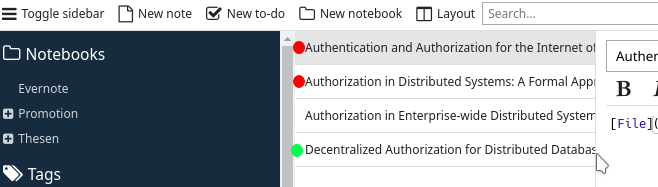
I would like to add an indicator to a note, so that i can highlight specific notes.
E.g. green --> read and red --> not read yet. (eventually via the note properties)
Is this actually possible? - otherwise this would be a good feature
 Blackjack92
All 10 comments
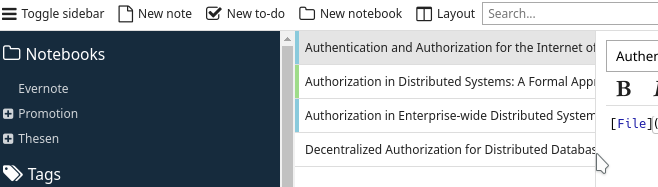
or may be something like a grey line instead of black to see the different between read/unread
 foxmask
on 15 Oct 2018
foxmask
on 15 Oct 2018
Maybe the color and the meaning behind could be chosen by the user, so that not only "read" and "unread" are possible. Also "important", "to prove", etc.
Furthermore, this would lead to complete new use cases, where the sort criteria could be the flag: e.g. search for status: "unread" and note title: "Auth*"
Blackjack92
on 15 Oct 2018
i prefer this new layout instead of a bullet ; and the idea too :)
foxmask
on 15 Oct 2018
Isn't it similar to tags? i.e. you could create a "read", "unread", "important" tag, etc?
 laurent22
on 15 Oct 2018
laurent22
on 15 Oct 2018
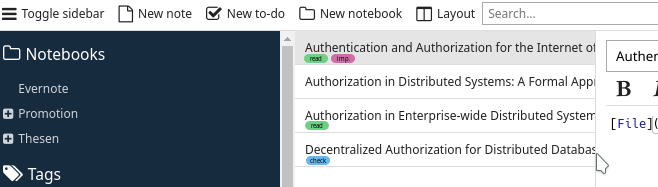
May be, but there is no color to highlight a note. Then may be a color by tag like github ? :)
then the layout could be
note title
tag1 tag2
where tag1 and tag2 could be displayed each with their own color.
foxmask
on 15 Oct 2018
Yes that would make sense. I guess to accomplish this feature, we basically need:
- Tag colour
- Being able to filter/search by tag
laurent22
on 15 Oct 2018
to avoid offtopic here, i made a post about filter/search things on the forum
foxmask
on 15 Oct 2018
It sounds quit good, with adding colours to tags and to display the tags if wanted. This is exactly what I thought of!
I would suggest also allow "none" colour --> so that not each tag is visible.
Blackjack92
on 15 Oct 2018
Hey there, it looks like there has been no activity on this issue recently. Has the issue been fixed, or does it still require the community's attention? This issue may be closed if no further activity occurs. You may also label this issue as "backlog" and I will leave it open. Thank you for your contributions.
![stale[bot] picture](https://avatars3.githubusercontent.com/in/1724?v=4&s=40) stale[bot]
on 22 Sep 2019
stale[bot]
on 22 Sep 2019
Closing this issue after a prolonged period of inactivity. If this issue is still present in the latest release, please feel free to create a new issue with up-to-date information.
stale[bot]
on 29 Sep 2019
Related issues
 deftdawg
·
3Comments
deftdawg
·
3Comments
 kopfuss
·
3Comments
kopfuss
·
3Comments
 christianlupus
·
3Comments
christianlupus
·
3Comments
 jmcastagnetto
·
3Comments
jmcastagnetto
·
3Comments
 okoetter
·
3Comments
okoetter
·
3Comments