Joplin: "Network request failed" on iOS with WebDAV sync
WebDAV Synchronisation does not work on iOS11.
Same settings are working on MacOS and Windows 10.
Error is "Network request failed"
Operating system
- iOS
Application
- Mobile
 mariomurrent-softwaresolutions
All 20 comments
What WebDAV server do you use? And is it possible to get a test user to try to replicate the issue?
 laurent22
on 21 Sep 2018
laurent22
on 21 Sep 2018
I am using OwnCloud as WebDAV Server.
Just send me an email and I will give you a test user and an own folder
mariomurrent-softwaresolutions
on 23 Sep 2018
I am on iOS 12 with Synology WebDAV and the config seems to hang on 'checking... please wait' when testing the config. Same settings work with MacOS
 cmsimike
on 28 Sep 2018
cmsimike
on 28 Sep 2018
Yes on the iPhone I am having the same issue ... On MacOS the Software works as expected
mariomurrent-softwaresolutions
on 28 Sep 2018
Any updates on this? I'm trying to setup a seperate owncloud installation for you
mariomurrent-softwaresolutions
on 26 Nov 2018
This issue will be used to track the mysterious "Network request failed" error on iOS and to try to find a common root cause to the bug.
Other ones:
- https://github.com/laurent22/joplin/issues/397
- https://help.nextcloud.com/t/mobile-note-taking-with-your-private-cloud-announcing-joplin-nextcloud-integration/29239/43?u=laurent
If someone can provide a test user on their server and send it here, it could help fix the issue.
laurent22
on 18 Jan 2019
Any updates on this? I sent you the test account
mariomurrent-softwaresolutions
on 31 Jan 2019
Should be fixed in latest version - https://github.com/laurent22/joplin/commit/4e3896c10824d8d4a55ccb19892574f4cfdaf19a
laurent22
on 31 Jan 2019
Been released to the app store?
cmsimike
on 31 Jan 2019
Not fixed in version 10.0.28 which is the latest one
mariomurrent-softwaresolutions
on 1 Feb 2019
@laurent22 Not even fixed with 10.0.29 - sync has no errors, but no notes are displayed
mariomurrent-softwaresolutions
on 8 Feb 2019
@mariomurrent-softwaresolutions, what is you try uninstalling and reinstalling the app?
laurent22
on 8 Feb 2019
@laurent22 i tried it but it did not help
mariomurrent-softwaresolutions
on 8 Feb 2019
Worked for me though it still seemed broken at first but finally went through. Thanks!
cmsimike
on 12 Feb 2019
@laurent22 Sync does not work. There is a new Error on my iOS Device.
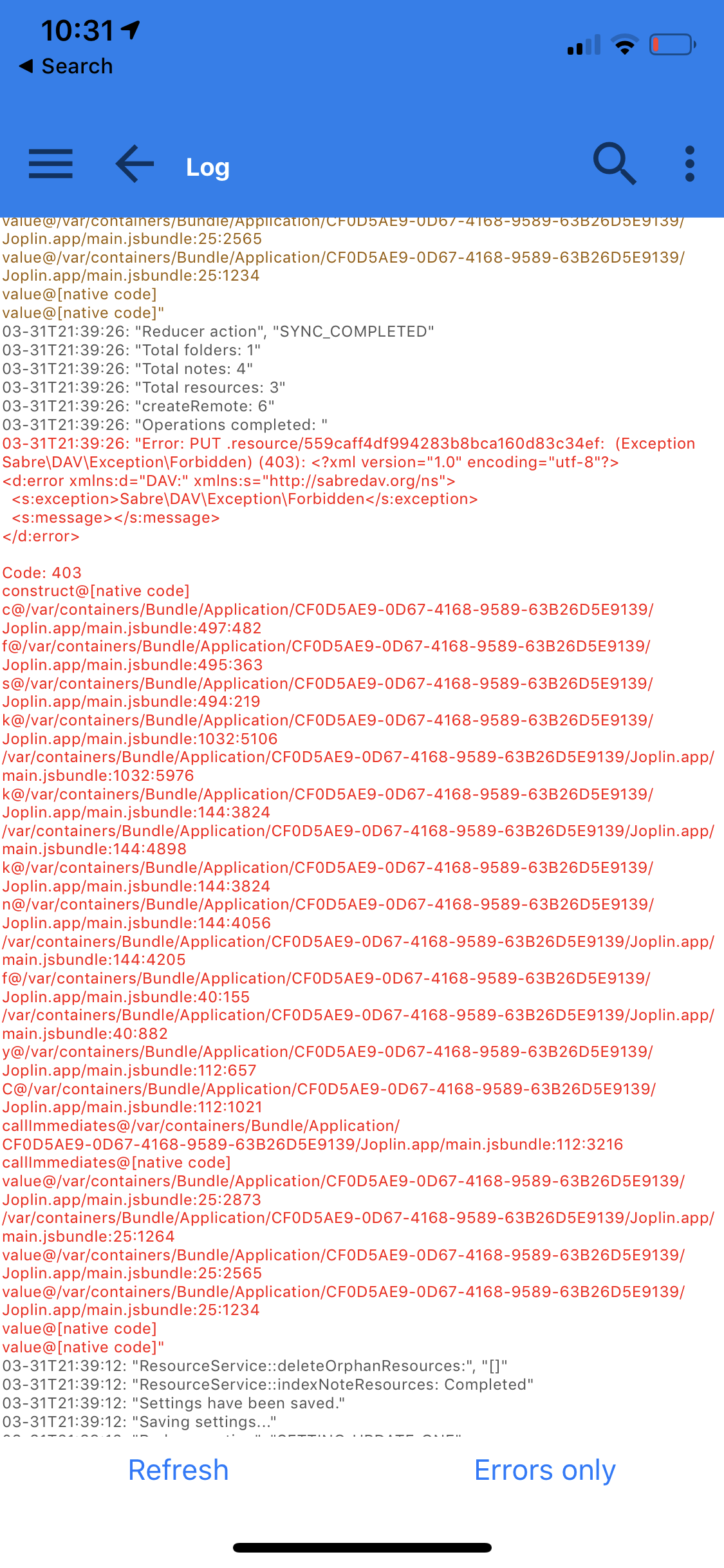
PUT ./resource/ Exception Forbidden - but the credentials are correct, also if I test them on the settings page.
mariomurrent-softwaresolutions
on 30 Apr 2019
@mariomurrent-softwaresolutions , could you post a screenshot of the error log?
laurent22
on 30 Apr 2019
mariomurrent-softwaresolutions
on 30 Apr 2019
This is the app on my iOS device

And this is Joplin on my Mac.
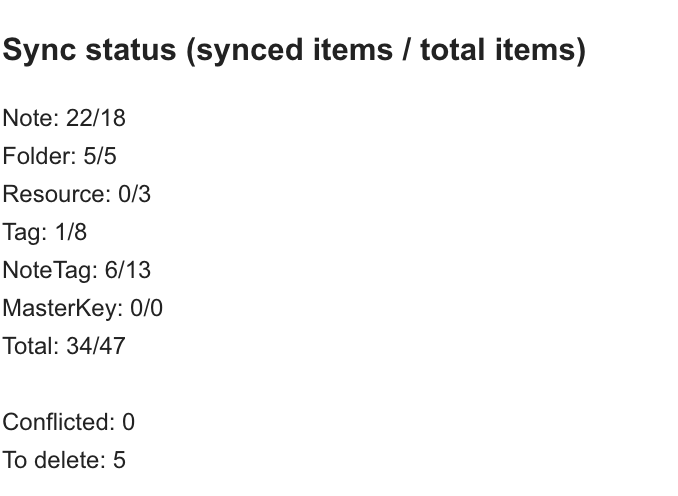
Actually they don't match :( I don't know whats wrong.
mariomurrent-softwaresolutions
on 30 Apr 2019
It seems it doesn't work on macOS either (0/3 means you have three resources but none has been uploaded) because for some reason your are not allowed to write to the .resource directory.
I don't know why it would do this, but you might want to ask on Nextcloud forum as there are more users there who might be able to help.
laurent22
on 30 Apr 2019
Yep, my MacOS cannt sync either: Last error: Error: Got metadata for path but could not fetch content: a598137175e24427a57ac3cb0083f216.md but the test says success ..
mariomurrent-softwaresolutions
on 30 Apr 2019
Related issues
 jurgenhaas
·
3Comments
jurgenhaas
·
3Comments
 yschutz
·
3Comments
laurent22
·
3Comments
yschutz
·
3Comments
laurent22
·
3Comments
 smhearty
·
3Comments
smhearty
·
3Comments
 GingerPapa
·
3Comments
GingerPapa
·
3Comments
Most helpful comment
I am on iOS 12 with Synology WebDAV and the config seems to hang on 'checking... please wait' when testing the config. Same settings work with MacOS